Accumulated Retention Graph
Note: This document is available in English and Portuguese. The English version is presented first, followed by the Portuguese version.
New Change: - v1.8 - 2025-07-01 - UI Improvements
English What is Accumulated Retention Graph?
Accumulated Retention Graph is an Anki addon that gamifies your learning by providing a visual representation of how your card states evolve over time. It allows you to clearly see whether you are adding new knowledge or consolidating what you have already learned.
How to interpret the graph:
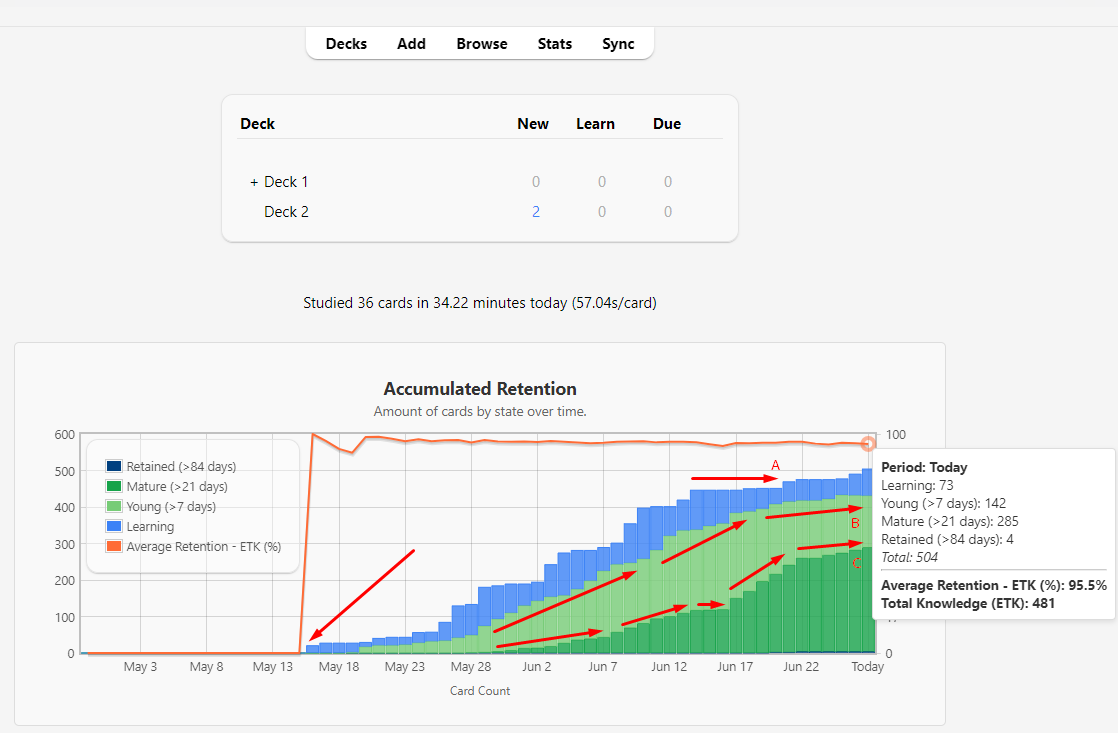
The example graph illustrates a real study journey:
The first sharp rise (near May 17) marks the beginning of a new study topic. Line A (horizontal arrow at the top) shows a period where no new cards were added, causing the total growth to stagnate. Lines B and C (diagonal arrows) reveal that, even without new cards, existing knowledge is being consolidated. The light green (Young) and dark green (Mature) areas are increasing, indicating that the cards are maturing and content retention is improving.
The graph also includes an orange ETK line (Estimated Total Knowledge) showing your average retention percentage on the right axis, providing insight into the quality of your knowledge retention over time using FSRS retrievability calculations.
The goal is to help you balance the growth of your card volume with the consolidation of existing knowledge. Future versions may allow customization of the interval ranges for each state.
Card States & Colors Blue (Retained): Cards with intervals > 84 days Dark Green (Mature): Cards with intervals 21-84 days Light Green (Young): Cards with intervals 7-21 days Orange (Learning): Cards with intervals ≤ 7 days or in learning phases Português O que é o Accumulated Retention Graph?
O Accumulated Retention Graph é um addon para o Anki que gamifica seu aprendizado, fornecendo uma representação visual de como o estado dos seus cartões evolui ao longo do tempo. Ele permite que você veja claramente se está adicionando novos conhecimentos ou consolidando o que já aprendeu.
Como interpretar o gráfico:
O gráfico de exemplo ilustra uma jornada de estudo real:
A primeira subida acentuada (próximo a 17 de maio) marca o início de um novo tópico de estudo. A linha A (seta horizontal no topo) mostra um período em que novos cartões pararam de ser adicionados, fazendo com que o crescimento total estagnasse. As linhas B e C (setas diagonais) revelam que, mesmo sem novos cartões, o conhecimento existente está sendo consolidado. As áreas verde-claro (Jovem) e verde-escuro (Maduro) aumentam, indicando que os cartões estão amadurecendo e a retenção do conteúdo está melhorando.
O gráfico também inclui uma linha laranja ETK (Conhecimento Total Estimado) mostrando sua porcentagem média de retenção no eixo direito, fornecendo insights sobre a qualidade da sua retenção de conhecimento ao longo do tempo usando cálculos de recuperabilidade do FSRS.
O objetivo é, portanto, ajudar você a equilibrar o crescimento do seu volume de cartões com a consolidação do conhecimento existente. Futuramente, a ideia é permitir o ajuste dos intervalos de dias para cada estado.
Estados dos Cartões e Cores Azul (Retido): Cartões com intervalos > 84 dias Verde Escuro (Maduro): Cartões com intervalos de 21-84 dias Verde Claro (Jovem): Cartões com intervalos de 7-21 dias Laranja (Aprendendo): Cartões com intervalos ≤ 7 dias ou em fases de aprendizado Configuration
License and Contact Copyright(C) [Carlos Duarte] Licensed under GNU AGPL, version 3 For bugs or suggestions, please open an issue at https://github.com/cjdduarte/AccumulatedRetentionGraph/issues Acknowledgments ETK Formula: Special thanks to Luc-Mcgrady. The ETK implementation uses the official FSRS retrievability formula R(t) = (1 + F * t/S)^C with parameters F=19/81 and C=-0.5, based on research from the Anki Search Stats Extended addon and the mathematical foundation from the ts-fsrs-memorized library. This provides accurate knowledge quality measurement using the same algorithm as modern FSRS implementations. Changelog v1.8 - 2025-07-01 - UI Improvements IMPROVED: Hidden right Y-axis labels to reduce visual confusion with primary axis FIXED: Removed mispositioned Y2-axis label that appeared outside screen on main page ETK line functionality remains intact while improving graph readability v1.7 - 2025-06-26 - ETK Integration & FSRS Formula NEW: Added Estimated Total Knowledge (ETK) line overlay using official FSRS retrievability calculations NEW: Enhanced tooltips display both retention percentage and absolute ETK values v1.6 - 2025-06-20 - Anki 25.6+ Compatibility NEW: Added compatibility for Anki 25.6+ with new core migration (3.9 → 3.13) Prepared addon for future Anki versions while maintaining backward compatibility v1.5 - 2025-06-09 - Exclude Suspended Cards NEW: Added exclude_suspended_cards option (default: true) Changed default main_screen_period from “3m” to “2m” v1.4 - 2025-06-06 - Main Screen Integration NEW: Added graph display to Anki’s main screen (overview and deck browser) NEW: Configurable main screen options: period, aggregation, height NEW: Individual controls for overview and deck browser display Improved translation system with automatic language detection Enhanced configuration documentation Default main screen integration enabled v1.3 - 2025-06-05 - UI/UX Improvements & Absolute Dates The graph’s x-axis and tooltips now display absolute dates (e.g., “Oct 24”) by default for better readability Added use_absolute_dates configuration option (default: true) Standardized the “Today” label across all graph views Improved tooltip and legend rendering consistency Adjusted title and subtitle spacing for compact layout Fixed container border display issues in deck overview screen v1.2 - 2025-06-04 - Automatic Translation System Complete overhaul of translation system with automatic language detection Dynamic language support extraction from config.json Added full Spanish support by default More robust system using native Anki functions v1.1 - 2025-05-28 - Exclude Deleted Cards Added exclude_deleted_cards option (default: true) v1.0 - 2025-05-27 - Initial Release Stacked bar graph of card states over time Data aggregation based on statistics period Customizable card state visibility Tooltip display with detailed counts Basic internationalization (English, Portuguese)
Screenshots
Liên kết hỗ trợ
Reviews (20)
👍 2026-01-27
Awesome! but please please release a dark mode
👍 2026-01-10
Hi. It’s actually a great addon. But I think there is something wrong with how the app counts the number of cards. Especially the “Learning” type.
I have used the addon Enhance main window for more than a year. It shows me young and mature cards. Young are <21 and mature are >21 days. So according to the addon Enhance main window I have 609 young cards and 21838 mature cards. And I believe these numbers are true.
But this addon shows me that today I have: Retained (>84): 14367 Mature (>21): 25
👍 2025-12-07
Great, I love to see how my learning cards accumulate, very motivating! I would be very happy to have an option to hide the retention graph, would that be possible? Thank you!! :)
👍 2025-10-30
Muito bom!
👍 2025-10-21
This is so useful to show my progress per day! One thing I can see definitely improved is the option to be able to scroll horizontally until the very first day we do Anki. So instead of being restricted to the preset number of days on the graph, we can scroll them till the earliest!
👍 2025-10-17
I really like the add-on but I wish new cards with no intervals had their own category so we could hide them specifically.
👍 2025-10-04
Very good add-on. Please make a dark mode.
👍 2025-10-03
Excellent ! I wish the background can be darker
👍 2025-10-03
Great add-on. I have one question though, why can’t I see the graph on the “Congratulations!” page once I have finished the deck that day?
👍 2025-10-03
Love the concept.
One issue I’m finding is my “Retention %” is only 12.5%. I guess it counts the 8000 or so language learning word/sentence decks I imported but have yet to look at.
Is there a way of excluding cards I have not started learning?
👍 2025-10-03
Super! It would be perfect if we able to customize the period on each deck.
👍 2025-10-03
Seems to be very good in motivating, excited for this add on.
👍 2025-10-03
This is absolutely amazing… I been searching for something like this for a really long time.
👍 2025-09-08
Very inspring graphs!
👍 2025-08-21
I love the add-on, you have added something I have been searching for! I have poor memory and your add-on shows that after slacking off it’s way better than I thought! It is a motivating add-on!
I have a request, please make it so that the graph is only shown in the deck browser (as opposed to the main screen) (Perhaps via “is_main_screen” or a new variable/setting)
👍 2025-08-09
Very cool for seeing progress over time. It would be nice if there was a dark mode though since I don’t use light mode on Anki.
👍 2025-07-16
valeu. virou meu principal addon de stats kkkk. senti até falta dele na tela de: Parabéns! Você terminou este baralho por enquanto.
Comment from author before post was edited Done
👍 2025-06-27
Thanks, what a helpful add-on.
👍 2025-06-21
Amazing Add-on! It’s really usefull to keep track of the graph and see that you are adding new cards and that the graph is growing together with their maturity and retention. Helps to motivate! Comment from author Tanks
👍 2025-06-06
Excelente! Addon muito útil! Por favor, coloque a função de excluir flashcards suspensos na análise. Se possivel também, colocar possibilidade de selecionar um espaço de tempo para ser analisado.
Obrigado! Comment from author It will be included, please wait.
“Se possivel também, colocar possibilidade de selecionar um espaço de tempo para ser analisado.” ME explique melhor essa parte? por favor, coloque isso em:
https://github.com/cjdduarte/AccumulatedRetentionGraph/issues
