This is not meant to be an easy to use add-on. If you don’t know anki well and are not willing to invest a few minutes to figure out how this add-on works it is not meant for you.
I’ve used it over the last few months to create over 1000 notes and haven’t noticed a problem. But this add-on is not widely used so it might contain bugs. If you find one let me know by posting in the official forum (link is at the top right of this page).
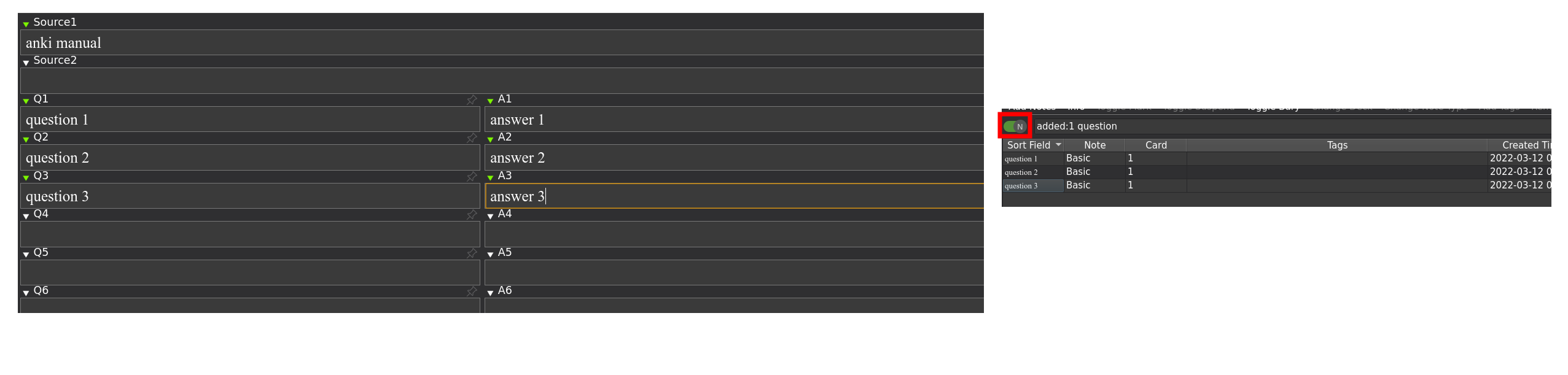
This add-on allows to create multiple notes at once by transforming a temporary note from the add window.
My motivation is this: When putting some text (page) into Anki I often don’t know the final number and wording of my qa-pairs/clozes so I don’t like to add them one after another from the regular add window - instead I like to edit and rearrange multiple qa-pairs/clozes until I like all of them and then I want to add them all at once.
I didn’t find another tool that I like: There many text-based (mostly markdown) solutions but when I process a html-document I don’t want to convert to plain text and back and markdown is bad when working with tables (and also not ideal for images). Then there are also add-ons that sync with Excel, Google Docs or note taking services like notion which I didn’t want to use either because these external solutions usually have problems with images and usually support fewer html tags than Anki.
In the config of my add-on for each note type I can select two fields that are used for the two columns q/a. From a technical point of view I use a regular editor with a temporary note. I.e. in the Add dialog I wrapped the function that’s called when the user clicks the “add” button: If the note is of a certain type (I bundle a note type named “multi_source”) the note is split up and my add-on adds multiple notes. When editing multiple notes from the browser my add-on copies the relevant fields to a temporary note, opens this in an EditCurrent window and when closing the window this temporary note is split up again.
This is complicated and slightly confusing but the upside is that by reusing the existing add window/editor all the usual other add-ons and shortcuts work and I should have less work with new anki versions.
I don’t want to have one note with many fields that generates many cards because then finding content is more complicated etc.
useful add-ons to make this add-on work better
This add-on works much better if you have an add-on installed that allows you to show two fields side by side in the editor: For Anki 2.1.39 or lower use Multi-column note editor. For Anki 2.1.42 or newer use the add-on Grid Fields.
This add-on does not work with Anki 2.1.40 or 2.1.41 because neither of the two aforementioned add-ons works with these versions.
For Anki 2.1.42+ with the add-on grid fields this add-on should have setup the bundled note type multi_source properly.
Also maybe useful: editor: move field contents down by one field
versions
- 2023-03-19 add note type with field for rescheduling (quick and ugly…)
- 2022-12-29 fix for more than 10 source fields that are numbered
- 2022-08-16 more than two fields per note can be extracted. This breaks the following functionality I rarely use: No more fields down/up/switching, you can no longer edit multiple notes from the browser in one source note. I’ll fix these later. ETA: within one year.
- 2022-07-14 easily create links between notes created at the same time: e.g. qqq1 in another field gets replaced with the actual note id of the first note created from the fields q1/a1 - the reference nidd1234567890123 can be quickly opened with the add-on, link Cards Notes and Preview them in extra window.
- 2022-07-11 allow to create cloze notes if “{{c1::” is in a field that would go to the front (like q1, q2, etc.)
- 2022-03-13 initial upload
Screenshots
Liên kết hỗ trợ
Reviews (2)
👍 2026-01-16
Tanks ! Excellent idea.
👍 2023-12-28
很棒的插件, 谢谢.
可惜另一款插件(双列)并未及时更新到23.12版本, 不过我想应该很快了.
