UPDATED for Anki 23.10+
Advanced Copy Fields
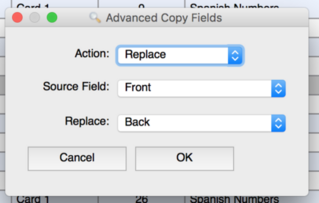
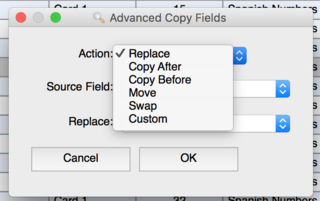
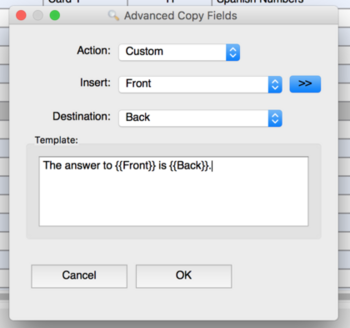
Replace, Copy After/Before, Move, or Swap a field from one to another, or complex copy multiple fields to another through the use of a Custom template.
Batch processing will be used to process all selected notes rather updating a single note or multiple. Undo can be used to reverse performed actions.
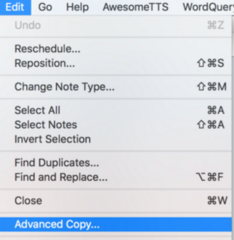
The plugin can be accessed through the browser’s Edit menu while notes are selected.
Inspired by Batch Note Editing. Watch Video on YouTube
Updates Update v0.4.01 Bugfixes Ability to save custom shortcut Moved menu option from the ‘Edit’ menu to the ‘Notes’ menu to better align with Anki’s interface. Update 2023-10-03 As version v0.40 Support for Anki 23.10+ which include Qt6 compatibility (contributed by Abdo) Screenshots
Contact and Resources My Github
Please contact me on GitHub if you’d like to become a contributor to this specific project, or if there is an issue you’d like to report or a feature you’d like to add.
Forks
As a worthy mention, there is an independent fork of this project independently maintained by andkinnamon as an alternative and/or replacement should this project become obsolete in the future or if you simply prefer it as your source fork.
Screenshots
Liên kết hỗ trợ
Reviews (28)
👍 2026-02-23
Works great. Many thanks! This is essential.
👍 2026-02-21
Works well. Thanks. Small recommendation: If an update is made, it is useful to update the description as well. See below: Old version “The plugin can be accessed through the browser’s Edit menu while notes are selected.” -> New version “The plugin can be accessed through the browser’s Notes menu while notes are selected.”
👍 2025-07-30
works <3
👍 2024-09-18
Same experience as reviewer below: works on macOS version 24+. The screenshots in the guide are outdated. In order to use this add-on, you go to “browser > menu bar > Notes”, not to “browser > menu bar > Edit”. I used this to copy an existing field to a new field after creating a new note type.
👍 2024-07-09
Works on macOS version 24+. The screenshots in the guide are outdated. In order to use this add-on, you go to “browser > menu bar > Notes”, not to “browser > menu bar > Edit”. I used this to copy a field to another field with the “custom” option. I inserted the “Front” field to my destination field “ID”.
👍 2024-05-31
Единственное что смутило это невозможность отменить действие.
👍 2024-05-28
Does exactly what it is supposed to do! As a bonus, it tells you what it is going to do before you execute the action so you have the opportunity to avoid a mistake.
👍 2024-05-19
I used this to generate composite unique keys for my entire deck based on multiple existing fields. Saved me time on having to do it manually or writing a script myself. Thank you!
👍 2024-02-23
perfect, very useful for sorting things properly when diacritics (and stuff like niqqud) are in the way.
👍 2024-01-21
Works as expected.
👍 2024-01-06
Works perfectly
👍 2023-11-08
I have used this add-on for a long time and find it very useful. It no longer works for Qt6, but I have made the necessary changes and created a new add-on since this one is unmaintained: https://ankiweb.net/shared/info/287110490
👍 2023-10-12
Must have!
👍 2023-09-17
Immense time saver
👍 2023-09-13
Saved me a lot of time
👍 2023-07-16
Awesome add-on, thanks a lot. It works with Anki 2.1.63 on MacBook.
Can I copy just a part of a field into another?
I wanted to copy a field omitting the first 7 numbers/letters written on it (“00054. love, care, about” omitting “00054. ” but this process also for other cards that have different numbers)
👍 2023-07-11
needed to do some editing, searched and found this - helped me do the job I wanted to get done.
👍 2023-06-28
Super useful for batch processing notes.
👍 2023-05-28
Magic!
👍 2023-04-28
very good
👍 2023-04-17
Is there a GitHub or other place I can report issues? Please respond with a link if there is or how else we should contact you.
👍 2023-02-05
Works good.
👍 2022-10-13
Works like a charm, quicker and without the bother of export and import
👍 2022-06-13
Works!
👍 2022-05-13
At first it did not work on Anki 2.1.50. when I press yes on it’s confirmation dialog, it shows an endless processing dialog. I had to end the Anki by TASK MANAGER of windows 10. Tonight I just updated Anki to (2.1.51) and it works.
Version 2.1.50 (26d40c3a) -------------> 2.1.51 (QT 5)
Python 3.9.7 Qt 5.15.2 PyQt 5.15.5
👍 2022-05-09
Works great, does exactly what it is supposed to. Good job
👍 2022-05-07
It works very well. Thank you!
👍 2022-04-25
Very convenient
