Anki Type answer Analysis AI Add-on Overview
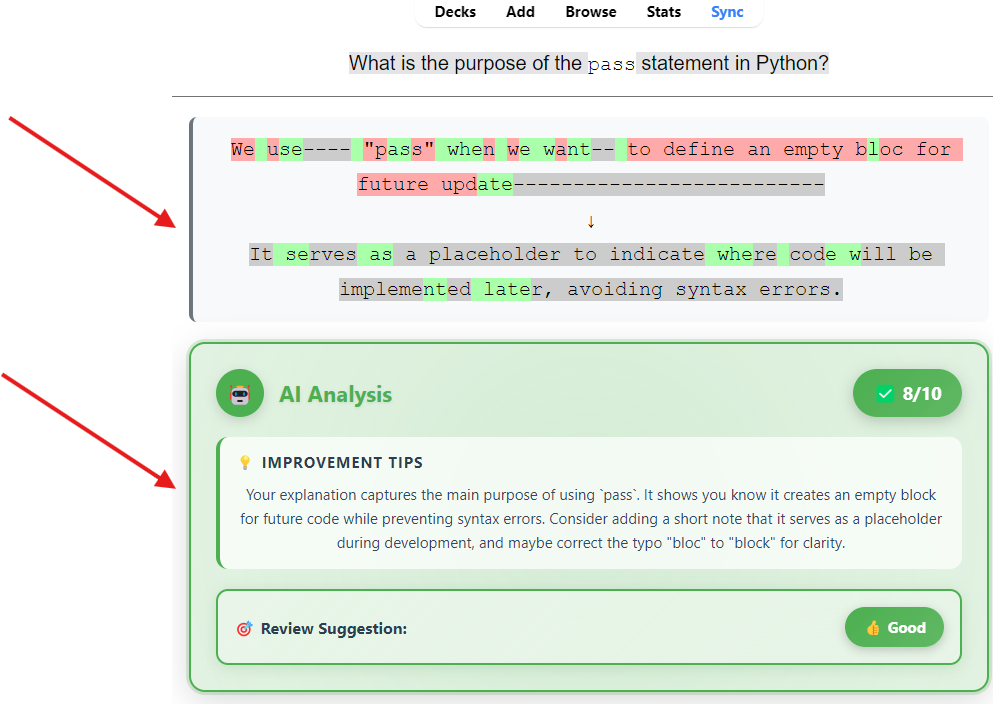
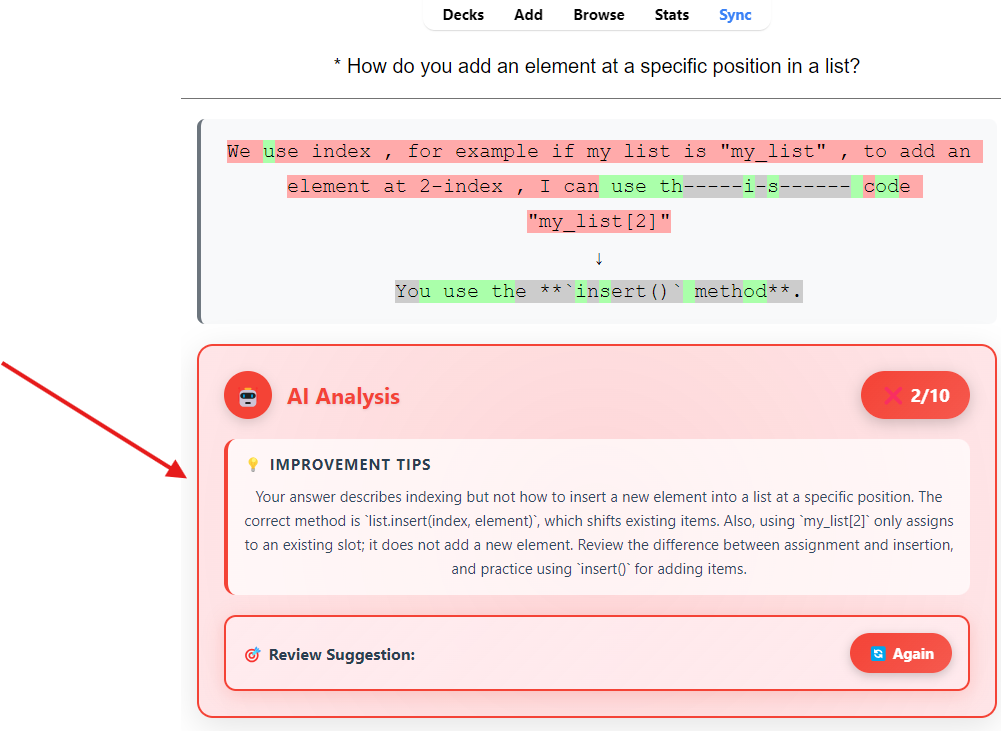
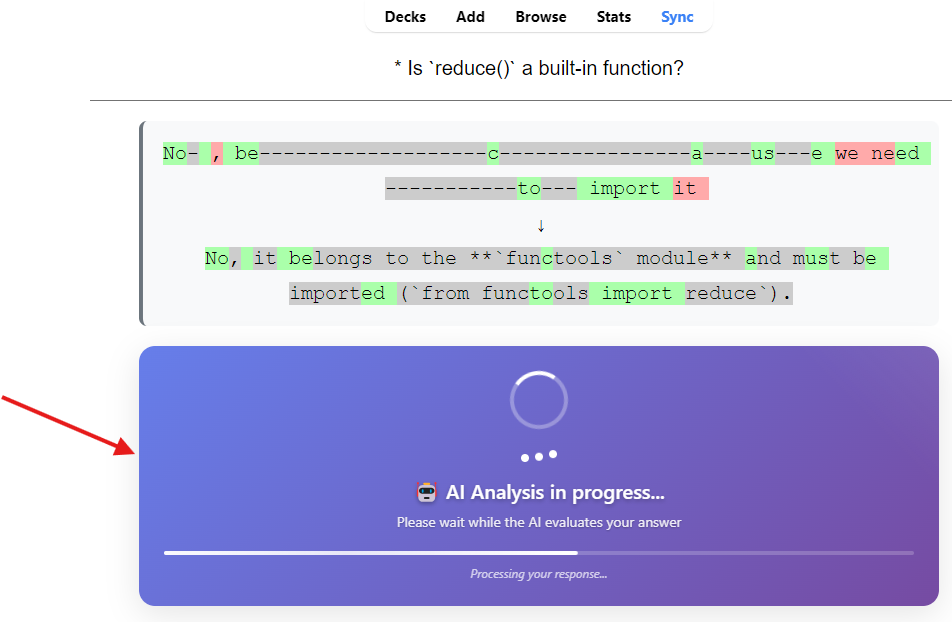
This Anki add-on enhances your flashcard review experience by providing intelligent AI-powered analysis of your answers. Instead of just showing whether your answer matches the expected one, the AI evaluates the quality of your response and provides constructive feedback to help you learn more effectively.
⚠️ : This add-on works with Anki’s type-answer question-answer.
Purpose What it does: Intelligent Answer Evaluation: AI analyzes your answers semantically, not just text matching Constructive Feedback: Provides specific tips to improve your understanding Smart Review Suggestions: Recommends appropriate review intervals based on answer quality Multi-Language Support: Works in English, French, Spanish, and German Multiple AI Providers: Choose from OpenAI, Google Gemini, Anthropic Claude, DeepSeek, openrouter or Groq ⚠️ : I tested Google Gemini and OpenRouter using their free evaluation keys. Why use it: Better Learning: Get personalized feedback on why your answer was right or wrong Semantic Understanding: AI recognizes when your answer is conceptually correct even if worded differently Efficiency: Focus more time on concepts you struggle with Motivation: Positive reinforcement when you’re improving Configuration Options
⚠️ : After setup config it’s mandatory to restart anki
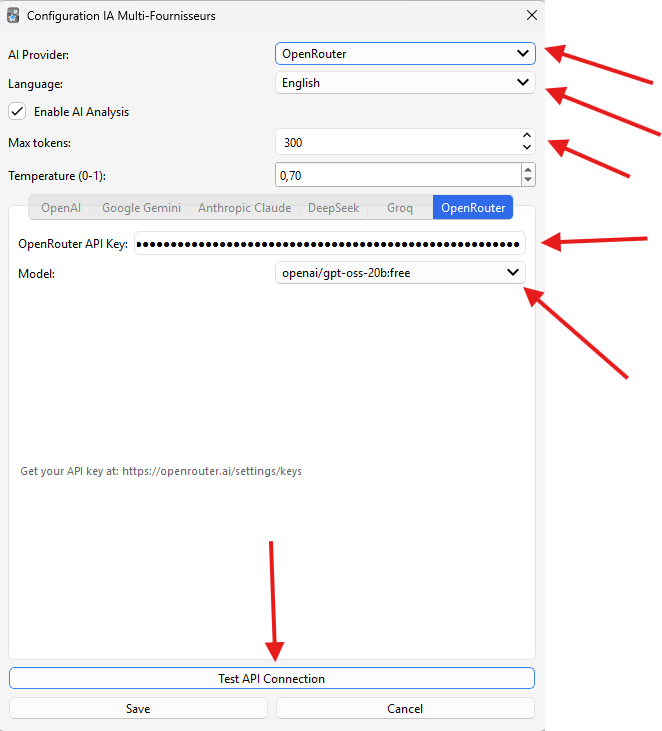
General Settings AI Provider
Purpose: Choose which AI service to use for analysis Options: OpenAI, Google Gemini, Anthropic Claude, DeepSeek, Groq Default: OpenAI Note: Only the selected provider’s tab will be enabled in the configuration ⚠️ : For basic use, I recommend using a Gemini key, since the free key allows you to run 2 or 3 complete review sessions Language Purpose: Set the language for AI feedback and interface Options: English (default) Français (French) Español (Spanish) Deutsch (German) Impact: Changes AI prompt language and interface text Enable AI Analysis Purpose: Toggle the entire AI analysis feature on/off Default: Enabled When disabled: Shows standard Anki comparison only Max Tokens Purpose: Limit the length of AI responses Range: 300-4000 tokens Default: 300 Impact: Longer = more detailed feedback, but costs more \n ⚠️ : Small values of max tokens (less than 300) can cause errors. Please use at least 300 as the minimum value. Temperature (0-1) Purpose: Control AI creativity/randomness Range: 0.0 (deterministic) to 1.0 (creative) Default: 0.7 Recommendation: 0.3-0.7 for educational feedback Provider-Specific Settings
Each AI provider has its own tab with specific configuration:\n
⚠️ : After config restart anki
OpenAI Models Available: gpt-3.5-turbo, gpt-4, gpt-4-turbo, gpt-4o, gpt-4o-mini API Key: Get from https://platform.openai.com/api-keys Cost: Pay-per-use, varies by model Recommended Model: gpt-3.5-turbo (cost-effective) or gpt-4o-mini (better quality) Google Gemini Models Available: gemini-1.5-flash, gemini-1.5-pro, gemini-1.0-pro API Key: Get from https://aistudio.google.com/app/apikey Cost: Free tier available, then pay-per-use Recommended Model: gemini-1.5-flash (fast and efficient) Anthropic Claude Models Available: claude-3-haiku-20240307, claude-3-sonnet-20240229, claude-3-opus-20240229 API Key: Get from https://console.anthropic.com/ Cost: Pay-per-use Recommended Model: claude-3-haiku-20240307 (fastest and cheapest) DeepSeek Models Available: deepseek-chat, deepseek-coder API Key: Get from https://platform.deepseek.com/api_keys Cost: Very competitive pricing Recommended Model: deepseek-chat (general purpose) Groq Models Available: llama3-8b-8192, llama3-70b-8192, mixtral-8x7b-32768, gemma-7b-it API Key: Get from https://console.groq.com/keys Cost: Free tier available with rate limits Recommended Model: llama3-8b-8192 (fast inference) OpenRouter Models Available: “deepseek/deepseek-r1:free”, “openai/gpt-oss-20b:free”, “qwen/qwen3-coder:free” ,“google/gemma-3n-e2b-it:free” ,“tencent/hunyuan-a13b-instruct:free” API Key: Get from https://openrouter.ai/settings/keys Cost: Free tier available with rate limits ⚠️ : Recommended Model: tencent/hunyuan-a13b-instruct:free Setup Instructions
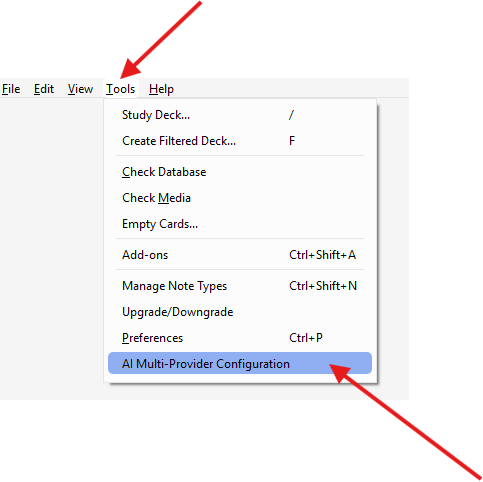
- Choose Your AI Provider Open Anki Go to Tools → AI Multi-Provider Configuration Select your preferred AI provider from the dropdown Notice that only the selected provider’s tab is enabled
- Configure API Access Click on the tab for your selected provider Get an API key from the provider’s website (links provided in each tab) Enter your API key in the field Select your preferred model Click “Test API Connection” to verify everything works
- Adjust Settings Choose your preferred language for feedback Adjust max tokens if needed (200 is usually sufficient) Set temperature (0.7 is a good balance) Click “Save”
- Start Using
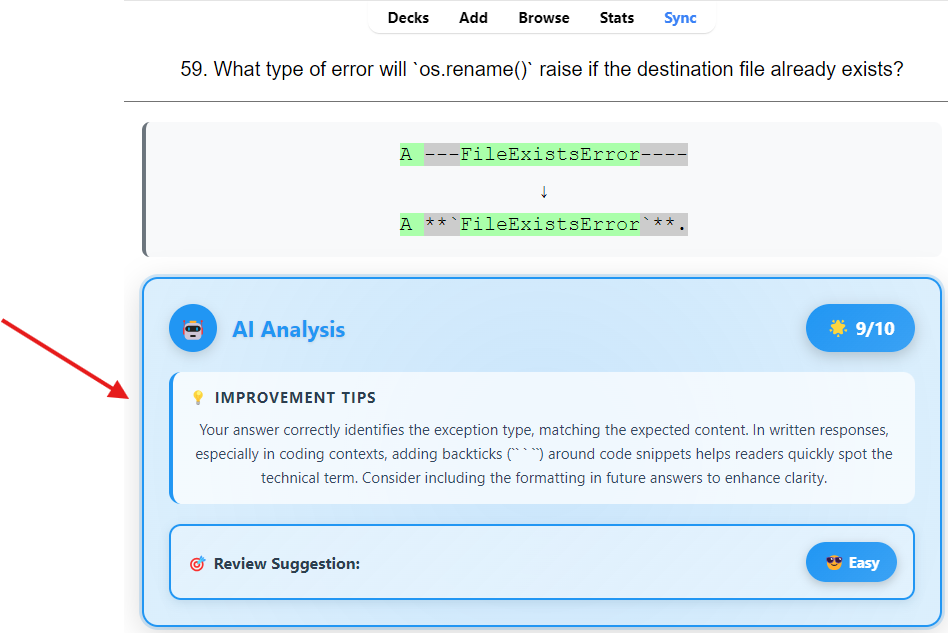
Review your flashcards as normal After answering, you’ll see both Anki’s standard comparison and the AI analysis The AI provides: A score from 0-10 Specific improvement tips A review suggestion (Again/Hard/Good/Easy) AI Scoring System
The AI evaluates your answers on a 0-10 scale:
0-3 (Again): Incorrect or very incomplete answer
Action: Review the material again immediately Color: Red ❌
4-5 (Hard): Partially correct but with significant errors
Action: Review soon with shorter intervals Color: Orange ⚠️
6-8 (Good): Correct answer with minor imperfections
Action: Standard review interval Color: Green ✅
9-10 (Easy): Excellent and complete answer
Action: Longer review intervals Color: Blue 🌟 Cost Considerations Free Options: Google Gemini: Generous free tier Groq: Free tier with rate limits OpenRouter: Free tier with rate limits Paid Options: OpenAI: Moderate pricing, excellent quality Anthropic Claude: Premium pricing, high quality Cost Optimization Tips: Start with free tiers (Gemini or Groq) Use shorter max_tokens (100-200) for basic feedback Choose efficient models (gpt-3.5-turbo, gemini-1.5-flash, claude-3-haiku) Monitor your usage through provider dashboards Troubleshooting Common Issues: “API key not configured” Ensure you’ve entered the API key for your selected provider Test the connection using the test button “Connection error” Check your internet connection Verify your API key is correct and has sufficient credits Try switching to a different provider “AI analysis not available” Check if AI analysis is enabled in settings Verify your selected provider’s API key is working Try reducing max_tokens if you’re hitting limits Interface appears in wrong language Change the language setting in the configuration Restart Anki after changing language settings Performance Tips: The add-on caches recent analyses to avoid duplicate API calls Analysis happens asynchronously to avoid blocking your reviews Cache automatically clears after 10 entries to manage memory Privacy and Data Your answers are sent to the selected AI provider for analysis No data is stored permanently by the add-on (only temporary cache) Each provider has their own data retention policies Consider using local or privacy-focused providers if data privacy is a concern Support
For issues specific to this add-on, check:
Your API key configuration Internet connectivity Provider service status Anki add-on compatibility let me know ! Compatibility
⚠️ This add-on was tested with Anki release 25.07.5.
Screenshots
Liên kết hỗ trợ
Reviews (1)
👍 2025-09-02
Thanks a lot, great idea. But is it possible to generate a JSON response without depending on the model? Because if the max tokens is too small (or there is an error in generation), something like this will be generated: “json …```” or ”{ “score”: 2, “tips”: “The correct …”. In the “Improvement Tips” section, the entire incomplete answer is inserted.
