This add-on can automatically copy text from a card to the clipboard.
When the card is selected in Browser. When Reviewer shows the card’s front side. When Reviewer shows the card’s answer side. Use cases
The add-on is intended to assist in editing large amounts of cards.
When editing premade or unfinished Anki decks. When using Yomichan’s clipboard monitor feature to add definitions to a deck of subs2srs cards.
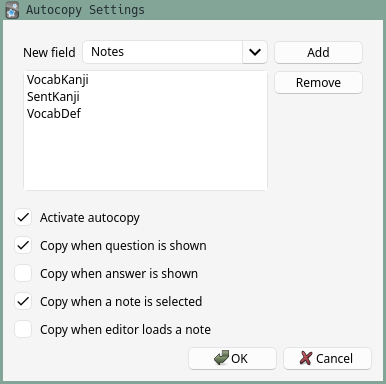
Configuration To configure the add-on, select “AJT” > “Autocopy Options…”. To toggle autocopy on and off, select “AJT” > “Activate Autocopy”. Usage Configure what fields you want to copy. Configure when to copy the fields. The content of the fields will be sent to the clipboard under the set conditions. Support what I do
I would not have been able to develop this add-on without the support of my patrons. Thanks so much!
Join our community
Want to discuss the add-on? Join our chat room.
Contribute
Click here if you would like to contribute on GitHub.
Screenshots



Liên kết hỗ trợ
Reviews (7)
👍 2025-01-12
Worked alright until I started using notes with multiple cards. It would be very useful if you could allow an option to limit the fields copied to only the currently showing card of a given note.
👍 2024-11-12
So helpful! I paste my vocab to GPT to get example sentences and this add-on just made it that much easier
👍 2024-09-11
Another great add-on, thanks! Huge time saver.
👍 2024-02-21
Just what I was looking for, thanks!
👍 2023-12-25
didn’t copy the fields in the audio example [sound:ENTR-F2-GMS-B-EN-2000.mp3]
To address the issue with brackets, I modified the get_fields_text function to remove brackets from the text before copying it to the clipboard. Here’s an updated version of the function in the main.py
def get_fields_text(note: Note) -> str: return ’ ‘.join(note[field].replace(”[”, "").replace(”]”, "") for field in config.fields if field in note)
Thank you for the Add on.
👍 2023-03-09
This is a great workaround for mpvacious without manually joining subtitles, exporting them, copy and pasting them on yomichan search, then merging cards with audio and image. It would be better if there is an option that it automatically merges with the previous add card. Thanks btw
👍 2023-01-03
Finally, that’s what I wanted!
