Bring keyboard-driven reviewing to Anki 2.1.
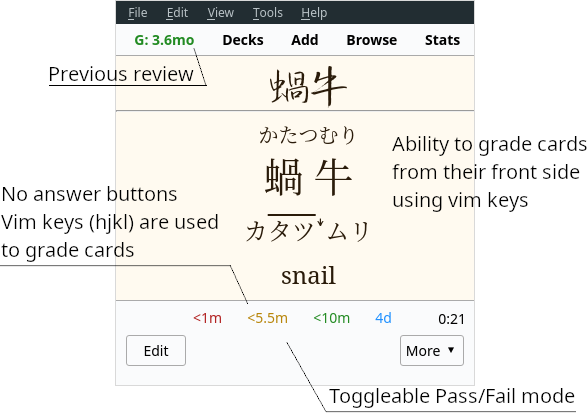
Ajatt-Tools Flexible Grading for Anki 2.1 significantly overhauls the reviewing process. It puts keyboard first and allows you to go through your reps by pressing hjkl while having your hands lay naturally on the home row of the keyboard. It goes further by removing answer buttons and letting you rate your cards from the question side.
Features Scroll without using the mouse with keyboard shortcuts (shown under “Scroll” in Options). Configurable answer keys. Put mouse away when doing your reviews. Defaults: h - Fail j - Hard k - Good l - Easy u - Undo Flexible grading. Rate cards from their front side. Save yourself a few extra keypresses if you know that you know the answer. Color coding for answers. Default colors: Fail - Red Hard - Orange Good - Green Easy - Blue Remove answer buttons. Possible options: Hide. Completely remove answer buttons (enabled by default). Disable. Disabled buttons are unusable and un-clickable. Toggleable Pass-Fail mode. Removes Hard and Easy buttons and keybindings. Make decisions easier by having to choose whether you know a card or not instead of how well you know it. Avoid being stuck in Ease Hell by using this feature in combination with the recommended Options Groups settings. Last rate is shown on the toolbar. It is possible to click on it and bring up the Anki browser with the card selected. Consistent key mappings for the 1234 keys. 2, 3 and 4 always rate Hard, Good and Easy respectively. Only relevant for the V1 scheduler. V2 scheduler does this out of the box. Zoom shortcuts. Adds zoom shortcuts that aren’t present in vanilla Anki. To zoom in, press Ctrl+Plus. To zoom out, press Ctrl+Minus. The add-on can remember previous zoom levels and restore them when Anki changes state. An option to turn off the indicator that tells you whether a card is new, review, or learn. An option to press the k key to flip the card while the card is in question state. This means that users can easily flip a card and rate it “good” by pressing kk.
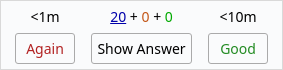
Flexible Grading with answer buttons enabled.
Usage
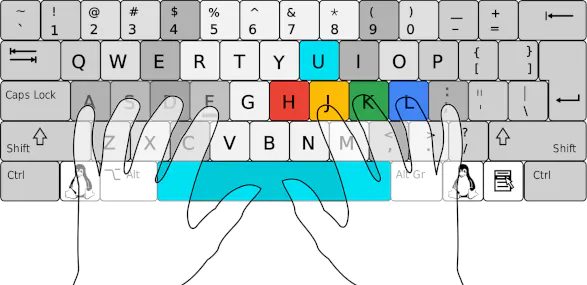
Keep your fingers on home row keys. The following fingers are used:
Thumbs - Reveal answer, rate Good. Right hand: Index - Again, Hard, Undo. Middle - Good. Ring - Easy. Configuration
To configure the add-on select AJT > Flexible Grading Options… The most optimal settings come out of the box:
Answer buttons are hidden forcing you to use the vim keys. Flexible grading and Pass-Fail are enabled. Support what I do
I would not have been able to develop this add-on without the support of my patrons. Thanks so much!
Join our community
Found a bug? Tell us in the chat room.
Contribute
Click here if you would like to contribute on GitHub.
Changelog 22 Nov 2024 18 Sep 2024 11 May 2024 17 May 2023 18 Apr 2023 08 Apr 2023 25 Aug 2022 12 May 2021 10 May 2021 08 May 2021 06 May 2021
Screenshots



Liên kết hỗ trợ
Reviews (22)
👍 2025-12-26
Thank you!
👍 2024-07-11
I was really enjoying it at first, but I noticed that it started to have inconsistencies, such as resetting the difficulty and lapses. Now all my cards have zero lapses. Comment from author This add-on doesn’t change anything about the lapse count. Another add-on might be involved. Please report all problems in our chat and they will be triaged there. https://tatsumoto.neocities.org/blog/join-our-community
👍 2024-06-14
the real best zoom Add-ons 💯
👍 2024-06-06
I’m not sure, but I think this addon did something permanent to the U key. Before this addon, I was using U to answer “good”. After installing this addon, the U key has been the undo button, EVEN AFTER removing U=undo from this addon’s options and ALSO AFTER UNINSTALLING this addon (and of course restarting Anki every time). I have no other keyboard shortcut addons installed. Setting U as the “good” key in Anki’s preferences has no effect. It’s still the undo key. Any help? Comment from author
👍 2024-05-17
Works as intended and helps remove unnecessary (at least to me) visual distractions!
👍 2024-05-13
Great addon!
👍 2024-05-12
Awesome addon, however, today’s update is not working anymore on 24.04.1. However, the previous version was still working.
👍 2024-02-28
Thank you!
👍 2023-04-05
Useful, but no matter what I cannot assign the K key to any keybinding. I had to rebind the ‘Good’ keybind from K for it to function.
I’m using the AJT guide’s pack of addons.
👍 2023-01-16
Nice but ctrl + plus or minus doesn’t seems to work to zoom in, out. Is there some possible solution? Comment from author Should work on the latest version of Anki. It won’t work on older versions.
👍 2022-12-14
If there is a replay audio function, it will be better. Comment from author Anki has a shortcut to replay audio: r.
👍 2022-12-03
Core functionality appears to be working on 2.1.49.
Issues:
Zoom feature didn’t seem to work by default so I re-added the Anki Zoom (538879081) add-on with seemingly no conflicts (and I much prefer the ctrl+scroll option to control zoom anyway)
Add-on Conflicts:
It visually conflicts with the numbers2stripes (2088639269) addon, since that one displays the queue at the bottom of the card right where AJT places the buttons. Also weirdly enough it causes numbers2stripes to also display fo
👍 2022-07-23
I still use 1,2,3,4 but being able to answer from the question side is great.
👍 2022-07-14
Can’t imagine reviewing without this add-on! It makes reviewing so much faster, which means you can spend more time learning new words. Unfortunately though, for some reason keys K and L don’t work with MorphMan enabled.
👍 2021-07-25
I Got this error, some conflict with Morphman:
Error
An error occurred. Please start Anki while holding down the shift key, which will temporarily disable the add-ons you have installed.
If the issue only occurs when add-ons are enabled, please use the Tools > Add-ons menu item to disable some add-ons and restart Anki, repeating until you discover the add-on that is causing the problem.
When you’ve discovered the add-on that is causing the problem, please report the issue on the add-on sup
👍 2021-05-12
Hey! Thanks for the addon.
👍 2021-05-10
Very well thought. Thanks.
👍 2021-05-10
Pretty pointless clutterware Comment from author I’m very sorry this add-on didn’t help you.
👍 2021-05-06
All other review confirmation addons are distracting and invasive. Even though I use arrow keys for reviewing (mapped to space, 1, replay audio, and undo) this addon is still useful.
Only the time for good disappears for failed cards.
👍 2021-05-04
keep up the good work abdul.
تحياتي من العراق.
👍 2021-05-04
A revolutionary way of reviewing your cards. Old cards are easy, you have to just press space, you don’t need to see the back of the card. You wast some time there, like 2s (if you have audio on the back you might listen to it just for the sake of listening; it takes your time)? Sometimes you do know the card but you reread the back without noticing you’re doing so. Now you just press K, K, K, K, K, K; and save your time to spend it with what really matters: input.
👍 2021-05-04
This is revolutionary.
