🌐 Anki Note Linker là gì?
Anki Note Linker giúp bạn:
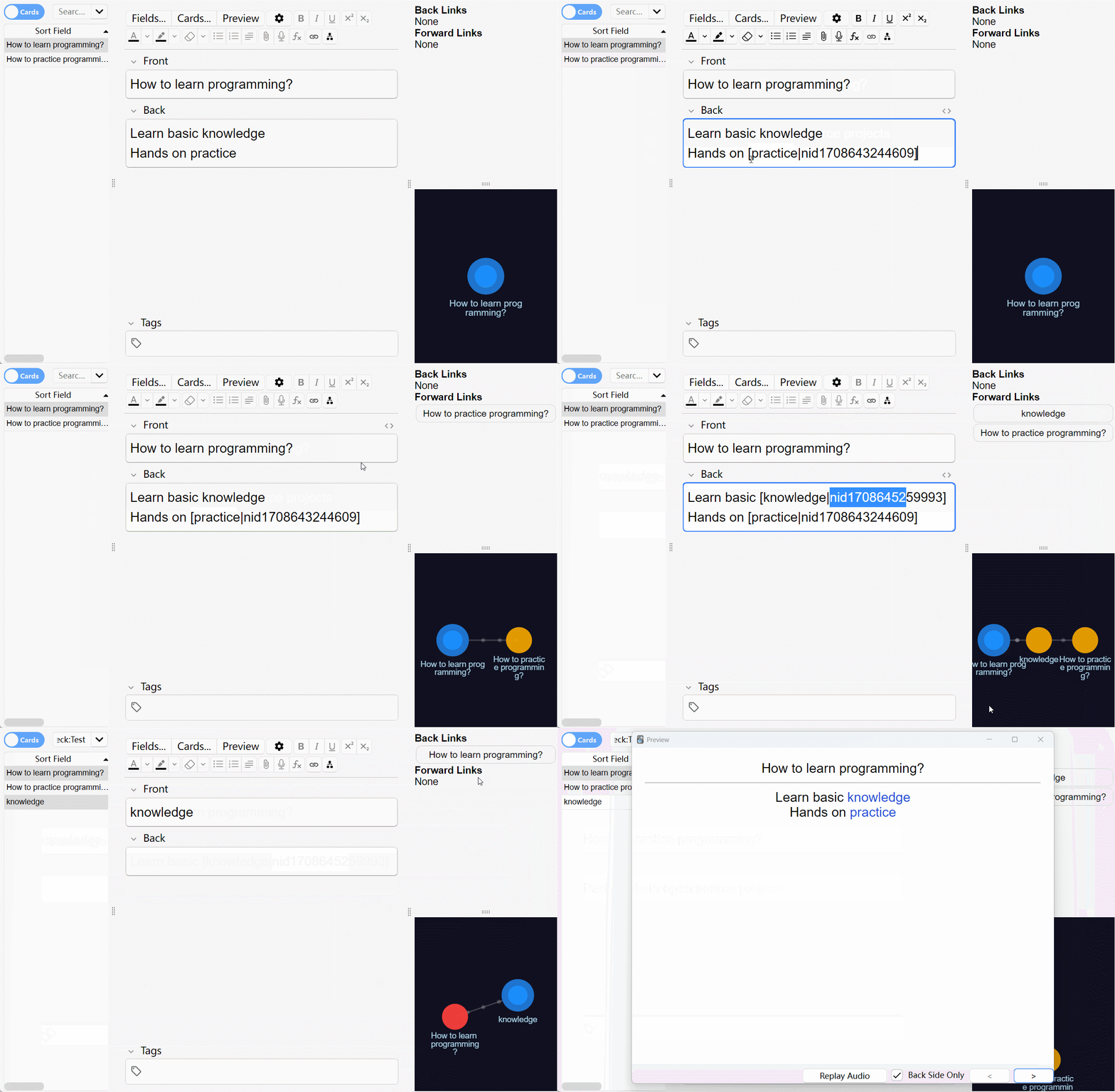
- Kết nối các note lại với nhau theo cú pháp:
[Tiêu đề|nid1234567890123]- Tự động render thành link có thể click trong thẻ:
- Click là nhảy ngay tới note tương ứng.
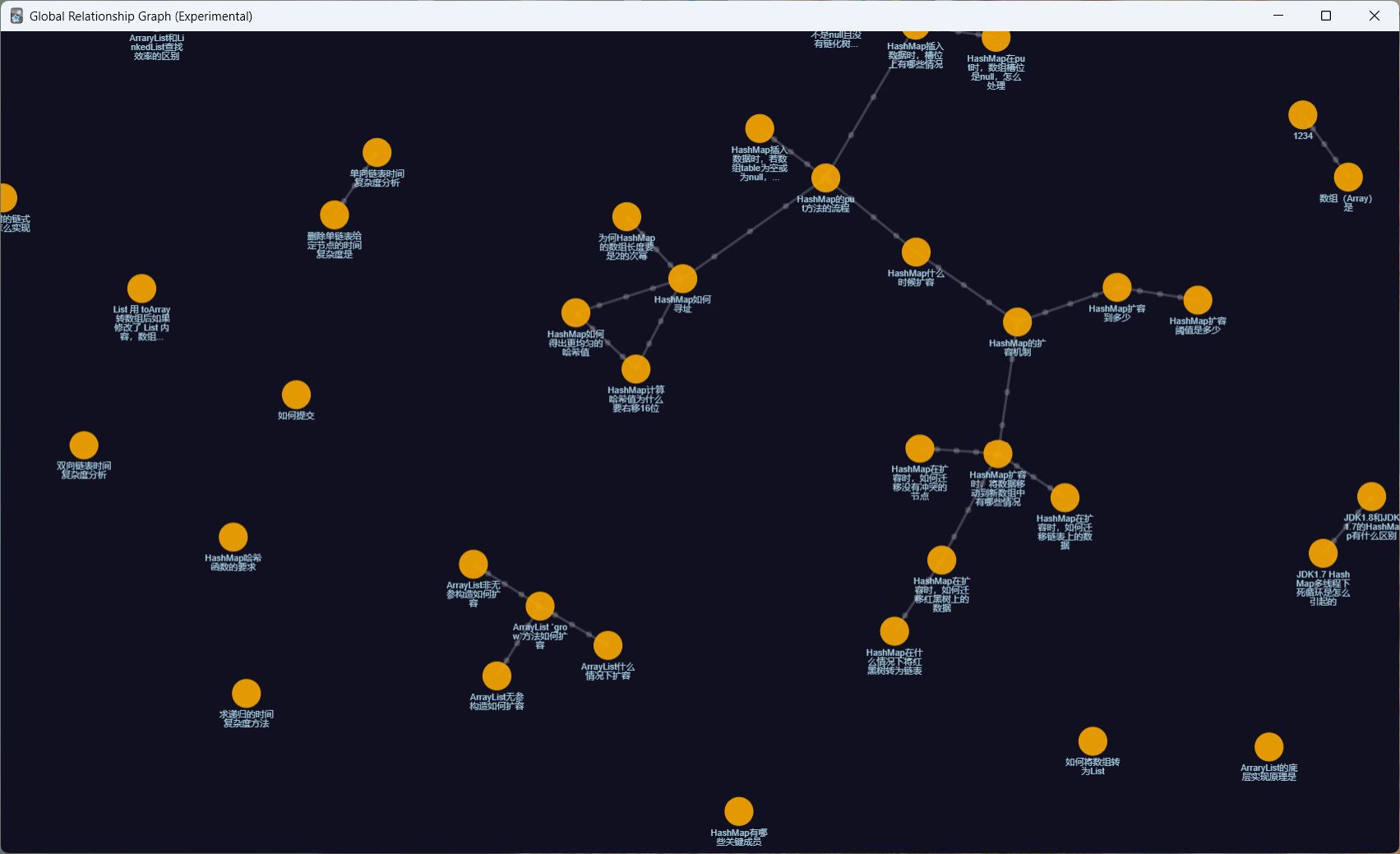
- Hiển thị toàn bộ mạng lưới các note được liên kết trên một Global Relationship Graph:
- Sơ đồ thể hiện quan hệ giữa ghi chú, cảm giác rất giống graph của Obsidian.
Nói ngắn gọn: bạn biến Anki thành một mạng kiến thức (knowledge graph) thay vì những thẻ lẻ tẻ.
🔗 Cú pháp link cơ bản
Định dạng link:
[Link Title|nidxxxxxxxxxxxxx]Trong đó:
Link Title:- Là phần text hiển thị trên thẻ,
- Nếu chứa ký tự
[thì cần escape thành\[.
nidxxxxxxxxxxxxx:xlà chữ số, tổng cộng 13 số,- Chính là note ID của ghi chú bạn muốn trỏ tới.
Bạn có thể tuỳ biến style của link bằng CSS:
.noteLink {
  /* style cho link */
}🧑💻 Các thao tác trong Editor
Addon thêm nhiều lệnh thuận tiện vào menu chuột phải và phím tắt:
1. Copy Note ID
- Chuột phải hoặc phím
Alt + Shift + C:- Copy ID của note hiện tại vào clipboard.
2. Copy Note Link
- Chuột phải hoặc phím
Alt + Shift + L:- Sinh sẵn một link ở dạng:
[Tiêu đề|nid1234567890123]- Copy vào clipboard để bạn dán vào field khác.
3. Insert link với Note ID đang ở clipboard
- Chuột phải hoặc
Alt + Shift + V:- Dùng note ID hiện có trong clipboard,
- Kết hợp với đoạn text đang chọn để sinh link:
[Selected text|nid1234567890123]4. Insert link mới (tạo note mới từ text)
- Chuột phải hoặc
Alt + Shift + N:- Từ đoạn text đang chọn:
- Tạo link mới, cho phép bạn thêm note tương ứng sau đó,
- Double‑click vào link để nhanh chóng tạo note mới liên kết.
- Từ đoạn text đang chọn:
5. Insert link template
- Chuột phải hoặc
Alt + Shift + T:- Sinh template:
[selected text|nid]- Bạn quay lại điền nốt 13 chữ số ID về sau.
- Nếu không chọn text, lệnh tạo link không có tiêu đề.
6. Mở note hiện tại trong cửa sổ mới
- Chuột phải hoặc
Alt + Shift + W:- Mở note đang chỉnh trong một cửa sổ editor riêng,
- Giúp bạn xem song song nhiều ghi chú liên quan.
🖱️ Hành vi click trên link
Trong editor / links panel / graph panel:
- Left click – mở note trong editor hiện tại,
- Right click – mở note trong editor window mới,
- Middle click – mở note trong Browser (một số panel không hỗ trợ).
Trong reviewer / previewer / global graph:
- Left click – mở note trong preview window,
- Right click – mở note trong editor window.
Bạn có trải nghiệm giống như:
- Click link trong một wiki cá nhân / Obsidian – nhảy qua lại giữa các khái niệm liên quan.
🌌 Global Relationship Graph
Để mở graph quan hệ toàn cục:
Menu → Anki Note Linker → Global Relationship GraphTại đây bạn thấy:
- Mỗi node là một note,
- Mỗi edge là một link giữa notes,
- Bạn có thể:
- Click node để xem note,
- Nhìn tổng thể cụm kiến thức quanh một chủ đề,
- Dùng màu sắc / vị trí để định hướng lại hệ thống thẻ.
Lưu ý về hiệu năng & driver
Tác giả khuyên:
- Trong Preferences → Video driver, tránh:
- Software (rất chậm),
- Và tạm thời tránh Vulkan (có thể gây lỗi ở bản hiện tại).
- Hãy chọn driver mượt và ổn định nhất cho hệ thống của bạn (thường là mặc định/OpenGL).
⌨️ Tùy chỉnh phím tắt
Trong phần cấu hình addon, bạn có thể:
- Đổi bất kỳ phím tắt nào (Alt+Shift+C/L/V/N/T/W, v.v.) cho phù hợp thói quen.
Nếu:
- Bấm phím tắt không thấy tác dụng:
- Nhiều khả năng là xung đột với addon khác,
- Hãy đổi sang tổ hợp phím khác ít đụng hơn.
📱 Dùng link trên AnkiDroid / AnkiMobile / AnkiWeb
Bản chất:
- Addon render link đúng trên Anki Desktop,
- Trên mobile / web, nếu không có addon:
- Bạn sẽ chỉ thấy dạng text
[Tiêu đề|nid123...].
- Bạn sẽ chỉ thấy dạng text
Nếu bạn đã tạo link trong note nhưng muốn:
- Chúng hoạt động ở mức cơ bản trên AnkiDroid / AnkiWeb / AnkiMobile,
bạn có thể:
1. Thêm class linkRender vào các field
Ví dụ:
<div class="linkRender">{{Front}}</div>
<div class="linkRender">{{Back}}</div>
<!-- Nếu field đã có class, thêm linkRender bằng khoảng trắng -->
<div class="otherClassName linkRender">{{Addition}}</div>
2. Thêm script render link (nếu không có addon)
- Dán đoạn script mà tác giả cung cấp vào cuối card template (cả mặt trước và sau).
- Script sẽ:
- Tìm các pattern
[Tiêu đề|nidXXXXXXXXXXXXX], - Chuyển sang:
- Gọi API AnkiDroid qua
AnkiDroidJSnếu có, - Hoặc mở
https://ankiuser.net/edit/<nid>trên web.
- Gọi API AnkiDroid qua
- Tìm các pattern
- Biến
disableLinkssangtruenếu bạn chỉ muốn:- Hiển thị Tiêu đề,
- Ẩn phần
|nid123....
Sau khi:
- Lưu template,
- Sync lên AnkiWeb,
bạn sẽ:
- Vẫn xem được nội dung ở dạng text đẹp mắt,
- Và trong một số trường hợp, click link sẽ mở được card tương ứng trên AnkiDroid / web.
🧱 Nguồn cảm hứng và công nghệ sử dụng
Addon được:
- Lấy cảm hứng từ Obsidian (mạng note liên kết),
- Xây dựng dựa trên:
pixijs(đồ hoạ),d3,KaTeX,- Và một số addon liên quan như:
link Cards Notes and Preview them in extra window,hjp-linkmaster,Editor Live Preview.
English | 简体中文
View on Github
You can easily connect your Anki notes together by this add-on, forming a web of interconnected information. By establishing links between relevant notes, you can create a comprehensive and organized knowledge base that reflects the relationships between various concepts, ideas, and topics.
Link Format
[Link Title|nidxxxxxxxxxxxxx]
The link title is the content displayed in the card. If the title contains[, it needs to be escaped with[
x is the ID of the note, consisting of 13 digits
You can customize the style of the links by using the CSS selector: .noteLink
In the editor:
Copy note ID
Copy the ID of the current note in the editor by using the right-click menu or pressing Alt+Shift+C
Copy note link
Copy the link of the current note in the editor by using the right-click menu or pressing Alt+Shift+L
Insert link with copied note ID
Generate a link from the note ID in the clipboard and the currently selected text by either using the right-click menu or pressing Alt+Shift+V
Insert new link
Generate a new link from the currently selected text by either using the right-click menu or pressing Alt+Shift+N
Double-clicking the generated link text allows adding a corresponding new note
Insert link template
Generate a link template from the currently selected text by either using the right-click menu or pressing Alt+Shift+T
The generated link template looks like this: [selected text|nid], you need to manually complete it
Note: If no text is selected, using the above actions will generate a link without a title
Open current note in new window
Open current note in new window by using the right-click menu or pressing Alt+Shift+W
Open the note corresponding to the link
Double click link text to open the corresponding note in a new window
In the “links panel / graph panel” attached to the editor:
Left click link to open the corresponding note in the current editor window
Right click link to open the corresponding note in a new editor window
Middle click link to open the corresponding note in the browser (unsupported in graph panel)
In the reviewer / previewer / global graph:
Left click link to open the corresponding note in a previewer window
Right click link to open the corresponding note in an editor window
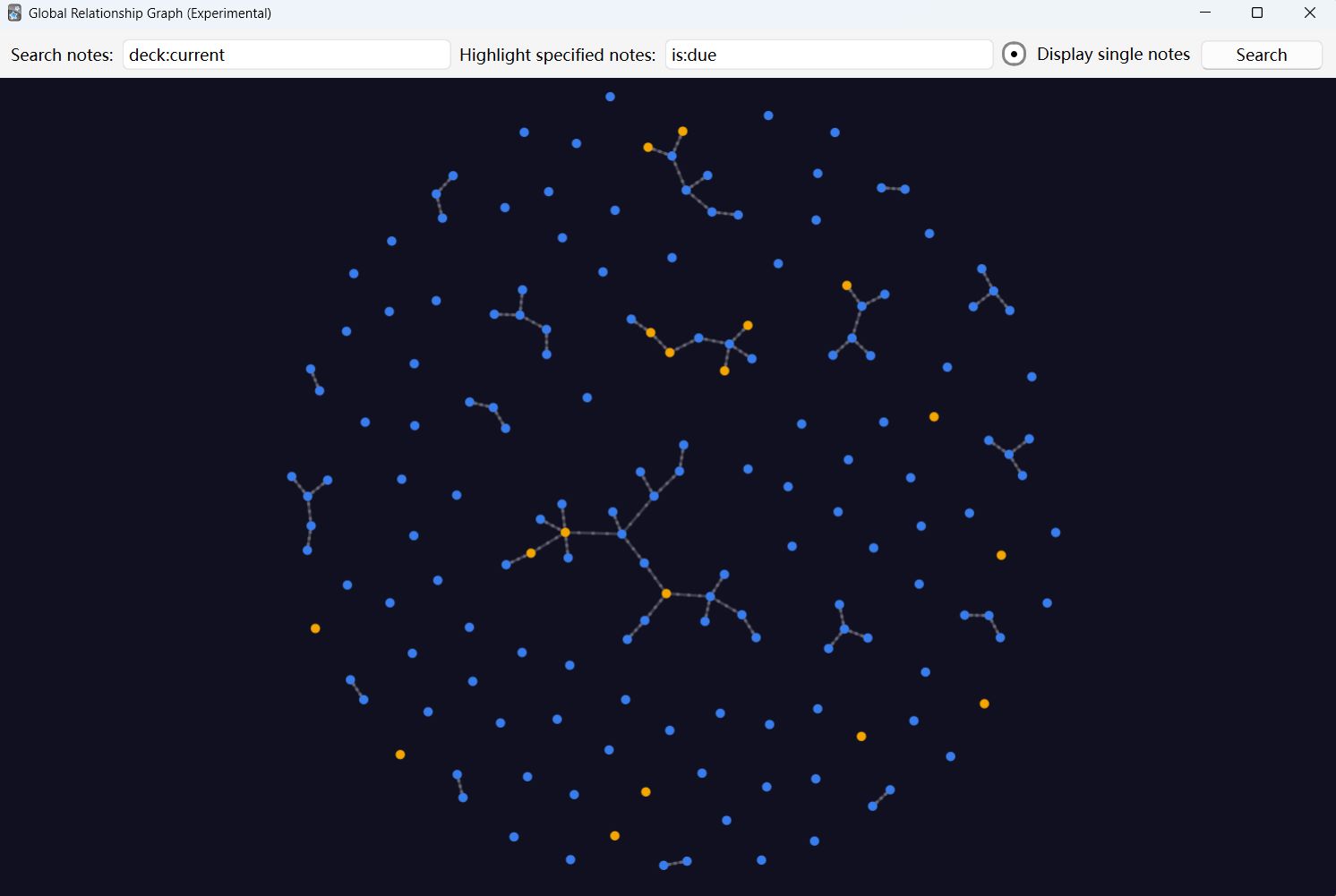
Global relationship graph
Entrance: Menu -> Anki Note Linker -> Global Relationship Graph
Please set the video driver in Anki preference to an option other than Software, as it can significantly decrease graphic performance. Not recommended to set it to Vulkan, as it may cause some issues in the current version
Customize shortcut keys
You can customize the shortcut keys according to your preferences in add-on configuration
If there is no response when using the shortcut key, it may be due to a shortcut key conflict. Please try changing the shortcut key
How to display note links properly without this add-on (such as on AnkiDroid, AnkiWeb, or AnkiMobile clients)
This add-on automatically renders note links as corresponding content on the desktop version of Anki. Without the add-on, the links will not be rendered properly, affecting use on mobile devices. However, you can still regain some functionality.
If you have already generated note links and need to use them without the add-on, you can follow the steps below to get links working:
In the card template, add a class attribute “linkRender” to each note field on the front and back sides. You can also customize the attribute’s name. <div class=“linkRender”>{{Front}}</div> <div class=“linkRender”>{{Back}}</div> <!— If the field already has a class attribute, you can use a space to separate the new attribute from the original one —> <div class=“otherClassName linkRender”>{{Addition}}</div>
Copy the following code to the end of the card template on both sides. Rename the linkRender attribute in the code if you changed it. Set the disableLinks variable to true if you only want the text to render (removes the ”[|nid]” marker).
<script>
var disableLinks = false; // Change to true if you want to disable all link rendering for clients without add-on
if (!window.AnkiNoteLinkerIsActive) {
const renderLinks = _ => {
document.querySelectorAll(‘.linkRender’).forEach(element => { // You can rename “linkRender” on this line, but leave the ”.” in front
element.innerHTML = element.innerHTML.replace(
/[((?:[^[]|\[)*)|nid(\d{13})]/g,
(match, title, nid) => {
title = title.replace(/\[/g, ’[’);
let link;
if (document.documentElement.classList.contains(‘iphone’) || document.documentElement.classList.contains(‘ipad’)) {
link = anki://x-callback-url/search?query=nid%3a${nid};
} else try {
window.jsAPI ||= new AnkiDroidJS({ version: “0.0.3”, developer: “github.com/gugutu” });
link = javascript:window.jsAPI.ankiSearchCard(\nid:${nid}`); } catch (e) { link = https://ankiuser.net/edit/${nid}’ target=’_blank; } return disableLinks ? ${title}:<a href=’${link}’ class=‘noteLink’>${title}</a>`;
}
);
});
};
document.readyState !== ‘loading’ ? renderLinks() : document.addEventListener(‘DOMContentLoaded’, renderLinks, { once: true });
}
</script>
Save the card template and sync your deck to AnkiWeb.
After completing these operations, Anki will automatically display the correct content.
If you click a link on an AnkiDroid or AnkiMobile client, it will attempt to display the corresponding note’s flashcard in the card browser; if you click a link on AnkiWeb, it will open the AnkiWeb edit page for the corresponding note. If you changed the disableLinks variable to true, then the original content of the card will be displayed without any links.
This add-on is inspired by Obsidian
The following projects were used in this project:
pixijs
d3
KaTeX
Force graph
The implementation of this add-on is inspired by the following add-ons:
link Cards Notes and Preview them in extra window
hjp-linkmaster
Editor Live Preview
Versions
2025-09-20 Adds automatic centering in the Global Relationship Graph. (by BruceFooo)
2025-04-27 Fixed the issue where double-clicking on links in the editor in the new version of Anki had no response.
2024-10-12 Fixed the crash when opening the add new note window.
2024-09-09 Fixed the conflict with the image occlusion cards.
2024-09-05 Fixed the issue where Anki’s preferences behavior was being overridden on macOS.
2024-08-16 Fixed the error message that appeared when exiting reviewer with the automatic links panel display in reviewer disabled.
2024-07-26 Fixed the issue of link jump failure when the deck name contains spaces (by qappell); Supports customizing which note field to display in the note summary.
2024-07-11 Fixed the issue where the automatic filling of the question field fails when opening an ‘Add Note’ window by double-clicking a new link; Fix some issues with the previewer.
2024-07-09 Support showing the links panel in the reviewer; Behavior change: Some link click actions have been modified to be more intuitive, which is inconsistent with the behavior in previous versions, please refer to the latest documentation.
2024-07-08 Global graph supports displaying tag nodes; Global graph supports changing the background color (thanks to qappell); Optimize the configuration page.
2024-07-02 Support displaying Mathjax formulas in links panel and graphic labels; Optimize the line wrapping effect of links to improve readability; Fix incorrect display of [ in note summary.
2024-06-26 Mask the display of [sound:xxx] in the note summary; Optimize the display when the size of the graph panel changes; Fixed the issue where occasionally no graphics would be displayed when switching the graph panel; Fixed the issue of graphics automatically reverting back to their initial size when modifying notes.
2024-06-12 Reconstruct the graphics rendering mechanism; Improve graphics performance; Fix inaccurate graphic click/drag recognition; Fix anomalies in graphics when a note contains a link to itself; Optimize the display effect of graphics and text; Optimize the adaptive size effect of graphics; Optimize graphic scaling effects; Added a configuration item for whether the global graph defaults to displaying single nodes.
2024-05-09 Optimize the performance of refreshing links/graph panel.
2024-05-08 Refactor link loading scheme to reduce lag; Fix Anki unresponsive when using AnkiConnect to batch operate notes.
2024-04-16 Using GUI configuration interface; Added configuration options for global graph node color; Change menu position; No longer supports old shortcut keys; Fix the error message box pop-up when closing Anki with auto-sync enabled.
2024-03-30 Enable the global graph to support highlighted specified notes; Use the previewer of hjp-linkmaster if it is installed; Added configuration options for default search text in the global graph; Added configuration option for whether to use hjp-linkmaster’s previewer.
2024-03-22 Enable the global graph to support search and filtering; Fixed the issue of occasional incorrect links in global graph links.
2024-03-15 Fixed memory leaks in the QtWebEngineProcess; Optimize performance in certain situations.
2024-03-14 Optimize the performance of the global graph and fix the issue of not refreshing the global graph in certain situations.
2024-03-13 Optimize performance when adding note.
More…
Screenshots
Liên kết hỗ trợ
Reviews (30)
👍 2026-02-20
Super easy to use, very useful, able to link notes and show relationship graph
👍 2026-02-08
Please we need this option, it would be very helpful during the review session -> “Automatically show the graph panel when entering the reviewer”
👍 2025-12-26
Single handedly changed my anki experience. Must have if you’ve been having trouble learning from anki.
👍 2025-12-11
Muito bom mesmo, ainda mais se vc for bem organizado e ligar tags dá para ver o entrelaçamento e relações entre as matérias. Além disso, a função de ligar cards com outros é ótima, ligando conceitos, fórmulas e derivações.
👍 2025-11-04
Awesome!!! Need: “Automatically show the graph panel when entering the reviewer” => Perfect.
👍 2025-09-18
非常好用,太赞了
- 快捷键非常方便alt+shift+c,alt+shift+v
- 支持新增卡片过程中选中文本直接右击添加新链接
- 背诵卡片右侧有正向、反向链接,非常方便复习相关知识点和易混淆知识点
- 浏览界面有图形化展示,一目了然地弄清知识点脉络关系
非常感谢,辛苦了!
👍 2025-08-22
Wonderful addon! Could you please tell me if it’s possible to make the circles in the Global Relationship Graph increase in diameter depending on the number of connections a card has
👍 2025-08-19
ingenious add on! full props to the author of this wonderful fun tidbit. makes learning productive as well as fun to link related info together! just two question/suggestion: i want to link multiple notes to each other with forward and back links, copying each note id and pasting in each one is slightly tedious. any way to batch link multiple notes? Also, any way to view the graph panel along with the links panel in the reviewer
👍 2025-08-15
很好 但是为什么有时候链接会失效呢? 是因为链接的卡片修改了内容吗?
👍 2025-07-26
It works pretty well on Anki Desktop, however I followed the steps to reproduce behavior on AnkiMobile and it does not work as expected. The link does appear, but then the card does not open in the app, the search screen is shown for a couple of seconds and then it returns to “Congratulations! You’ve finished for now” screen. It’s a shame…
👍 2025-07-23
Works great! Amazing and elegant add-on. I’m usually in editor mode, so the option to be able to seamlessly switch to related notes in editor mode is very useful. Thank you so much!
👍 2025-07-06
Great plugin. However, in Anki versions after 25.02, clicking links in the preview interface of “Editor Live Preview” fails to work properly. I’m uncertain whether this is an issue with “Anki Note Linker” or “Editor Live Preview”?
👍 2025-07-02
Love this!
👍 2025-07-01
podia ter uma tradução pra português brasileiro
👍 2025-06-30
Very good, thank you so much!
But I just have an issue with the usage on Ankidroid. When I click a note link on Android, I get the web browser editor opened. Maybe there is something to update on this line of code:
else try {
window.jsAPI ||= new AnkiDroidJS({ version: “0.0.3”, developer: “github.com/gugutu” });
link = javascript:window.jsAPI.ankiSearchCard(\nid:${nid}`)`;
}
Anyway, thank you again!!
👍 2025-06-29
Very interesting and practical! This looks like the local graph view in the Obsidian app. Could a global graph view be added where all the existing relationships of all the notes can be seen? Thank you for your work!
Edit: Thanks for your previous response! Will it be possible to use this addon together with the Editor Live Preview addon? It gets messy when using both addons at the same time. Maybe there could be an option to easily enable/disable it so you can switch between both addons. Edit2
👍 2025-06-28
Quá đỉnh, quá đẳng cấp, đây là tính năng map tương tự ở trên Obsidian mà tôi đã dùng.
👍 2025-06-23
this is excellent. Knowledge “lives” in networks and this captures that fact. Many thnks for creating this add-on!
👍 2025-06-01
Had a bit of trouble at first understanding how it works but it’s great now!
👍 2025-05-28
非常好用,感谢:)
👍 2025-05-11
like it
👍 2025-05-10
It works and helped me to organize cards and find duplicates. I added a custom field which is only visible on desktop (with CSS .win). I have only started using it recently.
👍 2025-05-06
I love this add on, I hope the other can improve it becomes more helpful
👍 2025-05-06
Very nice plugin! I often use the preview function to review content, but it doesn’t show the direct relationships between links in the preview interface. Would it be possible to add a new feature to display link relationships or diagrams in the preview interface?
👍 2025-05-01
hello, this add-on has been very useful for me so far! is there a way to link multiple cards to one word? for example, if the card says “tim ate the apple” and i wanted to link 2 cards, being able to link both to the word “apple” rather than having to assign 1 to “apple” and linking the second card to another word. thank you!
👍 2025-04-22
Great add-on, but need to be fixed.
👍 2025-04-18
Hello, author.
I’ve installed this add-on for 6 months. This add-on has massively improved how effectively I learn vocabulary!—thank you! However, today, after upgrading Anki, the add-on stopped working properly. Specifically, the graph no longer shows up when I click on Anki Note Linkeror select Browse and view any card—the node graph no longer appears in the bottom right corner.
I’ve tried downgrading Anki and reinstalling the add-on, but nothing worked 😭. I also tested it by instal
👍 2025-04-15
very useful add-on
👍 2025-04-10
Best addon I have randomly come across, I just discovered this and spent all evening linking my cards, it made me understand them and their relationships much better. 谢谢您!
👍 2025-04-04
this is so amazing