Anki Papers
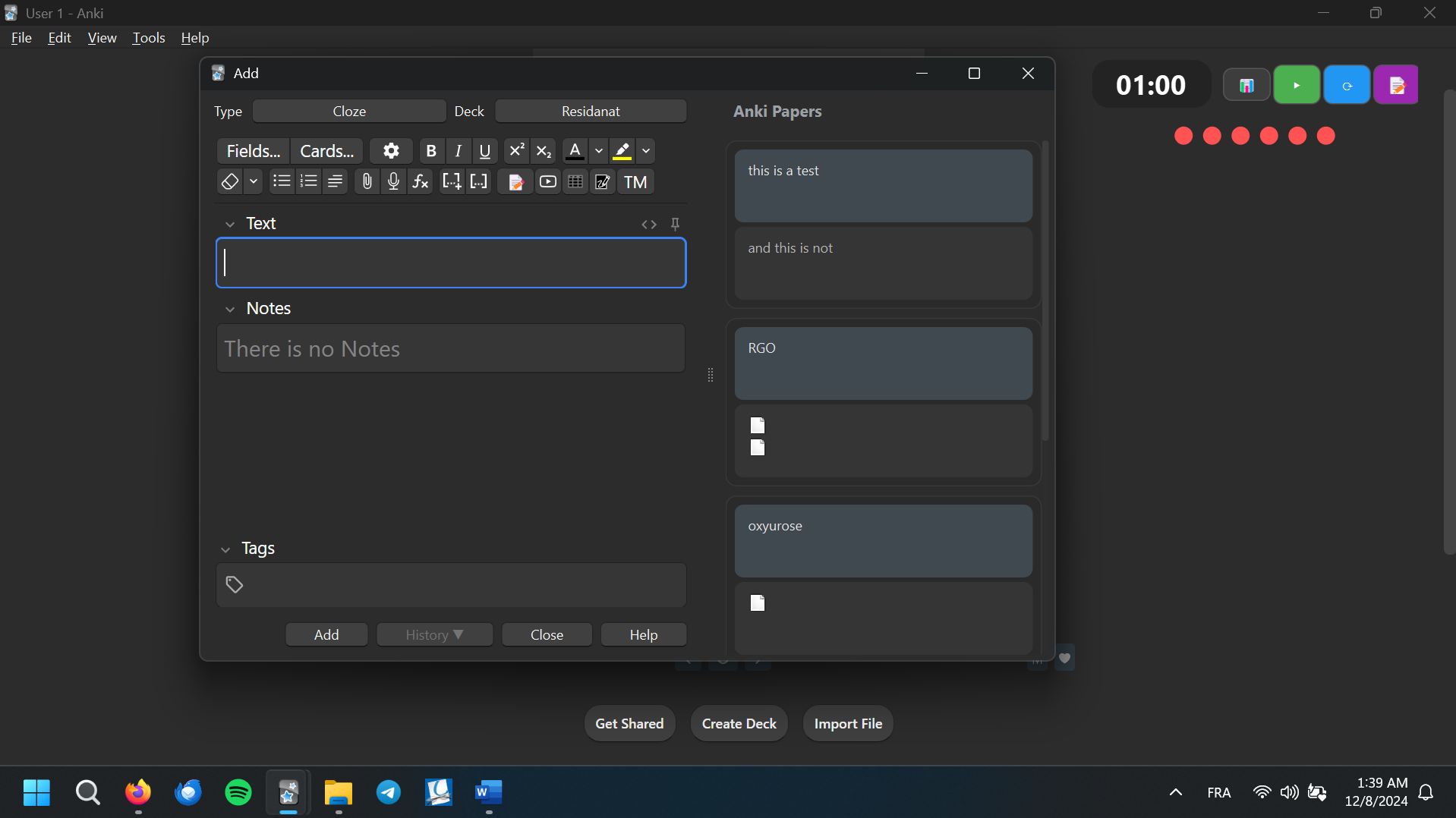
Note : From now on you can simply use the key combination : Ctrl + Shift + N to open and close the side panel , or the 📝 icon from the formatting toolbar
A modern, elegant addon for Anki that displays your recently added notes in a beautiful side panel. Perfect for reviewing your work and keeping track of your study materials.
Features 📝 Shows your last 10 added notes 🖼️ Supports images with automatic resizing (still working on this actually ><) 🌙 Beautiful dark theme integration 📱 Responsive layout 🎯 Support for Basic and Cloze note types
note that this add on still in development , if you there is any issues send me an email or keep a comment down
Installation Download the addon from AnkiWeb Restart Anki Open the Add Cards window to see your notes history Configuration
You can customize the addon through Tools > Anki Papers Settings:
Number of notes to display (default: 10) Image settings: Show/hide images Maximum image dimensions Dark mode toggle Note types to include Anki Papers Changelog Version 0.2 (2024-12-08) Added Features Added a toggle button (📝) to the editor toolbar Located on the right side of the toolbar Allows collapsing/expanding the notes history panel Preserves panel width between toggles Support Development ☕
If you find this addon helpful and would like to support its development, you can buy me a coffee:
Your support helps maintain and improve this addon. Thank you! 🙏
Author
Created by Ahmed Benarab (ankizium on Ko-fi)
License
This addon is released under the MIT License.
Screenshots

Liên kết hỗ trợ
Reviews (5)
👍 2024-12-08
Great, now you can collapse the side panel to quickly show or hide recently created cards. Thank you, author. Great work!
Past Reviews: 👍🏻
👍 2024-12-06
:
Author, you make good add-ons. This is a very nice idea!

Feature: It would be nice if you could add a button to open and collapse the side panel. Sometimes it's not necessary to have it open and it would look more neat if you could hide it easily.

Another feature you could implement is opening the Browse window with the card selected when you click on one of the cards in the side panel
Comment from author before post was edited Thank you for the good words 😇 I will take in considera
👍 2024-12-06
First of all, thank you very much!!
Ideas:
1 - Button to hide it if possible, Example: when you click on the button it hides and then expands
2 - Include a function that searches the anki database, including the flash card that is being created. It would be really good.
Once again thank you very much Comment from author Thank you for the good words 😇 Actually, started working on this two features, and they are gonna be available in the next beta release 0.2 , it comes with better stabilit
👍 2024-12-03
When you click add it shuts down the whole program :( Comment from author Please , can you well report this bug , like what system are you using , what Anki version you are on , because it doesn’t support the old versions
👍 2024-12-02
That’s very interesting add-on!
