This add-on has the following options:
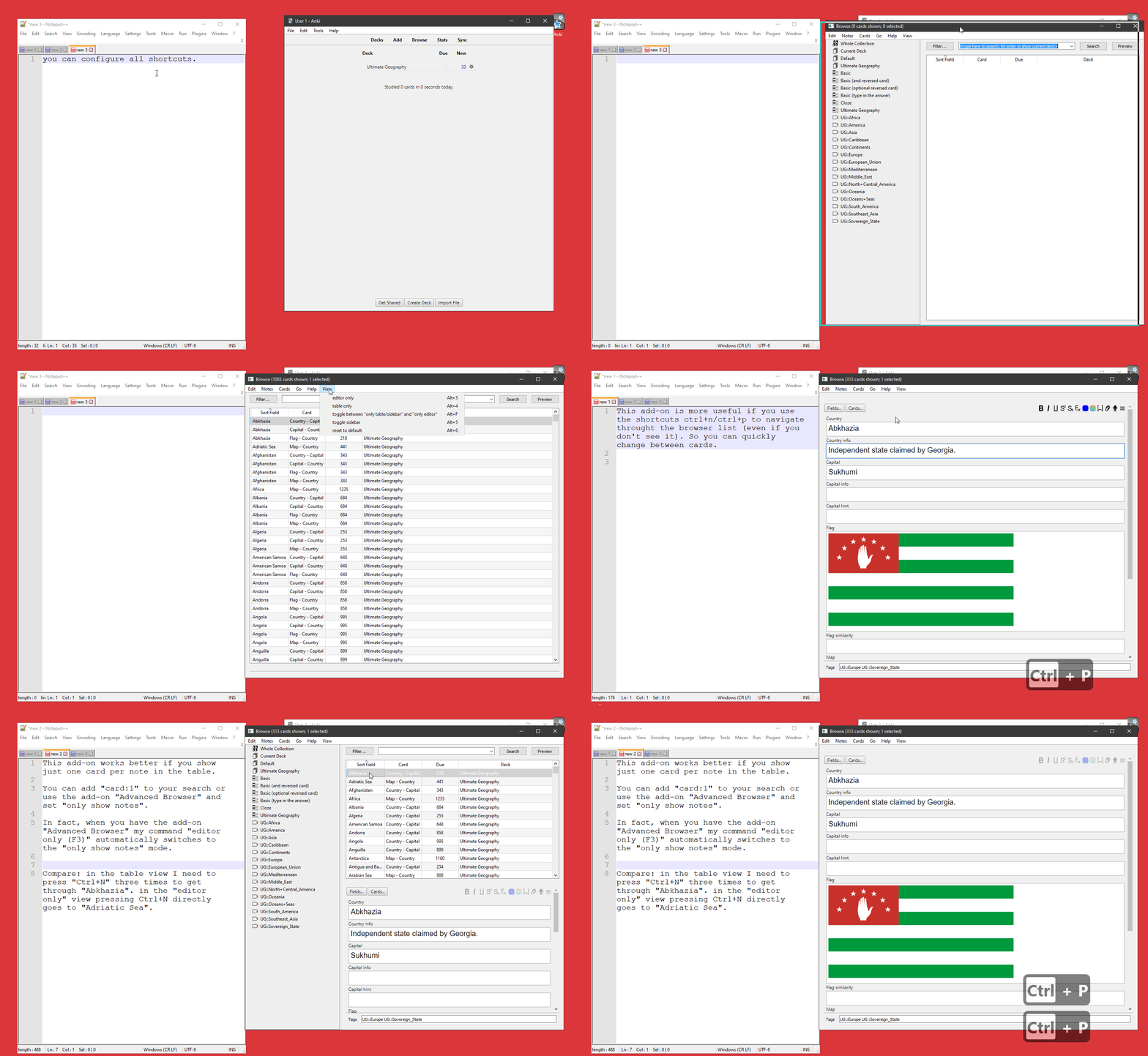
you can hide/unhide the table or editor view in the browser so that the remaining component is maximized and quickly change between the table and the editor you can hide/show the sidebar (that’s also in the fastbar add-on). You can’t maximize the sidebar.
You can also download the screencast (gif) by right-clicking it. Then select “save image as” from the context menu (tested in Chrome and Firefox). Then open this gif with a program that supports slowing down gifs. On Windows I use the popular image viewer IrfanView that can also display gifs. IrfanView has “Options->Start/Stop Animation” and you can adjust the speed with [SHIFT][CTRL][+] or [SHIFT][CTRL][-]. On Linux I use mpv.
When you maximize the editor the table that holds the search results will be adjusted so that it has only one card per note: This makes sure that whenever you press “Ctrl+n”/“Ctrl+p” you will see something different. Otherwise for note types that have multiple cards the view wouldn’t change as long as you go through cards of the same note. You need to have Card browser: List only one card per note. (For older versions of Anki before 2020 this functionality was part of the add-on “Advanced Browser”).
Use this at your own risk. This add-ons reuses some code by glutanimate and Arthur Milchior.
Config shortcuts can be configured in Anki 2.1 in the add-on dialog. The default keybindings are: “hotkey_toggle”: “Alt+D”, “hotkey_editor_only”:“Alt+3”, “hotkey_table_only”:“Alt+4”, “hotkey_toggle_sidebar”:“Alt+5”, “hotkey_back_to_default”:“Alt+6”, The setting “splitter_bigger” should slightly increase the size of the splitter between the table and editor so that it’s easier to click with the mouse.
bugs Please do not use reviews for bug reports or support requests. I don’t get notified of your reviews, and properly troubleshooting an issue through them is nearly impossible (formatting is limited and I can’t reply multiple times). If you find a bug let me know in the official anki support forum or on github. In Anki 2.1.41+ the sidebar is empty when opening it - a fix is mentioned at https://github.com/ijgnd/anki__browser_MaximizeHide_TableEditor/issues/4 and will be included in the next update.
Changes
2024-12-01 update for 24.11 and some internal tweaks 2023-06-24 allow user to configure delay (extend solution for #4) 2022-01-26 different menuView detection for better compatibility with other add-ons 2021-12-08 fix for github issue #4 2021-12-06 fix for 2.1.50 2021-05-27 fix for 2.1.45 2020-07-02 use same “View” menu as my other add-ons, misc adjustments to newer Anki versions. 2019-12-22 better compatibility with Browser side-by-side (horizontal split) . … 2019-03-07 initial release
Screenshots
Liên kết hỗ trợ
- Contact Author
- the official anki support forum
- github
- https://github.com/ijgnd/anki__browser_MaximizeHid
- Contact Author
Reviews (23)
👍 2025-10-02
goooooodddddd
👍 2025-09-06
Thank you.
👍 2024-09-17
Still works. Thank you.
👍 2024-09-03
Brazil!!!!! Excellent my friend
👍 2024-02-29
Wow! This addon is really great and necessary for handy editing of cards.
👍 2023-12-01
Very useful :)
👍 2023-05-26
yeah! it’s good
👍 2022-05-05
Provides exactly what I wanted for my workflow. Thanks for putting in the effort to create this add-on!
👍 2021-11-13
Very clever and convinient add-on !
10/10 !
👍 2021-10-26
Absolutely indispensable – very many thanks!
~ Anki 2.1.48, macOS Big Sur.
👍 2021-08-09
Works fine on 2.1.46 (debian buster) UNLESS you also enable “Browser: Table/Editor side-by-side (horizontal split)”, which for me is more important. Pity. Comment from author I’m not on 2.1.46 yet so I only did a very brief test with those on .46 and didn’t find a major problem. But that doesn’t say much …
Could you post at https://forums.ankiweb.net/t/browser-table-editor-side-by-side-horizontal-split-official-thread/548/11 and describe the exact steps needed to reproduce the problem or ma
👍 2021-06-19
Norm. Would remove 3 dots from the top would be great
👍 2021-06-09
Simple and Useful! Great job. Tks
👍 2020-11-15
Super practical - what you need to work with large arrays of records
👍 2020-09-16
Couldn’t it just be compatible with older versions? I’m using 2.1.22 and I’m not willing to update it due to prospect incompatibilities with other add-ons. Comment from author My add-on now depends on features that were introduced in 2.1.24.
Since 2.1.22 Anki has gotten many improvements and bug fixes. I don’t mind if some other add-on authors don’t want to adjust their add-on to these improved versions. But I don’t see how this makes my add-on bad.
Couldn’t the other add-ons just be com
👍 2020-03-07
This is great!!!
👍 2020-02-29
Great idea, very useful indeed
👍 2020-01-27
Exactly what I am looking for for my Anki 2.1
👍 2019-11-24
5 stars!
👍 2019-09-21
thank you
👍 2019-08-18
Thanks a lot!
👍 2019-04-19
good addon
👍 2019-03-08
That’s great! I like it.
