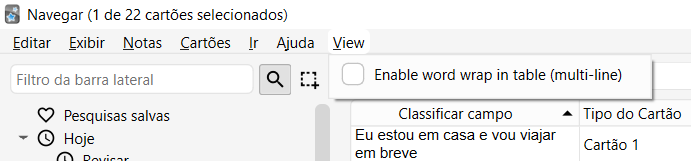
Browser > View > Enable word wrap in table
Original addon: https://ankiweb.net/shared/info/1389211778
versão 1.2 Adicionado atalho pra dar zoom+ e zoom-, com alt+ e alt- Mantem persistencia (ultima configuração) ao fechar painel e voltar
versão 1.1 Adicionado atalho ctrl+w ou ctrl+shift+t. Esse atalho pode ser alterado em config.json dentro da pasta do addon
versão 1.0
e-mail: eros18123@gmail.com
Whats Anki Brasil: https://chat.whatsapp.com/HL4TNruJDtr9ISGUsE9ddu Autor: Eros Cardoso The group is for support and there is no commercial intention.
Note: All the addons I make are free because anki for pc is free and I always used the free chatgpt to help me create codes. All codes are available on github and you can use them freely to translate.
Screenshots
Liên kết hỗ trợ
Reviews (3)
👍 2026-02-07
otimo, bem o que eu precisava Comment from author vlw
👍 2025-02-26
To access this from the menu:
- Go the the Browser
- Go to the View tab
- The “Enable word word wrap in table (multi-line)” option should be added to the menu Comment from author thanks
👍 2025-01-09
Thank you for the wonderful work. Feature request: Can you kindly add an option in config for hotkey to toggle the addon on and off in browser? Comment from author Added shortcut ctrl+w or ctrl+shift+t.
