A stripped-down port of the Clickable Tags add-on to Anki 2.1.
Just add the {{clickable:Tags}} special field to your card template. The add-on will take care of the rest.
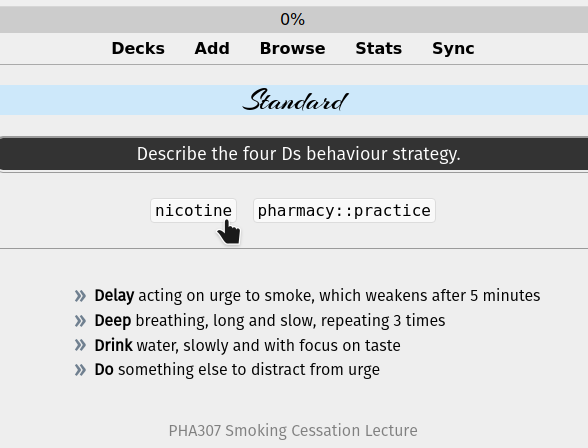
Single-click the tag to search for notes with that tag. Double-click to limit the search to the current deck.
This is the exactly same as Clickable tags v1.0 that Damien updated for Anki 2.1.20+. I am now maintaining both add-ons.
Problems, Bugs, Errors, Improvements If you find a serious bug, please submit it on Github or email us at ankingmed@gmail.com. Please remember that we are not coders and thus may not be able to provide support.
Changelog 2020-3-13: Initial release 2021-10-16: Fixed a conflict with the Closet add-on and IO-one by one note type. Thanks to RisingOrange for the fix! 2022-01-30: Added a compatibility fix for the AnKing Note Types and associated add-on
Please consider checking out our: YouTube Channel- How to use Anki for beginners and advanced users. Instagram/Facebook: @Ankingmed www.TheAnKing.com- Recommended add-ons, tutorials and more including how to download 40+ add-ons in < 5min Patreon/VIP- Support our work and get individualized Anki help!
Screenshots





Liên kết hỗ trợ
Reviews (30)
👍 2025-08-23
I wish this had dark mode support.
👍 2025-07-15
it’s great but the add-on image occluion enhanced stopped working ever since i got this. could anyone help with this or provide me another version so i can have both add-ons working? thank you in advance
👍 2025-07-14
It would be great to have it above the bar of the “Again”, “Hard, “Good”,“Easy”. Basically if a cloze note is very long, you can’t see anymore the tags
👍 2024-07-04
Thanks. instead of colorful borders and font colours, can I just have normal black? low readability. Could you provide some tweaks or some codes that I can adjust (I can see there are python files in the addon package.)
Thanks a lot again
👍 2023-11-23
How can the button be above the bottom Hard, Good, Easy buttons ? Thanks a lot for the add-on, it’s great Comment from author Can you explain what you mean? I’d love to turn this into a 👍🏼 but we can’t troubleshoot here. We don’t get notifications, can’t go back and forth, get screenshots, etc. Please report it on the github or email us and we’ll look into it!
👍 2023-11-18
This addon cause html problem : Invalid HTML on card: SyntaxError: Invalid or unexpected token Comment from author before post was edited UPDATE: This should be working now and we would really appreciate if you change this to a 👍🏼! :) If you find issues or have suggestions for improvement, please share on our GitHub and we can discuss! (we do not get notifications here and will not see any responses or edits you make)
👍 2022-12-10
Working perfectly, just add {{clickable:tags}}
For the people in comments wanting to style it, it uses the “clickable-tag” class, so just add
.clickable-tag { whateverstyleformattingyouwanthere } in your card styling
👍 2022-12-03
The comments helped me understand how to use it
👍 2022-05-16
Hi. How can I change the color of the button? My button is white with black writing after uploading the following configuration:
On back template:
<span class=“tags”>{{clickable:Tags}}</span>.
and on styling:
.tags {
color: #000;
I would also like the button to be above the bottom Hard, Good, Easy buttons.
This can be configured?
👍 2022-04-19
For anyone who is confused on how to use it:
-
Browse
-
Select a card
-
Select “Cards” (located above the fields on the selected card
-
Select “Back Template”
-
Scroll all the way to the bottom and paste this: {{clickable:Tags}}
You should now see the tags for that card on the backside of that card and any other cards that use that template (such as the AnKing note type).
👍 2022-02-14
If anybody is having a problem with the tags being white on white, change {{clickable:Tags}} to <span class=“tags”>{{clickable:Tags}}</span> for front and back and then add the following to your style.
.tags {
color: #000;
}
👍 2022-02-05
(https://ankiweb.net/shared/info/1739176371)
Works fine with 2.1.49.
👍 2021-11-25
Nice addon, shows white on white though in Nightmode on latest to date Anki 2.1, have to manually change the font color to black or some other dark color.
@user posted below: “I cannot add this text {{clickable:Tags}} as a field to a card type.”
Answer: you have to copy that {{clickable:Tags}} into your card template where you wish to have this clickable tag thingie
👍 2021-11-13
Can someone explain me how this work please ?
I cannot add this text {{clickable:Tags}} as a field to a card type.
Thank you in advance !
👍 2021-10-08
Loved it! So useful.
As other person mentioned, I would love to see some additional configuration options like edible
-
background colour
-
fontstyle
-
fontcolor, specially one resisting the nightmode overlie
-
where it shows up like at the bottom, corner etc.
👍 2021-06-15
Very useful
👍 2021-01-13
People who are downvoting should understand that this review section is not for bug reporting, it should be reported on github instead. Great work author.
👍 2021-01-04
2.1.35 not working Comment from author UPDATE: This should be working now and we would really appreciate if you change this to a 👍🏼! :) If you find issues or have suggestions for improvement, please share on our GitHub and we can discuss! (we do not get notifications here and will not see any responses or edits you make)
👍 2020-06-13
Nothing happens when I click on the tag! Though the cursor shape changes when I hover, but when I click, nothing happens. When I click twice, it shows the pop up dictionary… Comment from author UPDATE: This should be working now and we would really appreciate if you change this to a 👍🏼! :) If you find issues or have suggestions for improvement, please share on our GitHub and we can discuss! (we do not get notifications here and will not see any responses or edits you make)
👍 2020-06-06
Thank you!
👍 2020-05-11
Awesome add-on!
I started using tags because of this add on :)
👍 2020-03-30
March 23, 2020: This add-on works great, but with the V10 update, it is now showing an error code anytime I try to update it “error downloading 380714095: invalid code or add-on not available .”
Is this because of the switch to clickable tags 2.0?
March 30/2020 UPDATE: I didn’t realize that anki released a new updated version of anki. Once I updated, clickable tags started working.
👍 2020-03-23
Same as below Comment from author UPDATE: This should be working now and we would really appreciate if you change this to a 👍🏼! :) If you find issues or have suggestions for improvement, please share on our GitHub and we can discuss! (we do not get notifications here and will not see any responses or edits you make)
👍 2020-03-23
Ya not working for me (same with the person below me) Comment from author UPDATE: This should be working now and we would really appreciate if you change this to a 👍🏼! :) If you find issues or have suggestions for improvement, please share on our GitHub and we can discuss! (we do not get notifications here and will not see any responses or edits you make)
👍 2020-03-19
EDIT:
Thanks to the guy that posted the fix for 2.1.22
Great, thank you.
I had to add quotes around tags for it to work.
If someone else is havin this issue:
Simply replace
this line (n°31):
browser.setFilter(‘tag:%s’ % tag)
whith this one
browser.setFilter(‘“tag:%s”’ % tag)
👍 2020-03-10
guys anyone on anki 2.1.20 just copy the code here -> https://github.com/ankitects/anki-addons/blob/master/demos/porting_clickable_tags/__init__.py
then paste it in place of the old code of your init.py file of the addon.
In your card’s template put {{clickable:Tags}} instead of {{Tags}}. I tried it, it works.
👍 2020-02-28
I’m getting exactly the same error message as reviewer 2/18/2020:
ImportError: cannot import name ‘Template’ from ‘anki.template’ (C:\Program Files\Anki\anki\template.pyc)
The message comes up when running anki.exe. I am also on version 2.1.20
👍 2020-02-26
As another reviewer mentioned, I had to edit line 31 to get it to work (maybe since I’m using the Advanced Browser add-on as well?)
Change
browser.setFilter(‘tag:%s’ % tag)
To this…
browser.setFilter(‘“tag:%s”’ % tag)
👍 2020-01-19
Just what I need, very thanks, or I’ll take much long time to write such an add-on.
👍 2019-12-29
When it started to work ultra awesome!!!
I would love to see some additional configuration options like edible
-
background colour
-
fontstyle
-
fontcolor, specially one resisting the nightmode overlie
-
where it shows up like at the bottom, corner etc.
