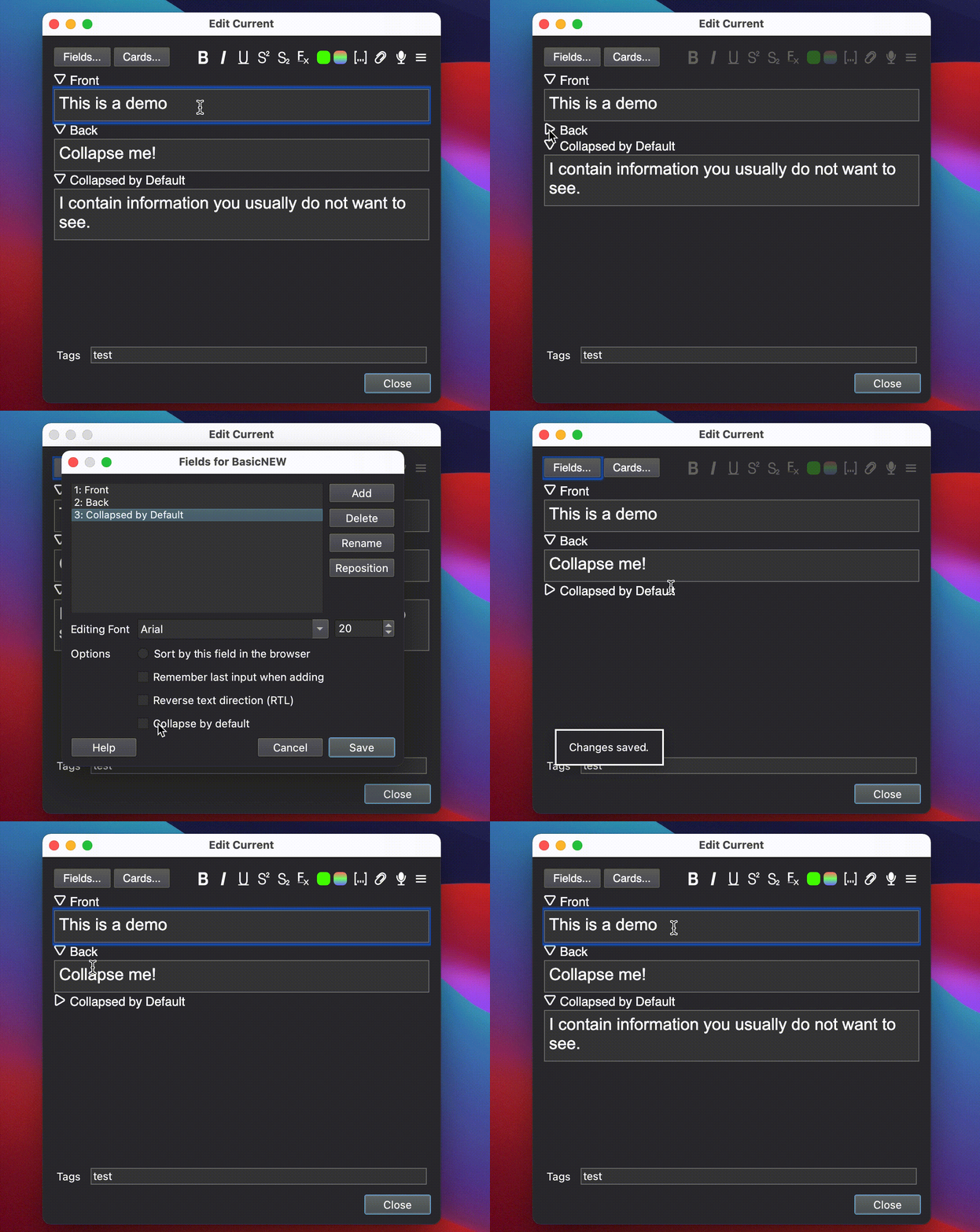
Adds a little arrow on top of your fields, which allows you to collapse them. Works in the Current Card Editor, Browser, and the Add Cards dialogs.
Shortcuts All shortcuts are settable through “Tools > Add-ons > Collapsible Fields > Config”.
F10: Toggle Collapsible status for current field Shift+F10: Uncollapse / Collapse all fields which are collapsed by default and non-empty
Collapse by default You can set fields to collapse by default. To enable this, open the editor, select “Fields”, choose your field, and check “Collapse by default”.
Updates 2020-03-07:
- Remove bug that prevented using Alt+Shift+Direction key 2021-02-11:
- Anki 2.1.41 support 2020-12-22:
- Green highlight on icon when field has content
- Fix blinking in browser
- Fix compatibilities with Persistent Editor
- Make collapsed fields unfocusable using Tab / Shift+Tab
- On Anki 2.1.38, you can Alt+Shift-click a field name to clear it (even if collapsed) 2021-08-28:
- Update for Anki 2.1.45+! Thanks go out to RisingOrange for helping out with this
- Clickable area around arrow is bigger (Thanks to Kleinerpirat)
Support If you like my add-ons, you can consider supporting me. My add-ons will always be freely available for everybody, but what I can offer you is my sincere thanks, and first-hand technical support, if you have any questions/issues with my add-ons. At the same time it allows me to put more time and focus into developing these and making them as powerful and user-friendly as they are. Thanks for considering!
ko-fi.com/hgiesel patreon.com/hgiesel
Screenshots


Liên kết hỗ trợ
Reviews (22)
👍 2022-09-14
Nice! I stumbled upon this by accident—was looking for way to collapse items in left panel—but it makes another wish I had possible: To add a field that I may not use most times to a general note template; now that field won’t clutter the editor. “Collapsible Fields” was a great find today.
Update 20220914: I realize that this addon will only work to 49. After staying with 49 for nearly 11 months I decided to try v54. Collapsible Fields is so important for me I have considered going back to
👍 2022-06-28
Very useful addon! I would very much appreciate an update for 2.1.50+
👍 2022-01-22
Good :)
👍 2021-11-09
phenomenol work! thank you for this amazing contribution to the anki community. take care!
👍 2021-10-12
Great Add-On, I’ve been using it for a while!
Just updated Anki to 2.1.48 — it seems the Add-On only works partially, for the time being:
some ticks for ‘Collapse by default’ are heeded, others ignored; i.e. one Field I need to be open in the ‘Add’-Dialogue is collapsed, even though there’s NO tick for ‘Collapse by default’. All the other Fields are fine … ;)
(there are 15 Fields in this note type, in case this is relevant)
👍 2021-08-29
As someone said, it doesn’t work on 2.1.46 version, and it was very useful. What a pity.
Edit: It works now on 2.1.46!!! Thanks a lot, Mr. Comment from author before post was edited Updated :)
👍 2021-08-28
Works in 2.1.46
I love u. Comment from author before post was edited Should work now :)
👍 2021-08-09
Great, thanks a lot! Would be even greater if there is a way for me to change the green highlight to, for example, blue highlight? Comment from author before post was edited Which color?
👍 2021-06-20
Collapse by default not working :(
👍 2021-05-14
If you use the Japanese addon, after Japanese gets generated it opens back up the collapsed text
It would be nice if the text label was clickable to collapse instead of the tiny collapse button.
I’m also getting this error when generating card data.
Caught exception:
Traceback (most recent call last):
File “aqt\webview.py”, line 37, in cmd
File “aqt\webview.py”, line 123, in _onCmd
File “C:\Users\AppData\Roaming\Anki2\addons21\278530045\main.py”, line 369, in prevBridgeRerout
👍 2021-05-10
Excellent add-on, but it has an annoying bug (nothing that obscures the brightness of its work): sometimes, when opening the card addition box, no file presents collapsed as placed in the field customizations. Would it be an addon problem?
Note: To return to the initial preset (collapse certain fields), it is necessary to restart Anki.
Edit: I found an error: every time you change the deck cards, the addon stops working, therefore it is necessary to restart the program
Error
An error occ
👍 2021-04-26
Unfortunately I couldn’t get it to work on my anki.
I use Anki version 2.1.35. I don’t know if it works for just a specific type of card, but in all that I tried it didn’t work.
A pity, because I really liked the idea!
Edit: The author’s suggestion solved my problem. There is incompatibility between this addon and the Frozen Field addon.
As I understand it, it is not possible to use both at the same time. Despite the regrets, good work, it is a very interesting addon! Comment from au
👍 2021-04-07
Great add-on!
Worked for me in Anki version 2.1.43.
Regards,
Andrej Adamenko
https://forums.ankiweb.net/u/andr/summary
👍 2021-04-01
I’m on win10 and using cloze overlapping notes on anki 2.1.38. It doesn’t work for me, arrows are not present, I do have the collapse by default option but even if selected, nothing happens.
UPDATE:
Yes, you were right. It conflicts with frozen fields. Is there a way to have both of them working?
Update: Thank you so much, now it works flawlessly Comment from author before post was edited Probably a conflict with another add-on. Maybe Frozen Fields? Have you tried turning off all other ad
👍 2021-03-23
Thanks
👍 2021-03-08
Great. But it binds ⌥⇧← (Alt+Shift+←), ⌥⇧→, etc., which I need to select words forwards, backwards, etc. Would it be possible that you make these bindings optional? Comment from author The version for Anki 2.1.41 solved this issue, I might go back and fix the older versions too.
👍 2021-03-07
Thanks! I recently added additional cloze fields to my notes, but they are empty more often than not. With this add-on, they take up less space and I can immediately see Sections like Extra, Sources, Images.
👍 2020-12-22
I didn’t know I needed It up to I see It
👍 2020-12-10
Great add-on
can you make the same idea but for the content of the field during the review?
Comment from author
This can be done by using the HTML detail element, have a look here: https://www.w3schools.com/tags/tryit.asp?filename=tryhtml5_details_css.
Another idea is the built-in {{hint::}} tag. If you post the question on the Anki forum, and @ me, I could help you even more.
👍 2020-11-29
Love the functionality, but I the icons are a bit distracting. They don’t really blend in with Anki, so I made an alternative set of icons that look more “default”: https://snipboard.io/GlRIrz.jpg
(Feel free to download the icons here: https://gofile.io/d/5WdfpG)
EDIT: Of course! I’m glad you like them! Comment from author before post was edited I really like the icons! They’re much better than the ones I chose. I especially like how they’re a bit off-center, to be more centered in front o
👍 2020-11-27
Thank you for making this addon. Nice!
👍 2020-11-26
Great idea! Will prove extremely useful for Closet cmds fields.
I also love that you can now tab over less used fields when they are collapsed. Improves the workflow a lot.

