Contanki allows Anki to be used with a gamepad or other controller device.
Features:
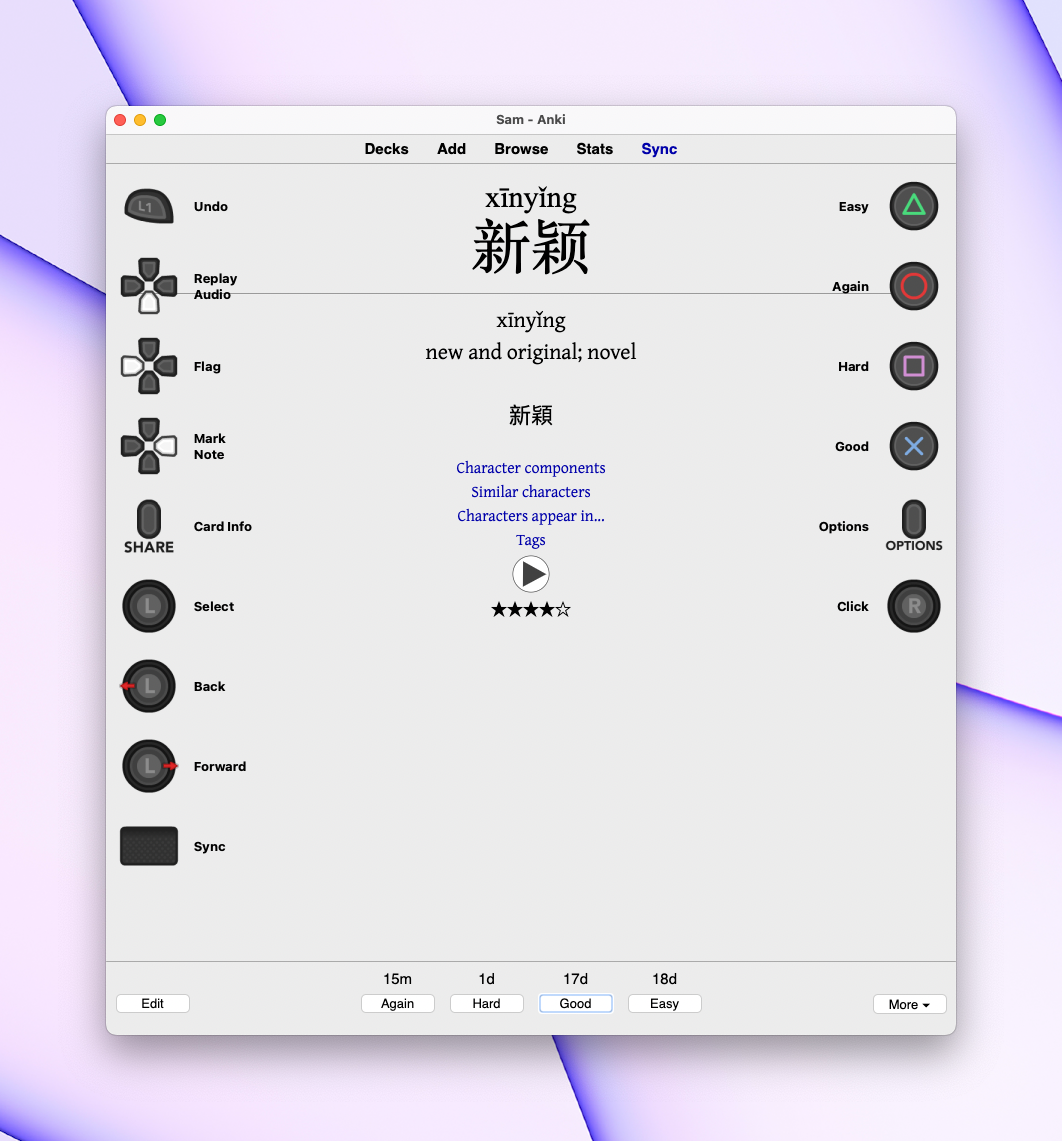
Comfortably review your cards using a gamepad - no more sore hands, backs, or eyes! Pull up a helpful overlay to remind you of the control mapping Control almost any Anki feature Fully customisable control bindings Cursor control for limited situations where the gamepad is insufficient Much more! Please report any issues in the official support thread or the GitHub issue tracker.
Usage Notes Connect your controller via USB or Bluetooth, install the add-on, restart Anki, and press any button to get started.
Controls can be reassigned using the add-on’s config dialog. You can assign controls for each context (review, deck browser, etc), as well as global settings that are used if a control isn’t assigned to a particular context. It is suggested that you try the default control bindings to begin with, and make changes as needed. Since Anki has a lot of functions to map, Contanki features a quick select menu, which by default is shown using the right trigger. This will also pull up an overlay showing the control bindings for the current screen. You can remove any actions you don’t need if the controls overlay is too cluttered.
Support is provided for 2.1.45 and above, but please note the version specific issues below.
Analog Sticks By default the right stick is used to move and click the mouse, and you can use L2 + right stick for a secondary click. It is only possible to click within Anki. The left stick is used to scroll and to navigate between views. Sticks can be reassigned and can also be put in ‘button mode’, where actions can be assigned to the directions of a stick.
Choosing a Controller I have been testing using a DualShock 4, which makes a good choice and can be readily purchased secondhand at a reasonable price. The cheapest option would be a knockoff SNES controller, which can be found for $10 or less.
Currently it is only possible to use a single controller at a time. This may include Joy-Cons depending on your system, but support for using both Joy Cons is planned.
Testing This add-on is still in beta, so there may still be some bugs. Please report any issues in the official support thread or the GitHub issue tracker.
If you encounter an issue, let me know what you were trying to do, what platform and controller you’re using, and the text of any error or message your receive. You can also obtain some debug information by clicking the help button in the Contanki’s config. Please take note of the known issues and don’t report anything listed there. Suggestions are also welcome, and can also be raised on the issue tracker or forum.
Known issues
Interaction outside of the main window (especially the browser and preferences) is only partially implemented Clicking outside Anki or in the title or menu bars doesn’t work Add-on doesn’t function in the profile window Unable to open or close webview context menus
Version Specific:
Due to changes in Anki’s toolkit, only version 2.1.66 and beyond are supported. Older versions of the add-on can be found on GitHub for older versions of Anki back to 2.1.45.
Platform Specific
Volume controls only work on MacOS
Controller Specific
Using both Joy-Cons at once might be buggy. 8BitDo controllers should be set to X mode, but D mode might also work. More info here If your 8BitDo controller isn’t detected correctly try Tools > Controller Options > Detect 8BitDo Controllers Steam Deck might not work at all
Add-on compatibility
Not compatible with: Anjoy Has issues: Customize Keyboard Shortcuts - a small number of actions rely on simulating a key press, and won’t work if you’ve changed that shortcut. Instead you can create a custom action in the controller options using your assigned shortcut
Screenshots
Liên kết hỗ trợ
- Contact Author
- official support thread
- GitHub issue tracker
- official support thread
- GitHub issue tracker
Reviews (27)
👍 2026-02-27
It doesn’t work. I think it needs updating.
👍 2026-02-26
dosent work
👍 2026-02-21
Very helpful add on, thanks.
👍 2026-02-19
no recognizing the controller
👍 2026-02-18
Works well with 8BitDo, but a little buggy
👍 2026-02-11
Works Great with my 8bitdo zero 2 controller
👍 2026-01-28
Guys, this addon seems to have been abbandoned. But I found a fork of it: https://ankiweb.net/shared/info/787807852
👍 2026-01-20
Works great with PS5 DualSense on latest MacOS.
👍 2026-01-18
working. follow instructions on https://www.theanking.com/controller
👍 2026-01-14
works great with 8bitdo zero 2
👍 2026-01-13
Not working
👍 2026-01-10
amazing
👍 2026-01-09
is not working
👍 2026-01-08
it doesnt work anymore
👍 2025-12-27
very helpful addon
👍 2025-12-23
very nice
👍 2025-12-22
Works great with my xbox controller in 2025!
👍 2025-12-20
Thanks!
👍 2025-12-15
doesn’t wok
👍 2025-12-12
very helpful. I can now learn and walk in the room.
👍 2025-11-16
It was working all well until Installing macOS Tahoe 26. Since then it no longer recognizes my PS5 controller. I have written so many feedbacks about this and It did not get fixed till now!
👍 2025-11-15
No longer working with 8BitDo Zero2 on Macs - seems to be a recent problem of last month or two based on other reviews. PLEASE FIX!!! Only recognizes my remote as a DualShock now so it won’t work correctly
👍 2025-10-28
it worked and helped
👍 2025-10-27
Connected remote find but have customised buttons and customisation shows in settings but does not work when working through cards, i.e. the easy button actually selects hard etc…
👍 2025-10-26
muy bueno, muchas gracias!
👍 2025-10-26
Connected remote find but have customised buttons and customisation shows in settings but does not work when working through cards, i.e. the easy button actually selects hard etc…
👍 2025-10-26
Its not working - keeps giving me this: Anki encountered a problem. Please follow the troubleshooting steps.
