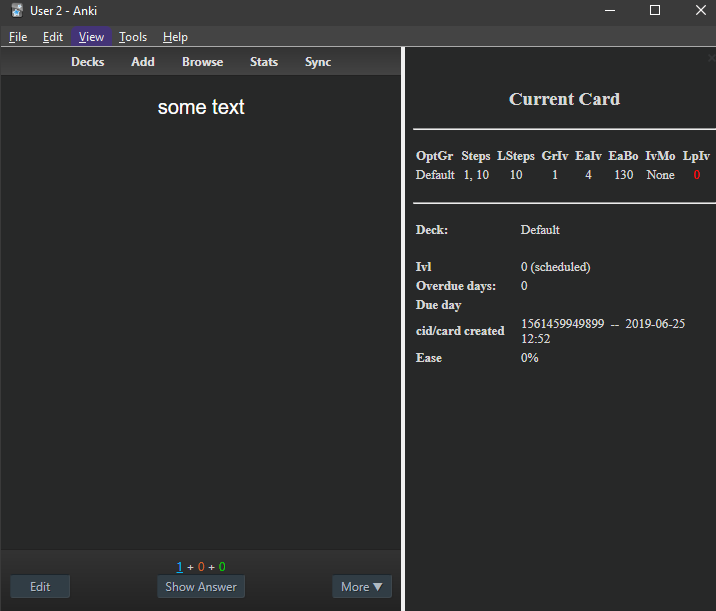
This is an extended modification of the add-on Extended Card Stats During Review. You can show/hide the sidebar with the shortcut “Shift+C” during reviews or from the main window toolbar with Tools->“Card Stats”. In the add-on config you can set if the sidebar is visible by default. The add-on remembers the last state.
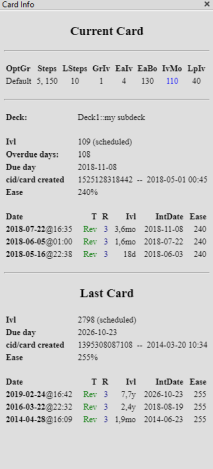
The sidebar contents are different from the other add-ons. There are deck options, only card properties that are relevant (to me) and a shorter and less wide table of repetitions. This version makes it easier to configure what is shown in the sidebar (if you know some python).
Compatibility to other add-ons This add-on does not work with the add-on Progress Bar (in 2020-06-08). This limitation also applies to other sidebar add-ons like “Extended Card Stats During Review”, see this bug report. “the fix will have to be implemented on Progress Bar’s side”. Since this add-on is a modification of “Extended Card Stats During Review” which is a modification of “Card Info During Review” they can’t be combined. It also doesn’t work with the add-on “Warrior Mode - Stats & Debug”.
Screenshots
Meaning of abbreviations used The add-on uses abbreviations in the sidebar so that the sidebar can be more compact.
On top for the deck options there is:
“OptGr”: Name of the option group “Steps”: Steps (“New Cards” tab of deck options) “LSteps”: Steps (“Lapses” tab of deck options) “GrIv”: Graduating Interval (“New Cards” tab of deck options) “EaIv”: Easy Interval (“New Cards” tab of deck options) “EaBo”: Easy Bonus (“Reviews” tab of deck options) “IvMo”: Interval Modifier (“Reviews” tab of deck options) “LpIv”: New interval (“Lapses” tab of deck options)
Then you have “Ivl” for “Interval” and “cid” which stands for “card id”. the “card id” stores the creation time of card in a special format (epoch/unix time in milliseconds).
The columns in the revision table have the following meaning:
“Date”: the last time you rated the card “T” refers to the state of the card: Learned (“Lrn”), Review (“Rev”), Relearned (“ReLn”), Filtered (“Filt”), Defered/Rescheduled (“Resch”) “R” means how you rated it: “1” means again, “2” means hard, “3” is good, “4” is easy (if you the v2 scheduler) “Ivl” is the interval “Ease” means the ease(ivlfct) property of the card: It’s the approximate amount the interval will grow when you answer a review card with the “Good” button, see the manual.
Versions
2025-08-30 avoid error message 2022-08-16 improve cards studied today: ignore cards forgotten in the browser (with ease 0), distinguish unique cards/total cards, better theme change detection for 2.1.50+, 2022-07-22 fix for Anki 2.1.54: adjust to theme change in Anki (only after closing and reopening the sidebar window). 2022-01-19 fix for Anki 2.1.50: adjusted to newer anki function names 2021-12-06 fix for Anki 2.1.50/qt6 2021-07-10 fix for Anki 2.1.45 2020-09-20 2.1.28+: no longer use deprecated col.backend.format_time_span() 2020-08-01 added lapse counter to default view, default width configurable 2020-06-23 better handle profile switching, properly check action on startup 2020-06-15 add option to show total cards studied today, defaults to True 2020-06-08 explain abbreviations in config_md 2020-06-06 fix #6 2020-05-05 update for 2.1.24+: “named arguments in queries will go away in the future” 2020-04-16 update for 2.1.22+: fmtTimeSpan -> mw.col.backend.format_time_span 2020-03-22 revert overdue calculation 2020-02-20 set initial state (configurable) and remember state while Anki is running, support built-in night mode from Anki 2.1.20, better overdue calculation (2.1.20+ only) 2020-01-05 fix missing values in deck options 2019-08-07 clicking the cid opens the card in the browser 2019-06-25 add-on night mode (2.1 only), drop support for 2.0 2019-02-25 refactor 2018-10-29 initial release
bugs If you you run into problems with this add-on you should use glutanimate’s original. Please do not use reviews for bug reports or support requests. I don’t get notified of your reviews, and properly troubleshooting an issue through them is nearly impossible (formatting is limited and I can’t reply multiple times). If you find a bug let me know in the official anki support forum, on github.
Other Authors
(c) Ankitects Pty Ltd and contributors (c) Glutanimate 2015-2018 (c) Lovac42 2018 (c) Steve AW 2013 (c) hssm 2013-
Screenshots
Liên kết hỗ trợ
- Contact Author
- this bug report
- the fix will have to be implemented on Progress Ba
- in the official anki support forum
- github
Reviews (20)
👍 2020-02-20
set initial state (configurable) and remember state while Anki is running, support built-in night mode from Anki 2.1.20, better overdue calculation (2.1.20+ only) 2020-01-05 fix missing values in deck options 2019-08-07 clicking the cid opens the card in the browser 2019-06-25 add-on night mode (2.1 only), drop support for 2.0 2019-02-25 refactor 2018-10-29 initial release
bugs If you you run into problems with this add-on you should use glutanimate’s original. Please do not use reviews for b
👍 2025-09-03
I have been using this addon for years. I see there was a recent update - maybe the author finds some time to include the FSRS-relevant parameters (stability, retrievability, complexity) to the display. That wuld be great. Comment from author I’d like to implement this but I don’t know when I’ll have time for this.
👍 2022-06-01
23.10.2020
I love that its customizable in the add-on configuration.
28.12.2020
edit: I don’t need the deck info. So, in sidebar_set_contents.py, I commented out lines 11 and 42–45 and 50–51.
01.06.2022
I have just noticed that you can click on the cid in the sidebar and it opens the card in the reviewer. Nice.
For the time until the add-on is fixed, I have renamed styling.css to styling.css.bak, created a copy of styling_dark.css and renamed the copy to styling.css. Because I prefer
👍 2021-12-06
It is one of my favorite addons, thanks for updating it
👍 2021-11-20
shows completely wrong stats. Comment from author I haven’t run into this problem and over the last two years no one reported such a problem.
Could you share some additional info at https://forums.ankiweb.net/t/deck-and-card-info-sidebar-during-review-official-thread/549 (the forum thread that you reach when you click the “contact author” button) so that this problem can be solved?
👍 2021-11-02
2.1.48 Windows: seems to work great. I can’t believe that I lived without this for so long.
👍 2021-08-28
superior
👍 2021-05-02
So cool
👍 2020-07-08
Pretty great. Highly recommended for anyone who wants to understand how learning works in Anki.
It would be nice if there was a way for the table headings to switch to a non-shortened form if there is enough space. That way, when you forget the meaning of one of the short terms, like “IvMo”, you can just drag the side-pane larger until the term switches to “Interval Modifier”.
👍 2020-06-23
Is it possible to show the side bar by default, without having to press the shortcut? Comment from author if the config option “open on first review after start” is “true” you should see the sidebar by default. You must restart Anki after changing this config value.
In older versions this config option didn’t properly work if you changed profiles. I just uploaded a new version that should fix this.
Does this solve your problem? If not I suggest you post in the forum thread you get to when
👍 2020-06-09
Such a beautiful and functional add-on.
👍 2020-05-14
What does IntDate refer to?
Why does it say NA for all of the reviews during the learning phase?
👍 2020-05-06
Fantastic job! Very useful to give us the chance to understand the algorithm and, if needed, to interact with it. Info such as overdueness, total time spent in that unique card, how many reviews and lapses, etc, help us to develop a particular strategy in certain difficult, but important cards. Thanks a lot!
👍 2020-04-01
I am having a similar issue as far as night mode goes but on my Mac Mini. No other addons loaded. Using Version 2.1.23. Using the built in night mode, the panel is grayish; definitely not black.
👍 2020-02-26
The built in night mode works on my iMac desktop but not on my macbook pro… Any Ideas? Comment from author Yes. I would update Anki on your macbook to the latest versions and disable all other add-ons and restart and see if it works then. If not I have no idea since I have no Mac. If it works then it might be an add-on conflict. I would enable half of the other add-ons and try again. If everything works enable half of the remaining half and so on so that within a few steps you identify the con
👍 2020-02-05
Is it possible to get the bar shown by default in the review window without having to press Caps+C each time? Comment from author The latest version of this add-on includes this function. But this requires Anki version 2.1.20+
👍 2019-11-19
다른 모드에서 나타나는 사이드바 창 조절이 안되는 문제가 해결되었습니다.
👍 2019-09-02
very helpful
👍 2019-08-30
What do the abbreviations mean?
IvMO?
LPIv? Comment from author These are abbreviations of the deck options so that they fit into one line:
-
“OptGr”: Name of the option group
-
“Steps”: Steps (“New Cards” tab of deck options)
-
“LSteps”: Steps (“Lapses” tab of deck options)
-
“GrIv”: Graduating Interval (“New Cards” tab of deck options)
-
“EaIv”: Easy Interval (“New Cards” tab of deck options)
-
“EaBo”: Easy Bonus (“Reviews” tab of deck options)
-
“IvMo”: Interval Modifier (“Review
👍 2019-01-21
The right information panel would be too narrow to use if you changed the windows size during reviewing. I couldn’t revert to original panel size as well. Then I tried reinstalling this add-on. Still failed.
updated: Sorry for the misunderstanding. I finally discovered that the conflict between another addon — Progress Bar and this one caused this fault. Original addon — Extended Card Stats During Review reported this bug.
Uninstalling the Prog
