This addon enhances the info displayed in the main deck tree:
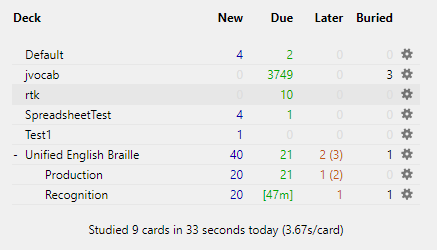
Makes the “Due” count show only the number of cards due now. If no cards are due now, but some are due later today, shows the time until the next review becomes due. (Originally, if cards were due now, Anki showed all reps left on those cards. Otherwise it showed 0.)
Adds a “Later” column to show the number of cards and reps due later. Formatted as “cards (reps)” if the numbers are different (for cards in the learning stage with more than one learning step).
Adds a “Buried” column to show the number of buried cards.
Triggers a refresh every 30 seconds, so you can see the minutes counting down. (Originally, Anki refreshed this screen every 10 minutes.)
This addon may cause some delay on slow computers or very large collections.
Please post any questions or feedback to: https://github.com/HelenFoster/AnkiDCNL/issues
Version: 4.0.0 License: AGPLv3+ ( https://www.gnu.org/licenses/agpl.html ) Development repo: https://github.com/HelenFoster/AnkiDCNL
Screenshots
Liên kết hỗ trợ
- Contact Author
- https://github.com/HelenFoster/AnkiDCNL/issues
- https://github.com/HelenFoster/AnkiDCNL
- Contact Author
Reviews (14)
👍 2025-04-17
Invaluable!
👍 2023-07-16
Adds visibility to what is due current day.
👍 2023-02-17
Does exactly what I need and helps me plan my time around my reviews.
Thank you!
👍 2021-01-16
Thanks for this. Works as expected
👍 2020-07-23
Pretty Good add-on on 2.1.26 but same error in 2.1.28…
👍 2020-07-23
Error
An error occurred. Please start Anki while holding down the shift key, which will temporarily disable the add-ons you have installed.
If the issue only occurs when add-ons are enabled, please use the Tools > Add-ons menu item to disable some add-ons and restart Anki, repeating until you discover the add-on that is causing the problem.
When you’ve discovered the add-on that is causing the problem, please report the issue on the add-on support site.
Debug info:
Anki 2.1.28 (7d8818f8) Py
👍 2020-05-14
Can this be achieved via the add-on Enhance Main window?
👍 2019-12-18
If anyone wants to have there time displayed in hours/days as well, replace the original if statement in the makeCell function with this:
if due == 0 and self.lrnSoonest is not None:
waitSecs = self.lrnSoonest - self.cutoff
if waitSecs < 3600:
waitMins = int(math.ceil(waitSecs / 60.0))
due = ”[” + str(waitMins) + “m]”
elif waitSecs >= 3600 and waitSecs < 86400:
waitHrs = int(math.ceil(waitSecs / 3600.0))
👍 2019-09-22
I love this! One suggestion: also add a column that shows the total number of unseen cards (including subdecks). Then you’ll have an even better overview of your progress.
👍 2019-03-26
The count down is extremely useful. Thank you
👍 2018-06-01
exactly what I was looking for, maybe add a column for displaying how many cards are already matured
👍 2017-12-03
Looks absolutely beautiful. Thanks for writing this!
👍 2017-06-30
It works as described This is the best “Deck Counter” add-on I’ve used, as far as providing valuable information, and functioning correctly.
👍 2017-06-29
Interesting idea Thanks for sharing!
