When reviewing a card, reschedule its siblings if they are set to appear too soon. Consider that you’ve got two cards on a single note, “A → B” and “B → A”, that both have an interval of several months but are due to appear days apart. If you review one of these cards today, your reviewing the sibling card tomorrow will make little sense and will just waste your time.
This script is especially useful when you are reviewing a deck that hasn’t been touched for a while and thus has a lot of siblings due simultaneously.
This script displays a notification whenever it’s rescheduling a card, unless you disable it, like this:
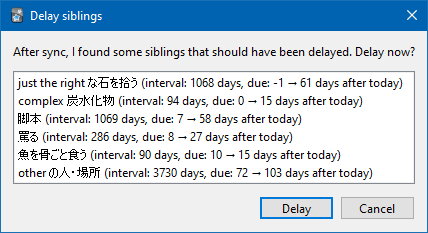
While this script only works inside the desktop version of Anki, if configured, it will also offer to reschedule siblings of cards that were changed during synchronization with AnkiWeb:
In this case, you probably want to synchronize your devices and Anki desktop daily, and it might be wise to enable the option “Bury review siblings” in Deck preferences (aka “Bury related reviews”).
How it works
This script reschedules siblings when Anki displays an answer to a card. The only thing that is taken into account is the sibling’s interval (the number of days between the last review and the next one). The interval of the current card and your answer are not considered. The siblings are not rescheduled if they appear after the minimum new interval. The following table contains some minimum and maximum delays for siblings, taken from the function used.
Interval 1 sibling 2 siblings 0 to 1 days 0 days 0 days 2 to 4 days 1 days 0 to 1 days 5 to 6 days 1 to 2 days 1 days 7 to 10 days 2 to 3 days 1 to 2 days 12 to 14 days 3 to 4 days 2 to 3 days 16 to 20 days 4 to 6 days 2 to 5 days 30 days 6 to 8 days 4 to 5 days 60 days 10 to 13 days 7 to 9 days 90 days 13 to 17 days 9 to 11 days 180 days 19 to 25 days 13 to 17 days 360 days 28 to 37 days 19 to 24 days 720 days 40 to 52 days 27 to 35 days 1500 days 57 to 74 days 38 to 49 days 3000 days 78 to 101 days 52 to 67 days
When rescheduling siblings of cards that were changed during synchronization, the script will examine the review log to determine which cards where reviewed on other devices. It will then look at the most recently changed of these, and offer to reschedule their siblings using the same logic as the above, relative to the date of the last review.
Settings
You can find the following options in the Tools menu:
Enable sibling delaying for this deck. If the option is greyed out, please choose a deck. For all decks → Don’t notify if a card is delayed by less than 2 weeks. Since only the interval of the sibling is considered, the current card or other siblings can become due close to the sibling. To prevent tooltip spam, check this option. For all decks → After sync, delay siblings without asking; After sync, if any siblings can be delayed, ask whether to delay them or not; Do not delay siblings after sync. You can choose one of these three options. If you choose to delay siblings after sync one way or the other, you’ll be seeing a confirmation tooltip whenever any siblings get delayed after sync. There will be no tooltip or anything else if no delaying could be performed.
If you have any issues, please report them on GitHub.
Screenshots

Liên kết hỗ trợ
Reviews (29)
👍 2024-12-06
Very useful. I wish there was a way to delay non sibling cards too
Edit: I guess this is no longer needed with FSRS.
👍 2024-05-09
I like!
👍 2024-01-27
Really liking it so far
👍 2023-11-09
If you don’t see any new options show up in the Tools menu, try closing anki and open again. They didn’t appear for me right away so this might have something to do with it.
Would’ve been nice if there was an option to adjust how “lenient/severe” the delays are, I found the function in the addon files but I’m too stupid to use it LMAO
👍 2023-11-06
Thank you! Still works with 23.10
👍 2023-03-19
Doesn’t work. It still shows me the reverse card. Yes I turned it on the deck and synced
👍 2023-01-27
I love this. No more “I know this card, but is that just because I saw its sibling yesterday?” Works even with V3 and FSRS4Anki, it seems.
👍 2022-12-16
Great! Does it also work with multiple siblings?
👍 2022-09-29
Very useful addon! Thank you
👍 2022-09-10
Phenomenal. Works flawlessly, the function used to determine the appropriate number of days to delay a sibling is spot on. Grade A addon
👍 2022-06-14
Awesome! Most underrated Addon for Anki.
Must-have for users, who learn cards in both directions. It happens so often, that card 1 appears on day 1 und card 2 on day 2 and you only know card 2, because you have seen card 1 a day before.
Would be amazing, if it the addon is automatically activated when you install it.
Edit: With the new update, on Ankidroid reviewed cards can be delayed with the first sync - that’s fantastic!! I appreciate it so much
👍 2022-06-08
Great tool! I didn’t read the description closely enough and missed this, so highlighting for other people: you seem to have to manually go into each deck and turn it on for that specific deck. This is great for customising what you want to apply it to, but means that if (like me) you miss this in the description on this page, you might think the add-on is only working sometimes, when it is actually working as intended.
For the developer: it might be clearer if the tools option said “Enable s
👍 2022-06-06
Always loved it! Even working for mobile devices is so tremendous! Thank you :)
👍 2022-01-01
Must-have addon. The default manage of sibling cards of Anki isn’t the best, IMO.
👍 2021-09-06
Brilliant! Thank you!
As someone else said, the only problem is that I don’t want to review on my phone anymore because I feel like I’m wasting my time reviewing without this add-on.
👍 2021-06-10
I thought this add-on would avoid NEW siblings to be shown in the same day.
But it seems it just works for siblings with due date set. Comment from author For new cards, you can tick the built-in option Deck options → New cards → Bury related new cards until the next day
👍 2021-03-30
Amazing addon. I wish this was integrated into Anki natively.
👍 2021-03-09
Fantastic add-on. My only “complaint” is that it’s so nice, I find myself hating to review on a mobile platform where it’s not available (obviously not actually a problem with this add-on). Strongly recommend.
👍 2021-03-06
must have addon!! better then alternatives. it actually takes into account ur cards interval and assigns the sibling based on the interval. for this reason its my favorite option to fix sibling scheduling
👍 2021-02-05
I would love “find the following per-deck options.” Your instructions say to go to the “Tools menu,” but I haven’t found any options there. Am I missing something?
I’m not sure how to get to the “Tools menu.” I’ve looked online for this reference and can’t find anything. Comment from author As long as the add-on shows up in the list (Tools → Add-ons), you should be seeing the mentioned items around the bottom of the Tools menu (not deck options). If these don’t show up, please file an issue o
👍 2021-01-20
Excellent. Essential if you create multiple related cards from a single note, as I do.
👍 2020-10-02
great!
👍 2020-09-22
Awesome
👍 2020-08-26
Very useful!
👍 2020-06-04
Can be activated during learning phase, otherwise it will be greyed out.
This add-on should be a standard function of anki in my opinion.
👍 2020-05-27
Good though I’m a little lost why the options I can select to enable this add-on in the tools heading are grayed out, and I don’t see why?
👍 2020-05-12
Awesome! I’ve been doing this manually with ReMemorize, but the present automatic add-on is much more reliable.
A card is definitely easier if I have seen its sibling one or two or three days ago. Especially if you have clozes, and completely read your cards like you should.
Two suggestions, if I may:
-
Add an option to adjust the duration of the tooltip.
-
Make it enabled by default after installation.
-
Make it compatible with https://github.com/Arthur-Milchior/anki-relation, wh
👍 2019-04-17
Probably one of my favorite add-ons. Burying a card’s sibling one day is not enough for me to get a true gauge on whether or not I would have really remembered if I hadn’t just seen that sibling the day before. I know it technically messes with the spaced repetition algorithm, but in my opinion it messes with it in a positive way. Maybe once in a while it pushes a sibling out a couple of days past when SR says it should be and I don’t remember it when it comes up, but I feel like I have way more
👍 2018-05-12
great, i was looking for that kind of addon
