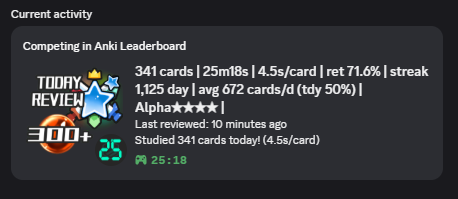
Use RP (Rich Presence, activity status) in Discord for desktop to display your Anki leaderboard scores in Discord in real time (score display only, no direct communication with the leaderboard). The status updates every 15 seconds and the icon display changes based on reviews, time, etc. This add-on is not related to the official Discord or the official Anki.
How to use
Basically this add-on is optimized for the leaderboard but you can use it even if you don’t register on the leaderboard.
Need Discord for desktop. (website and mobile are not supported by discord RP.) Activity sharing needs to be enabled in Discord’s activity privacy settings. (also it will not be displayed when your Discord status is set to invisible.) Auto launches when the add-on is installed. You can customize the icon type and behavior with options. If you are using the add-on leaderboard, the league name will be displayed, and a button to open the User Info page on the website leaderboard will display. (this button can be disabled optionally.)
Options
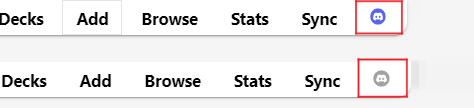
Click the Discord icon in the top toolbar to open the add-on options (or the tool’s add-on menu). This icon will be colored when connected successfully and gray when not connected.
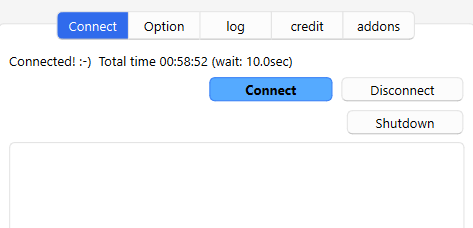
Connect tab
You can check whether the connection was successful on this tab. The total connection time and the time taken to send data are displayed.
The options window continues to run in the background even when closed to communicate with Discord, to completely close it please press the shutdown button.
If an error occurs information will be displayed in the box below. (Even if an error is displayed, there is no problem if communication is successful.)
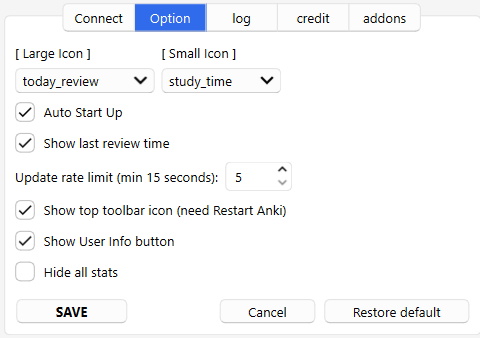
Option tab
After changing the settings, please press the SAVE button. It may take a bit of time for the changes to display on Discord.
Large Icon
You can change the type of large images displayed on Discord. The values displayed on the icon are images, so they show approximate values for each threshold, they are not exact values.
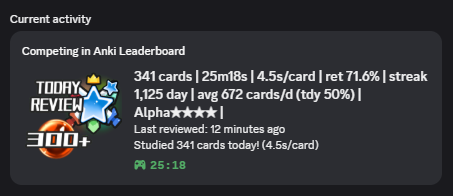
today_review: Displays the number of cards studied today.
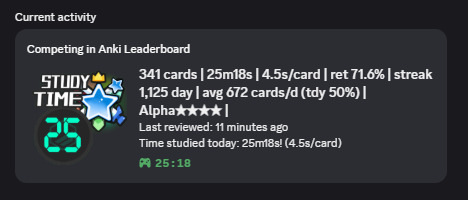
study_time: Today’s study time is displayed. This time represents the time spent reviewing cards, the same as in Anki and the leaderboard, not the time Anki was open.
streaks: Streaks displays trees and the number of days.
review_31days: Displays the average number of cards reviewed in the last 31 days.
review_31days: Displays the percentage of today’s reviewed cards out of the past 31 days’ reviews. (e.g. today 341cards ÷ 31day 672cards /day = 50%)
League: The icons change to 4 different types depending on the league. To use this feature, you need to be already syncing using the add-on Anki leaderboard. (There is no function to identify the exact league rank.)
This add-on does not have the function to communicate directly with the leaderboard so it does not affect your leaderboard score. (you can use it even if you are not registered on the leaderboard.)
Others: You can change the icon to other Anki icons. These do not have the feature to change based on score.
Small Icon
You can change or hide the type of small image displayed in the lower-right corner of the icon. (study_time, today_review, League)
Auto Start Up
This add-on automatically runs when Anki launches and connects to Discord. You can disable it using this option.
Show last review time
Rich Presence status auto calculate and display the time since the card was last reviewed. You can hide this using this option.
Update rate limit
Rich Presence can update at a minimum of every 15 seconds. If you update at a faster rate your own RP display will update, but it will not be communicated so other users won’t see it. (this limit by Discord)
Communication takes a bit of time, so the set seconds and actual seconds won’t match exactly.
Show top toolbar icon
You can hide the Discord icon in the top toolbar. This option requires restarting Anki after changing it.
Show User Info button
This add-on displays the User Info from the Anki leaderboard and shows the time of your last review. If you dislike these features you can disable them optionally. (this button won’t display for you but only for other users)
Show cards and time in the title
The Discord username activity app title displays the number of cards and time in small text. You can hide it with this option.
Competing or Playing
Switch between Competing and Playing for Rich Presence (RP). Some RP features only work when set to Playing (e.g., voice chat). But Playing occasionally interferes with other RP add-ons so the default is still Competing. (If you’re not using any other RP add-ons either one is fine.)
Hide all stats
Hide all status(stats) and display only large other icons. (Review and time icons are not displayed.)
Credit The code for calculate scores is customized from Thore Tyborski’s Anki LeaderBoard code. Communication with Discord uses pypresene. The idea for rich presence was inspired by the add-on Ankicord by STadas and the add-on AnkiDiscord by Monacraft. The illustrations for orbs, ranks, and other elements are game assets created by these creators, which I have modified and edited for use. Rank icon : Rhos @RhosGFX, Star icon : Clip Art Library, ProgressBars : BDragon1727, TimeRank : Warstellar Interactive, Tree : Pixel Art World, Orb and Crystal : Nanamiyuki atelier. Some icons include official Anki icons. (Anki License) This add-on is not related to the official Anki. Anki-tan is an unofficial meme character I created on my own and I draw the illustrations myself. (CC4, not related to the official Anki.) Related Add-ons add-on : 📱AnkiCord - Discord Rich Presence (Customized by Shigeඞ) This add-on uses RP as well as this add-on. Since the original add-on’s development has been discontinued I am maintaining it.
🚨Report
If you have any problems or requests feel free to send them to me.
👍️Rate Comment : You can contact me anonymously, and AnkiWeb will send you an email when I reply, a high rating increases priority of development. 👩🚀Reddit : You can request me to repair broken Add-ons. 🌟AnkiForums : You can request me to repair broken Add-ons, and it is ideal for open discussions. 🐙Github : Makes it easier to track problems. 💖Patreon DM : Response will be prioritized.
💖Please Support Shige’s Anki add-ons development!
Hi thank you for using this add-on I’m Shigeඞ!
[ 🛠️Fix add-ons ] So far I fixed and customized 80+ broken add-ons for free and developed over 30 add-ons as a hobby (all add-ons). If you have requests to fix broken add-ons feel free to contact me. Fix broken addons (Free) [ 💖Donation ] I’m looking for supporters for my add-ons development because I like Anki!👍️ If you support my volunteer development you will get 14 add-ons for patrons only and 15 game themes included in AnkiArcade ($5/month).
Get Patrons only addons | Patrons Q and A | Contact
[ Special Thanks ] So far I received donations from 561 patrons and without their support I never could develop this, thank you very much!🙏
Patrons: Arthur Bookstein Haruka Luis Alberto, Letona Quispe 07951350313540 Lily Daniel Kohl-Fink Tim NamelessGO Kyle Mondlak ElAnki Abhi S Matthew Hartford Jonathan Contreras findus161 K Peasant of Anki Juan Salgado Ernest Chan Yaeerrrrrr Elisabeth Barber Jesse Asiedu GP O’Byrne David C KM Christopher Lam Kolorophyll Jake Stucki Kaitlyn Bowler Isabel Guan Steven Banner Heidi Leonora Lomoki Akporyoe ellie Tobias Klös Xiuxuan Wang Ujwal Chadha gus forester iuventius Patrick ellis tarek Iggi qiting zeng Carly Burdorf Austin Regal Muneeb Khan Aydin Herik Mia Hoang Hung Sameer Al Matheus Chagas Bryn Price Orlando Frey pie_is_good Svel1989 Take Root Vivian Cao Keeler Kime Kurt Grabow Zarina Balde Pansanity Gabriel Farrugia Lis Y. Fahim Shaik Augusto Stein Ashok Rajpurohit mootcourt NoirHassassin alpha male, shredded af Morgan Torres Dennis Obis Anh-Tai Nguyen Tae Lee Joseph Howell Gabriel Vinicio Guedes sab hoque Terence Bartenbach R Rebecca only Ythalo Vlogs Ketan Pal Aurora Dzurko Tyler Schulte Kmyungc Mac Will S. Meeyah Davis Eric Allen Devon Williams alex han Douglas Beeman Andrew Yick Robert Remedios Marley Easterbrook Temi Jide Ansel Ng Simeon Azfar Hussain Haley Schwarz Woody kenken Jeanna …full list
📥 How do I install this add-on? This add-on works with Anki for desktop (it does not work on mobile). Download Anki from the official website if you haven’t already. Copy and paste the add-on code ( 978245457 ) into Anki and you can install it. ( Menu -> Tools -> Add-ons -> Get Add-ons -> Code [ add-on code ] ) When I develop bug fixes, create new features, or compatibility for New Anki, I will notify you and you can install it. Add-ons will be broken when the official Anki gets a major update, so if you like this add-on please support my volunteer development by rating, sharing, and donating. Thank you!
Click here and please Rate this add-on, Thank you! :-)
Screenshots




Liên kết hỗ trợ
Reviews (3)
👍 2026-02-15
. Comment from author thx!
👍 2026-01-04
Very cool! Comment from author thanks for the feedback! :D
👍 2025-11-30
Great work Shige! It’s a superb alternative of Discord Rich Presence add-ons, more customization is always welcome!
PS: The anki-tan emojis are great! Comment from author Thanks! I’ll try enhancing it again later👍️
