EasyVocab
Quick and easy foreign language vocab card generation for anki
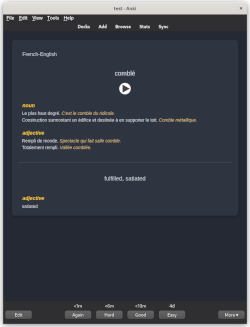
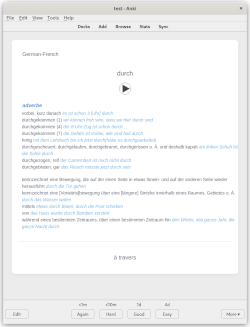
Intro Tired of needing to look up and manually make flash cards for foreign language study? It can quickly add up to hours when creating so many cards… EasyVocab can generate all those cards for you, with beautifully styled and formatted notes with extra useful information and text-to-speech to help you internalize the sounds of your target language. Generate reverse cards automatically to help establish a two way association with each word and its meaning. Just throw the words you want to learn into a text file or directly into the interface and cards will be generated and added to a deck. EasyVocab uses the googletrans and gTTS python packages to translate your words and generate text-to-speech, so the process is totally free and doesn’t require any premium API keys.
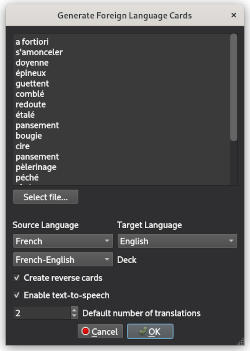
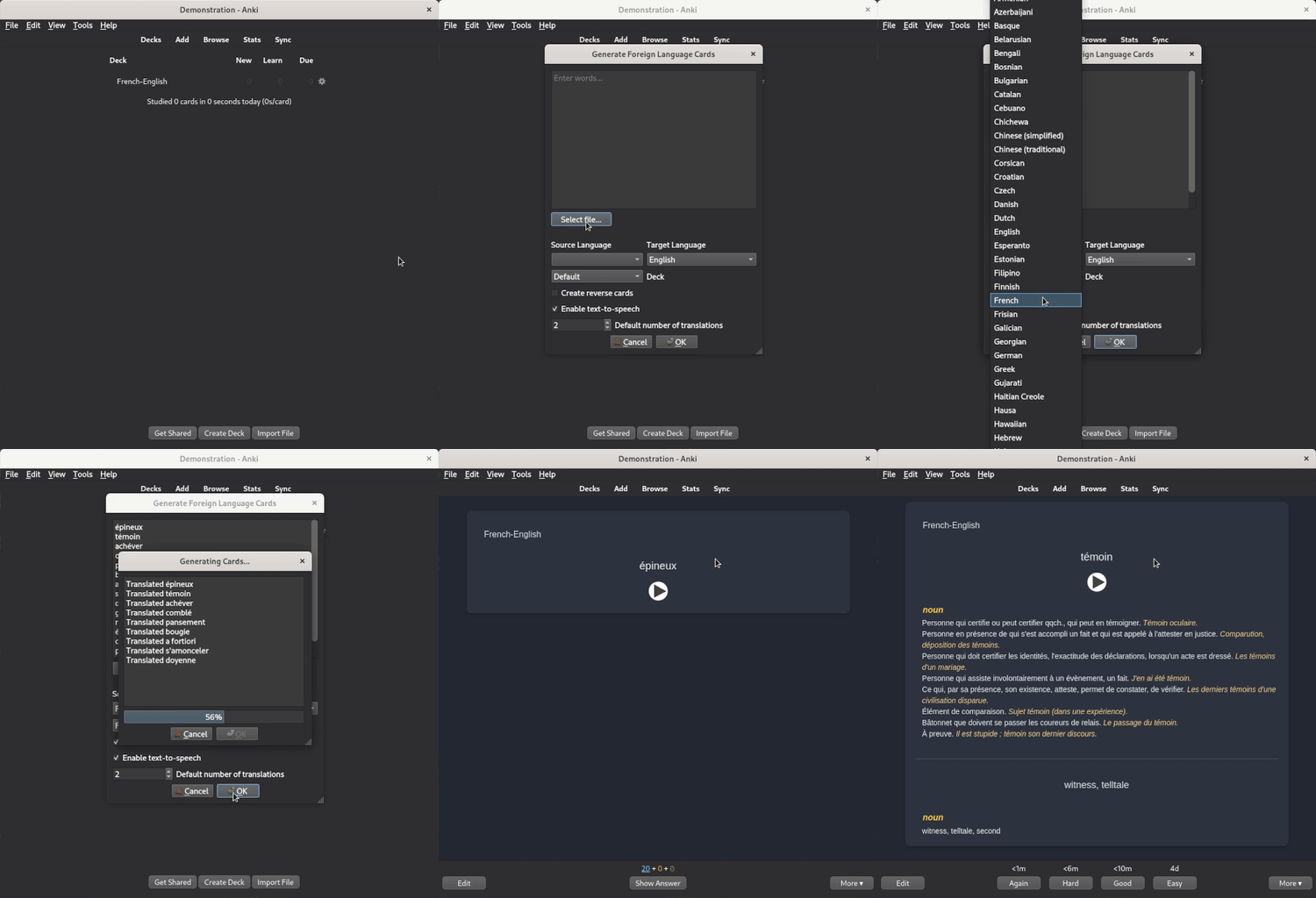
Instructions To use the plugin, click on Tools in the main menu and select “Generate Foreign Language Cards” to bring up the interface. From here you can enter the words you would like to generate cards from in the text box at the top. Words are accepted in plaintext only with one word or phrase per line. You may also click “Select file…” and choose a file which will automatically import the words from the file and populate the text box for you. Note that cards are generated from the current value of the text box at the start of the process rather than the contents of the file, so any updates you make in the window after file import will change the generated cards.
From there you can configure various settings for the import. Source Language is the language of the words you would like to import. Target Language is the language you would like to translate the words to (Default: English). Deck controls which deck to import the new cards into. Note that if a card already exists for a given word in the deck it will be skipped rather than creating a duplicate. Create reverse cards Toggle reverse card generation. Reverse cards have the Target Language translation on the front and the Source Language word on the back. Enable text-to-speech Toggle text-to-speech. EasyVocab uses GoogleTTS to generate audio for your cards. Default number of translations The default number of possible words to include in the translation.
Acknowledgements This addon was heavily inspired by mnemocards, especially the card format. mnemocards is great if you want some more advanced features but it comes with an unnecessary 3 minute pause after every 25 cards that can make very large vocab sets take a long long time to generate. It also generates .apkg files that have to be separately imported into anki and a command line tool with json configuration isn’t convenient for most users. I wanted to make something that can be used directly from anki and is focused on just quickly generating vocab cards to help accelerate language learning. I also want to give credit to anki-prettify for the base card format I extended for foreign language vocabulary. The note type responds to system theme and is responsive to screen size so it displays really nicely on mobile. I also tried to make the card format as easily human editable as possible without relying on embedded html in the card fields for styling (with one small exception) so you should be able to quickly update any cards that googletrans produces questionable translations for.
Contact If you encounter any issues with the addon you can reach me on here, open an issue on GitHub, or email me directly.
Screenshots
Liên kết hỗ trợ
Reviews (10)
👍 2024-09-23
it is not working Anki 24.06.3 (d678e393) (ao) Python 3.9.18 Qt 6.6.2 PyQt 6.6.1 Platform: Linux-6.10.9-amd64-x86_64-with-glibc2.40
When loading EasyVocab - Easily generate foreign language vocab cards: Traceback (most recent call last): File “aqt.addons”, line 247, in loadAddons File “/home/kzl/.local/share/Anki2/addons21/203110167/init.py”, line 10, in <module> from .src.ui import main_dialog File “/home/kzl/.local/share/Anki2/addons21/203110167/src/ui/main_dialog.py”, line 1
👍 2024-07-20
Still not working 07/20/2024
👍 2024-04-13
I love the add-on but has stopped working on 2.1.49 as of 4-12-2024.
👍 2024-01-25
Doesn’t work with the updated version of anki
👍 2023-10-25
Amazing, good app
👍 2023-09-21
Great. Could be useful to allow an option, which only has the reverse cards active and not generates the normal cards anymore. That way the user could decide to only generate one-way transalations! For example I only want from DE to EN, but I have the 5000 most used English words. So I need to translate the English words to German words and checkmark the “Reverse Cards” option, but I need to delete all EN to DE cards now.
👍 2023-06-22
That will be a killer addons!!!!
👍 2023-01-31
Very good!
👍 2022-08-13
Cool thing!
Is it possible in the future to be able to also add a thematic image to the card?
Many often use a visual association for a word.
👍 2022-08-11
Working =)
