Cloze notes are very powerful for spaced repetition softwares like Anki. This add-on along with the attached note type aims to improve Anki’s mechanism of displaying clozes and offers great features for better user interaction.
The name of the note type the add-on uses is “Enhanced Cloze 2.1 v2”.
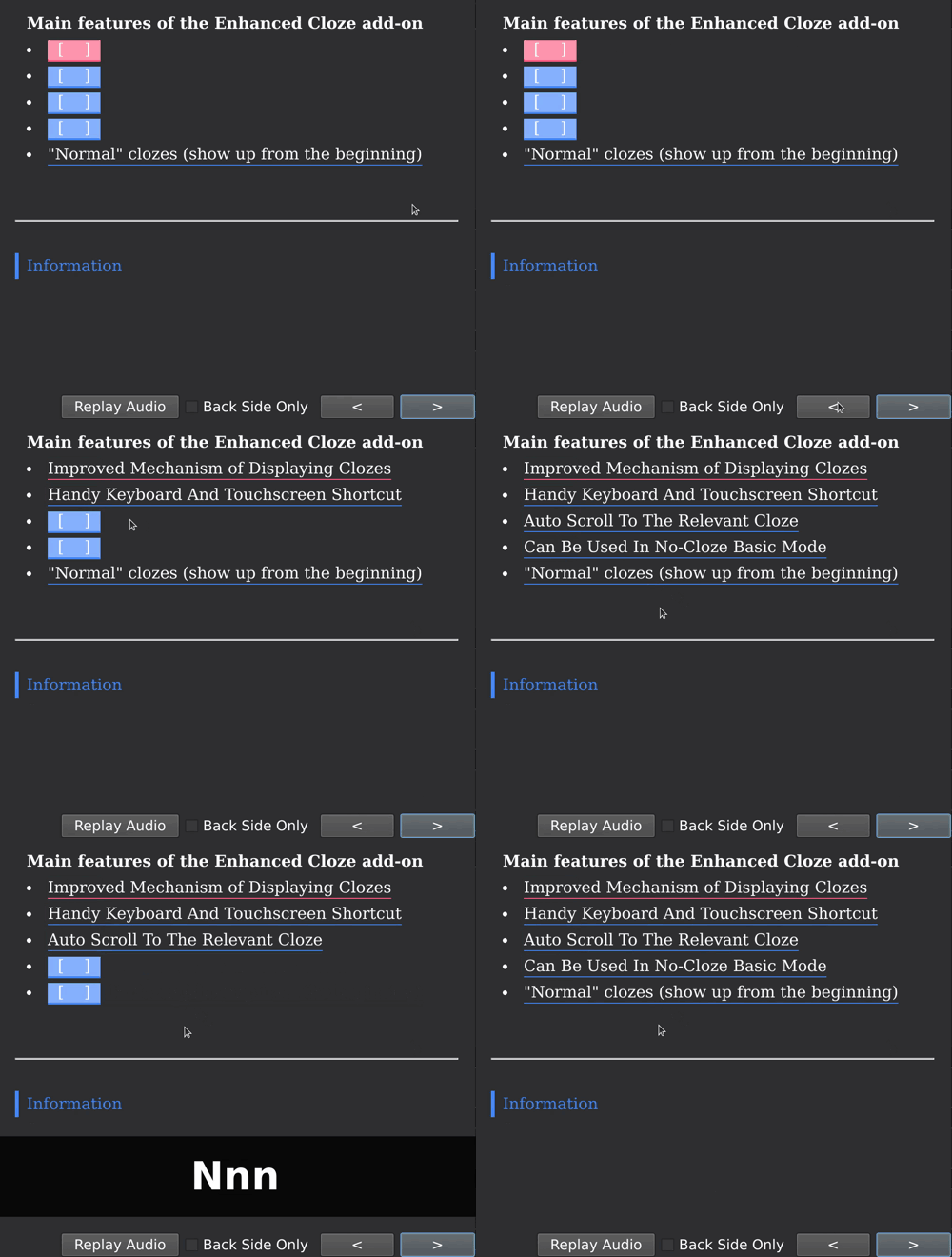
Preview
.
Improved Mechanism of Displaying Clozes
Take card1 for example. All c1 clozes (called “genuine clozes”) will be red. All other clozes (called “pseudo clozes” for this card), eg. c2, c3 will be blue. On the front of the card, all clozes (genuine or pseudo) will be shown as their hint (if one exists) or empty. You can show the answer of every cloze (genuine or pseudo) by clicking it. This means you can think about a genuize cloze and check the answer one by one without getting hints from pseudo-clozes and genuine clozes after it.
Handy Keyboard And Touchscreen Shortcut You can…
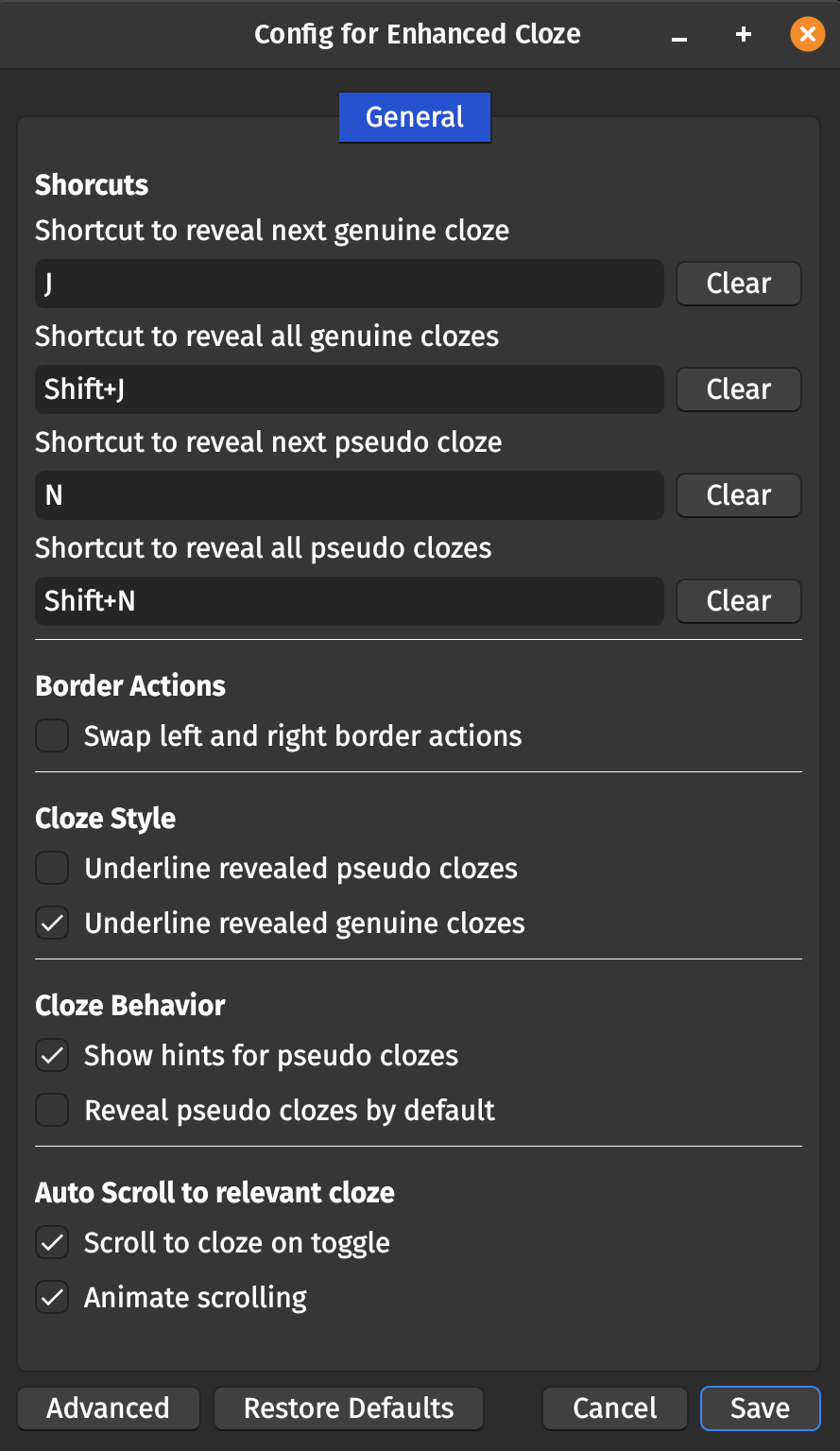
uncover genuine clozes one by one using the keyboard shortcut [J] (conifgurable) or by touching the left border of the card. uncover pseudo clozes one by one using the keyboard shortcut [N] (conifgurable) or by touching the right border of the card toggle all genuine clozes using the keyboard shortcut [Shift+J] (conifgurable) border. toggle all pseudo clozes using the keyboard shortcut [Shift+N] (conifgurable) border. This makes uncovering clozes super convenient, no matter whether it’s on a computer using the keyboard or on a mobile phone. You can edit the shortcut keys in the config (Tools -> Enhanced Cloze -> Config)
Auto Scroll To The Relevant Cloze
The card will scroll to the first genuine cloze at the very beginning. When you use shortcut to uncover clozes one by one, if the next cloze is out of view (common situation on mobile phones with small screen), the card will automatically scroll to it. This makes for a super fluent experience of answering cards. The behaviour can be turned off (Tools -> Enhanced Cloze -> Config).
Can Be Used In No-Cloze Basic Mode
It is also Ok to go without clozes using this note type. (Note: Creating such notes only works on Anki Desktop, not on mobile!) Just type the question in the Content field and the answer in the Note field. The Note field will be hidden on the front of the card and shown on the back of the card, just like with the Basic note type. Anki won’t warn you that no clozes are found.
“Normal” clozes
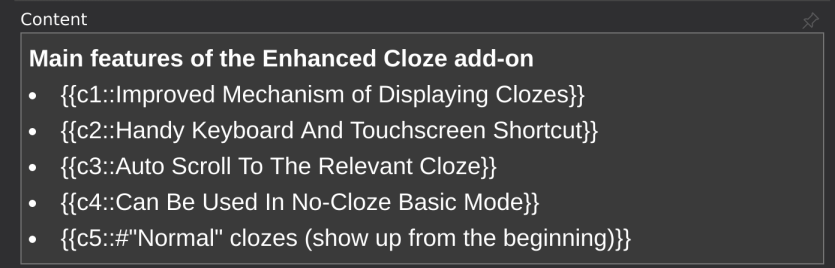
If you want a cloze to alway be displayed when it’s a pseudo cloze, prepend the answer with a #-sign like this: {{c1::#some text}}.
Usage
Select the “Enhanced Cloze 2.1 v2” note type in the editor Write down anything in the Content field, whether with clozes like {{c1::abc}} or not, the add-on will process the note intelligently. For you information, you can create clozes with increasing numbers like {{c1::aa}} {{c2::bb}} with Ctrl+Shift+C and clozes with the same number like {{c1::aa}} {{c1::bb}}. I’d recommend you to group several closely related pieces of information to use the same cloze number and review them together on a card for convenience; use different cloze numbers to turn you informative note into several cards to maximize review efficiency. When you have the Edit Field During Review (Cloze) add-on installed, Ctrl+Click fields to edit them.
Configuration
To open this dialog, select Tools -> Enhanced Cloze -> Config. If the underline options do not work, try using “Reset Enhanced Clozes css to default” from the Tools menu of the main window.
Credits The 2022-02-04 - update was inspired by TRIAEIOU’s Flexible Cloze add-on This add-on is a fork of https://github.com/ijgnd/anki-enhanced-cloze by ijgnd Previous version of the add-on by Arthur Milchior: https://github.com/Arthur-Milchior/anki-enhanced-cloze Previous version of the add-on by LuZhe610: https://ankiweb.net/shared/info/873439973 Thanks to BlueGreenMagick for creating the ankiaddonconfig package used in this add-on.
Problems, Bugs, Errors, Improvements If you have an idea for an improvement or encounter a problem please create an issue on Github.
Support my work If this add-on is useful to you please consider buying me a coffee:
Changelog 2025-08-09: Fixed error on startup on pre-release versions of Anki.
2023-09-10: Toggling clozes on mobile is less finicky now - touching a close while scrolling doesn’t toggle it. Fixed config values not getting read into config properly. Fixed note type changes not always getting synced to AnkiWeb.
2023-08-27: Fix for note type not working when reviewing on AnkiWeb
2023-07-26: Added config dialog (Tools -> Enhanced Cloze -> Config)
2023-07-25: Added option to swap left and right border actions
2023-04-26: Fix basic-mode clozes on AnkiDroid on Anki >= 2.1.61
2022-11-15: Fix incompatibility with CrowdAnki
2022-07-21: Changes to actions in the Tools menu.
2022-07-19: Fixed the Extra field. To get the fixed note type you have to go to Tools -> “Reset Enhanced Cloze note type to default” on the main Anki window
2022-07-15: Added option to reveal pseudo-clozes by default
2022-04-22: Added compatibility with Edit Field During Review (Cloze) add-on, added option to not underline revealed clozes
2022-03-18: Fixes for iOS, other fixes
2022-03-15: Added option to disable hints for pseudo clozes (showHintsForPseudoClozes on the front card template)
2022-03-15: Added option to reset note type to default version (it’s in the main window in the Tools menu)
2022-02-09: Added option to disable scroll animation (animateScroll = false). Force a full sync to get the new version
to your mobile device (Preferences -> Network -> Check “On next sync force changes in one direction”)
2022-02-09: Shortcuts now reveal only one cloze even if multiple clozes have the same id
2022-02-04: Big update: Adding/Editing on mobile works now, removed unnecessary fields (Thanks to TRIAEIOU for showing how to do this), added shortcuts, some fixes
2022-01-28: Update for Anki 2.1.50
2021-10-20: Fixed incompatibility with Field during Review (Cloze) (cards work now, but you still can’t edit them during review)
2021-10-15: Fixed images not working in the Content field (again, because the first fix was not complete)
2021-9-31: Fixed touches not working properly on iOS devices
2021-9-22: Fixed mathjax not working inside of clozes
2021-9-16: Fixed images not working in first field
2021-9-14: Fixed incompatibility with Popup-dictionary
2021-9-08: Fixed no-cloze-mode on Ankidroid (force sync collection from desktop to phone to make it work) + clozes start at 1 when using the shortcut in the editor
2021-8-28: Add-on doesn’t overwrite changes of the note type now (you can add new fields, just don’t delete the existing ones)
2021-8-26: You can now have 50 clozes on one note if you want to (before this update the limit was 20)
2021-8-19: Added backwards compatibility down to Anki 2.1.28
2021-8-18: Fixed no cloze mode
2021-8-17: Fixed “type in the answer” message showing up on mobile, Fixed “show one cloze” hotkey action
Screenshots

Liên kết hỗ trợ
- Contact Author
- TRIAEIOU’s
- https://github.com/ijgnd/anki-enhanced-cloze
- ijgnd
- https://github.com/Arthur-Milchior/anki-enhanced-c
Reviews (29)
👍 2026-02-16
It’s a very nice Addon! But is it possible to include a function to auto-flip the card after all genuine clozes have been clicked?
👍 2026-01-20
I love this add-on. Solved one of the biggest problems that I had with cloze cards. Plus the shift+n feature is pretty handy. Have been using this for almost a year now. Thank you!
👍 2026-01-07
It still works (at least with my set up) and does so wonderfully :) I have no problem with putting LATEX inside it and it’s even possible to customize the provided template without it breaking completely. There are animations that can be toggled off, which I appreciate.
Thank you for this amazing add-on !
👍 2025-12-16
Amazing
👍 2025-12-05
Great!
👍 2025-11-05
Its great, but the keyboard shortcuts don’t seem to work for me, the clozes only show when i tap on the blank or when i tap on the sides of the card, but pressing crtl+j for example doesn’t reveal the next genuine cloze even though its configured like that in the configurations.
👍 2025-10-27
You nailed the missing feature.
👍 2025-10-19
need to add a line to use user defined keys. for example:
globalThis[“userJs1”] = () => revealOneClozeOfAType(“genuine”);
can we get this fixed? Comment from author before post was edited There is now an option for this in the configuration. See the “Configuration” section in the add-on description to see how to edit it. The option is called “swapLeftAndRightBorderActions”.
👍 2025-09-29
very useful; it would be nice to have a keybind that reveals the first pseudo cloze before the genuine cloze
👍 2025-09-21
Is there a new version yet for the bug where it creates a {{c2::}} (second) cloze instead of a {{c1::}} (first) cloze? Its making me a little antsy hehe
👍 2025-07-31
Add-on startup failed on Version 25.08b4 (d13c117e), please update and thanks for the good work! Comment from author Fixed!
👍 2025-06-23
I have an issue with the AnkiDroid search. When I do flashcards with “Enhanced Cloze” and the extra section is present, the results show the extra section instead of the content section.
👍 2025-05-13
It works. but when I paste some text with html, it will begin from {{c2::}}…drives me crazy.
👍 2025-05-09
Great add on! to those who wanna to remove the “information” segment at the back side:
- go to browse and select the enhanced cloze 1 of the card
- go to “Cards…” button, beside preview
- In “Template” section , make sure its at “Front template”
- Search for “information”
- delete the whole segment
👍 2025-05-06
QUICK QUESTION!! How can I use this for basic questions without clozes? I tried putting the question in the first slot, and the answer in the second slot, but it still says “No cloze 1 found on card. Please either add a cloze deletion, or use the Empty Cards tool. More information” and when I try to add the card, it says “You have a cloze note type but have not made any cloze deletions. Proceed?
Can you please provide me guidance on how to use your amazing add-on for basic card types as well?
👍 2025-05-06
amazing! by the way, for any of those put off by the default font used by this addon, you can fix this easily by editing the Enhanced_Cloze_CSS.css within the files of the addon
👍 2025-04-12
Great addon!
👍 2025-03-23
You can disable the fixed font settings in Edit -> Card Typeds -> Styling. Delete the first 6 or so code lines after #card-body. After this you can again edit the font style in Fields options for each field.
👍 2025-03-14
many bug,appear unwanted repeated content on my card
👍 2025-03-13
I don’t like the font and I can’t figure out how to change it
👍 2025-02-17
Very Good.
👍 2025-02-09
Converted all my Cloze cards to enhanced cloze and its so much better :)
👍 2025-01-22
Great job! There’s a way to put a standard color just for the closed? I searching on configs but can’t find. I find just for all words on the card.
👍 2025-01-18
It is great. I just have one question, with this note type all text becomes left centered. I was just wondering that is there any way to make all of the cards centered as default. Thank you.
👍 2024-12-29
Great add-on!
👍 2024-12-04
Bug: When using mathjax inside of clozes, it does work when the formula includes something like \frac{a}{b}, but does not work when it includes something like \frac{a}{\text{b}} or \frac{a}{b_{ab}} or \frac{a}{b^{ab}} (so curly brackets inside something like a fraction)
👍 2024-11-15
the way it disorganise bullet lists is so annoying
👍 2024-11-01
Would be perfect if cloze worked inside of Mathjax or latex
( {{c1:: y}} = {{c2:: mx+b}} ) -> Mathjax does not render at all [$] {{c1:: y}} = {{c2:: mx+b}} [/$] -> LaTeX does not render correctly (images seem to be generated, but aren’t embedded properly)
Maths inside of cloze works, but this problem means the extension is unusable for me, which is a shame
👍 2024-10-27
Thank you so much!
