FLEXIBLE CLOZE 2 Reimplementation of Flexible cloze Anki addon to handle nested clozes avalable from Anki 2.15.56 as well as remove lesser used features for easier maintenance. FC2 (GitHub) is a configurable cloze note type for keeping related information (and cards) on the same note.
Ideas for the functionality of Flexible cloze (1 and 2) was blatantly stolen from trgkanki’s Cloze (Hide all) and RisingOrange’s Enhanced Cloze (for Anki 2.1) - both of which are excellent addons.
ALL CREDIT FOR INNOVATION GOES TO TRGANKI AND RISINGORANGE
The addon adds two note types:
Flexible cloze 2: Has 5 fields: Title, Text, Notes, Mnemonics and Extra where Text is the cloze field and Title the default sort field/shown in the card/note table. Flexible cloze 2 (min); Has 2 fields: Text and Back Extra, similar to the core Anki cloze note type. When reviewing the first <h1> found in the Text field will be extracted and set as title (primarily for use with Markdown notes, there is no default way of inserting <h1> tags in the Anki editor), failing this it will insert the deck name. The functionality, apart from what is mentioned above, is the same for both.
IOS Please note, I have no iOS device to test on, it should work as it is generic javascript. If something appears broken, please let me know (with debug info, see below).
USE CASE One note generation strategy is keeping one cloze note per “subject”, rather than lots of small notes. This allows using Anki as the primary “note keeping location” rather than having the actual notes somewhere else (in OneNote, markdown files etc.) and have to create Anki notes for quizzing as a separate step. It also greatly improves maintainability (at lecture: “hmm, I seem to remember it was X, not Y, now where is that Anki note so I can amend it?”). During reviewing it adds the posibility to easily look up related info (“so if it wasn’t ABX X for Y, for what was ABX X used?”). This while following the general card principles of making individual cards “atomic” and brief.
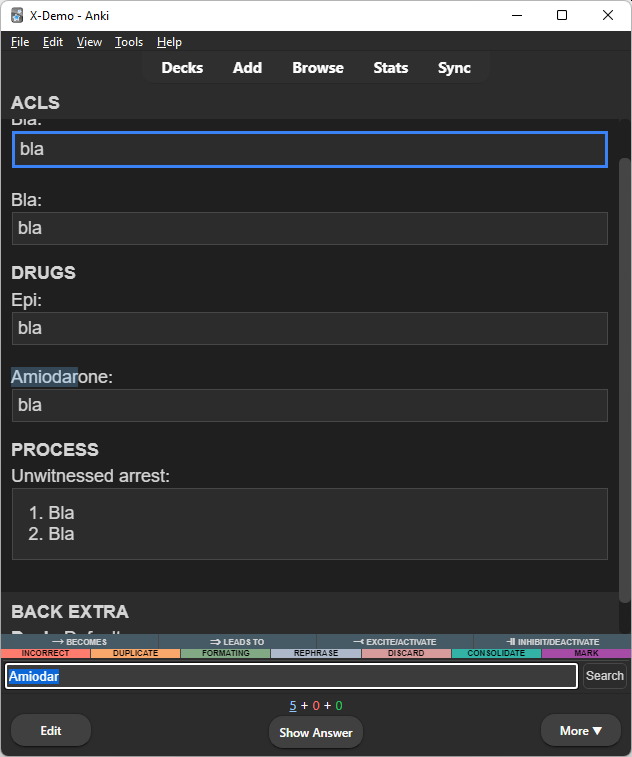
ACLS
Terminology
Bla: {{c1::bla}}
Bla: {{c2::bla}}
Drugs
Epi: {{c3::bla}}
Amiodarone: {{c4::bla}}
Process
Unwitnessed arrest: {{c5::
Bla
Bla
}}
You can of course also use FC2 if you just want some more configurability/functionality for “regular clozes”.
USE
Clicking an active cloze on the front side will cycle it between hint (if there is one) and show. Clicking an inactive cloze on the front side will cycle it between hide and show (no hint). Toggle all/cycle between active and/or inactive clozes (configurable) by tapping left/right/top of screen or keyboard shortcuts. Search in card from the reviewer (Ctrl+F or top bar) - if you, like me, have all your notes in Anki and want to be able to look something up quickly from your phone. There is an optional “show all” button (styleable with id #fcz-show-all-btn). Lists Using same ordinal clozes with iteration.loop = true and iteration.hide = true you can easily review lists by using next/previous keyboard shortcuts or edge taps to cycle through the clozes. Example:
Step 1: {{c1:someting}} Step 2: {{c1:someting else}} Step 3: {{c1:someting completely different}}
CONFIGURATION Configuration is made in the note template between:
At the top of Front/Back between the <!— FC2 CONFIGURATION BEGIN/END —> tags. At the bottom of Styling after the /— FC2 FUNCTIONALITY END —/ tag. The update logic is dependent on the user keeping these tag intact and updates will overwrite everything that is marked as “functionality”. Active cloze: Cloze(s) with the current ordinal, i.e. the cloze(s) that should be answered. To change styling of these change or override .cloze class in Styling of the card template. Inactive cloze: Cloze(s) that are not the current ordinal, i.e. the cloze(s) that should not be answered. To change styling of these change or override .cloze-inactive class in Styling of the card template. Exposed cloze: Cloze(s) that when inactive (see above) will always be in “shown” state. Mark a cloze as exposed in the editor by making the first character an exclamation mark (e.g. {{c1::!This will always be displayed when the cloze ordinal is not 1}}). Configurable expose character, default is ! Configurable position of the expose position to allow use with {{type:cloze:Text}}: pre: !{{c1::content}} begin (default): {{c1::!content}} end: {{c1::content !}} post: {{c1::content}}! Configurable to reverse the expose status, i.e. all inactive clozes are exposed and those marked as expose will be hidden. Cloze prompts can be configured: prompt: Prompt format/text for clozes without hint. Example: […] hint: Prompt format/text for clozes with hint where %h will be replaced by the hint text. Example: [%h] scroll: Configurable scrolling behavior on card show/flip, when clicking a hidden cloze and when cycling to next/previous with edge taps or keyboard shortcuts: none: no scroll. min: scrolls as little as possible to get active cloze(s) into view. center: centers the active clozes in the viewport (or places the first active cloze at the top if all active clozes won’t fit the viewport). context: as center but includes the context (content from preceding <hr>, <h1>-<h6> or inactive cloze). context-top: as context but aligns the start of the context at the top of the viewport context-bottom: as context but aligns the last of the active clozes at the bottom of the viewport (if the entire context fits, otherwise aligns top of context at top of viewport). Scroll on initial display (of front or back): initial. Scroll on click: click. Scroll on iterate (pressing next key etc.): iterate. iteration - cycling active clozes with keyboard shortcut or edge tap. Iteration behavior can be configured as follows: Hide the cloze “you are leaving” when iterating: hide Loop iteration once you reach the first/last (otherwise you will stop): loop Always start iteration from the top (otherwise iteration will “continue” from the last clicked item): top show cloze initial display behavior: inactive: inactive clozes. Setting to true will make FC2 behave similar to core Anki clozes. Setting to ‘preceding’ will show inactive clozes that come before the first active cloze (document order) and hide all other inactive clozes (if your note builds on access to preceding clozes to answer the current one(s)). addtional: Additional fields. fields: customizations of the interface title: (only relevant for the min version) Wether to show the note “title field” (will parse out first <h1> or deck name if not found). legends: Array of array of HTML strings that will be inserted into elements at the bottom of the page for use as symbol legend(s). The logic expects each entry to be enclosed in a <div>. Remove/empty to remove legend. show_all_button: Show “Show all” button at bottom of card. (default false) log: Level of logging, pops up a logging field at bottom of page when level is met (false for none, error errors and true for errors and debug information, default error). Please provide this information if/when reporting errors/bugs. Configuration can be overridden on an individual note by using Anki Tags, e.g add fc2.cfg.front.scroll.initial.context-bottom to set the front side initial scroll of the note to context-bottom (leave out the side to set for both front and back, e.g. fc2.cfg.scroll.initial.context-bottom) Styling of different elements (e.g. “I want the answer to be displayed inline rather than in a block”) can easily be configured in the Styling section of the card template. RECOMMENDED COMPANION ADDONS Some useful companion addons if you, like I, keep one note per subject rather than per question: Review in ascedning cloze ordinal order: Asdcending cloze reviews or AutoReorder or similar to review the cards from a note in ascending cloze ordinal order as later clozes may use the answers from earlier clozes. For cloze order presentation of new cards use the the v3 scheduler and Deck options as follows: New card gather order: Deck New card sort order: Order gathered Bury new siblings, Bury review siblings and Bury interday learning siblings: off Sort cloze ordinals in ascending order while keeping learning state: Sort clozes If you prefer note taking in markdown: Markdown input If you want to maximize the note taking space in the browser: Sidebar table If you want a little more VS Code-y interface, consider CSS Injector - Change default editor styles with something like:
/* editor.css */ div > div.editor-field { border-radius: unset; border: none !important; box-shadow: none !important; padding-left: 10px; padding-right: 10px; padding-bottom: 5px; } div:not(:nth-child(1)) > .field-container { border-top: 1px solid var(—border); }
.editor-toolbar .button-toolbar { border: none; padding: 7px 7px 0px 7px; margin: 0px; }
.editor-field { —fg: #3b3b3b; —selected-bg: #ADD6FF80; } .night_mode .editor-field { —fg: #d4d4d4; —selected-bg: #ADD6FF26; }
body { —fg: #3b3b3b; —canvas: #ffffff; —canvas-elevated: #ffffff; —border: #CECECE; —border-focus: 1px solid #3794ff; } body.night_mode { —fg: #858585; —canvas: #1e1e1e; —canvas-elevated: #1e1e1e; —border: #474747; —border-focus: 1px solid #3794ff; }
REGARDING STYLING The default styling of the template does not look like “regular Anki clozes”. You can have the clozes display however you want by adjusting the CSS on the “Styling” page of the “Cards” dialog.
To achieve the “regular Anki cloze styling” On both Front and Back (with the exception of show.additional which should be true on Back) set configuration to:
var config = { prompt: ’[…]’ // Prompt when no hint hint: ’[%h]’, // %h is replaced with hint text expose: { char: ’!’, // Char to mark exposed cloze pos: ‘begin’, // Char pos: pre, begin, end or post reverse: false // If true exposed clozes are hidden, others shown }, scroll: { // Valid
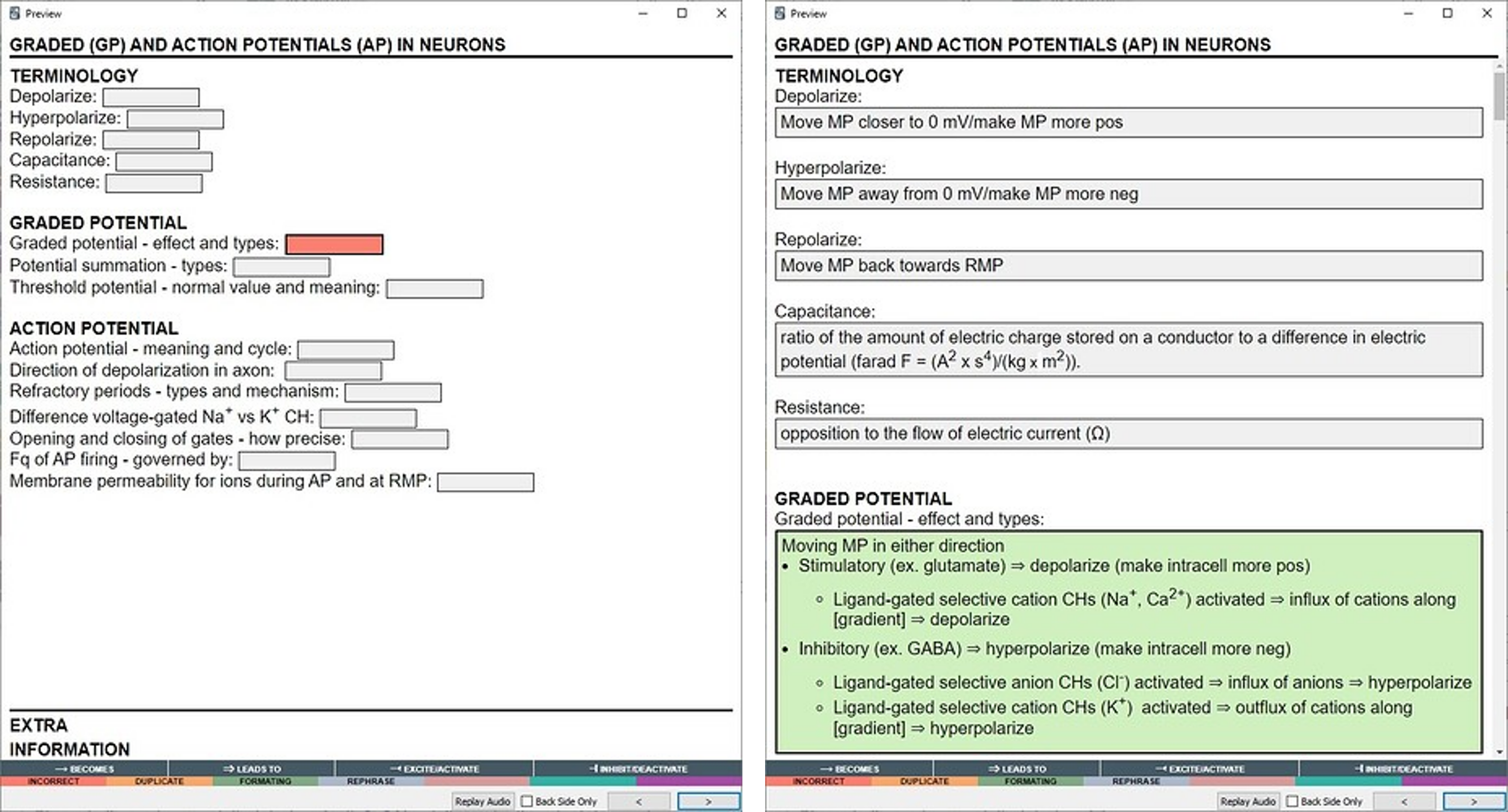
Screenshots
Liên kết hỗ trợ
Reviews (6)
👍 2025-01-17
Good option to big cards, i don’t understand why the subtitles, but it was easy to take it off.
👍 2023-12-06
I like this addon. I need to be able to write in my answers. How do i apply the typical “type:cloze” to this addon?
👍 2023-05-28
Revolutionary add on for those who have long notes with multiple clozes. It is an improvement upon prior efforts. Developer is very responsive in the support thread. Thank you for making this.
👍 2023-02-22
It’s the best app.
Thank you for your hard work.
There are two things that need to be improved.
-
I can’t see the words in night mode.
-
As you have known, hint has disappeared!! Comment from author Thanks! Regarding your issues, I’ve answered in the support thread here: https://forums.ankiweb.net/t/flexible-cloze-2-support-thread/26614/5
👍 2023-02-07
This add-on is the most advanced add-on among cloze-related add-ons that currently exist.
This addon merges and evolves the ideas of similar existing addons. I respect you for your efforts and hard work.
👍 2023-01-28
A version without all the custom fields, buttons and note design would be much better. Better to use the default anki styling and include the code for all that extra stuff separately, not the other way round.
