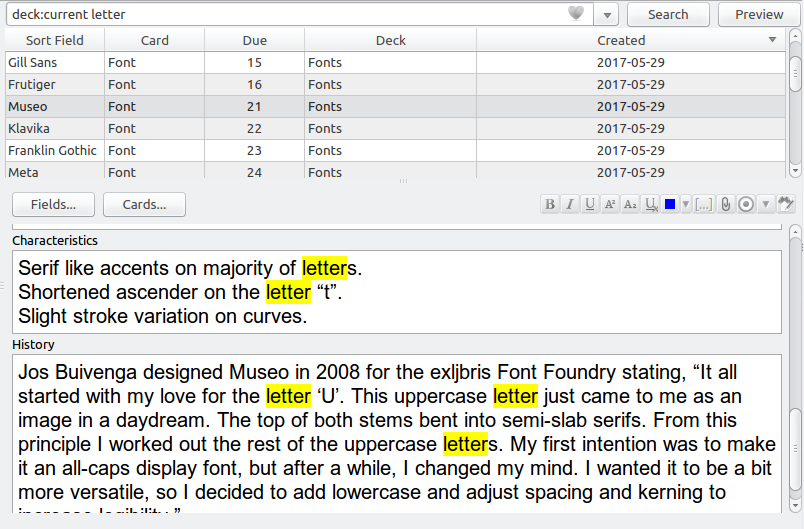
Highlights search results in the Editor pane of the Browser and extends the search bar with two new search modes.
USAGE
By default the add-on will highlight all search terms that aren’t search operators. You can temporarily disable search highlighting by using the provided View menu entry, or its associated hotkey (Ctrl+T, H).
In addition to search highlights the following new hotkeys are provided in the search bar:
Shift-Return: Jump to next result in current card list Ctrl-Shift-Return: Select all results in current card list CONFIGURATION
You can configure hotkeys and other settings by heading to Tools → Add-ons, selecting Highlight Search Results in the Browser, and then clicking on Config.
CHANGELOG
Version 1.0.1 – 2023-10-21
Added
Added support for Anki 23.10 and up (thanks to @zjosua)
You can view all past releases here.
HELP AND SUPPORT
Please do not use reviews for bug reports or support requests. I don’t get notified of your reviews, and properly troubleshooting an issue through them is nearly impossible. Instead, please either use the issue tracker (preferred), add-on support forums, or just message me at ankiglutanimate@gmail.com. Constructive feedback and suggestions are always welcome!
CREDITS AND LICENSE
Copyright © 2017-2023 Aristotelis P. (Glutanimate)
This add-on was commissioned by a fellow Anki user who would like to remain anonymous. All credit for the original idea goes to them.
Licensed under the GNU AGPLv3, extended by a number of additional terms. This program is distributed in the hope that it will be useful, but WITHOUT ANY WARRANTY. For more information on the license please see the LICENSE file accompanying this add-on. The source code is available on GitHub. Pull requests and other contributions are welcome!
Please note that this program also uses the Libaddon library which comes with its own additional terms extending the GNU AGPLv3 license
MORE RESOURCES
Make sure to check out my socials for the latest add-on updates and news: @Glutanimate | / Glutanimate
SUPPORT MY WORK
If you like Highlight Search Results in the Browser, please give it a thumbs up and share it with your friends, so that more people can enjoy it!
A kind request: Writing, supporting, and maintaining Anki add-ons like these takes a lot of time and effort. If Highlight Search Results in the Browser has been a valuable asset in your studies, please consider using the button below to support my efforts by pledging your support on Patreon. Each and every contribution is greatly appreciated and will help me maintain and improve Highlight Search Results in the Browser as time goes by!
Pro-tip: Lots of exclusive add-ons and other goodies await on my Patreon page. Make sure to check them out!
Screenshots






Liên kết hỗ trợ
Reviews (25)
👍 2025-12-30
very cool, usually works but there’s a recent problem in configuration with last Anki update (does not work anymore on mine)
👍 2025-10-30
good :D
👍 2025-04-14
This only works for simple searches, so it technically works for many people and I’ll upvote it.
You’re not going to see much use for this if you’re like me and search for multiple terms at once or heavily use regex.
Regarding multiple-term searches, glutanimate said this: (2021-03-06) “Sadly this is not supported by Anki’s widget toolkit at the moment, so I likely won’t be able to fix it in the near future. Keeping this issue open to track progress on this, however.” ( https://github.com/glut
👍 2025-03-08
Consider using this instead: https://ankiweb.net/shared/info/1057317630
👍 2025-02-19
Works.
👍 2025-01-29
lov it
👍 2024-12-19
Très pratique !
👍 2024-11-15
Thank You So Much
👍 2024-11-14
It worked
👍 2024-07-15
brilliant!
👍 2024-06-23
This is very helpful! Could you also add a feature to highlight search results made by regular expression, by any chance?
👍 2024-05-30
Overall great tool, but unfortunately, I will be disabling it as it is not practical. The auto-scroll feature makes it really hard to look through several cards sequentially in the browser. If a card has the searched term at a field in the bottom of the card, it will scroll all the way down. This would mean I have to scroll all the way up again to see the content of the card and then click on the next card and repeat if a highlighted word is at the bottom. Also means that I can’t just use arrows
👍 2024-05-19
Everyone should have this. No more frustration over searching for a specific word within a card.
👍 2024-02-25
I use this addon for several years. It is absolutely essential. I’m surprised that Anki hasn’t integrated it as a built-in feature yet.
👍 2024-02-17
Great Addon
👍 2024-02-16
Good Tool!Thanx!!
👍 2024-01-03
Awesome addon! I’d really like this to work for regular expressions as well.
👍 2023-11-21
Works great except if you use regular expressions then no highlighting - not even of non-re search terms. Search for “deck:xyz be the end back:re:\bfin\b” has no highlighting in the browser window. Even highlighting of the “be the end” parts would be helpful.
👍 2023-11-19
Immensely Useful!!
- This is such an important feature for finding text within big note cards or cards with a lot of text.
- I really needed this to find key words within my cards just like I would use in any other note app like Mac Notes or in a browser.
- The yellow highlighting of the words is very clear and the addon bringing you to the 1st match is amazing. I can scroll through the card to find exactly what I’m searching for in the other matches.
- I can just type out all the key words in
👍 2023-10-12
Fantastic!
👍 2023-07-31
Thanks for your efforts!
👍 2023-05-08
Highlight is showing, but shortcuts won’t work, this is the error:
Error
An error occurred. Please start Anki while holding down the shift key, which will temporarily disable the add-ons you have installed.
If the issue only occurs when add-ons are enabled, please use the Tools > Add-ons menu item to disable some add-ons and restart Anki, repeating until you discover the add-on that is causing the problem.
When you’ve discovered the add-on that is causing the problem, please report the issue
👍 2022-11-12
Makes life easier, thanks.
👍 2022-08-12
🌐 Comment from author ❤️
👍 2022-07-04
This is Beautiful!
