Highlighter Pro - Cores, Estilos e Atalhos Personalizados (Gerenciador Visual)
Baseado no addon https://ankiweb.net/shared/info/62061336 feito pelo Eros.
O Highlighter Pro é a ferramenta definitiva para personalizar o editor do Anki sem precisar tocar em uma linha de código sequer. Crie seus próprios botões de destaque, cores de texto e estilos de formatação usando uma interface visual moderna e amigável.
🚀 Principais Recursos
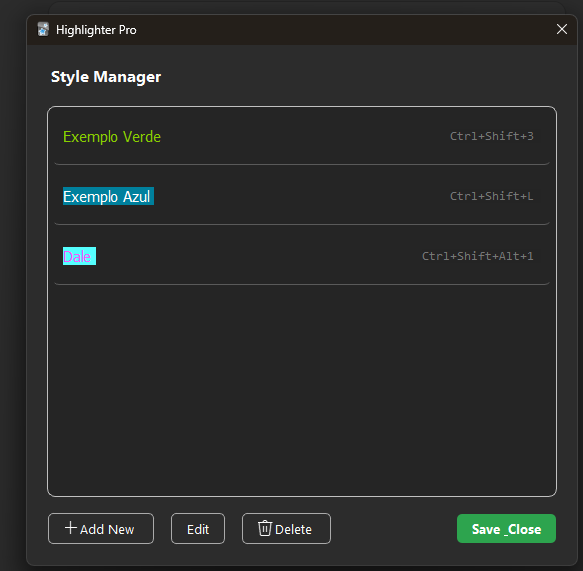
Gerenciador de Estilos Visual: Adicione, edite ou remova botões usando uma interface gráfica simples (Vá em Ferramentas > Highlighter Pro - Settings).
Atalhos Personalizados: Atribua qualquer atalho de teclado (ex: Ctrl+Shift+H, Alt+1) aos seus estilos.
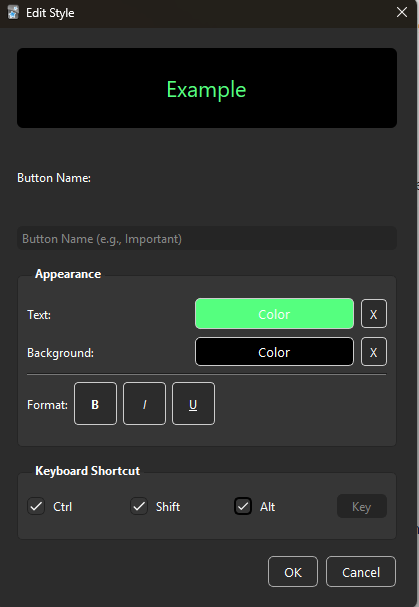
Formatação Completa: Combine Cor de Fundo, Cor do Texto, Negrito, Itálico e Sublinhado em um único botão.
Pré-visualização em Tempo Real: Veja exatamente como seu botão ficará antes de salvar.
Ícones Inteligentes e Padronizados: O add-on gera automaticamente ícones limpos e organizados para a barra do editor, mantendo o visual profissional e sem quebrar o layout.
✨ Como Usar
Instale o add-on e reinicie o Anki.
Vá em Ferramentas (Tools) -> Highlighter Pro - Settings.
Clique em “Add New”.
Escolha suas cores e formatação (Negrito/Itálico/Sublinhado).
Defina um atalho (opcional) e clique em Salvar.
Reinicie o Anki para ver seus novos botões no editor!
💾 Configuração Não é necessário editar arquivos Python! Todas as configurações são salvas automaticamente através do menu de configurações.
Highlighter Pro - Custom Colors, Styles & Shortcuts (GUI Manager)
Add-on based on https://ankiweb.net/shared/info/62061336 made by Eros.
Highlighter Pro is the ultimate tool to customize your Anki editor without touching a single line of code. Create your own highlighting buttons, text colors, and formatting styles with a modern and user-friendly visual interface.
🚀 Key Features
Visual Style Manager: Add, edit, or remove buttons using a friendly graphical interface (Tools > Highlighter Pro - Settings).
Custom Shortcuts: Assign any keyboard shortcut (e.g., Ctrl+Shift+H, Alt+1) to your styles.
Full Formatting Support: Combine Background Color, Text Color, Bold, Italic, and Underline in a single button.
Live Preview: See exactly how your button will look before saving.
Smart & Clean Icons: The add-on automatically generates clean, standardized icons for the editor toolbar, ensuring a professional look that fits perfectly within the interface.
✨ How to Use
Install the add-on and restart Anki.
Go to Tools -> Highlighter Pro - Settings.
Click “Add New”.
Choose your colors and formatting (Bold/Italic/Underline).
Set a hotkey (optional) and click Save.
Restart Anki to see your new buttons in the editor!
💾 Configuration No need to edit Python files! All configurations are saved automatically via the Settings menu.
Addon GUI https://imgur.com/a/wuiloS7
Adding Colors https://imgur.com/a/RIHefCl
Bar on add cards: https://imgur.com/s2GZEEe
Screenshots
Style Manager / Gerenciador de Estilos
Easy Color Picker / Seletor de Cores Fácil
Compact Toolbar Buttons / Botões Compactos
Screenshots