NOTE: This add-on is no longer actively maintained. It might not work on newer Anki versions. I recommend using the updated add-on by shige instead.
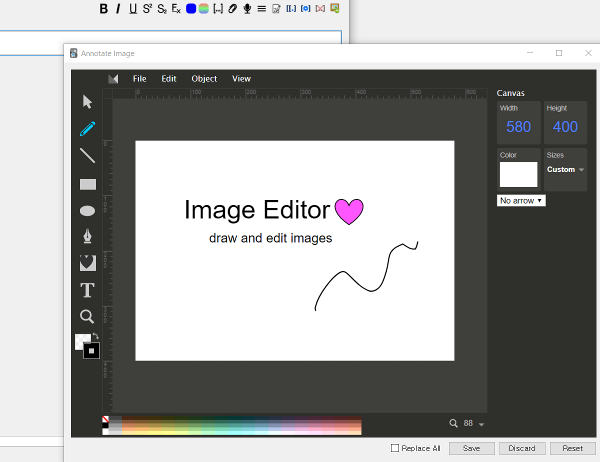
Draw or edit images while adding and editing cards!
How to Use
To create a new image, click the button (A pen scribbling on a paper) on the toolbar. To edit an existing image, right click an image and click ‘Edit Image’.
After editing, click ‘Save’ to save the image. If you have the same image across multiple notes, check ‘Replace All’ to replace all of them with the new image. Otherwise, only the image on that one note is edited.
If you are using Anki v2.1.50+, the image should not be selected when you right click on the image. Or the ‘Edit Image’ context menu will not show up.
Image Editing Tools Long press the button to access the shape library Left color square is the fill color, Right color square is stroke color.
Miscellaneous Github Link
Screenshots
Liên kết hỗ trợ
Reviews (27)
👍 2025-11-03
broken use 🖼️Image Editor - Edit image by right click in the Editor (Fixed by Shigeඞ) https://ankiweb.net/shared/info/789309990
👍 2025-08-11
Hi I’m add-ons developer Shige, I fixed this add-on and uploaded it to AnkiWeb. 🖼️Image Editor - Edit image by right click in the Editor (Fixed by Shigeඞ) https://ankiweb.net/shared/info/789309990
👍 2025-08-03
doesn’t work with the latest versions of anki. The latest version that works for me is 25.02.06 (on mac). Please update this addon when you get a chance!!! I know i’ll have to update eventually but this is literally my favorite addon for anki.
👍 2025-07-27
Still works today!
👍 2025-04-21
Love this addon
👍 2025-01-22
Doesn’t work on images that are already in my Anki deck…
👍 2025-01-10
doesnt work with existing images
👍 2024-11-05
It doesn’t work with image occlusion, or I didn’t figure it out
👍 2024-10-25
doesn’t seem to work with existing images. right clicking just comes up with cut/copy/paste menu
👍 2024-08-11
Awesome. still works on anki Version 24.04 (429bc9e1)
👍 2024-08-04
Does’nt work it.
👍 2024-08-01
Love it. Would like to have a Cut feature in the future. So I can cut out certain parts of the picture or smth. (not cutting by covering or resizing)
👍 2024-06-04
Does’nt work it.
👍 2024-05-20
Can you please add highlighters pleasee, i need this and i can t find any add ons with what i want
👍 2024-05-08
Absolutely lifesaving. Also on M1 Mac with latest Anki version and works fine for me.
👍 2024-02-27
This add-on is simply wonderful!
However, if there was the possibility to pre-define the color and opacity of the shape it would save a lot of time. Thanks!
👍 2024-01-17
This addon is working awesome on the latest version: 23.12.1 I’m so grateful for this addon and all the other addons that make Anki easier and more effective for all of us. You people are amazing, thank you so much👏
👍 2024-01-06
Unfortunately, it doesn’t work anymore with the newer version of Anki. Editing an image turns the image into some form of text/code. The edited image used to work with Closet add-ons and Anki mobile, which are no longer compatible.
👍 2023-11-28
Fantastic Addon
👍 2023-10-04
I Love this.
But, in 23.10 beta, it can’t work properly. Editing and saving a image, it turn into characters. (M1 MAC) Pls fix this for all. Thanks.
👍 2023-05-05
would be even better if it was compatible with Edit Field During Review (Cloze) add-on. That would be amazing.
👍 2023-01-25
Doesn’t work with 2.1.54 version ( latest one)
👍 2023-01-24
This saves a great deal of time; however, the only downside is that the shortcut ctrl + shift + I doesn’t function.
👍 2023-01-02
works so well
👍 2022-12-22
It is an amazing add-on. Much appreciated for your hard work! Could you please include a way to save settings instead to adjust them every time? For example, in the square/circle tools, the opacity is set to 100, I use mostly 20 instead. and I would like to fix a color other than white.
Thanks again!
👍 2022-08-12
Thanks
👍 2022-08-11
Works great!
