Note: Version 4 of the add-on is only available for Anki 2.1+. Some features will be missing from the earlier versions.
Introduction
This is an updated version of the Incremental Reading add-on, which aims to provide features that support incremental reading in Anki. The idea of working with long-form content within a spaced-repetition program appears to have originated with SuperMemo, which offers an elaborate implementation of the technique (see their help article for more information). This add-on for Anki is comparatively bare-bones, providing a minimal set of tools for iterating over long texts and creating new flashcards from existing ones. For an overview of these features, see below.
Version 4: GitHub, issue tracker, discussion board Version 3: GitHub, discussion board Version 2: AnkiWeb, GitHub, manual
Main Features
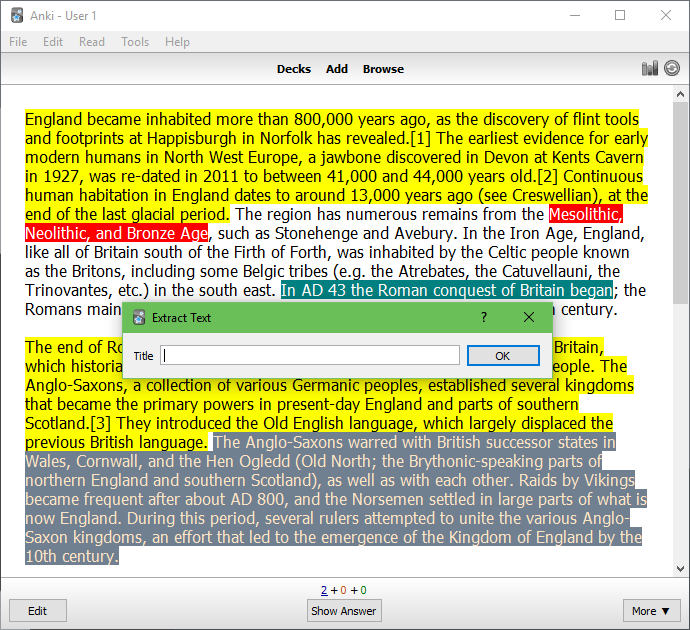
Import content from web feeds (RSS/Atom), webpages, or Pocket (v4 only) Extract selected text into a new card by pressing x Highlight selected text by pressing h Remove selected text by pressing z Undo changes to the text by pressing u Apply rich text formatting while reading Create custom shortcuts to quickly add cards Maintain scroll position and zoom on a per-card basis Rearrange cards in the built-in organiser Control the scheduling of incremental reading cards Limit the width of cards (useful on large screens) (v4 only)
New to Version 4
Compatible with Anki 2.1 Import single webpages (Alt+3) Import web feeds (Alt+4) Import Pocket articles (Alt+5) Apply bold, italics, underline or strikethrough (Ctrl+B, I, U, or S) Toggle formatting on and off (Ctrl+Shift+O) Choose maximum width of cards (see options: Alt+1) Control initial scheduling of extracts (see options: Alt+1)
New to Version 3
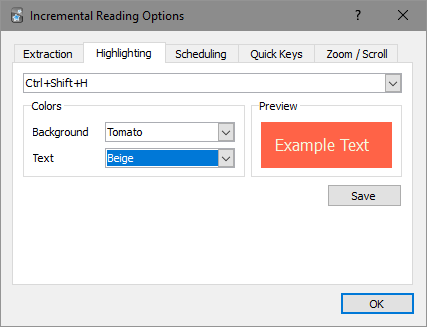
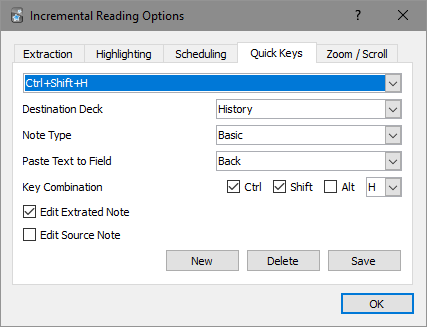
Remove unwanted text with a single key-press (z) Multi-level undo, for reverting text changes (u) New options to control how text is extracted: Open the full note editor for each extraction (slow), or simply a title entry box (fast) Extract selected text as HTML (retain color and formatting) or plain text (remove all formatting) Choose a destination deck for extracts New options for several aspects of zoom and scroll functionality: Zoom Step (the amount that magnification changes when zooming in or out) General Zoom (the zoom level for the deck browser and overview screens) Line Step (the amount the page moves up or down when the Up or Down direction keys are used) Page Step (same as above, but with the Page Up and Page Down keys) Highlighting: Both the background color and text color used for highlighting can be customized A drop-down list of available colors is provided A preview is now displayed when selecting highlight colors The colors applied to text extracted with x can now be set independently Quick Keys A list of all existing Quick Keys is now shown, to allow easy modification Unwanted Quick Keys can be easily deleted A plain text extraction option has also been added All options have been consolidated into a single tabbed dialog
Screenshots
Note: These are fairly outdated.
Installation
You will first need to have Anki installed. Download the relevant installer here.
To install through Anki, navigate to Tools → Add-ons → Get Add-ons…, and enter the code 935264945. To install manually, download the GitHub repository (here) and place the ir folder into your add-ons folder.
Usage
Experimentation should lead to a pretty quick understanding of how the add-on works. If in doubt, start with the following:
Create a new IR note with an article you want to study (the easiest way to do this is to import a webpage, by pressing Alt+3 while on the deck overview screen) Set up a shortcut for creating regular Anki cards from IR cards (press Alt+1, or go to the menu, then go to the Quick Keys tab) Review the IR card that was created, and extract any text you find interesting (by selecting the text and pressing x) Choose Soon or Later when you want to move to the next card (which will be a portion of text you extracted) Whenever you want to create a regular Anki note, simply select the desired text and use the shortcut you created earlier
Outdated instructions can be found here. They were written for v2, but the basic behaviour of the add-on is still similar.
Compatibility
In general, the settings stored in _ir.json will be preserved when upgrading. The main exception is that v3 and v4 of the add-on are not backwards-compatible with v2. The newer versions store settings in a very different manner. v2 settings will be ignored.
Additionally, changes were made to the v2 card template, so if you have incremental reading notes from v2, you will need to select them in the card browser and choose Edit → Change Note Type, to convert them to IR3 notes.
Support
If any issues are encountered, please post details to the Anki add-ons forum. It’s best if you post in the existing thread (here) so I receive an email notification. Otherwise, note an issue or make a pull request on GitHub.
Please include the following information in your post:
The version of Anki you are using (e.g., v2.1.0-beta5; can be found in Help → About…) The version of IR you are using (this can be found in Read → About…) The operating system you are using Details of the problem Steps need to reproduce the problem
License
Multiple people have contributed to this add-on, and it’s somewhat unclear who to credit for which changes, and which licenses to apply.
Tiago Barroso appears to be the person who began the project, and he has stated that he releases all of his add-ons under the ISC license. Frank Kmiec was responsible for vastly expanding the add-on, but it’s unclear which license his changes were released under. Presuming he didn’t specify one, the terms and conditions of AnkiWeb suggest they were automatically released under the AGPL v3. Aleksej’s changes to Frank’s version are multi-licensed under the ISC license and the GPL.
For the sake of simplicity, I am also releasing my changes under the ISC license. For each author, I have placed a copyright line in the license with what I believe are correct dates. If I have made a mistake in this respect, please let me know. I have also removed the manual that is still available in Aleksej’s fork, mainly because it is becoming less relevant, but also because it is a Google Groups conversation, which makes the licensing slightly murky.
Frank Raiser released an Anki 1 add-on under a similar name, but it doesn’t appear to share any code with the current project and functions quite differently. For more information, see Anki Incremental Reading.
Screenshots

Liên kết hỗ trợ
Reviews (29)
👍 2024-03-28
https://ankiweb.net/shared/review/999215520 is the more updated version, for whoever is looking through this. especially for newer versions
👍 2024-02-15
Try to use this, it works fine with the latest Anki!👍
Incremental Reading v4.11.9 (unofficial clone) https://ankiweb.net/shared/info/999215520
👍 2023-06-26
Good to use.
👍 2022-10-23
doesnt work on Qt6
👍 2021-12-22
I love IR
👍 2021-11-20
great add on but not working right now, please fix it.
👍 2021-10-20
please Fix it,3Q,3Q
👍 2021-08-15
Incompatible with anki 2.1.46
👍 2021-08-15
更新2.1.46版本anki该插件会报错,希望解决一下!
👍 2021-06-23
I like the idea of incremental reading, and the purpose of an addon like this is to make that convenient compared to doing the exraction and other steps manually. Unfortunately, there’s enough inconvenience and issues with this addon that the benefits are outweighed.
It often doesn’t download images in a page, which makes it necessary to go to the browser to read with explanatory images and then come back to Anki to extract - far from the smooth experience IR is supposed to be. It doesn’t re
👍 2020-11-09
Seems like this isn’t being actively maintained anymore. All outstanding PRs have been merged here: https://github.com/gwydirsam/incremental-reading
-
fix https 403 error
-
download images
-
allow suspend on cards
👍 2020-09-19
works great! keep up the good work
👍 2020-05-02
Hey everyone, this add on was a great idea, I tried using it for a few months but support has been lacking, for those interested in incremental reading, give this add on a look, it supports pdfs and is way more functional - Searching, PDF Reading & Note-Taking in Add Dialog ( https://ankiweb.net/shared/info/1781298089 )
👍 2020-04-12
It seems quite nice but crashed when I made a cloze with the shortcut. :(
Debuginformationen:
Anki 2.1.23 (de9543ff) Python 3.8.0 Qt 5.13.1 PyQt 5.14.1
Platform: Mac 10.15.4
Flags: frz=True ao=True sv=1
Add-ons, last update check: 2020-04-11 16:22:15
Caught exception:
Traceback (most recent call last):
File “aqt/webview.py”, line 446, in handler
File “aqt/editor.py”, line 444, in <lambda>
File “aqt/addcards.py”, line 239, in afterSave
File “aqt/editor.py”, line 471, in fie
👍 2020-03-27
Very nice to have as an option. Thank you.
Hyperlinks from imported pages are not working for me. They automatically try to open as penguin.linux.test/wiki/websitename which throws an error (err_connection_refused) for my browser (chrome). I tried to troubleshoot with chrome and such but did not work. Is there a way to change how these hyperlinks open? Using a chromebook with anki on debian.
👍 2020-03-27
Caught exception:
File “C:\Users\Administrator\AppData\Roaming\Anki2\addons21\935264945\view.py”, line 117, in saveScroll
if viewingIrText():
File “C:\Users\Administrator\AppData\Roaming\Anki2\addons21\935264945\util.py”, line 35, in viewingIrText
isIrCard(mw.reviewer.card)
File “C:\Users\Administrator\AppData\Roaming\Anki2\addons21\935264945\util.py”, line 29, in isIrCard
card.model()[‘name’] == mw.readingManager.settings[‘modelName’]
<class ‘AttributeError’>: ‘ReadingM
👍 2020-03-20
Anki 2.1.22 and works fine. I really appreciate this add-on.
👍 2020-03-19
it works for 2.1.22
👍 2020-03-10
This package unfortunately does not work for anki 2.1.20+ and appears to have been abandoned by the developers.
👍 2020-03-08
Anki 2.1.20:
It doesn’t import text only title and source. This plugin needs an update.
👍 2020-02-29
No part of this addon works. It fails to extract text from the imported document, and therefore extracted pieces or flashcards cannot be created.
I am using Incremental Readion v4.10.3, Anki 2.1.20 on Linux Mint. This seems to be an issue with the new version. I hope the dev updates it to fix this add-on for anki 2.1.20.
👍 2020-01-14
一直用的很好,今天却崩溃了!
👍 2019-10-20
I really like it but often when I want to add a card it crashes, which causes the loss of all the cards I extracted before. This unfortunately happens quite frequently…
👍 2019-10-14
essential!
👍 2019-09-24
Works well
👍 2019-09-15
Was super excited to try this add-on, but despite reading this page, the READ ME on git-hub, and the old Google form page, I can not figure out how to even get started. The “alt” commands for the application are not working. Overall, unclear.
👍 2019-08-29
Great incremerntal reading implementation
👍 2019-04-25
Works on macOS! Turns out that enabled in the add on menu still requires a reset of the app.
Had some further issues but they turned out to be with the website that I was trying to use and not the plugin itself!
👍 2019-03-12
Good, but wish there were support for cloze.
