Japanese like a breeze (Jlab)
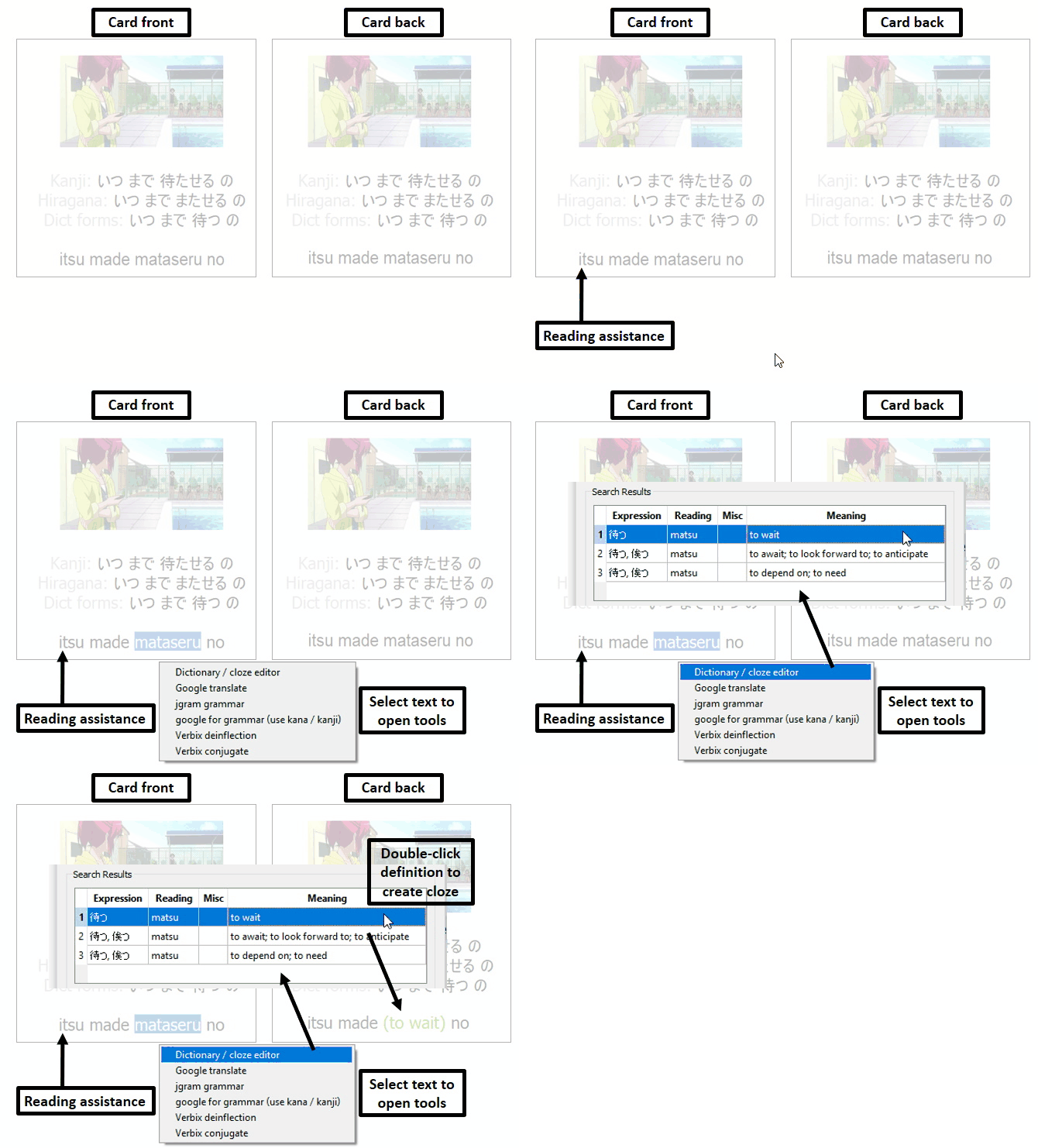
I created this addon to make learning Japanese with subs2srs-created movie decks fast, easy and convenient (it also works on other decks, too). It allows you to focus on spoken Japanese without knowing kanji and then teaches the writing systems from words you already know. The built in tools help you to quickly understand unknown sentences.
A detailed manual for this addon is found on the addon’s website: https://www.japanese-like-a-breeze.com/addon-manual/
MOST IMPORTANT:
Only works with Qt6 Tested up to Anki 25.02.5. It can happen, that Anki updates break the addon. I fix this, but sometimes it takes a while, thanks for your patience! Doesn’t work on decks already in anki, you need to import an apkg Start with the listening comprehension deck Tools are triggered by selecting text on the card Settings are changed from the main window’s menu bar For suggestions and bug reports (include full error message): japaneselikeabreeze@gmail.com
Screenshots
Reviews (29)
👍 2025-12-10
tôi không thể sử dụng tiện ích JLab này, tôi đã làm đúng các hướng dẫn nhưng nó vẫn thông báo : Add-on Startup Failed The following add-ons failed to load: Jlab Study Japanese with moviessubs2srsRomajiKana They may need to be updated to support this version of Anki. Click the Check for Updates button to see if any updates are available. You can use the Copy Debug Info button to get information that you can paste in a report to the add-on author. For add-ons that don’t have an update available
👍 2025-12-10
so far it’s comfortable and fun to use, but i’m confused about cloze cards, is the back of every cloze card meant to be entirely blank? so far i used them to try and remember how to write the sentence and to remember the meaning, but seeing them just blank and useless feels off
👍 2025-10-16
It’s allright although it feels a bit unnecessary when all you want is to use the full kanji and kana. It would be much better if you could turn off the text selection popup menu (with links to various sites) and/or if those options were instead in the standard right click menu rather than the custom popup that this add-on uses.
👍 2025-10-05
Great! IMO, it’s nice if the add-on can hide the front’s lines for the listening comprehension deck. Because I want to practice my listening ability and don’t want to rely on any hints.
👍 2025-07-07
Alright
👍 2025-06-11
Deck conversion currently does not work.
👍 2025-05-29
Doesn’t work. First, it asks for a folder with the message: “Please specify a folder where the plugin can store user data.” But no matter which folder you select, it says: “Please set a valid data folder” and blocks access to Anki. You have to go through a bunch of complicated steps to manually disable it just to get Anki to open again.
I don’t recommend it at all!
Update: I’ve tested after the reply and it’s working now. Problem solved, works fine! Comment from author before post was edited E
👍 2025-05-19
it works on linux arch and worked on linux nobara when i used it, though when i used nobara it asked to find the folder to store user settings everytime i opened anki which is pretty annoying, but after that it let me use it normally
👍 2025-05-14
It hasn’t been updated in over a year and a half and doesn’t seem to work on MacOs 15.4 at all. I’ve fiddled with the settings but as the user below said, they don’t seem to do anything. Even on the official JLAB decks. I should also mention that a lot of the links ar broken, eg. the “Get Decks” option in the menu opens a deleted blog.
The creator is mainly focusing on making intermediate decks now for their Patreon subscribers. Comment from author The addon’s core features have been in a stabl
👍 2025-05-07
I can’t really tell if it’s working, but it doesn’t seem to save its settings and asks me to set a folder for saving data every time I start Anki. I’m not sure if there’s supposed to be some kind of confirmation button on the settings dialog to save the settings, but it doesn’t have one and hitting escape is the only way out of the dialog.
This is on Linux. On my Windows machine, it seems to work fine.
The accompanying decks are good. But this addon seems like nonsense that doesn’t even work.
👍 2025-04-19
I’ve been using this deck for a while now and am about 2/3rds through it. Over all I think it’s a very good and well organized deck and a great start to learning Japanese. However, I do think having the deck in romaji is counterproductive, I don’t mind that I had to change the card layout (I don’t want to see the images on the front and changed the display text on the front of the card from romaji to hiragana/kanji) but what I do find annoying is that I have to go into basically every text on
👍 2025-03-28
Excellent deck. Works perfectly and everything is extremely organized. Thank you so much for the time and effort put into this.
👍 2025-02-09
Just finished the deck - Really great content and much more fun than other decks - Amazing work! Note: A few customization needed for your individual use case
👍 2025-02-02
Hello, thank you for this Jlab add on (I tried to report this problem via your contact page, but your contact page just gives an error response when I try to send a message.)
Unfortunately, downloading this JLab add on has locked me out of my Anki until I specify a folder where the plug in can store user data. I don’t know how to do this. I have a thread in the Anki user help forum, but no one’s presented an answer there yet either.
https://forums.ankiweb.net/t/where-do-i-store-plugin-user-dat
👍 2025-01-24
Спасибо дружище. Ценю твои старания :)
👍 2025-01-21
Man thats perfect for Immersion Learning after Losanow!!!!
👍 2024-12-26
Perfect
👍 2024-12-16
I don’t understand how to change the image to the back of the card. The only way I’ve found is to do it on a per card basis, which seems insane. Is there no way to do this for the whole deck? I’ve been breaking my head trying to figure this out. It just makes way more sense as I’m memorizing meanings based off screenshots. Comment from author The memory being triggered by seeing the card’s image is a common problem, I recently added this to the faq page. There are also detailed instructions on h
👍 2024-09-30
Great plugin. I’ve used it for 3-4 weeks daily now. Though I would like to point out that I’ve been connecting the words and meanings to the shown images. Hence I disabled the images (although sometimes I noticed that you need the image to get the context ”^_^) Comment from author Connecting the meaning to the images is a common issue, I added some hints on how to handle this to the faq: https://www.japanese-like-a-breeze.com/faq/
👍 2024-09-28
This is a Great add-on.
👍 2024-08-26
It overriden some cards from my other decks Comment from author What exactly do you mean by this? It would be helpful of you provide some more details on what happened. Thank you!
👍 2024-06-29
Great addon, I havent used it or the jlab decks much I just started using it, but is Jlab addon compatible with Migaku Vacation?
👍 2024-06-14
This addon carries my Japanese learning journey since I finished all the JLAB Anki-decks. Just watching anime is both more fun and more efficient than plowing through dry vocabulary decks.
The one complaint I have is that the card management is a little wacky. I’ve set “Tag” as my end action, so the addon doesn’t interfere with the JLAB intermediate decks - since the words there are hand-picked, I prefer to keep them in Anki a little longer, to build a solid foundation for my language learning.
👍 2024-04-10
Anki 23.12.1 (1a1d4d54) (ao) Python 3.9.15 Qt 5.15.2 PyQt 5.15.5 Platform: Windows-10-10.0.19045
When loading Jlab Study Japanese with moviessubs2srsRomajiKana: Traceback (most recent call last): File “aqt.addons”, line 245, in loadAddons File “C:\Users\user\AppData\Roaming\Anki2\addons21\2110939339_init_.py”, line 4, in <module> from . import Jlab File “C:\Users\user\AppData\Roaming\Anki2\addons21\2110939339\Jlab.py”, line 30, in <module> from Core.ClozeEditor import * File
👍 2024-04-03
Great deck, but I found that a lot of the time I was recognizing the image and linking that to what I remember the sentence to be, rather than being able to properly translate it, so I recommend removing the image.
👍 2024-02-15
Great, have used this for a while on my phone and went back to set it up on a new computer again and couldn’t get it to work in the qt5. It seems the description on the https://www.japanese-like-a-breeze.com/guide-for-beginners/ is outdated but the one here on the anki website works. Comment from author Thank you for this remark! I will update the docs on the website, too.
👍 2024-02-14
It seems to have a lot of very nice features… but I’m stuck at the beginning already. The cloze editor / swap doesn’t work in the hearing comprehension deck, it just does nothing. Then I went to the reading comprehension deck and tested it there, it works, but the audio on these cards is still played automatically? I don’t get it. There are so many options, but I feel it isn’t documented well enough to understand. Also the Kana trainer tables are just empty white block. I see that this must be
👍 2024-01-20
I just can’t seem to make it work. “Japanese course based on Tae Kim’s grammar guide & anime” works just as it would if I had no add-on installed. I have tried Qt5 and Qt6 installations. Same issue in both.
Update:
I have not edited any cards. My system is Windows 10, using Anki Desktop Anki Version: Qt6 Version 23.12.1 (1a1d4d54)
I do see the “japanese like a breeze menu” Comment from author Edit: This means that the addon is most likely working. Can you tell me which part is causing prob
👍 2024-01-12
outdated and cant get rid of the romanji on my cards without it grrrrrr Comment from author Update: The addon is working again
The roumaji can be removed without the addon, see https://www.japanese-like-a-breeze.com/course-without-addon/ . This is also explained inside the course and in its manual.
