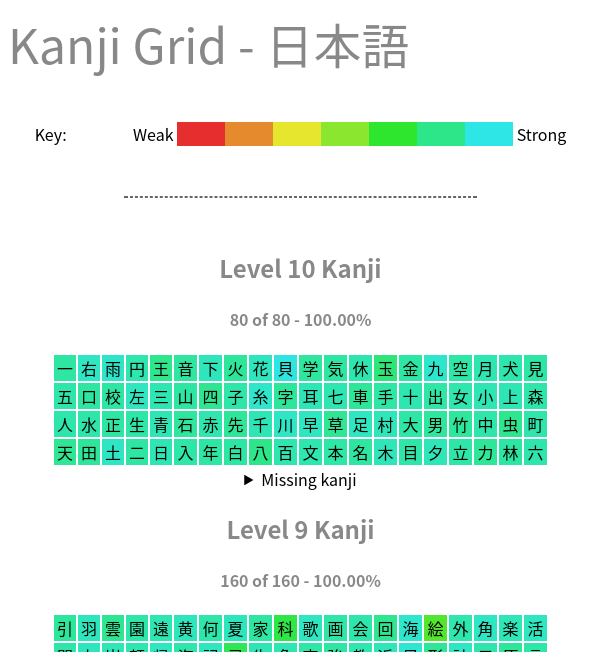
Anki 2.1 port of the Kanji Grid addon. Source code | Feedback Screenshot (click to see full image):
Screenshots
Liên kết hỗ trợ
Reviews (30)
👍 2026-02-26
Anki 25.09.2 (3890e12c) (ao) Python 3.13.5 Qt 6.9.1 PyQt 6.9.1 Platform: Windows-11-10.0.26200-SP0
Traceback (most recent call last): File “C:\Users\Claudia\AppData\Roaming\Anki2\addons21\909972618\Kanji_grid.py”, line 457, in setup self.makegrid(config)
File "C:\Users\Claudia\AppData\Roaming\Anki2\addons21\909972618\Kanji_grid.py", line 362, in makegrid
self.displaygrid(config, units, timeNow)
~~~~~~~~~~~~~~~~^^^^^^^^^^^^^^^^^^^^^^^^
File "C:\Users\C
### 👍 2025-03-07
It worked for me using Anki Version Version 24.11 (87ccd24e) on Windows 10 and 11. Here's what I had to do:
1. Install the add-on
2. Click "View files" in the add-on menu
3. Copy the python code from https://github.com/joshualiangxy/kanjigrid/blob/733a9b3b0812a385f766a4df5d22f1c03f1103b0/Kanji_grid.py by hitting copy raw file (indicated by the copy button) on the right side of the page, in between the "RAW" button and the Download symbol button
4. Replace the content of Kanji_grid with the co
### 👍 2025-01-16
Anki 24.11 (87ccd24e) (ao)
Python 3.9.18 Qt 6.6.2 PyQt 6.6.1
Platform: macOS-15.2-x86_64-i386-64bit
Traceback (most recent call last):
File "/Users/yangmillstheory/Library/Application Support/Anki2/addons21/909972618/Kanji_grid.py", line 378, in setup
deckcb.setSizePolicy(QSizePolicy.Expanding, QSizePolicy.Fixed)
AttributeError: type object 'QSizePolicy' has no attribute 'Expanding'
===Add-ons (active)===
(add-on provided name [Add-on folder, installed at, version, is config changed])
A
### 👍 2025-01-05
Not seeing grid after adding addon
### 👍 2024-12-21
Not working
Anki 24.11 (87ccd24e) (ao)
Python 3.9.18 Qt 6.6.2 PyQt 6.6.1
Platform: macOS-15.2-arm64-arm-64bit
Traceback (most recent call last):
File "/Users/morigs/Library/Application Support/Anki2/addons21/909972618/Kanji_grid.py", line 378, in setup
deckcb.setSizePolicy(QSizePolicy.Expanding, QSizePolicy.Fixed)
AttributeError: type object 'QSizePolicy' has no attribute 'Expanding'
===Add-ons (active)===
(add-on provided name [Add-on folder, installed at, version, is config changed])
### 👍 2024-08-26
Works great once I tried the fix to get it working.
I'm very cautious and created two folders inside this Add-on's folder.
I copied the original "Kanji_grid.py" file into one folder as a backup, downloaded the new "Kanji_grid.py" file into the other folder, and then copied the new "Kanji_grid.py" file into the Add-on's folder to overwrite the original "Kanji_grid.py" file .
After that, I restarted Anki, selected "Generate Kanji Grid" from the Tool menu, selected the Deck, and typed in the name o
### 👍 2024-04-24
Working great once I did the little code fixing others have stated for the updated Anki.
### 👍 2024-02-28
It worked for me using Anki Version 23.12.1, on Windows 10. Here's what I had to do:
1. Install the add-on
2. Click "View files" in the add-on menu
3. Copy the python code from https://github.com/joshualiangxy/kanjigrid/blob/733a9b3b0812a385f766a4df5d22f1c03f1103b0/Kanji_grid.py
4. Replace the content of Kanji_grid with the code copied above (don't forget to save)
5. Restart anki, add-on worked. (Don't forget, you have to tell it what fields to look for kanji in on your cards, use the browser t
### 👍 2024-02-06
Not working currently.
Anki 23.12.1 (1a1d4d54) (ao)
Python 3.9.15 Qt 6.6.1 PyQt 6.6.1
Platform: Windows-10-10.0.22621
Traceback (most recent call last):
File "C:\Users\18099\AppData\Roaming\Anki2\addons21\909972618\Kanji_grid.py", line 457, in setup
self.makegrid(config)
File "C:\Users\18099\AppData\Roaming\Anki2\addons21\909972618\Kanji_grid.py", line 362, in makegrid
self.displaygrid(config, units, timeNow)
File "C:\Users\18099\AppData\Roaming\Anki2\addons21\909972618\Kanji_gr
### 👍 2024-01-21
The last person provided a fix but it still doesn't work. The error log follows as such:
Anki 23.12.1 (1a1d4d54) (ao)
Python 3.9.15 Qt 6.6.1 PyQt 6.6.1
Platform: Linux-6.7.0-arch3-1-x86_64-with-glibc2.38
Traceback (most recent call last):
File "/home/user_name/.local/share/Anki2/addons21/909972618/Kanji_grid.py", line 457, in setup
self.makegrid(config)
File "/home/user_name/.local/share/Anki2/addons21/909972618/Kanji_grid.py", line 362, in makegrid
self.displaygrid(config, units,
### 👍 2024-01-13
Created a fix that makes the add-on qt6 compatible: https://github.com/joshualiangxy/kanjigrid/pull/1/files
Also fixes the issue with saving html/images.
Either change the Kanji_grid.py file on your own (the github pull request highlights the differences in code), or download/copy the Kanji_grid.py file from the repository and replace the old Kanji_grid.py with it.
### 👍 2024-01-11
Really good way to visualize all the kanji you know.
### 👍 2023-12-08
the fix below allows the addon to work, but still doesnt allow the saving of the HTML/Image, would be great if we can get an update, i love keeping a log to look back on how far i've come mining
### 👍 2023-11-28
Works in 23.10.1 with the fix posted 2 weeks ago, thank you. Very neat add-on.
### 👍 2023-11-25
Doesn't work anymore. Tried the fix listed in the comments to no avail. Shame.
### 👍 2023-11-10
If you're getting an error on the latest version of Anki when trying to generate a kanji grid, go to the addon's folder and replace the contents of Kanji_grid.py with the following: https://pastebin.com/AZEh0SKa
Save the file + restart Anki, and it should work again.
### 👍 2023-10-25
It was great when it was working , but sadly it has not been working for me for a good while now. Either it generates an empty grid or throws an error upon attempting to gen one.
### 👍 2023-10-12
Sadly not working for me
### 👍 2023-09-11
It works. Thanks!!
### 👍 2023-06-16
Works- just follow the instructions left by other users here.
### 👍 2023-02-27
My config
{
"defaults": {
"groupby": 6,
"interval": 180,
"kanjionly": true,
"literal": true,
"pattern": "front expression sentence kanji word entry characters",
"thin": 20,
"tooltips": true,
"unseen": true,
"wide": 48
}
}
### 👍 2023-02-16
works on 2.1.49
### 👍 2022-12-31
Works well! I was able to generate the grid immediately and save the image to my desktop.
### 👍 2022-12-10
Working fine on 2.1.49. Very aesthetic.
Would be nice to have an option to customize the colors, but still pretty regardless. Great for figuring out how far you're into JLPT or whatever option you pick.
### 👍 2022-09-16
Nice visual. Could use some more description.
### 👍 2022-06-19
Works fine. Having stats over the "color distribution" (i.e. how many percent are in the red, orange etc.) would be nice, as it would allow you to track progress more accurately.
### 👍 2022-05-21
This is incredible! Thanks for the add-on!
### 👍 2022-05-19
Works great
### 👍 2022-03-12
Useful and works
### 👍 2022-03-11
Brilliant!
