##############################################################################################
Kanji OverLay v0.3.3 - Anki Plugin
Git: https://github.com/fanatic84/KanjiKeywordOverlay.git Contact: fanatic84@gmail.com
#-#-#-#-#-#-#-#-#-#-#-#-#-#-#-#-#- WHAT IS IT ? #-#-#-#-#-#-#-#-#-#-#-#-#-#-#-#-#-#-#-#-#-#-#-
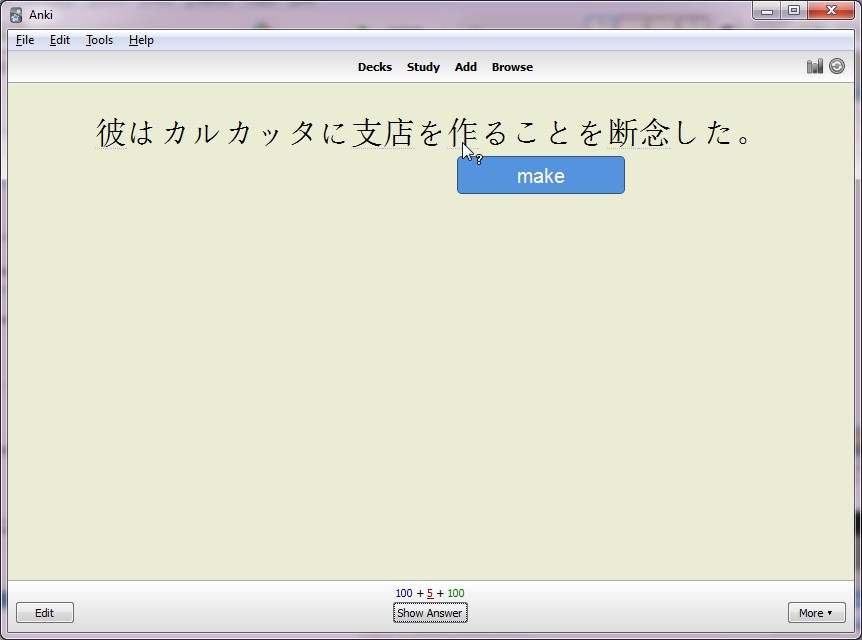
Kanji OverLay is a anki-plugin used to display Keywords on Kanji (from Heisig or other) When you move your cursor on a kanji, it display a pop-in with the corresponding keyword.
See screenshots: https://raw.githubusercontent.com/fanatic84/KanjiKeywordOverlay/anki2.1/screenshots/screen1.jpg
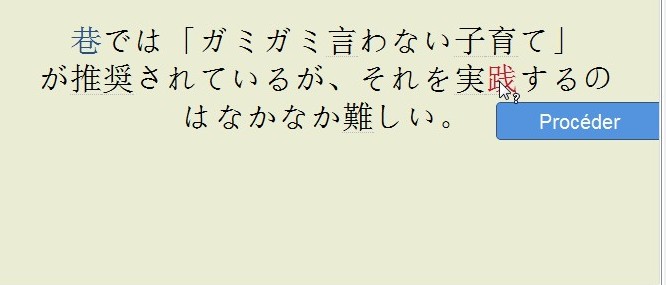
Kanji OverLay can also change the color a kanji depending of your knowledge of them. This needs a custom deck to be specified. See “How to use ?” for more informations.
See screenshots: https://raw.githubusercontent.com/fanatic84/KanjiKeywordOverlay/anki2.1/screenshots/screen2.jpg
Red : kanji not seen Blue : kanji not referenced at all (3007 kanji referenced by default so it is fairly rare)
#-#-#-#-#-#-#-#-#-#-#-#-#-#-#-#-#- HOW TO USE ? #-#-#-#-#-#-#-#-#-#-#-#-#-#-#-#-#-#-#-#-#-#-#-
A. Quick configuration
First of all, in order for this plugin to work, you will need to specify in your template the appropriate markup for your fields.
If you have already japanese plugin installed, you probably already have {{furigana:Field}} or {{kanji:Field}} defined in your template. In that case, you should remplace them with {{kol:furigana:Field}} or {{kol:kanji:Field}}
If it’s not the case, you will need to add {{kol:Field}} for each field that you want the overlay to be displayed. By default, Kanji OverLay plugin use a predefined English Keywords set using Heisig.
With that you are ready to go, the overlay should be displayed on your kanjis. If you want more customisation go the next section.
B. Custom configuration
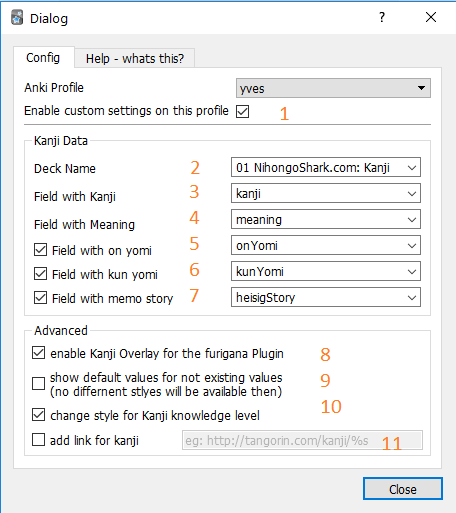
https://raw.githubusercontent.com/fanatic84/KanjiKeywordOverlay/anki2.1/screenshots/DialogBox.png
B.1. Choose the profile and check the checkbox to start customization B.2. Choose your kanji deck, then configure the following field inside your kanji deck : B.3. Choose your kanji field B.4. Choose your keyword field B.5. Choose your on yomi field (optional) B.6. Choose your kun yomi field (optional) B.7. Choose your memo story field (optional) B.8. Enable if the markup {{furigana:Field}} or {{kanji:Field}} are used for display the overlay B.9. Enable if the default english database is used if a kanji is missing in your custom kanji deck B.10 Use colorisation of kanji depending on the level of knoweldge you have of that kanji B.11 Specify an url of the link, when you click on the kanji
C. Customisation
You can change place inside your user_files:
C.1 “styles.css” in order to customize the style
You can customize the style of the overlay by creating a new “style.css” file inside your user_files directory and adding your css override.
For instance:
-
class: unknown will change the style of values found in your deck and not yet reviewed
-
class: kol-missing will change the style of values not found in your deck
-
class: kol will change the general style of kol and kanjis found in your deck and already reviewed
C.2 “template.hbs” in order to customize the overlay template
You can customize the content of the overlay by coping the original template.hbs inside your user_files directory and modify it. You can display any fields from the kanji note inside the overlay. Just add it inside the div with the class kol-overlay.
C.3 “scripts.js” in order to customize the javascript of the overlay
You can customize the behavior of the overlay by coping the original scripts.js inside your user_files directory and modify it.
#-#-#-#-#-#-#-#-#-#-#-#-#-#-#-#-#- CHANGES -#-#-#-#-#-#-#-#-#-#-#-#-#-#-#-#-#-#-#-#-#-#-#-#-#-
v0.3.3:
- Fix issue using multiple profile
v0.3.2:
- Fix kanji coloring not working
v0.3.1:
- Fix issue when selecting parent decks for kanji custom deck
v0.3.0:
- Refactor to make it for anki 2.1.22
- Breaking change: if you use {{furigana:Field}} or {{kanji:Field}} in your template, then you need to change it to {{kol:furigana:Field}} or {{kol:kanji:Field}}
- Update README
- Improve field selection in config
- Improve custom templates: You can now display any field from your kanji note in your custom templates
v0.2.2:
- Refactor to make it for anki 2.1
- Rewrite README to make it clearer
- Add more field on yomi/kun yomi/heisig storyies to be display in overlay
- Add configurable templates, styles and scripts
v0.2.1:
- Add an option to be able to add link that open a configurable url when you click on a kanji.
- Fix an issue where you couldn’t copy / paste kanji without the definition
important:
The css loading has been changed. You have to reload kol on the menu (it will overide your css if you have custom change, make backup !)
v0.2: important:
- name of the Addon-file changed: no space
- 2 new menu items under Tools -> Addons -> Kanji Overlay
- GUI for Add-on configuration added
general:
- 2 new options:
- load default DB in addition to custom
- disable the color-changes for unknown kanji
- if custom database could not be loaded, the default DB will be loaded
- user can also choose to configure the plugin via python-code (option available in the top of the add-on)
in-code-changes:
- split up the big load()-Function into smaller pieces
- added: reload()-function to reload the plugin
- for Debugging: option for always loading the database (even if no changes) is available
- loading of kanji-dictionary does not directly load into the self.kanjidict-variable. It loads to other temporary variables to enable loading of more than only one database at a time
- GUI is connected to anki via the ‘ankiConnection’-class. For the run without anki or any testcases, there is an ‘ankiConnectionMOCK’-class that holds test/default data
misc:
- GUI can also be run independently for easier debugging
v0.1:
- Display Keyword popup
- Use custom Kanji Deck or predefined English Keyword (Heisig)
- Reload kanji keyword dictionnary only if modified
- Change color of the kanji if seen, missing
#-#-#-#-#-#-#-#-#-#-#-#-#-#-#-#-#- THANKS #-#-#-#-#-#-#-#-#-#-#-#-#-#-#-#-#-#-#-#-#-#-#-#-#-#-
- Insperated from the anki v1 plugin of Brian Bush, Thanks !
- The plugin “Local css” for Anki 2 of Roland Sieker, Thanks !
- Big thanks for Ricky for Adding GUI for the plugin, Thanks !
- Thanks for Tyler for the help with some improvements and bug fixes, Thanks !
- Of corse, Damien Elmes for Anki & Anki 2, Thanks !!
Liên kết hỗ trợ
- https://github.com/fanatic84/KanjiKeywordOverlay.g
- https://raw.githubusercontent.com/fanatic84/KanjiK
- https://raw.githubusercontent.com/fanatic84/KanjiK
- https://raw.githubusercontent.com/fanatic84/KanjiK
Reviews (5)
👍 2025-05-19
Anybody have it working past 4/27/2025?
5/19/2025 Today I decided I was going to fix this myself since I really enjoy this addon. Simple fix. In the anki add one page, select Kanji Keyword Overlay (anki 2.1) and click on view files. Open the src folder. Open the KolConfigGui.py file with notepad. Change the PyQt5 to PyQt6. Thats it. Enjoy the addon.
👍 2020-09-28
The location the author named as “user_files” is this.
AppData\Roaming\Anki2\addons21\1582755932\data
👍 2020-07-13
Absolutely incredible and must have plugin for Japanese learners. I am honestly surprised that it is relatively unknown. Thank you so much for your work. Keep it up!
👍 2020-03-26
Great for quick lookups of Kanji while reviewing without resorting to external dictionaries or the browser. Thank you so much.
👍 2020-03-26
One of the best plugins. Use this plugin with https://github.com/Mauville/Koohii2Anki and https://ankiweb.net/shared/info/1600796261. Imported my meaning and mnemonic stories from the site “kanji koohii” and learn words using this plugin. As my progress through vocab decks, gradually adding new kanji meanings to my kanji deck.