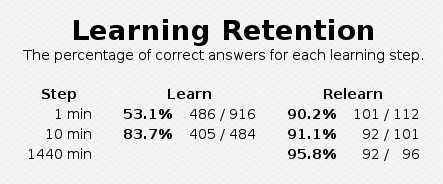
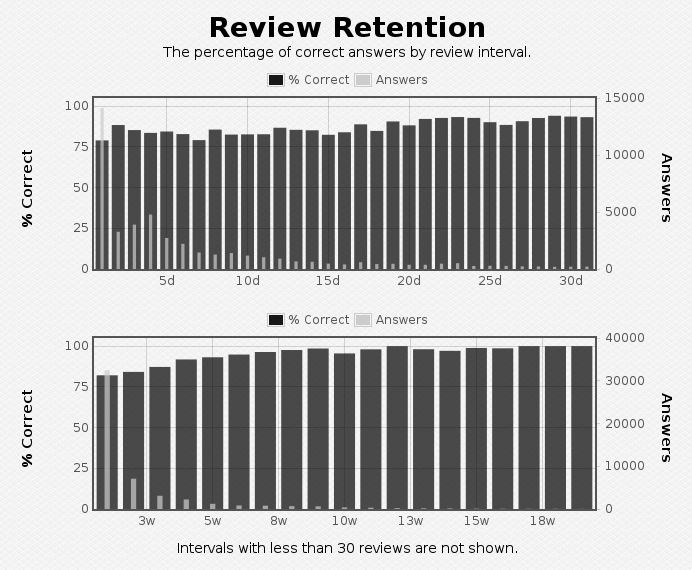
This add-on adds statistics showing the percentage of correct answers for each learning step and review interval. Those can be used to tune learning steps and interval modifier.
Retention is shown separately for learning, relearning and cramming reviews.
Statistics are calculated from the nominal intervals Anki stores in the review history. This means that same-length learning steps are grouped together and reviews are counted for their scheduled interval even if done early or late.
This add-on does not support the new stats in Anki 2.1.28 or later. To access the old stats, hold shift while opening the stats window.
Advanced mode: If advanced mode is turned on, a more complex algorithm is used. It tries to separate successive same-length learning steps and show the first review after graduation as a separate step. It can be slow with collections with lots of reviews, and it is likely to miss some edge cases.
Version history: 2025-08-21:
- Added an option to set the statistics period to any number of days.
2025-04-18:
- Improve compatibility with recent Anki versions by ignoring manual and rescheduled entries in the review history.
- Added a workaround for the bug in Anki that causes some of the graphs to be empty unless a deck is manually selected after starting Anki.
2024-01-06:
- Added an optional graph showing review retention for long intervals. It can be enabled with the hide_review_month option.
- Round learning intervals over 1 day to whole days to match the changes in the v3 scheduler. The old behavior can be restored with the round_steps option. For more details, see the support thread on the Anki Forums.
2022-08-28:
- Improve compatibility with the V3 scheduler. For more details, see the support thread on the Anki Forums.
2022-03-14:
- Support for Anki 2.1.50
- Removed support for translated texts as Anki has not supported them for a while
2020-12-28:
- Add advanced mode
2020-09-26:
- Show non-integer learning step lengths as minutes and seconds
2020-01-12:
- Initial release
Screenshots
Liên kết hỗ trợ
Reviews (24)
👍 2025-04-18
Great add-on that more people should know about, especially those not using FSRS. Understanding at which intervals your retention becomes bad can really help with improving your learning/relearning steps or properly adjusting your interval-multiplier.
👍 2024-01-16
Like it, although I think it became a little bit less useful with FSRS
👍 2023-08-10
By far the best extension on Anki. This has completely taken out the guess work of if the learning steps are too easy or difficult. You should be using long learning steps to avoid ease hell and to better control the initial timing to optimize learning (video explaining https://youtu.be/1XaJjbCSXT0?t=754).
I recommend using this extension with another one from the author that allows better filtering in the stats page (https://ankiweb.net/shared/info/16703369). What I mainly use this for is wh
👍 2023-08-04
So brilliant, so necessary.
You’ve no idea how many hours I’ve spent ripping my hair out trying to work out what my retention was between learning steps, and what changing learning steps was doing to my retention.
It’s funny to me that the Anki community has spent the last year raving about FSRS and using artificial intelligence to design the perfect custom review schedule, but the Custom Schedulers only work on already learned cards. They do nothing to learning or relearning cards. Yet mos
👍 2023-06-28
Super useful in tracking my retention stats.
👍 2023-04-17
Is there a GitHub or other place I can report issues? Please respond with a link if there is or how else we should contact you. Comment from author You can click the Contact Author button on this page to go to the support thread on Anki Forums. I try to answer questions there in a more or less timely manner.
👍 2023-04-02
Works well
👍 2022-09-15
The other add-ons just classify by young and mature. This one here is much more detailed, classifying by days and weeks. Thanks a lot! I’d suggest adding another diagram that classifies by months (up to 48 or 60 months).
👍 2022-08-20
The addon is very useful, but i cant see some of my intervals
For example, in the deck, my learning steps are: 30m 4d. The add-on only shows statistics for the 30m and graduation interval
Please advise how can this be fixed?((
Also, please tell me, does the Review Retention column also display the learning intervals, or only the intervals of graduated cards?
I would be very grateful for an answer! Comment from author Thank you for the bug report! This should be fixed in the latest versio
👍 2021-09-28
thanks!
👍 2021-04-11
Is compatible with both True Retention (613684242) and Progress Graphs and Stats for Learned and Matured Cards (266436365)!
👍 2021-04-01
Should be implemented in Anki
Must have add-on
👍 2021-02-11
Thanks very useful addon!
👍 2021-02-02
really helpful for optimizing anki for my learning! thank you!
👍 2021-02-02
Essential for understanding how our learning is doing.
👍 2021-01-26
This add-on is amazing! When I explained Anki’s algorithm settings to a friend the other day, I told he that one of the few things that have to be set arbitrarily are the learning steps. This add-on changes that. Truly great!
I want to find out whether my “New interval” for lapses is set too high or too low at 75%. In order to do that I can activate advanced mode and look at the “Graduation” number. Is that right? Comment from author Yes, that’s exactly what it is made for.
👍 2021-01-22
Thanks
👍 2021-01-20
Realy useful for tweaking my customized times. Thank you
👍 2020-12-24
Incredibly helpful addon. It clearly shows your memory capacity and see what things you need to tweak.
I have separated my deck options now to show in your add on as different intervals like subdeck 1 has 1441 min, subdeck 2 1442, subdeck 3 1443, 7201, 7202, 7203.
However I cannot find a way how to calculate my graduating interval percentage. Could you help me out? I also don’t understand the lapsed cards column. Because of the many settings I have a few numbers lying there. What does la
👍 2020-11-30
freaking GOLD!
PROBABLY THE FREAKING BEST EXTENSION TO ADJUST LEARNING STEPS / DECK!!!!!!!!!!
👍 2020-09-30
Very useful.
Can the rounding of steps be disabled?
2020-09-26:
My steps are non-integer amount of minutes (because of this add-on). The add-on shows integers. I read the code and thought it’s what Anki gives it, but the add-on still distinguishes them, so I am not sure.
2020-09-30:
Thanks. Comment from author before post was edited What do you mean by rounding of steps? There should be no rounding.
If you mean the somewhat quirky way learning steps are displayed, that’s just how A
👍 2020-05-03
It’s very beneficial to use longer learning steps than default.
See here:
-
https://masterhowtolearn.wordpress.com/2018/10/30/what-i-discovered-from-tweaking-the-anki-setting/
-
https://eshapard.github.io/anki/what-anki-learning-steps-to-use.html
-
https://eshapard.github.io/anki/anki-learning-steps-with-feedback.html
👍 2020-01-13
Excellent add-on for those that use long learning steps (i.e. 1, 2, 3 days).
👍 2020-01-12
The first graph should respect the statistics page filters (1 month, 1 year or always). Overall, congratulations on the addon. Comment from author The graph should already respect those settings. If it doesn’t, it might be a bug caused by some incompatible add-on or too old version of Anki.
Please note that if your performance has stayed about the same over time, the graphs will look very similar regardless of the selected time span. The scale on the right side of the graph should still chang
