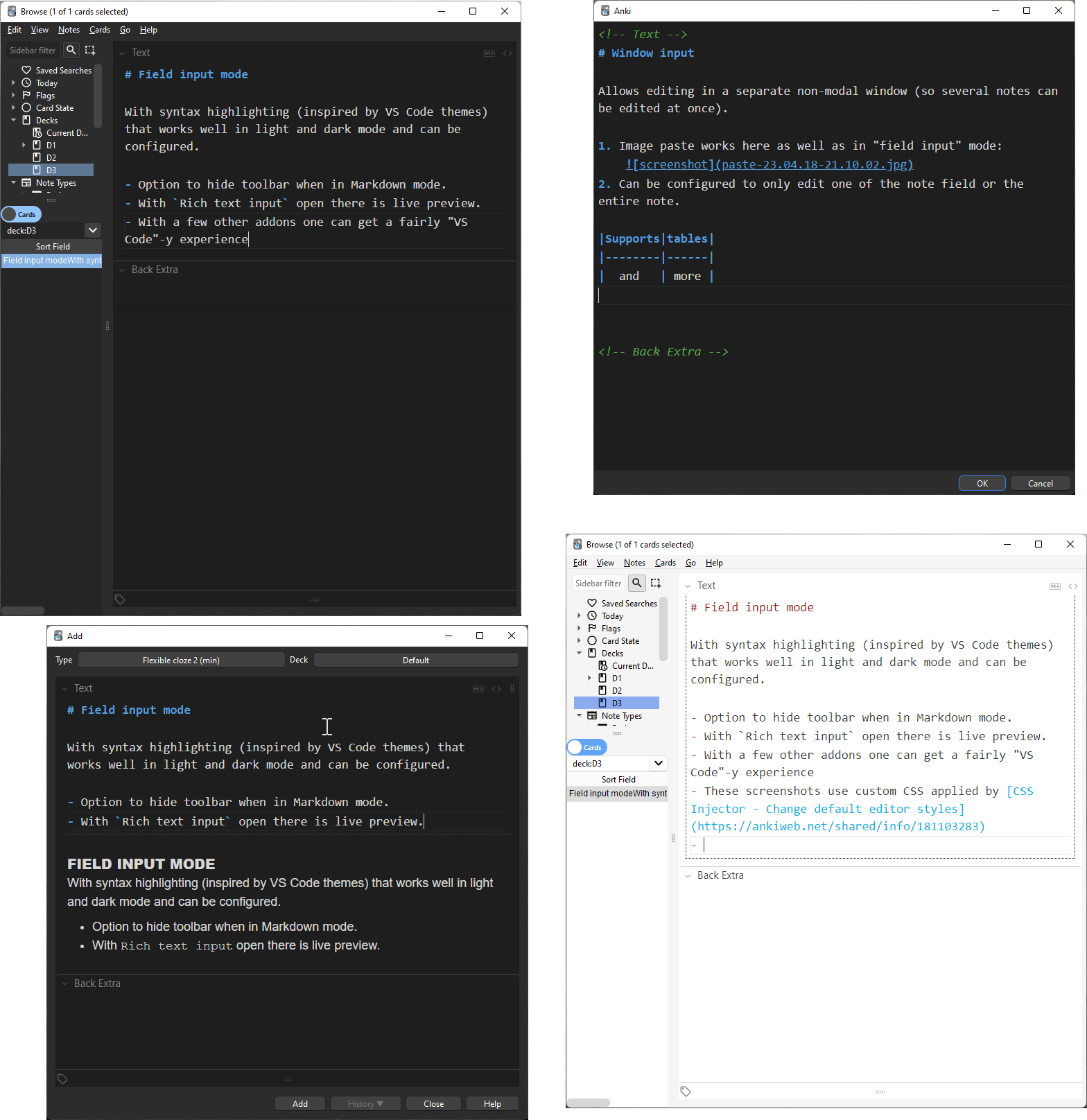
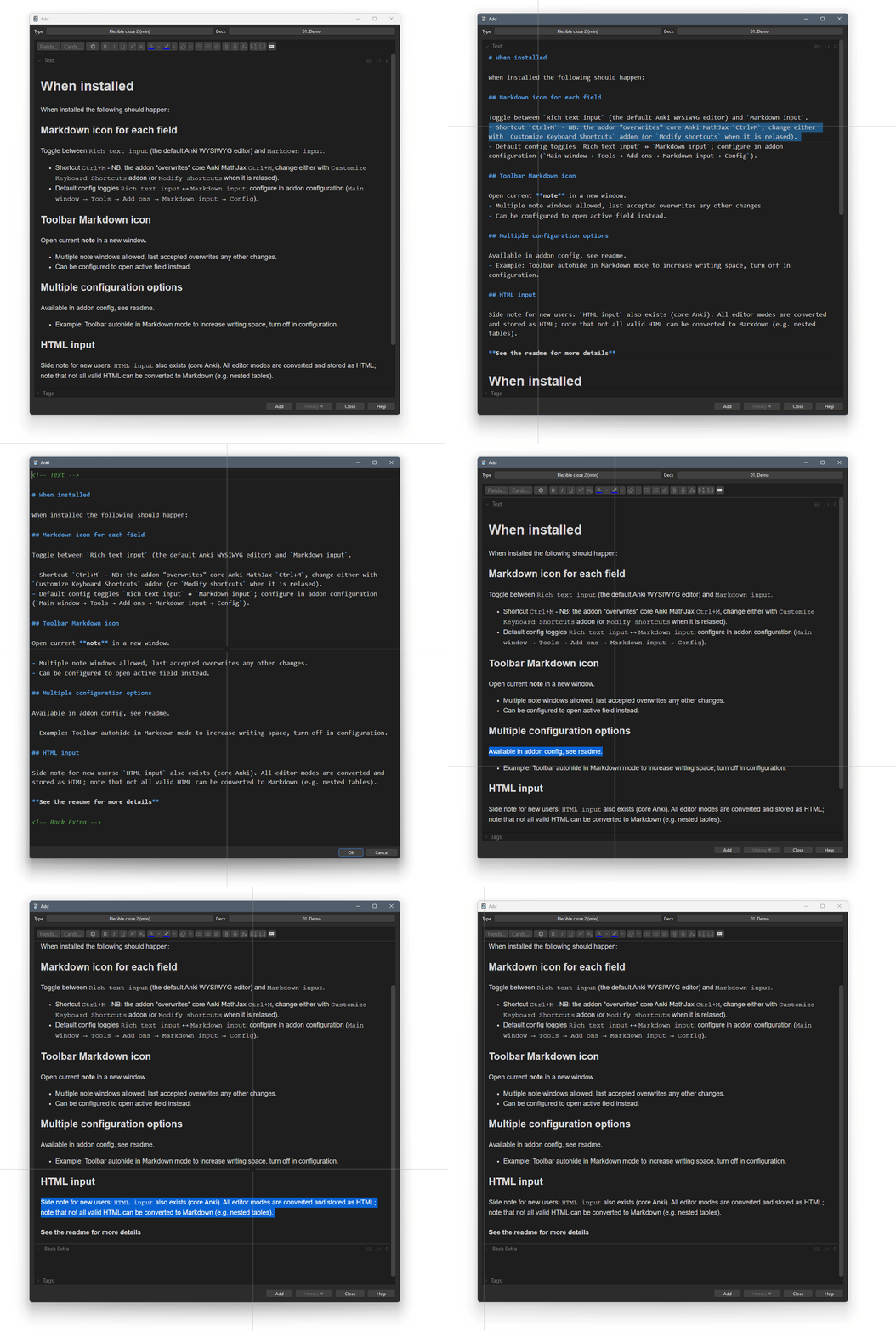
MARKDOWN INPUT Anki (GitHub) addon (GitHub) that allows adding and editing notes in extended CommonMark Markdown, either directly in the editor fields (“field input mode”, similar to the core rich and plain text edit interface) or by opening a separate window to edit a specific field or the entire note (“window input mode”).
ANKI VERSION NOTE (2.1.56+) The editor DOM and internal functioning which Markdown input depends on changed in Anki version 2.1.56. Therefore support for < 2.1.56 has been abandoned but the last version remains available (Branch 1) which corresponds to release targeted at 2.1.55. Going forward no updates/fixes will be made to the legacy code, any development/bug fixes will be in the 2.1.56+ code (Branch 2).
WARNING
Markdown is not “another way to write HTML”, it is a plain text format that has a determined translation to HTML (the format the Anki editor uses). The HTML generated is a subset of all HTML and, amongst other things, makes heavy use of <p> tags (which are not used by the Anki editor). Furthermore there is no spec on the conversion from HTML to Markdown. This makes conversion tricky and there is risk for loss of information when cycling HTML → Markdown → HTML.
Editing a field in Markdown will result in the original field HTML being converted to Markdown and then back to HTML - the end result may differ from the original (especially in case of complex HTML). For instance, the representation of tables does not allow for nested tables in Markdown. So if the original HTML has nested tables these will be lost on cycling. If you are not familiar with Markdown consider duplicating your deck and play around with a copy so that you are sure you know what you are doing.
Note however, that if you do not make any changes in the “field input mode” or cancel the “window input mode” the orginal Anki HTML will remain untouched when you toggle back. Also note that in field input mode making a change and then undoing will still count as “making a change” (changes update the HTML continuously).
If you are not familiar with Markdown look it up where it began or here or here for instance, to determine if it is for you.
HTML ↔ MARKDOWN Conversion to/from HTML is done through unified Markdown functions hast-util-from/to-html hast-util-to-mdast/mdast-util-to-hast and mdast-util-to/from-markdown which are CommonMark compliant. The following changes/extensions has been made in the addon:
Markdown uses <p> tags to mark paragraphs, these are replaced with <br> tags instead to match the Anki editor.
Markdown has a concept of lists being “tight” or “loose” which results in list items being wrapped in <p> tags or not. This has been replaced with HTML .markdown-tight or .markdown-loose classes to allow styling, example:ul.markdown-loose > li, ol.markdown-loose > li {padding-top: 10px; padding-bottom: 10px;} ul.markdown-tight > li, ol.markdown-tight > li {padding: 0px}
Spec <em>sample</em> (sample) and <strong>sample</strong> (sample) are swapped to <i> and <b> to match the Anki editor.
Markdown syntax extensions (set to true or “some vale” to enable, false to disable):
Subscript: true for sample subscript
Superscript: truefor ^sample^ superscript
Underline: true for sample underline (spec Markdown is <em>, disable to revert to spec).
Strikethrough: “double” for sample strikthrough (“single” supports single tilde, incompatible with subscript above).
Inline media: truefor Inline Media directive, e.g. :audio(im-xyz.ogg){loop auto_front}/:video(im-xyz.ogg){loop auto_front height=200}.
Definition lists: true for Defintion lists (not available in the core Anki editor).
Table stle: Table syntax, “gfm”/“extended”:
GFM table syntax
| A | GFM | | :---- | ----: | | table | ! |
Extended table syntax - GFM style extended to allow headerless tables (no <thead> generated):
| :—: | ----: | | A | table | | with | rows |
Table newline: Symbol to replace hard line break (<br>) inside table cells (newline characters are normally not allowed inside Markdown table cells)
fences: Optional fencing pipes (i.e. at start and end of each row).
Align none, left, right and center as per GFM format.
EDITOR The editor used is CodeMirror 6 with the following configurations:
Markdown syntax highlighting and auto fill (continue lists, autoindent etc.).
Undo history.
Multiple drawable selections.
Search and replace, Ctrl+F, note: the Anki editor eats Ctrl+F, set to other shortcut in config or remap the Anki editor shortcuts with Customize Keyboard Shortcuts or similar.
Insert cloze deletions
Cloze without increment: Ctrl+Shift+Z - For some reason I am unable to get Ctrl+Alt+Shift+C to work (the default Anki keyboard shortcut)
Cloze with increment: Ctrl+Shift+c (with multiple selections this will cloze each incrementally)
If you feel the cloze deletion tags end up in the wrong place please make sure you understand how Markdown is converted to HTML (notably line breaks and empty lines).
Allows image pasting in the same way the “rich text input” does.
Customize the editor styling by copying cm.css into user_files subdirectory and customize. Consider using —var(xyz) to use the Anki colors from the current theme (i.e. follows light/dark mode).
Customize Markdown input editor shortcuts (i.e. inside the field/window, not the core Anki editor) in config.json, see config.json and CodeMirror documentation for further information. Available functions to map are all in “@codemirror/commands”, “@codemirror/search” and custom commands clozeNext, clozeCurrent, joinLines.
Configurable search/replace default options (caseSensitive, regexp, wholeWord).
Field input mode
Configurable default state for editor fields (rich text, markdown or rich text/markdown, default rich text).
Configurable behaviour of “field input mode” shortcut, cycle between rich text and Markdown (true) or just toggle Markdown input (false). (default true)
Configurable shortcut to toggle rich text input. (default Ctrl+Alt+X)
Configurable shortcuts to move to next/previous input (since tab is a valid Markdown character it will not work to “tab out” of a markdown input). (default Ctrl+PgDown and Ctrl+PgUp)
Configurable option to autohide editor toolbar when focusing Markdown input (to increase available space). (default true)
Window input mode
Configurable window size (parent, last or WidthxHeight, default parent)
Configurable note editing mode, either the entire note (i.e. all fields) or current field. In note editing mode the fields are separated by HTML comments (e.g. <!— Front —>) and content will be inserted into the correspondingly named field. (note or field, default note)
CONFIGURATION
“Field input mode” can be configured under Field input, note that the default shortcut, Ctrl+M conflicts with Mathjax shortcuts, remap one of them.
“Window input mode” can be configured under Window input.
HTML ↔ Markdown conversion configurable under Converter. See mdastToMarkdown for Markdown format options.
Editor configurable under CodeMirror. See CodeMirror documentation how to configure.
Default Anki behaviour is to use the entire sort field text in the Browser table, Browser sort field option (default true) instead uses content of first level 1 heading (if existing).
Note that Anki shortcuts grab key sequences before they reach the CodeMirror editor, use Customize Keyboard Shortcut or other addon to change the Anki shortcuts as needed. At the time of writing Customize Keyboard Shortcut hooks into the Qt/Python for the cloze shortcuts. This means they never reach CodeMirror so unmap (<nop>) them in Customize Keyboard Shortcut (the new Anki editor grabs the shortcuts on the JavaScript side).
To customize the look of the finished HTML apply custom CSS styling (for instance of <h1/2/3/etc>, <table> <ul/ol> etc.) to the note template.
To customize the look and feel of the editor, make a copy of cm.css (styling of CodeMirror and syntax highlighting) into a user_files subdirectory in the addon directory and modify that file (it will be given precedence and not be overwritten on addon update).
SUGGESTED COMPANION ADDONS To achieve a note editing friendly interface consider using:
CSS Injector - Change default editor styles to modify the editor interface for smaller margins, for instance something like this will give a slicker, VS Code inspired, editor interface: /* editor.css */ div > div.editor-field { border-radius: unset; border: none !important; box-shadow: none !important; padding-left: 10px; padding-right: 10px; padding-bottom: 5px; } div:not(:nth-child(1)) > .field-container { border-top: 1px solid var(—border); }
.editor-toolbar .button-toolbar { border: none; padding: 7px 7px 0px 7px; margin: 0px; }
.editor-field { —fg: #3b3b3b; —selected-bg: #ADD6FF80; } .night_mode .editor-field { —fg: #d4d4d4; —selected-bg: #ADD6FF26; }
body { —fg: #3b3b3b; —canvas: #ffffff; —canvas-elevated: #ffffff; —border: #CECECE; —border-focus: 1px solid #3794ff; } body.night_mode { —fg: #858585; —canvas: #1e1e1e; —canvas-elevated: #1e1e1e; —border: #474747; —border-focus: 1px solid #3794ff; } and /* field.css */ anki-editable.night_mode { color: var(—fg); font-size: 18px; }
Sidebar table to move the note/card table to the side for increased editing space, esp. with Markdown input“Autohide toolbar set to true Browser Maximize/Hide Table/Editor/Sidebar to toggle hiding the sidebar with a keyboard shortcut (e.g. Ctrl+Shift+B) DEVELOPERS Functionality split into different classes to facilitate reuse: anki-md-html: library which converts Anki style HTML ↔ Markdown. CustomInputClass encapsulates adding an editor to the Note editor fields. Editor encapsulates the CodeMirror editor. CHANGELOG 2022-08-27: Add image paste support, prevent focus from being stolen on focus in/out, bug fixes. 2022-10-16: Make window mode non-modal (and allow multiple windows open), add Ctrl-Shift-j to join lines, make inline Markdown syntax configurable, make several options configurable, bug fixes. 2022-11-20: Ma
Screenshots
Liên kết hỗ trợ
Reviews (28)
👍 2025-08-19
As of Aug 19, 2025, doesn’t work on MacOS. As other reviews have stated, when saved, the back of the card is empty.
👍 2025-08-02
Not working! I’ve opened the back side of the card as markdown, made some changes, saved it, and the text on the back side was erased. v. 25.07.3 (65b5aefd)
👍 2025-07-27
Not working on macOS, “back” does not work.
👍 2025-07-07
MD Input only works for front not back (Linux - newest version)
👍 2025-05-20
Nice addon, but “Field input mode” doesn’t work on latest version 25.02.05 on MacOS. Use 24.11 version.
👍 2025-04-10
I like this add-on very much. I would love if you could add support for block quotes and footnotes as well, because I’m making a markdown deck, but not all features work.
👍 2024-06-23
Thank you!
👍 2024-04-20
Exactly what I needed to more efficiently copy markdown notes from obsidian while carrying over formatting, thank you!
👍 2024-04-17
Thank you for this addon. Works well on Anki Version 24.04 (429bc9e1) Python 3.9.18 Qt 6.6.2 PyQt 6.6.1, but I do not know whether it is intended or not, but changing configs via Config button in Anki’s “Add-ons” window changes meta.json file. config.json file seems to be unused.
👍 2024-03-24
Very useful complement. The developer has done a tremendous job.
👍 2024-02-04
Very good and practical, highly recommended.
👍 2024-01-13
My favorite addon, but if you set "Default field state": "markdown", when you go to add a new card it will always focus the last input field.
👍 2023-12-25
Only one that I have found useful in anki/obysdian sync.
👍 2023-11-20
Great addon. I am surprised that Anki apps don’t come with Markdown support built in by default. This addon comes to the rescure.
👍 2023-11-14
Great addon ! Thanks ! Is there a way to create a keyboard shortcut to turn selected word in bold for instance ?
👍 2023-10-19
Great addon
👍 2023-10-07
very useful and convenient.worth downloading
👍 2023-09-07
very useful
👍 2023-08-01
Works good, looks nice
👍 2023-07-23
Very useful :). Is it possible change font size in input form where we type markdown code? Comment from author Thanks, to customize the look and feel of the editor, make a copy of cm.css (styling of CodeMirror and syntax highlighting) into a user_files subdirectory in the addon directory and modify that file (it will be given precedence and not be overwritten on addon update).
👍 2023-06-22
Great!
👍 2023-05-10
This is an elegant, useful addon. I recommend it.
👍 2023-05-05
works Great, and a built in preview for markdown makes it very easy. much easier if you know markdown
👍 2023-04-12
Fantastic! Works well and so much easier than typing HTML.
👍 2023-03-26
At least a good way to use Markdown with anki
👍 2023-01-18
I love this addon, If you know just a bit of markdown, you can write and “modify” faster than before
👍 2022-12-21
Yes! It is the version that is all fine! It seems to work normally now. Comment from author before post was edited Ok, I have reworked some of the Svelte code interface, it works for me in a VM Ubuntu 22.04 LTS, let me know in the support thread if it doesn’t work for you.
👍 2022-09-12
The button to enable markdown is no where to be found for me. I also have Image Occludion and Syntax Highlighting which adds 2 more buttons so it might somehow broke your add-on. I have to Ctrl-Alt-M to open and edit notes. Waiting for an update.
Also you might want to change supported versions to 2.1.55+ instead of 58 :) Comment from author Ok, button and badge added (as well as some other behaviour).
