Differences from the “Free weekend” addon
This addon is heavily inspired by the “Free weekend - or Any Other Day” addon (accomplishes a similar task, but works completely differently - can also be used together).
As the former only works with newly learned cards (cards already in review won’t be affected), does not work with mobile apps, and might conflict with other add-ons that change the Scheduler behavior.
This add-on aims to solve these shortcomings by instead of patching the Scheduler, it reschedules already scheduled cards.
Thus, it will also work for someone who uses both AnkiMobile/AnkiDroid and Anki desktop, and for someone who already has many cards scheduled for the future.
It can seamlessly be used together with the “Free weekend” add-on linked above, as well as other add-ons that affect the scheduler (for example, LoadBalancer).
Addon description
Do you want to take a break from doing your Anki reviews without having them pile up on the weekends, holidays or a vacation? Or do you have specific days on the week when you’re too busy to do the reviews? Then this add-on is the solution to your problem!
It works by re-scheduling the already scheduled cards anytime by moving them either before, or after the specified days. By default, the intervals never change by more than 10%, or by 7 days in any case.
Compatibility with mobile apps and other addons
This add-on plays well with mobile versions of Anki (AnkiMobile/AnkiDroid), assuming that the user also uses the desktop version, as the cards scheduled on mobile will be moved away from the specified days when the rescheduling is run (with Ctrl+Shift+r), or at every startup if run at startup is chosen at configuration options.
The add-on does not directly modify the scheduler, but instead reschedules already schedules cards, so it should play well with addons that patch the scheduler (for example, load balancer), but this is untested.
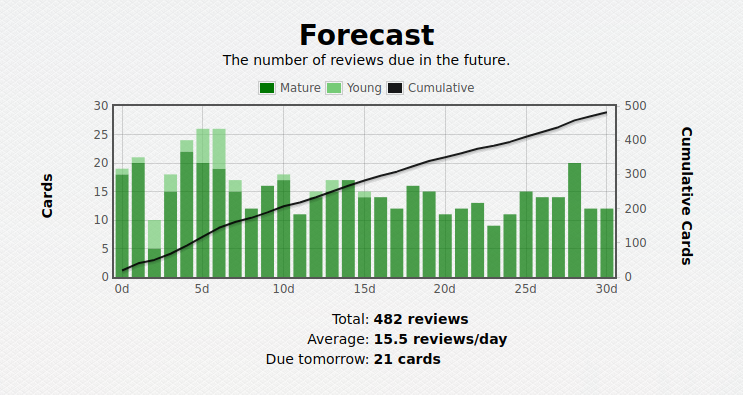
Images Before using the add-on reschedule:
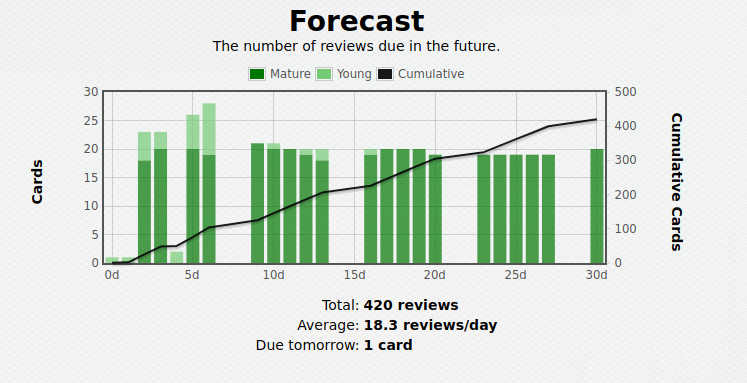
After:
Usage and configuration
By default, the add-on will free up the weekends and nothing else. However, this behaviour can be changed to move the reviews away from specific dates and/or any day of the week.
Config can be edited in the Tools -> Add-on(Ctrl+Shift+A) -> Move Reviews from Weekends and Holidays. Make sure to restart Anki after editing the configuration.
Once you’ve set the dates and days of the week that you want to free up, you can use the shortcut Ctrl+Shift+r (by default) to reschedule the cards.
Bug reports and source code
The source code is accessible at: https://github.com/vasarmilan/AnkiWeekendsAndHolidays
Please submit bug reports here, if you encounter any problems. PRs are also welcome.
Screenshots
Liên kết hỗ trợ
Reviews (15)
👍 2024-09-27
Works perfectly
👍 2024-03-30
Great tool. Only wished it was possible to revert the changes made through the add-on and maybe have a little user interface instead of the configuration page.
👍 2024-03-09
It’s great but you need to warn people that since the deefault days affected is 365 that means all reviews are set to weekdays (or whatever you want) for the next whole year. You can undo it, just restore from backup. I think that I might just create a backup and store it on my computer while I go on holiday to back up since it’ll be like I never left. Good add on though
👍 2024-01-05
This Addon has done Anki Magic for me! Without it, I would never have been able to make a streak of over a full year of Anki. You have to be careful about the days you free up, since it cannot be undone. As always before updating Anki, check if your preferred addons are supported by the newer Anki version! That said, I would love to update to anki 23.10 if the addon was supported.
👍 2023-11-11
hello, i instaleed this add on to my anki but it dont want work with my anki at all. i tried to configure it but this did not help. add on did not change dates repetition
👍 2023-07-16
Is there a way to undo the scheduling? I input some dates to reschedule and it worked, however, I need to undo it. I deleted the dates in the code, used ctrl+shift+r to apply it, reopened my anki, but it did not undo the scheduling. I am hoping to get the normal schedule back if possible. Do you know how to do this?
👍 2023-06-09
Very Good Add On.
I’d just say for those using it that it’s important to know that there’s no way to undo it once you run it s make sure you read the add on page and have adjusted the settings to what you want.
👍 2022-04-21
Mega Nice! Works well on Version 2.1.44. Thank you so much for this add on!
👍 2022-02-10
Is there a way to undo the scheduling? I input some dates to reschedule and it worked, however, I need to undo it. I deleted the dates in the code, used ctrl+shift+r to apply it, reopened my anki, but it did not undo the scheduling. I am hoping to get the normal schedule back if possible. Do you know how to do this?
👍 2021-09-26
this is the config for this Addon but this was not working at any time. (Anki version is 2.1.48 )
{
“dates”: [
“1970-01-01”
],
“execute_at_startup”: 0,
“max_change_days”: 7,
“max_change_percent”: 10,
“max_days_lookahead”: 365,
“shortcut”: “Ctrl+Shift+r”,
“weekdays_skip”: [
5,
6
]
}
👍 2021-08-17
This addon deserves mucho more positive reviews!! It´s amazing. Great work from the developer!
👍 2021-07-13
I was looking for a way to implement the Free Weekend add-on to mobile. This seems to be the answer. Thank you!
I have a question, though. After cmd+shift+r’ing (rescheduling cards), is there a way to cmd+z, i.e. revert the rescheduling? I haven’t done it yet, but I worry that once I do it, the daily load for weekdays will be too much to handle. Or, better say, I want to be able to have a safety net of reverting. A workaround that occurred to me was backing up and re-loading the backup in cas
👍 2021-01-03
Awesome addon, works perfectly!
👍 2020-10-25
Like the idea ( please explain a little more on the description, I am new to anki and still learning about cool addons and feature like this)
- I have been playing around with the addon. I was trying to skip a day, the thing is it did it to all my decks. Is there a way to choose the preferred deck? like free weekend? Comment from author Hey!
Thanks for the feedback! There is no way to do that currently. I originally developed the add-on for personal use, and I use it to free up days in all d
👍 2020-10-19
Awesome add-on!!! Comment from author Thanks :)
