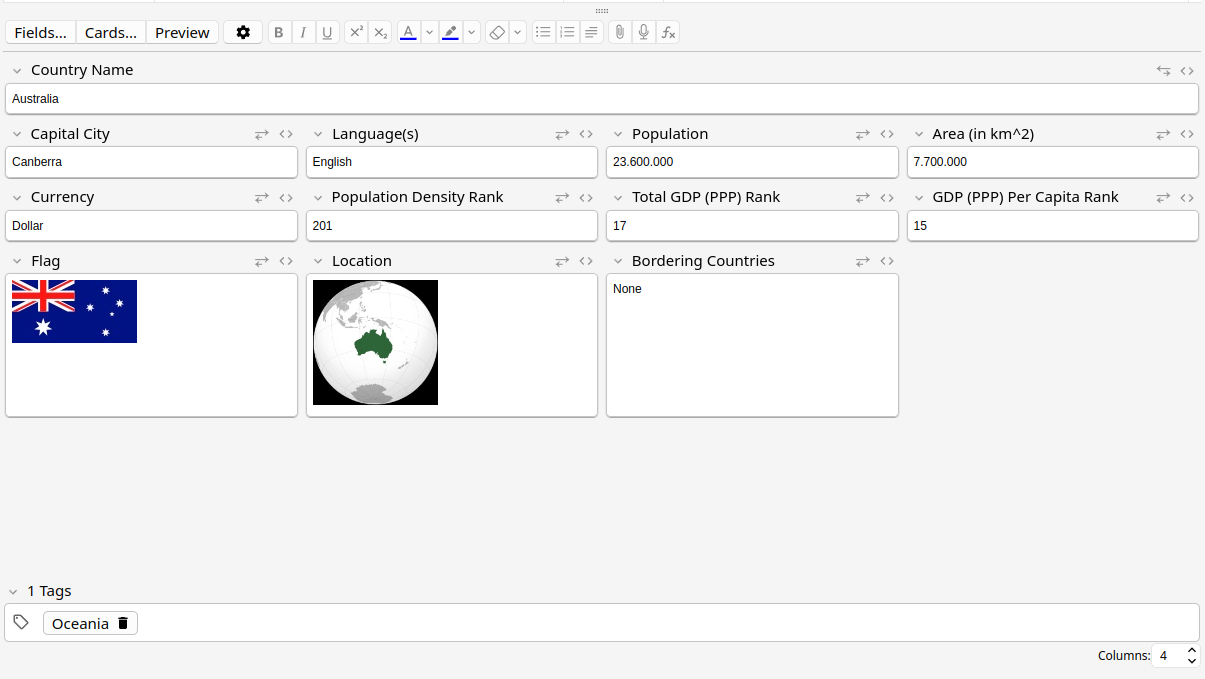
Change the note editor to see your fields inside multiple columns. A new input box at the bottom of the window allows you to easily and quickly change how many columns you see. Each note type can have its own custom number of columns, and any field with a lot of content can be toggled to take up a full line again.
— Changelog —
1.5 - (2025-10-20)
More fixes for field height stretching. No longer breaks with PgUp/PgDown and fixes (subtle) inconsistent border shadow clipping.
1.4 - (2025-10-16)
Improve field height calculation. Fixes some fields getting cut off.
1.3 - (2025-01-15)
Proper support for multiple windows with an editor open at the same time (and fix crash when closing one of them) Fix excessive config saving on load
1.2 - (2025-01-14)
Fix positioning of expander when “Show Duplicates” button is visible Add an animated outline on the field when expanded/contracted to easily see where it moved to
1.1 - (2025-01-01)
Fix tabbing order to match the visual order instead of original order Expander button now colored when expanded (matches the code expander next to it) Fix a very minor bottom border protrusion (1px) on some fields
Screenshots
Liên kết hỗ trợ
Reviews (6)
👍 2025-05-06
ABSOLUTE LIFESAVER!!!! i was looking for such a layout for a very long time now, and i just happened to come across it on this link: https://forums.ankiweb.net/t/looking-for-addons-that-simplifies-multiple-fields/55963
thank u so, so, SO MUCH!!!
👍 2025-03-25
Very useful! Thank you for making this!
👍 2025-02-08
works great
👍 2025-02-05
Love it. Thank you!
👍 2024-12-26
Absolute huge thumbs up! This is a beautiful and useful add-on for anyone who has many fields within a note. Thanks @hssm.
👍 2024-12-22
Great work!👍️
