The add-on can be used to perform multiple similar searches at once, for example, by searching for cards using a list of words or some text as input.
👷♂️ My Freelance Services – Anki Decks & Bilingual Audiobooks
For more information, please see my personal page at https://kelciour.notion.site/Home-14b745ea2520800cbd92ed43718202b6
It’s been developed for Anki 2.1.49 and may not work with the latest version, but it appears to be working fine with the latest version (Anki 24.06.3).
I’m not very familiar with Anki’s codebase and how Anki works under-the-hood, but after a bit of testing the add-on seems to be working fine for me, but there might be some minor bugs that were left undetected or maybe the add-on doesn’t play well with some other add-ons. Any bug reports or suggestions will be appreciated but at the moment I probably won’t be interested to spend time to update and improve the add-on.
In theory, it should produce similar results when searching for cards in Anki manually one by one or at once using OR syntax - https://docs.ankiweb.net/searching.html.
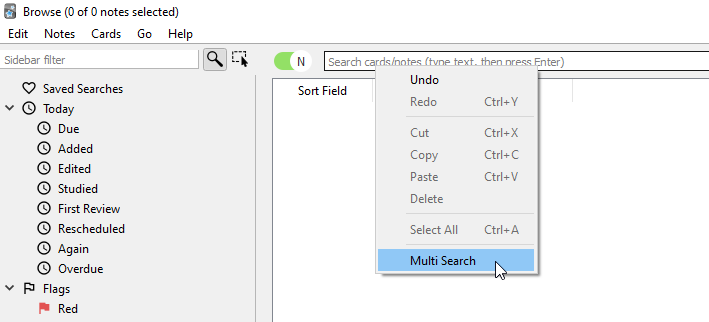
The add-on is accessible from the search box’s context menu.
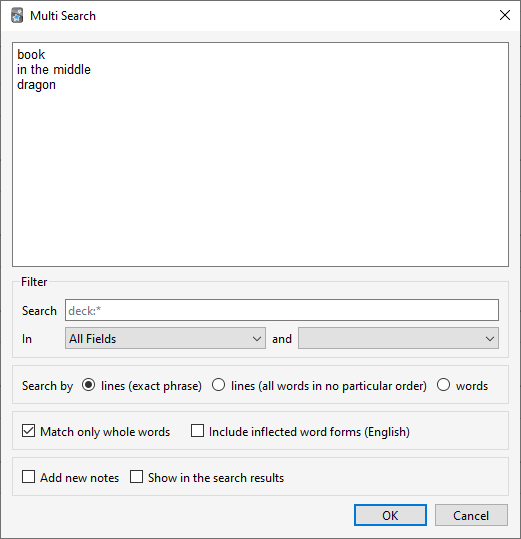
The input can be a list of words or phrases separated by lines (search by lines) or some sentence or text (search by words). The search results can be filtered by field or by search. The search filter will be empty or contain the same text that was in the browser.
- Search by “lines (exact phrase)” might be unsuccessful and find nothing if it’s been separated by HTML tags and it’s not in a sort field.
Anki is only able to search within formatting in the sort field you’ve configured. For example, if you add “example” to one of your fields, this will not be matched when searching for “example” unless that field is the sort field. If a word is not formatted, or the formatting does not change in the middle of the word, then Anki will be able to find it in any field.
https://docs.ankiweb.net/searching.html#searching
After pressing Ctrl+Enter or clicking OK, the add-on will perform multiple searches and build the list with results.
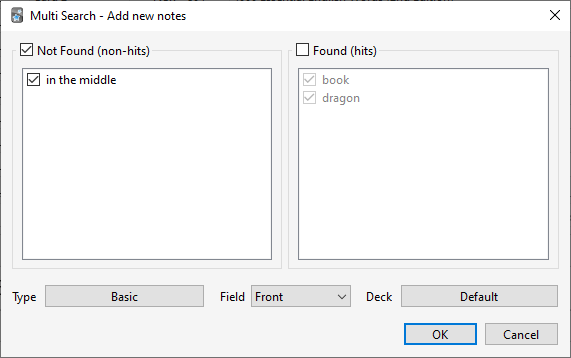
If “Add new notes” was selected, a new window will appear first that can be used to add new notes with the search terms.
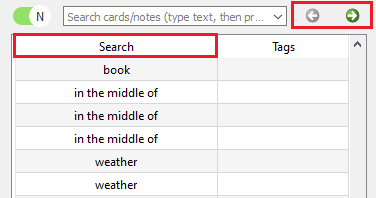
Then the browser window will be modified a bit. There will be a new column (Search) and two arrow buttons.
The browser will contain all searches with at least one result. To view each result separately, use the arrow buttons.
The same note might appear more than once in the browser if it was found by different searches. It looks like any modifications to one of these notes will be noticed by Anki and updated appropriately.
The Search column and two arrow buttons will be hidden after searching for something else in the browser.
Credits
https://github.com/tomaarsen/Inflex
> The Inflex module is a rule-based morphological analyser and generator. It allows for conversions of any noun, verb or adjective to a specific wordform such as singular, plural, past, past participle or present participle.
— N. <kelciour@gmail.com>
Screenshots
Liên kết hỗ trợ
Reviews (11)
👍 2025-12-24
Such a great addon! Save me a lot time to check duplication before making a card. Simple, effective, easy to use. These are the best addon’s attributes. That’s it!
Btw, I came here from the Author’s another addon (https://ankiweb.net/shared/info/1024335436). It does well in the special field.
👍 2025-07-07
Add-on is amazing! Saves me so much time when I’m looking for the new words my students learned that day in class. Adding a button next to the search bar would be helpful.
👍 2025-05-06
Useful extension! Works well in version of Anki (25.02). I had a list of over one thousand words that I had to search up and suspend in my new premade deck because they were words I already learned in my old deck. I used this extension to mass suspend them all at once.
👍 2025-01-29
best search addon
👍 2024-09-26
You just saved me many many hours of my life. For that, I greatly thank you. ありがとうございます!!!!
👍 2024-09-26
Can you add a “delete” function to this as well? to delete the words/phrases searched via multi-search? There is only search & replace in Anki. No search & delete. Pleaaaasseee _/_ I love this add on. Where’s you koffee? Comment from author Thank you! I added back the link to my coffee page, but I won’t be able to add the “delete” function, because the notes can be already removed after doing multi search by selecting all the notes in the browser and using the existing action in the context m
👍 2024-09-20
beautiful
👍 2024-09-17
I’ve been using it on latest Anki (24.06.3 as of now) and it’s been working great for me!
👍 2023-12-07
modified rating, because it is really useful. Comment from author before post was edited > Hey! Why do you update it every day?
I was asked to update it, fix a bug and add new features, in return for a few cups of coffee.
👍 2023-06-29
Looks like the Contact Author button just reloads this page so I will make a feature request here. It would nice to be able to show a list of words that were NOT found, that way you can see what words out of a list need to be added to Anki
👍 2022-03-11
I’ve been looking for an add-on that lets me search texts in my cards effortlessly. I’ve just installed the add-on. I hope this one works fine. Thanks!
