UPDATED VERSION OF https://ankiweb.net/shared/info/379383283 to work with the new render options Not compatible with mobile versions, unfortunately :(
If you have any questions, please post to https://forums.ankiweb.net/t/multiple-choice/1668 and I will do my best to help you.
Removed the option to select multiple correct answers due to update to how cards are rendered. Will add in future update.
This plugin lets you add multiple choice cards to Anki. These choices will be randomized.
How to use:
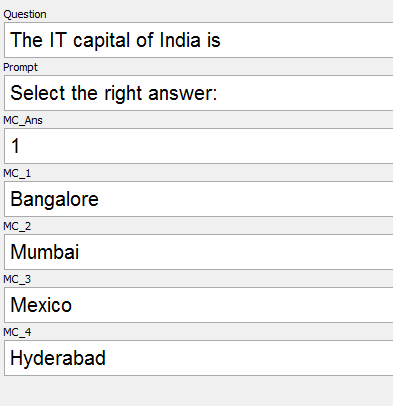
- Make a note with the following fields: MC_Ans, MC_1, MC_2, MC_3, … (can have as may MC_#s). [ANKI 2.1 UPDATE: MC_Ans, MC_1, MC_2, etc. are configurable.but must retain the numbers. MC_Ans is changeable, and you can change the prefix for MC_1, MC_2, etc. For example, if you change it to Option then your fields must be Option1, Option2, etc. ] MC_Answer should have which MC_# has the right answer. For example, if MC_2 is the right answer, then MC_Answer should have 2.
The right answer is Bangalore, which is in MC_1, so MC_Ans is 1. Only the fields starting with MC are essential. You can add as many other MC_# fields as you wish.
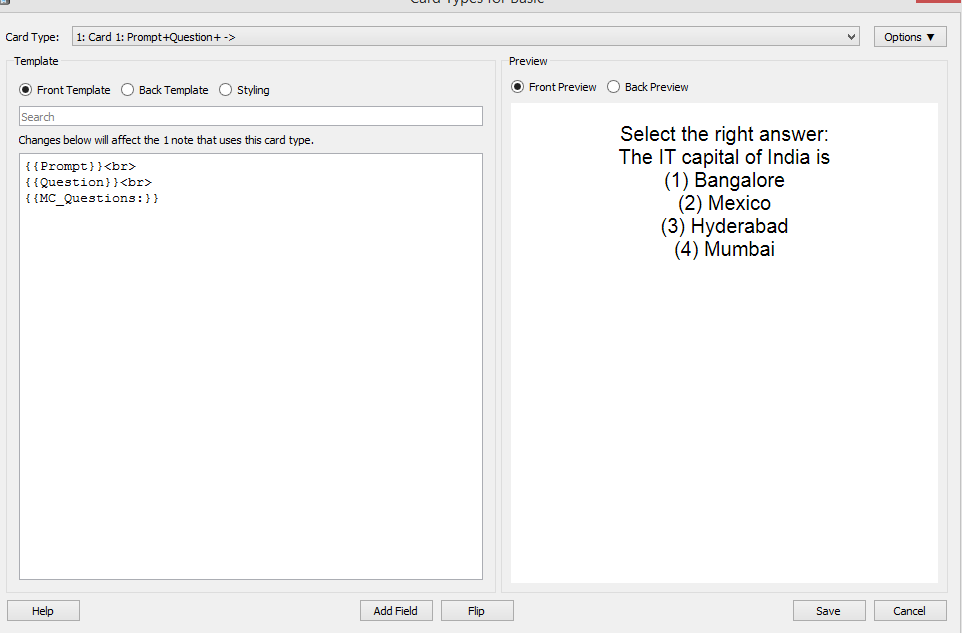
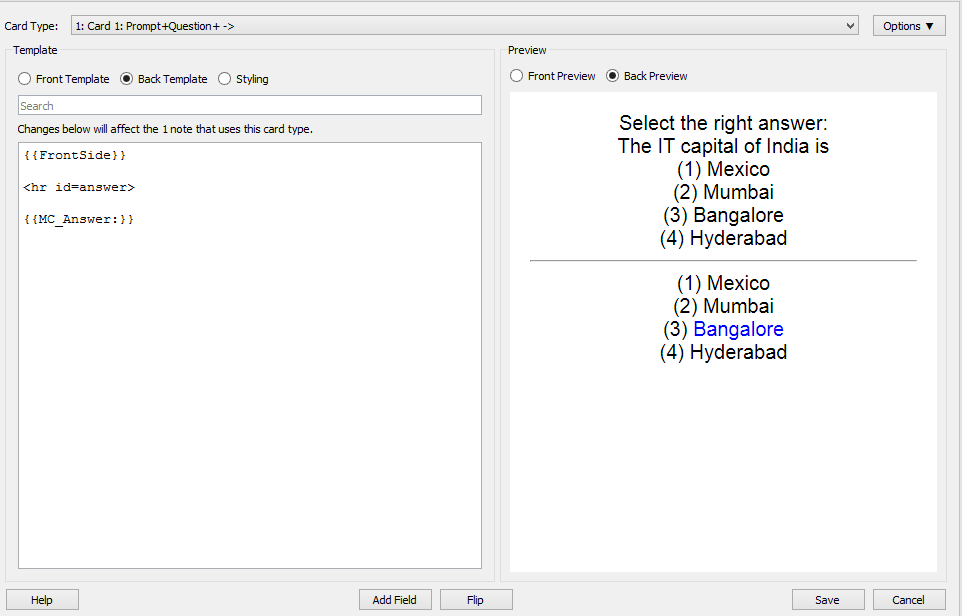
- Make a card with {{MC_Questions:}} [ANKI 2.1 UPDATE: Also configurable] where you want the questions to appear, and {{MC_Answer:}} [ANKI 2.1 UPDATE: Also configurable] where you want the answer to appear. NOTE: YOU MUST HAVE THE COLON (’:’) AT THE END OF THE TWO FIELDS
Note that you do not have to have any of the MC_# fields. Also, note that the answer choices are randomized - they will always be randomized.
- The end. If you want to change the format of the correct answer, edit the file.
How this works, in case you’re interested: It uses filters to replace {{MC_Questions:}} with a shuffled list of the multiple choice options. Then, when it renders the answer, it looks at that list, finds the answer, and then replaces the answer with the SAME list, but the answer highlighted.
Screenshots
Liên kết hỗ trợ
Reviews (30)
👍 2022-10-09
Works great and easy to use.
Only downside is that it is not compatible with AnkiWeb / iOS version.
👍 2021-12-17
Works wonderful! Thank you!
👍 2021-05-23
Use https://ankiweb.net/shared/info/1566095810 instead!!!
👍 2021-03-20
i’ve used this for a while and it’s actually good. but can you randomise multiple (2 or more options in one box ‘Q_1’, for example).
Question: Find the answer
Q_1
answer A
Q_2
answer B
Q_3
answer C or answer D or (answer D or answer C)
Q_n…
👍 2021-03-19
Formating
👍 2021-02-10
Works for me without problems until now (versions > 2.1.13)
For older 2.1.x versions try the
Add-on Multiple Choice (for Anki 2.1) (download-code 843236755)
PS: Make sure you use the correctly spelled !MC_x! field names.
Also make sure your are using the correctly spelled “fields”
on the card: !{{MC_Questions:}}! and !{{MC_Answer:}}!
👍 2021-01-13
Other users: Make sure to make a test card and follow the instructions given on the page before you dive in. The set up isn’t painful, but it’s true the add-on doesn’t work straight out of the box.
To the author: Very well done!
👍 2021-01-01
Got the error:
Error
An error occurred. Please start Anki while holding down the shift key, which will temporarily disable the add-ons you have installed.
If the issue only occurs when add-ons are enabled, please use the Tools > Add-ons menu item to disable some add-ons and restart Anki, repeating until you discover the add-on that is causing the problem.
When you’ve discovered the add-on that is causing the problem, please report the issue on the add-on support site.
Debug info:
Anki 2.
👍 2020-11-19
Works like a charm, thanks. Randomized positions of the answers would be nice.
👍 2020-10-14
Does an amazing job! Thanks :)
👍 2020-10-07
Can someone share their card type via google drive for the people that don’t understand all the steps?
👍 2020-08-25
Amazing. Thanks very much. Works exactly as it should.
👍 2020-08-18
Works perfectly if you follow the instructions exactly as stated. I see many negative reviewers did not read every word of the instructions and consequently ran into issues.
👍 2020-08-10
I followed all instructions, but the field I designated as the correct answer is not the answer that shows up. Please fix this or addon is literally unusable and I just wasted 6 hours making 500 cards. Jesus christ
👍 2020-08-03
I’m a bit confused because the backside of the card stated that “The answer must be in a field labeled MC_(total number of MCs + 2)”. For example, I when I create a note with 3 choices, if I want the backside to show the correct answer, I have to rename the field with correct answer “MC_5”. Whatever number I put in the field MC_Ans doesn’t change the outcome.
But still, it worked.
👍 2020-07-29
I am running Anki on Linux Mint your latest version latest version, I do not assume I am running the stable version I know I am not
Version 2.1.26 (70784154)
Python 3.8.1 Qt 5.14.1 PyQt 5.14.1
I am getting on startup this message after installing successfully. Message reads:
An add-on you installed failed to load. If problems persist, please go to the Tools>Add-ons menu, and disable or delete the add-on.
When loading ‘Multiple Choice UPDATED AS OF 2114’:
Traceback (most recent cal
👍 2020-06-21
Multiple Choice [Updated as of 2.1.14] Does not work
Win 10 Pro, Anki 2.1.26 on desktop machine
Followed instructions explicitly. Created note type multiple choice exactly as shown. Viewed cards and conformed exactly to the example.
Then installed this add-on. Received successful installation message. Closed Anki.
On restarting, Anki reports the add on you installed did not load. Err line 27 in multiple_choice.py, AttributeError:type object ‘_Collection’ has no attribute ‘_renderQA’
👍 2020-06-09
Doesn’t work for 2.1.26
👍 2020-05-19
Sadly it stopped working for Version 2.1.26 :(
Otherwise it was great. Maybe you could update again, it would be much appreciated :)
👍 2020-05-13
I can create the cards but sometimes it will just mark random answers as right or wrong although in the note they are marked the opposite… Thats very unfortunate because I have to go into the note to see if my answer was actually right or wrong. I hope that tehre will be a good update because I really need this feature…
👍 2020-05-02
I have been back and forth on this add-on. I’ve gone through the instructions with a fine tooth comb, making sure that what I have on my notes and cards are an exact match and I still get
“Front template has a problem:
Found ’{{MC_Questions}}’, but there is no field called ‘MC_Questions’
More information”
👍 2020-04-22
Works perfectly. Follow the instructions
👍 2020-04-13
Simple add-on, but not being able to use it on mobile platforms is a major hurdle.
Hope this gets fixed soon!
👍 2020-03-13
Doesn’t work
👍 2020-02-26
It doesn’t work :(
👍 2020-02-21
With the versiion
Version 2.1.20 (47a1bf8b)
Python 3.8.0 Qt 5.14.1 PyQt 5.14.1
I get the following message on start up:
An add-on you installed failed to load. If problems persist, please go to the Tools>Add-ons menu, and disable or delete the add-on.
Anki
When loading ‘Multiple Choice UPDATED AS OF 2114’:
Traceback (most recent call last):
File “aqt\addons.py”, line 205, in loadAddons
File “C:\Users\mengesh\AppData\Roaming\A
👍 2020-02-03
no idea how to use it
👍 2020-01-18
Fehler
Es ist ein Fehler aufgetreten. Bitte starten Sie Anki neu und halten Sie während des Startvorgangs die Umschalttaste gedrückt, damit Anki die installierten Erweiterungen temporär deaktiviert.
Wenn das Problem nur auftritt, wenn die Erweiterungen aktiviert sind, dann benutzen Sie bitte den Menueintrag Extras>Erweiterungen um die problembehaftete Erweiterung durch selektives Deaktivieren herauszufinden.
Wenn Sie die entsprechende Erweiterung herausgefunden haben, dann bitten wir Sie s
👍 2020-01-13
Anki 2.1.17 (f4fb7319) Python 3.8.0 Qt 5.14.0 PyQt 5.13.2
Platform: Windows 10
Flags: frz=True ao=True sv=1
Caught exception:
Traceback (most recent call last):
File “aqt\progress.py”, line 73, in handler
File “aqt\clayout.py”, line 337, in _renderPreview
File “lib\site-packages\anki\cards.py”, line 146, in q
File “lib\site-packages\anki\cards.py”, line 163, in _getQA
File “C:\Users\user01\AppData\Roaming\Anki2\addons21\413154037\multiple_choice.py”, line 53, in _renderQA
data[6] +=
👍 2020-01-13
Anki 2.1.17
Anki 2.1.17 (c69ccb50) Python 3.8.0 Qt 5.14.0 PyQt 5.13.2
Platform: Windows 10
Flags: frz=True ao=True sv=2
Caught exception:
Traceback (most recent call last):
File “aqt\browser.py”, line 1542, in onTogglePreview
File “<D:\Anki\Anki.2.1.17\decorator.pyc:decorator-gen-38>”, line 2, in _openPreview
File “lib\site-packages\anki\hooks.py”, line 82, in decorator_wrapper
File “lib\site-packages\anki\hooks.py”, line 73, in repl
File “aqt\browser.py”, line 1593, in _
