This description refers only to Anki 2.1.45 or newer. Also see the heading privacy, security below. With this add-on you can show pdf files in an extra window. The pdf files are only shown if they are in a special folder that you can set in the add-on config. By default this is a folder named “Ankifiles” in your Home folder (MacOS) or in your Documents folder (Windows, Linux). You can directly open the pdf file at a specific page. There are also some basic editing features. You can add drawings (annotations) and text boxes. Here are two screencasts showing how this add-on works and is setup: Here is mine and here is one made by a user that’s clearer and more extensive - though it’s not about the latest version it still applies (last checked in 2023). Thanks @aboali1hassona for sharing this video. There are two totally different ways to add reference/link a pdf file into your notes:
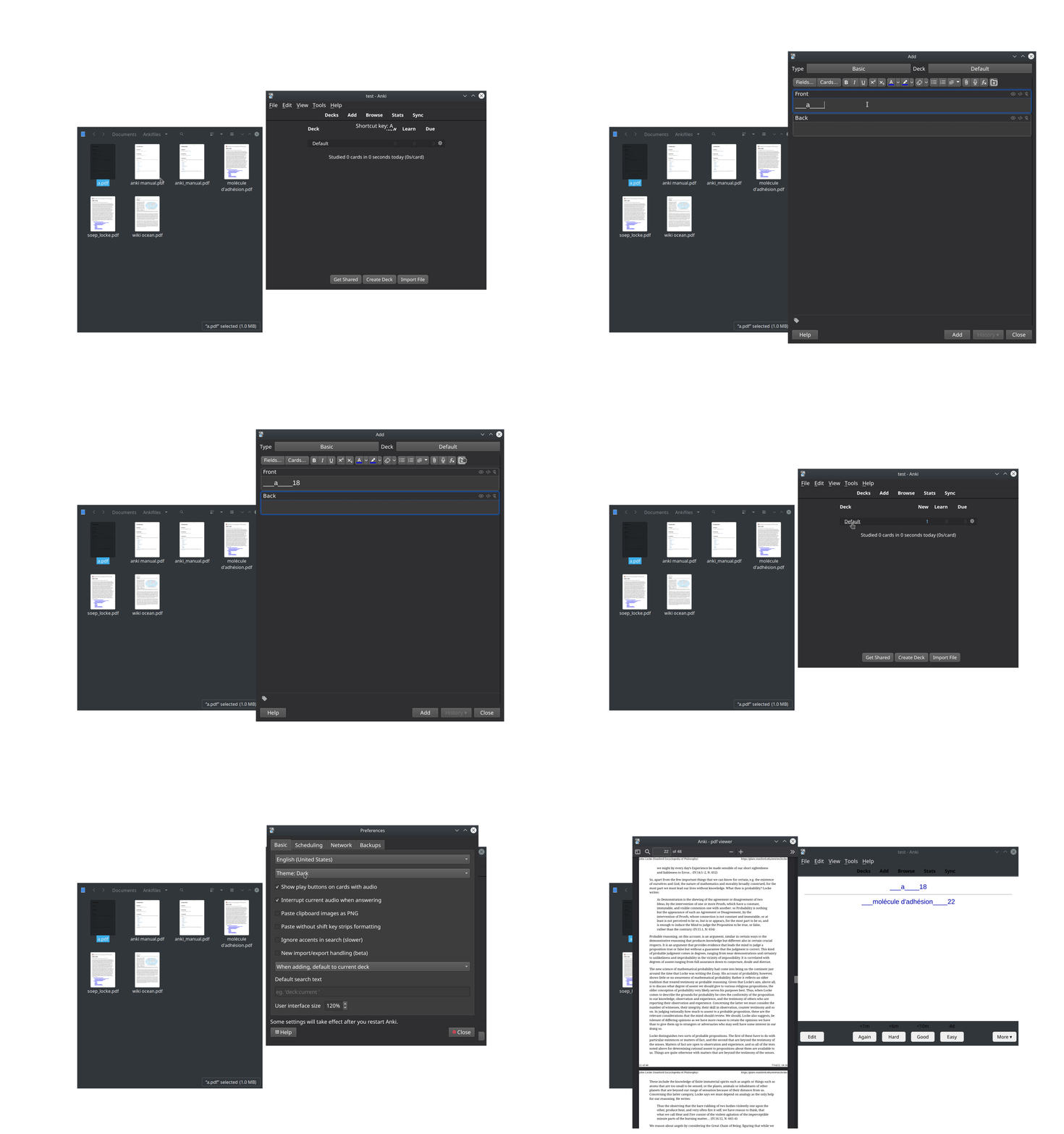
As shown in the screencast shown above you can just add ___ (3 underscores”) + filename + ____ (4 underscores) + pagenumber anywhere in a field and then either double click this or use the context menu to open it. You can leave out the file extension, e.g. write: __anki_manual____17. If you want to open the pdf file on page 1 (i.e. don’t need a special page number) you still must add the ____ (4 underscores”) after the filename, e.g. myfile. To quickly insert filenames of pdfs you already have in your pdf folder there’s a button in the editor to quickly insert the filename prefixed with ___ (3 underscores”) and postfixed with ____ (4 underscores). I added this way of linking to a pdf file in the summer of 2022. Before this date you could only use the following still supported method:
you can add the fields “external_source” and “external_page” to your note type and then in the “Card Types for …” window add a button/hyperlink to your card templates for opening the pdf file. If you don’t know the term “note type”, see the section “further info about the setup” at the bottom of this page. about file names: You must only put the file name of the pdf into the field external_source, e.g. my lecture notes.pdf. You may not write file:////Users/myname/Documents/Ankifiles/my lecture notes.pdf or C:\Users\myname\Documents\my lecture notes.pdf. The idea behind this limitation is to make sure that this add-on still finds the files if you review the cards on a different operating system. You may only add numbers into the field external_page like 123. You may not write page 123 or p. 123.
motivation, limitations -My use case is this: Sometimes I notice that a card is too short and the info on the card is not really meaningful to me anymore. With this add-on I can quickly refresh my memory and add additional info from the source to this note. -Add-ons that modify the reviewer don’t work on Ankimobile or Ankidroid. So this add-on doesn’t help on mobile. -This add-on by default uses the pdf viewer that’s also built into Firefox. For newer anki versions using pyqt6 you can also use the pdf viewer that’s built into qtwebengine (which is basically the same as in chrome) by changing the addon config. But then you’ll lose the editing feature and night mode support. -If you create many notes/cards you can use the sticky fields feature (in older versions you needed the frozen fields addon) from the same pdf the add-ons like Field history make it much easier to fill out these fields.
further info about the setup (when you want to use two extra fields in your note type) These steps are not necessary if you use the approach with underscores shown in the screencast. -see e.g. the anki manual section about adding fields to a note. You must add the fields “external_source” and “external_page” to the notetypes that link to pdfs. If you don’t know what I mean by ‘add fields to your note type’ watch about one minute of this youtube-video. -You must add the hyperlink to your “front template” or “back template” in the “Card Types for …” window. If you don’t know what I mean by “front template” or “Card Types for … window” watch this youtube video. This add-on adds a button named “PDF open from fields code” into the “Card Types for …” window. In older versions of this addon this buttons was named “Ext-Docs-Link”. Click this button to insert the link text into your template.
2022-07 template updates If you just updated the add-on: You must manually modify all card templates and change the code that puts the clickable hyperlink for opening the pdfs in your cards. But this change was necessary because the old code I used in old versions of this add-on just worked with my narrow use case which consists of file names with basically just english characters. This approach fails e.g. with the grave accent used in many western European languages or with other non-western characters. Proceed like this: Delete the old code from your card templates and then insert the new improved code by clicking the button “PDF open from fields code” in the “Card types for …” window. With old code that needs to be removed I refer to a line of code that starts with <code><a href=‘javascript:pycmd(“pdfjs319501851</code> Remove the code until you get to the first <code></a></code> Between there’s code depending on your settings. If you always used the defaultsettings the code to remove looks like this (ignore the linebreaks in this narrow window): <code><a href=‘javascript:pycmd(“pdfjs319501851{{text:external_source}}319501851{{text:external_page}}”);‘>View external file: {{text:external_source}}/<a> </code>
alternatives -Check out the very popular Searching, PDF Reading & Note-Taking in Add Dialog. -There’s another add-on I made for viewing pdfs on a specific page named Open linked pdf, docx, epub, audio/video, etc. in external Program. This add-on has a complicated setup but offers some advanced features like using a different pdf viewer (e.g. one that allows to edit/highlight your pdfs) or displaying pdf files from any location on your disc.
privacy, security Do not use this add-on with untrusted pdf files. I don’t have time to update this add-on with the latest pdf-js version in a timely manner. Also you might no always use the latest Anki version and even if you did it doesn’t always include the latest qt version and this doesn’t always include the latest chromium fixes … All pdfs in a the pdf folder are accessible for all the cards you review or previews just as your other files in your media folder. For the security implications see this discussion from the official forum.
bugs etc. If you find a bug or have improvements please post them in the official support thread in the official anki forum by clicking the “contact author” button in the upper right of this page. This is the only place where I get notifications about your posts.
Versions -2025-08-31 fix for code related to the editor in anki 25.02+ -2023-06-18 2.1.50+ fix filename sometimes inserted at the beginning of a field, no more first start dialog about changing card templates -2022-11-02 add some basic editing features. You can add drawings (annotations) and text boxes (thanks abdnh) -2022-10-21 add shortcut to open pdf from reviewer, by default try to move pdf window to the left of source window, clickable links in reviewer have a class. -2022-10-18 update pdfjs, better night mode support in pdfjs, fixes for pdfium, etc. some config keys have been renamed -2022-07-18 better handle non english file names (2.1.45+) Breaking change: you need to update the card templates. -2022-07-14 fix for Anki 2.1.50+/qt6; build pyqt-webengine pdf viewer for qt6 by default, add hack to invert colors of pdf when in anki night mode (disabled by default), add support for links that are in fields (adjusted from my other add-on Open linked pdf, docx, epub, audio/video, etc. in external Program), selector window to quickly insert file names from pdf folder, perform file names that are added without an extension; update bundled pdf-js; misc — major update, for .45+ only -2021-10-14 revert back to version from 2021-07-11 (after two people in the linked support thread reported that the new version doesn’t work for them). -2021-09-26 update pdf.js, earlier garbage collection for dialog -2021-07-11 fix for .45+ (disable what’s not working) -2020-07-13 update for 2.1.28 (wrap instead of monkeypatch a function, adjusted to the new _redirectWebExports, adjusted dialog), it now works with the add-on popup dictionary, in 2.1.28 also full paths are supported, pdfjs is updated (which didn’t work on older Anki versions for me so now there’s a minimum version required). -2020-05-25 works in Preview window (that you can open from the browser) in Anki 2.1.24 or later -2019-11-12 better restore window position/size, changed template names for better order -2019-09-17 initial release
Screenshots
Liên kết hỗ trợ
Reviews (14)
👍 2026-01-19
Excellent. Absolutely essential add-on.
👍 2025-09-04
its really helpful !! can you please tell how to always open pdf window in fullscreen view ? Edit : actually i solved it for now .. for anyone else facing this issue , here is what i did :- in addon config … Update this line “dialog move besides current window”: “center”,
in pdf.py file (update these 2 lines) self.resize(1280, 960) self.setGeometry(50, 50, 1280, 960)
👍 2025-07-27
it is working , can you share code or .addon file to download it Comment from author the code is in the addons21 folder in your user data folder (https://docs.ankiweb.net/files.html?highlight=folder#user-data). you can also open the addon folder from the addon window. the name of the addon folder is the addon id on ankiweb that you used for downloading (319501851)
👍 2024-06-28
Awesome. Would be awesome if this is native and implemented into anki so that it can be used on mobile. Any workaround for now? Comment from author in general it should be possible to load a pdf file into an alement on the front or back of a card using the same library I use (mozilla’s pdf.js). You would have to put the pdf files in your media folder that also contains your images (https://docs.ankiweb.net/media.html). if you pdf file is named “somefile.pdf” the address to use in the code for yo
👍 2024-03-14
mac을 사용하고 있습니다. 홈폴더라는 것이 정확히 어디를 말하는 것인지요? (예를 들어 pdf 파일 이름이 a라고 가정한다면 홈폴더에 a.pdf 를 넣고 ___a____10을 할 경우에 파일이 존재하지 않을수도 있고 pdf뷰어에 버그가 있을수도 있다 이렇게 뜹니다 나는 이 기능이 정말 필요해서 도움이 필요합니다.
혹시나 mac에서 적용가능한 pdf뷰어가 있다면 추천도 부탁합니다
Comment from author On Mac the path ”~” is an abbreviation for your home folder. The home folder is where all your user data is stored. The home folder is the folder one level above ~/Documents. “home folder” is a technical term with a precise definition. This refers to one sp
👍 2024-03-14
Great complement
👍 2024-01-07
It’s not working. The hyperlinks can be created using the menu button (that comes with the add on) or by using the characters at the start and end of file names. However, upon clicking on these blue hyperlinks links, no opening of any pdfs would take place, making the add on non-functional and not in line with what the description advertises. It’s a nice idea. It looks straightforward. However, it doesn’t work. All you’ll end up with are dysfunctional and weird hyperlinks (made of the file names
👍 2023-09-19
on 2022-10-21 Awesome addon!
Thank you very much
==============
Question
Is there a way to automatically open link or keyboard shortcut without clicking a link?
: Wow!! Solved.
Thank you very much for the great effort. Comment from author before post was edited update: 2022-10-21: I uploaded a new version. Now you can configure a shortcut for the reviewer in the addon settings that opens the first link to a pdf.
I suggest we continue in the support thread for this add-on at https://
👍 2022-05-23
please give it a shot
it was a worth trying to up to date with the last versions Anki 2.1.50+ Comment from author 2022-07: Thanks. I uploaded an update for 2.1.50+
👍 2022-05-16
Really great addon! Please update for Anki 2.1.51+ ): Comment from author 2022-07: Thanks. I uploaded an update for 2.1.50+
👍 2021-10-10
Great add-on and excellent support!
👍 2020-11-28
Thanks for the add-on!
👍 2020-09-02
Thank you very much, it’s a must for me.
👍 2020-01-22
Great addon but it is interfering with popup dictionary addon. Comment from author I know it’s late but the most recent version of “pdf viewer” should work with “popup dictionary”. If you try it out and find a problem there’s a “contact author” button in the upper right of this webpage.
