Note: This is a fix of the original addon: Persistent Editor created by: Hgiesel.
Disclaimer
Please Note: This add-on is provided “as is” without any guarantees or warranty. While I have tested the add-on to the best of my ability, there may still be bugs or issues that could cause unexpected behavior. Use at your own risk. If you encounter any problems, please report them on the GitHub issue tracker. However, I cannot guarantee that all issues will be resolved.
Thank you for understanding and for your support!
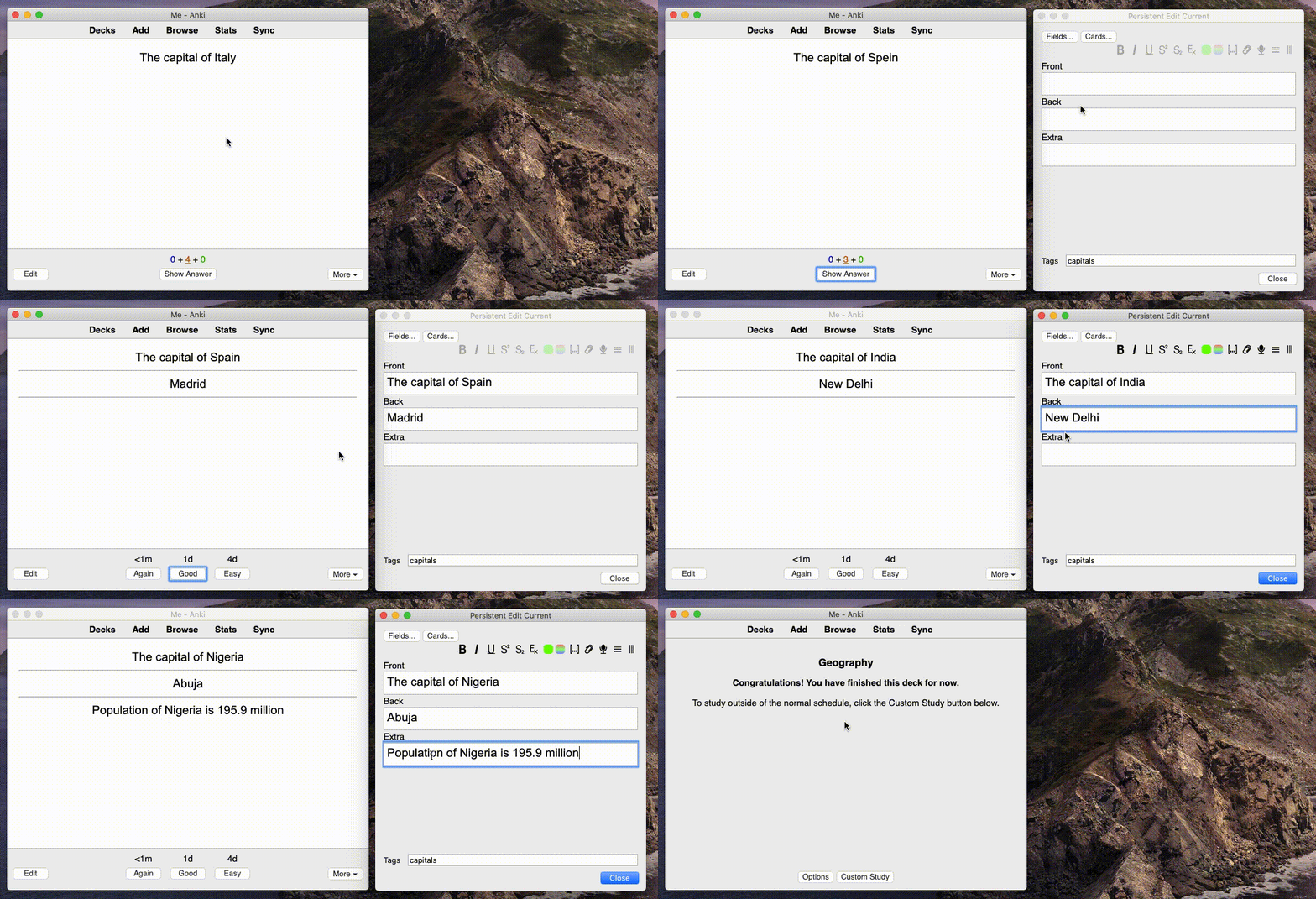
This add-on will make the editor window for review persistent. On the front of the card, the fields will be obscured, so the answer to the flashcard cannot be read. On the back of the card, all fields will be revealed.
Important shortcuts
e: will trigger the editor window. This is identical to the standard Anki behavior. Clicking e again will bring focus to the editor window. c: will flip the card, going to the front, if you’re on the back and vice versa. Before creating this add-on, I typically used the editor shortcut to go back to the front of the card. This is no longer possible, the editor shortcut won’t change which side of the card is displayed. For this reason, you can use this shortcut to have the old functionality. This shortcut is configurable in the add-on settings under “Tools > Add-ons > Persistent Editor > Config”.
Obscuring mode vs Presentation mode
If you do not like the obscuring behavior, you can use “presentation mode”. This makes the Editor work the same for the back and front side. Under “Tools > Add-ons > Persistent Editor > Config” you can put the editor window into presentation mode by default. There is a shortcut to easily switch between those modes, which defaults to Ctrl+P.
Updates
v0.1.0. On Reddit. v0.1.1. v0.2.0. v0.2.1. v0.2.2. v0.3.0. v0.3.1. v0.3.2.
2020-02-12: Support for 2.1.41. Uses different strategy to obscure field, using visibility: hidden
Support
If you like my add-ons, you can consider supporting me. My add-ons will always be freely available for everybody, but what I can offer you is my sincere thanks, and first-hand technical support, if you have any questions/issues with my add-ons. At the same time it allows me to put more time and focus into developing these and making them as powerful and user-friendly as they are. Thanks for considering!
ko-fi.com/hgiesel patreon.com/hgiesel=
Screenshots


Liên kết hỗ trợ
Reviews (2)
👍 2024-08-01
This addon does work on 24.06.3. However, whenever I open the editor window, the main window turns white and messes up the font style/color. Any advice or fix would be appreciated, as otherwise this is a great addon!
👍 2024-07-17
Good evening, would it be possible to make it available in the new versions? in version 24.04 it doesn’t work
Invalid code or extension not available for your version Comment from author In browse you can open preview and edit simultaneously and see the changes Live. This add-on has similar features, but it is used while you are studying. It was originally designed for Anki’s older version but now works with the latest version 24.06.3. It might has conflicts with other plugins, try to disable a
