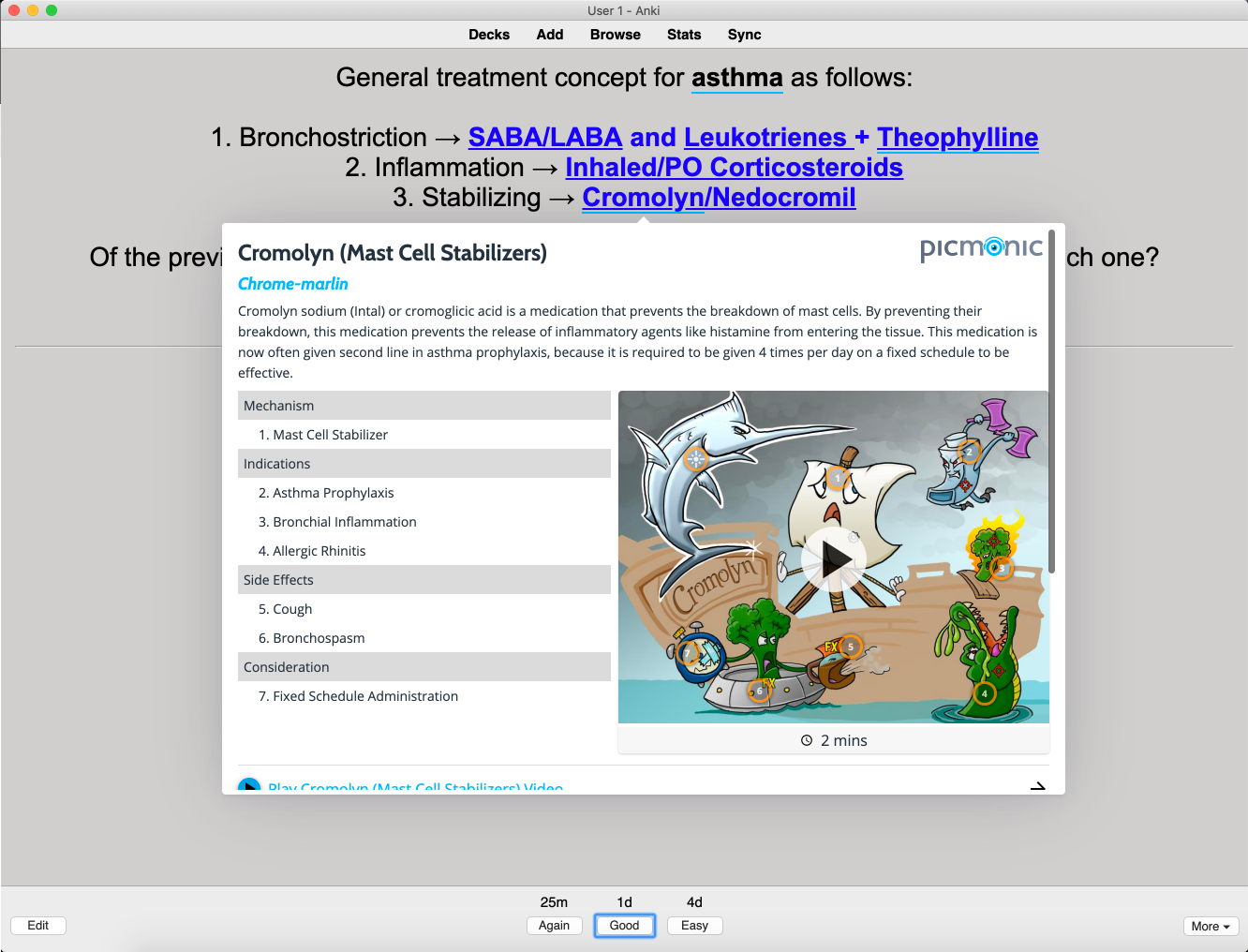
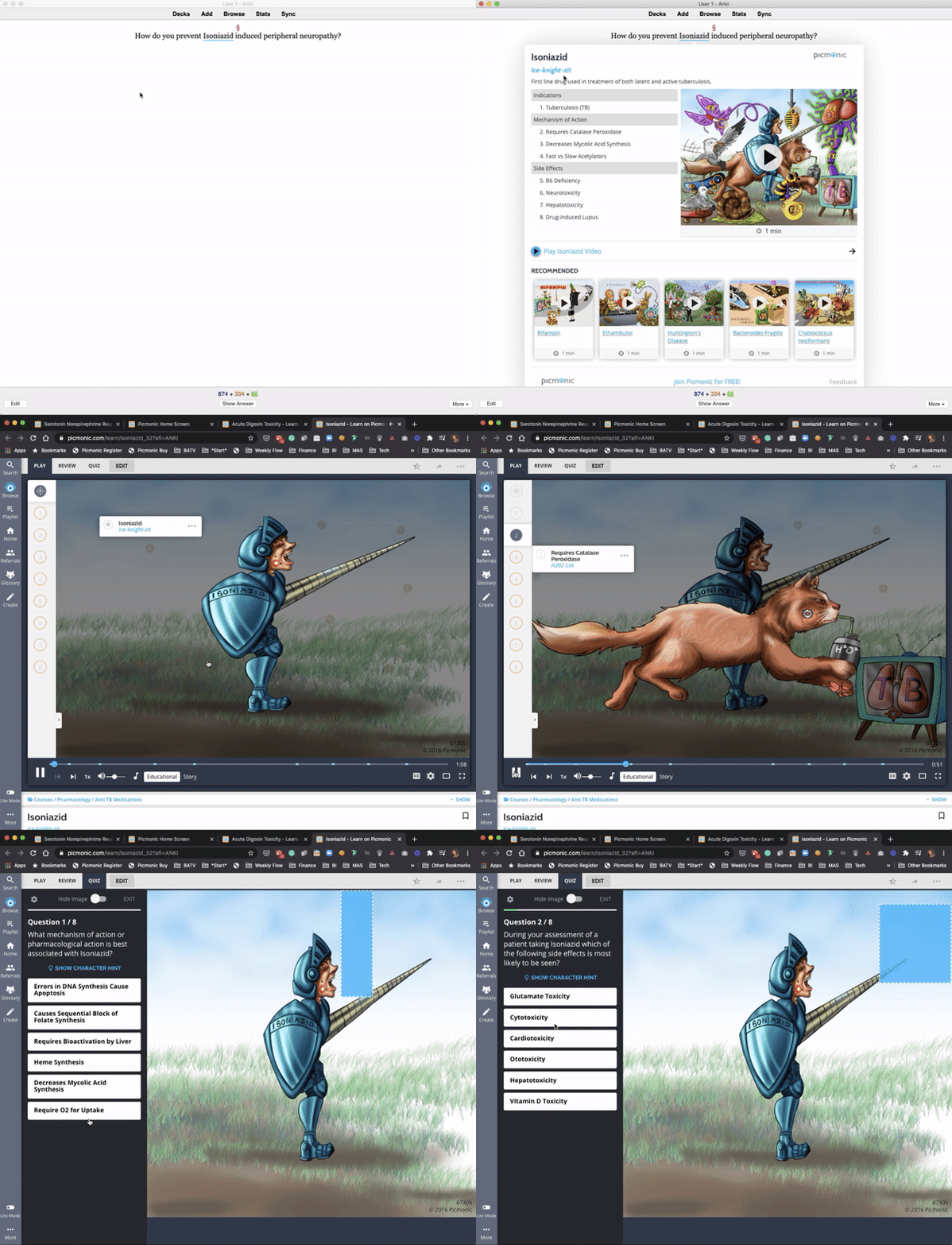
GETTING STARTED Download the Picmonic Anki Add-On (a pop-up window inside of Anki) that will enable you to quickly view any topic (Picmonic), high-yield facts, thumbnail image, and quick access links to open and play the 3-minute Picmonic mnemonic video in a new window. Relevant topics will have a blue underline. Just hover it with your cursor and you’ll see the pop-up window.
This add-on will work with any Anki deck!
You do not need a Picmonic account to use it!
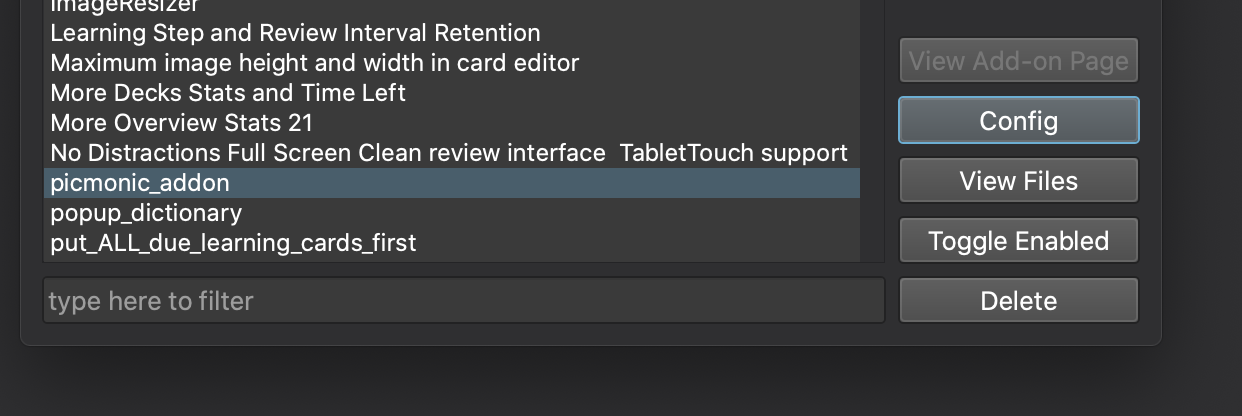
CONFIGURATIONS The add-on has several settings you can adjust to suit your preferences. You can access the settings via:
Tools → Add-ons Find “Picmonic Anki Add-On” in the list and click it. Click “Config” button
MORE RESOURCES Get access to 1,400 Picmonic video-quiz lessons covering the hardest to remember, highest yield need-to-know information in Medical and PA school. Use this exclusive Anki discount for 20% off a premium subscription.
FAQ Is the Picmonic Anki Add-On Free?
Yes, it’s 100% free to use for everyone. A Picmonic account is not required. Do I need a Picmonic account? No, you can download and use the Anki Add-On without signing up for Picmonic. Can I use the Picmonic Anki Add-On with any deck? Yes, the Picmonic Anki Add-On will work with any content set. Does Picmonic make Anki decks?
No, not yet! Reach out to feedback@picmonic.com if you’re interested in helping us create them. Can I change the underline color? Yes, see the CONFIGURATIONS section above. Can I use both the Picmonic and Amboss Add-Ons at the same time? Yes, however, the underlined terms may cause overlap. To fix this, there are a few settings you can modify. Refer to the CONFIGURATIONS section above. Can I change the Picmonic eye if I’m using the Amboss Add-On? Yes, refer to the CONFIGURATIONS section above. HELP & SUPPORT Please let us know if you run into any bugs, mismatched topics, or if you have feedback on how this Add-On can be improved.
If you need help or see a bug, please contact us at feedback@picmonic.com.
Provide feedback and suggestions by clicking this link, or from inside the Anki Add-On via the feedback link in the bottom right corner.
CHANGELOG 09/29/2021 - v1.3.7 Release Notes:
Fix “Request failed. TypeError: Cannot read property ‘addEventListener’ of null” issue. 07/07/2021 - v1.3.5 Release Notes: Fix conflicts with latest AMBOSS plugin Fix page shifting New loading indicator and animation New animation when showing pop up 05/04/2020 - v1.3.0 Release Notes: Support for multiple areas of study New user friendly configuration screen 01/27/2020 - v1.2.11 Release Notes: Housekeeping release. Bump version number to prompt for add-on upgrade. 01/27/2020 - v1.2.10 Release Notes: Fixed an issue which prevented some words from not being highlighted when using “Basic” card types Updated synonym list 11/30/2020 - v1.2.9 Release Notes: Fixed/added several synonyms 11/09/2020 - v1.2.8 Release Notes: Fixed an issue with highlighting words with single quotes such as “Light’s Criteria” Fixed preview showing a blank screen 11/04/2020 - v1.2.7 Release Notes: Decreased the size of the modal and made it scrollable to better work on smaller screens. Additional synonym fixes Modal appears/hides faster now. 300ms -> 100ms 11/02/2020 - v1.2.6 Release Notes: Significantly improved the term matching Added case sensitive terms Added back the Picmonic Eye icon when using AMBOSS plugins. Can be enabled or disabled in the plugin settings. Added configuration for the underline color (can be changed in plugin configuration) Added analytics (can be disabled in plugin configuration) LICENSE AGPLv3
Credits A special thanks to AMBOSS and the AMBOSS plugin.
Add-On Walkthrough
Screenshots
Reviews (27)
👍 2025-10-14
PLease fix
👍 2025-03-09
its not runnin
👍 2025-03-05
Hi, still doesn’t work post-update. Please fix :(
👍 2024-01-21
Please update to Q6, currently using Q5 (which is really buggy) to continue using this addon. I advise anyone still wanting to use this addon to downgrade to Q5 as it works with that anki version. If anyone can update it to Q6, please do!!!
👍 2024-01-13
Please, it is not working on the new Anki version. please fix it.
👍 2024-01-07
Not working on my Mac desktop, help!
👍 2023-11-25
please update for latest anki
👍 2023-07-19
That’s perfect! Pop up of the picmonic image with the list of facts on the side, grouped by mechanism, symptoms, diagnosis. Wow (even better than the website!)
👍 2022-12-30
Still cant get it to work on MacBook pro. NEED video explaining how to add Picmonic Anki Add-On to desktop.
👍 2022-03-10
IT IS AMAAAAAAZZZZZING !!!!!!!
👍 2022-01-05
its good
👍 2021-10-24
picmonic sucks
👍 2021-09-19
Incredible. I was looking for an alternative to my amboss addon after my subscription ended, and this has been phenomenal. finally made study sessions interesting again!!
👍 2021-06-02
A very great alternative to amboss addon, and this one is free. highly reccomended
👍 2021-02-06
doesn’t work
👍 2021-01-14
best add on till date,
thanks
👍 2020-12-12
Great job!
👍 2020-11-26
Absolutely love this Picmonic content!
👍 2020-11-25
I was looking forward to having something like this for months!
👍 2020-11-21
So useful for connecting topics together!!
👍 2020-11-21
Super easy to use, and a great study tool!
👍 2020-11-20
The fact list makes it really easy to dig in on topics I’m having a tough time with, without having to search through FA. I also like how it links straight to the Picmonic video.
👍 2020-11-20
I’ve been hoping for a Picmonic add-on forever! This is great!
👍 2020-11-20
A game-changing addition to seamless studying!!
👍 2020-11-20
I love this add-on! Makes it so easy to cross-reference things. Plus I use a small screen when studying, and after writing in to their support team, they made this easier to view on smaller screens! A++++++!!!!
👍 2020-11-20
Yess, finally! This is going to save me so much time. So easy to use!
👍 2020-11-17
This Add-On is a must have for med students! It’s like First-Aid at your fingertips inside of Anki.
