If you mainly care about shortcuts to change note types you might not need this add-on anymore: Since Anki 2.1.28 from 2020 you can use : “Ctrl/cmd+number selects decks/note types in list”. To select the third note type you would use Ctrl+N to open the note type selection window, then Ctrl+3 to focus the third note type, then Enter
This add-on will most likely stop working in the second half of 2022 when the anki component that this add-on changes will be completely rewritten so that this add-on would need a full rewrite, too.
You must adjust the config of this add-on to your needs. Otherwise your new notes might have tags like “adjust_the_config_of_the_addon_Quick_note_and_deck_buttons” or “really_adjust_the_config_of_the_addon_Quick_note_and_deck_buttons”.
Use it at your own risk.
Bugs, Feedback, Comments
If you find a bug one or have a bug fix or improvement you can tell me in the official support forum - just click the “contact author” button in the upper right of this page.
In 2021 and later Anki is changing a lot with each new version so every Anki update might break this add-on. I’m not always using the latest version of Anki so when this add-on stops working at some point in the future it might take a long time until I fix it.
History
This is an extended port to 2.1 of the popular addon Quick note and deck buttons. The configuration/user options for this version are slightly changed because the original authors (ospalh, glutanimate) added support for multiple rows in 2017. This updated version was never published to Ankiweb - just to github. I adjusted this latest version. Since 2020-04 you can also change the deck and note type at the same time which requires a slightly modified configuration, see config.md for details.
MacOS
I don’t like how it looks on MacOS. For details see this reddit thread. If you have a solution for this or find another bug let me on know.
Alternatives
Since 2.1.28 Anki has this feature: “Ctrl/cmd+number selects decks/note types in list.”
Quick note and deck change menus.
Configuration
You configure this add-on from the Add-on Manager.
Versions
- 2022-05-23 fix for .50+: compatibility to latest Image Occlusion add-on version
- 2022-04-12 fix for .50+ only: don’t show labels in separate row on top.
- 2022-02-13 fix for .45-49 only: don’t show labels in separate row on top.
- 2021-12-12 fix for older anki versions (<2.1.20), limitation: note type chooser doesn’t work well in 2.1.24 (and hasn’t worked well with older versions either), one add-on version for all anki versions.
- 2021-12-08 fix for anki 2.1.45+
- 2021-03-03 fix for anki 2.1.41
- 2020-12-17 fix for anki 2.1.36+ (github issue #8)
- 2020-07-13 fix for anki 2.1.28
- 2020-05-17 fix for KeepModels from 2020-05-17
- 2020-05-15 option to enable/disable in selected profiles.
- 2020-05-14 option to adjust width (ratio between) note type and deck area; added config.schema.json
- 2020-05-13 fix for shortcuts without buttons, improve config.md
- 2020-05-05 compatibility with Keep model of add cards from 2020-05.
- 2020-04-19 when quickly changing don’t lose editor contents, when you change a deck (or notetype) you can change the note type (or deck) and tags at the same time, the add-on is no longer loaded to the “Change Note Type” dialog that you can open from the browser which caused problems
- 2020-02-22 better compatibility with Anki 2.1.20
- 2019-10-15 compatible to Keep model of add cards, misc changes (tooltip, focus), …
- 2018-11-10 initial release
Credits
The original authors are Steve AW, ospalh, Glutanimate. ospalh has written “no update planned” (in 2020-04-18).
Screenshots
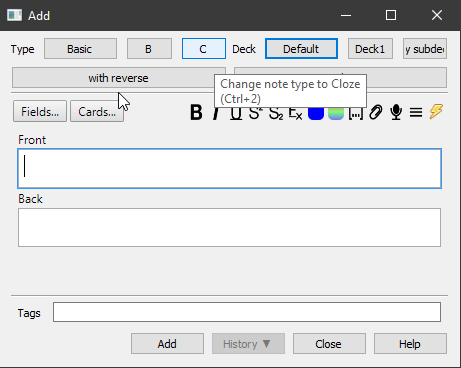
Liên kết hỗ trợ
Reviews (26)
👍 2025-08-02
Great addon! Was hoping to just add keyboard shortcuts to switch between two types of notes, but this is so configurable and it added shortcuts for decks too! Plug and play, took me ~10 minutes to setup, but will save me hours. Huge thanks to the author for making this!
👍 2025-07-09
even this add-on still is a great add-on in 2025, help me save much time.
👍 2022-10-01
It’s Awesome that making “add” convenient!Thanks for sharing! I used it before, and now having a new loptop. Luckily, I found it at last after a long-time search.
👍 2022-05-25
Hey man, your add-on is amazing and help me a lot, but it’s not compatible with “Image Occlusion Enhanced” anymore. Can u help pls?
Edit (24/05/22): Now it’s working, thx bro. Comment from author before post was edited 2022-05-23: thanks for the report. I just uploaded a new version that should fix the problem. Let me know if you still run into problems.
👍 2022-04-10
Nice!Thank you! Would you tell me how to set the shortcut key as a non numeric key?
“shortcut”: ”???”
What the ”???” should be? Comment from author I don’t really understand the question. Have a look at the default config, e.g. there I have
“shortcut: “Ctrl+1”
If this doesn’t work, click the contact author button in the upper right of the add-on description page.
👍 2022-01-12
Essential app for making cards. Works perfectly for me on Mac.
👍 2021-12-11
I am very,very and very like this add-ons.but it does’t work at 2.1.46.
2021-12-11 15:02:18
I am so surprise found that it has updated! thanks!
👍 2021-12-07
Thank you so much for updating this to support 2.1.45+! This is a great add-on and the visual buttons added to the editor are fantastic and essential for my Anki workflow. Please keep up the good work!
👍 2021-10-20
Hi, me again.
PLEASE update to 2.1.46! 🙏🙏🙏🙏🙏🙏
“This is literally going to save me hours of clicking between note types. THANK YOU!
ABSOLUTELY ESSENTIAL ADD-ON.
I bestow a perfect rating of 5/7.” Comment from author thanks for the kind words. I’ll try my best to get a new version out in 2021.
👍 2021-09-30
Please, update for anki +2.45
👍 2021-08-21
This fantastic, INDISPENSABLE add-on ABSOLUTELY needs to go the ‘Frozen Fields’ route — it needs to be officially imported into Anki; become part of Anki.
21 Aug 2021, edit:
Thanks for replying; and thanks again for this great addon.
What about a ‘toned-down’ version: Quick note and deck SWITCHER ?
Even though I’m a ‘power-user’ of this addon, I NEVER EVER use the buttons; ONLY keyboard shortcuts.
Just being able to switch between 2 note types using the keyboard would already be g
👍 2021-06-28
Very helpful! This makes it so much easier to adjust the note type and deck I’m adding flashcards to. Thank you!
👍 2021-04-14
Awesome addon, thank you!
👍 2021-03-23
Thanks
👍 2020-10-27
Simple and Helpful
👍 2020-09-01
It’s very good, but there is a problem: if you use the addon’s change note type button while a field is not empty the content of this field will be transferred to whichever field is in the same position in the second note type, while Anki’s default change note type button checks if there is any field with the same name even if in a different position and moves the content to that one
👍 2020-08-11
Just what I was looking for!
👍 2020-04-26
Just what I was looking for - customizable hotkeys to quickly switch note type and deck when adding notes. Editing the config file was easy.
👍 2020-03-24
Great!
I disliked how the buttons were displayed on multiple rows, but it is actually very very easy to fix! You can find the instructions in the configuration menu.
(you just need to delete some ] [ brackets)
I WOULD NOT follow the advice given below where they suggest to edit the “quick_note_deck_buttons.py” code. The solution suggested in the configuration menu works much better!
👍 2020-02-13
absolutely wonderful, only lacks ability ability to make buttons that select both note type and deck at the same time.
For example : I have a note type that I only use for adding in a specific deck
👍 2020-01-11
操作起来更方便了
👍 2020-01-11
Nice add-on!
To the previous post:
You can change the layout to something like: “Name of note type” ” note button 1” “note button 2” “note button 3”, … in ONE row with these steps:
-
Open quick_note_deck_buttons.py
-
Change “self.vbox = QVBoxLayout()” to “self.vbox = QHBoxLayout()”
-
Change self.setSpacing to (4)
-
Delete the # before “b.setStyleSheet” and change padding-right to 5 px
-
Save and restart Anki
-
Only use short names for the buttons in the config
Then it
👍 2020-01-08
The default version only has three model buttons, but I want to set more and I think it’s a little bit ugly that the third button takes a whole row. Can I make the buttons thiner and have more than three buttons in the same row? Comment from author sure. Replace this part of the config
{
“label”: “with reverse”,
“shortcut”: “Ctrl+3”,
“name”: “Basic (and reversed card)”
}
with something like
👍 2020-01-05
improve efficiency greatly for making flashcards.
👍 2019-12-26
Thank you for this useful addon! It saves me tons of time.
👍 2019-10-13
It works on 2.1!
