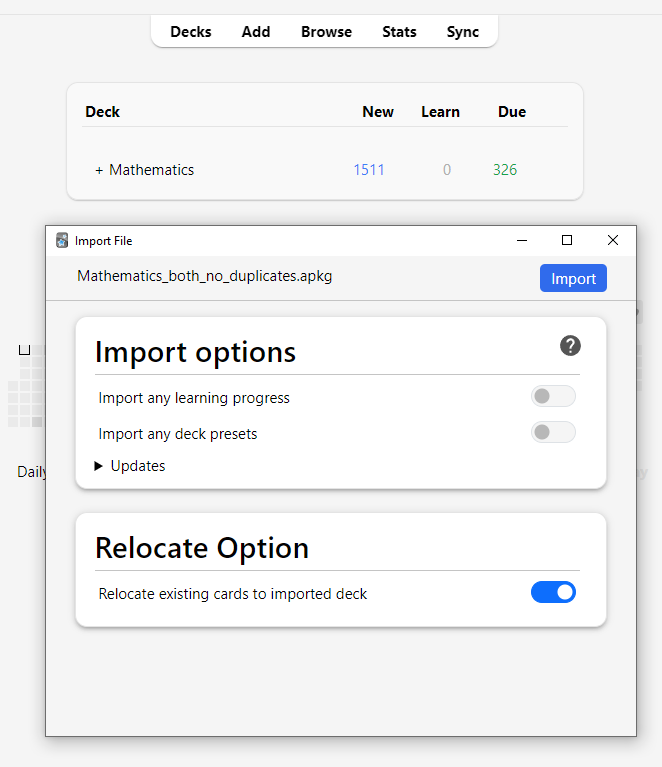
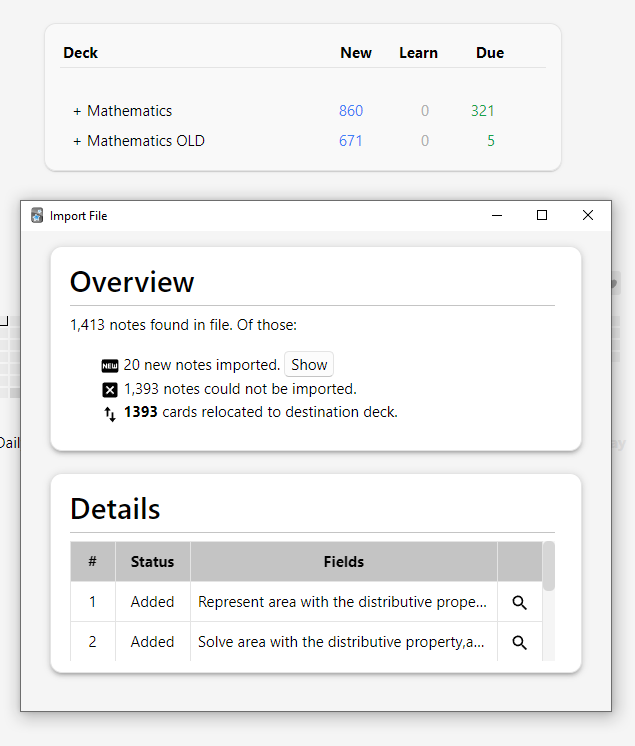
This addon adds a handy feature to the import process: it allows you to automatically move your existing cards to the new deck you are importing, if they are detected as duplicates or conflicting.
This is useful if you have cards sitting in a generic deck (e.g., ‘Default’). If these cards are also present in the imported .apkg file, the addon will automatically move them from ‘Default’ to the specific deck declared in the imported file.
How it Works
The addon hooks into Anki’s import process to relocate cards. However, it operates under a Strict Identity Rule:
It only moves cards that share the exact same GUID (Global Unique Identifier) as the cards in the imported file.
It specifically looks for cards that Anki categorizes as:
Conflicting Updated Duplicate
If a card falls into any of these categories, the addon should moves your existing card to the deck specified in the imported file.
Scheduling Handling Existing Cards: If the card already exists in your collection, the imported scheduling is ignored. Your current review history and intervals are preserved. New Cards: If the card does not exist, it is added normally, and any scheduling information included in the file is imported without issues. 🚀 Future Roadmap
In the future I am considering implementing the following features to make the detection more flexible:
- Content-Based Matching (Flexible Detection)
Currently, if a card has the exact same text as your existing card but a different GUID, it is ignored.
- CSV / Text Support
Support for importing and relocating via CSV/Text files (comma-separated) is also being considered after implement Content-Based Matching
Best Practices & Limitations
To ensure the addon works correctly and to avoid data loss, please follow these rules:
- Do NOT use Anki’s Built-in “Merge” Options
When using the “Relocate” checkbox, do not select any of Anki’s standard merge or update options (e.g., “Update notes,” “Always,” “If newer,” etc.).
Why? The add-on doesn’t handle Anki card updates well (it claims it does, but I haven’t tested it much, to be honest).
Solution: If you need to update fields or merge content, perform the Relocate import first (with standard options disabled), and then run a second import specifically for merging/updating the note content.
- Supported Formats
Currently, this feature only works with .apkg (Anki Package) files.
- Experimental / “As-Is” Status
This is an intermediate solution developed to solve a specific personal use case. While it works for its intended purpose, it is not a native Anki feature.
My hope is that Anki developers might implement this natively in the future. Until then, use this as a helpful tool, but be aware it is a personal project shared for anyone who may find it useful. ⚠️ Important Safety Warnings
Please read this carefully before installing:
- 💾 BACKUP YOUR COLLECTION FIRST
Before using this addon, please go to File > Export and create a backup of your collection. This addon deeply modifies how Anki handles your cards, so it is always better to be safe than sorry.
- RECOMMENDATION: Use Once, Then Disable
This addon modifies internal Anki methods to work its magic. These methods were not originally designed to be changed by addons. My strong recommendation is:
Enable the addon. Perform your Import. Disable or Uninstall the addon once you are done.
While the addon has been tested for imports, keeping it active during your daily study sessions could interfere with other Anki functions that I’m not aware.
Compatibility Tested on: Anki 25.09.2 If you update Anki, this addon might stop working correctly due to internal changes in the app. Issues & Feedback
If the addon does not work as expected, please report it on GitHub Issues. Since this is a personal project, immediate fixes aren’t guaranteed, but reporting bugs helps me.
Scheenshots
Before Relocation
After Relocation
Screenshots