Anki Addon to allow users to create decks in Google docs that can then be synced with Anki. The remote deck acts as the source of truth. When a user syncs their local deck to a remote cards are added / updated / deleted. When cards are updated (excluding the primary field) their history is preserved.
Example Google file
Example Google Document
Unpublished Google Document
Published Google Document
DOCUMENTATION
Video on how to add a remote deck
Current full documentation with gifs and more details! GitHub
OVERVIEW
Create a new Google doc
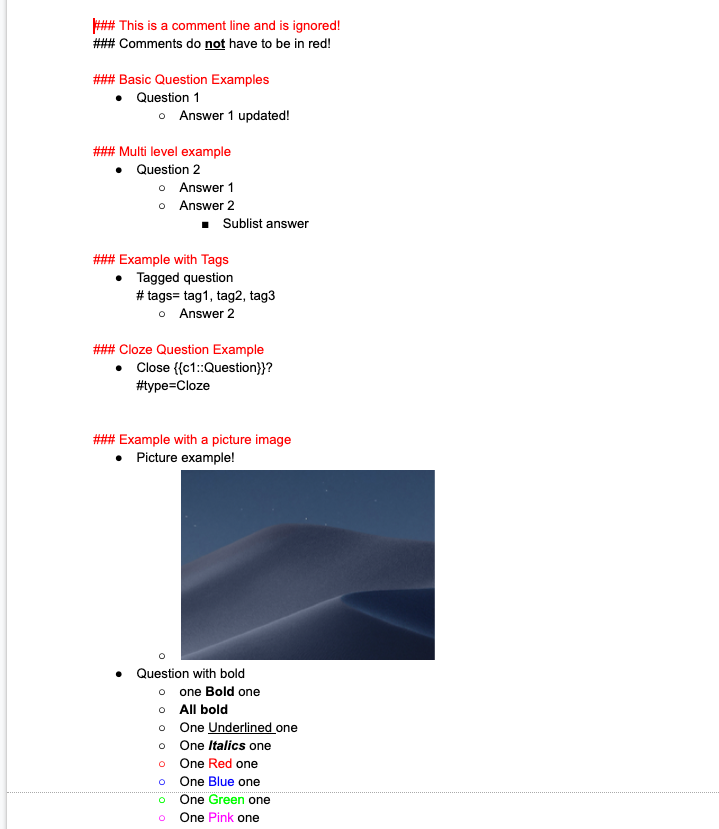
Add bullet point answer as show in the example
Publish the Google Doc
Add the Google Doc as a deck using the addon
Sync for any update
COMPATIBILITY
Unfortunately this add-on currently only supports Anki 2.1 going forward. All cards generated should be backwards compatible as of the V1 release of this add-on.
CHANGELOG 2021/09/09 - Release of Version V1.9.1 => Fix issue with images not loading correctly 2021/03/08 - Release of Version V1.9.0 => Add shortcut keys 2020/10/13 - Release of Version V1.8.2 => Fix for update Google Docs format 2020/09/10 - Release of Version V1.8.1 => Reduce number of errors for end user 2020/09/03 - Release of Version V1.8.0 => Improved error handling on failure to add note 2020/08/20 - Release of Version V1.7.2 => Fix model issues with non English setups 2020/08/09 - Release of Version V1.7.1 => Fix Syncing issue where cards were not being updated 2020/07/23 - Release of Version V1.7.0 => Make writing Cloze cards easier and add support for multiline comment sections 2020/05/08 - Release of Version V1.6.1 => Fix new deck name bug 2020/05/07 - Release of Version V1.6.0 => Support for subscript / superscript 2020/04/07 - Release of Version V1.5.2 => Fix delete issues 2020/01/26 - Release of Version V1.5.1 => Bugfix 2020/01/26 - Release of Version V1.5.0 => Check for default models and fix image metadata bug
SUPPORT
Please do not report issues or bugs in the review section below, as I will not be able to reply to them nor help you. Instead, please report all issues you encounter either on GitHub.
CREDITS AND LICENSE
Copyright (c) 2020 c-okelly
Licensed under the GNU AGPL v3. The code for this add-on is available on GitHub
Screenshots
Liên kết hỗ trợ
Reviews (30)
👍 2024-10-08
Does not show up in tools. This issue was brought up 3 weeks ago in Github and has yet to be responded to.
👍 2023-08-30
I wanted to take a moment to express my sincere gratitude for the incredible work you’ve done in creating this Anki add-on. It has been an incredibly valuable tool for me in my learning journey and has made a significant difference in how I use Anki.
Your dedication in developing and maintaining this add-on is truly admirable. The way it enhances Anki’s functionality and makes studying more effective is remarkable. It’s evident that you’ve invested a lot of time and effort into this, and that d
👍 2023-07-14
Very cool add-on, thank you so much for your work. Try the bug fix in the comments it worked for me.
When I edit a card in google doc, anki keeps pushing it back as a new card, even if its only a minor adjustment, is there any way to solve this?
Support for Tagging and more cardfields would be awesomee.
Thank uu
(Repost Bugfix)
- Anki > Tools > Add-ons > Remote Decks > View files
2 ) Navigate to […]/911568091/remote_decks/libs/org_to_anki/converters/BulletPointHtmlConverter.py
👍 2023-07-08
Need support for extra fields for more than two lines
👍 2023-03-13
Amazing
Is there any way to remove the * in the answer?
👍 2022-12-07
Extremely useful!
Thank you
👍 2022-12-03
Nice add-on. If it doesn’t work and ur using the newest version (2.1.54), try these steps (source: GitHub):
- Anki > Tools > Add-ons > Remote Decks > View files
2 ) Navigate to […]/911568091/remote_decks/libs/org_to_anki/converters/BulletPointHtmlConverter.py
- Add a ”#” in the line 11 so it become “#import chardet”. Then save the file and restart your app.
Wish you luck. :)
👍 2022-11-19
THIS ADD IS FENOMENAL!!!!
YOU CHANGED LIFES!! THANK YOU VERY MUCH <3<3
Aos estudantes brasileiros. Funciona muito bem pessoal!!!
👍 2022-08-22
Don’t work
👍 2021-10-29
Can’t really get this to work consistently. There seems to be an issue copying / pasting from other documents, into google docs. The cards come out as blank (just a deck with 0 cards) despite being layed out in the format of the example.
👍 2021-10-18
“warning: the following note could not be created. possible reasons include strangely configured local note modes”
update: I managed to get this working / avoid this error notice, by using your unpublished example doc and then copy and pasting my notes into the same document, leaving just initial heading. Although when I generate or type the document to myself from scratch, I haven’t yet got it to work. Not sure why, but it seems to be on my end. Comment from author before post was edited The
👍 2021-08-17
Great plugin but sometimes the images are not downloaded. For some cards I see downloaded_image_xxxx and for other cards it’s empty. Any idea ? Comment from author Try resysncing? The images my have faiele to download
👍 2021-08-10
I don’t understand why make something in Google Docs instead of Google Sheets where you can directly put in the code in the column to directly translate the word/phrase and do so much more. Now I’m trying to use Airtable and Ingetromat and the “Import from Airtable” add-on just to be able to use Google Sheets. You have to create accounts for all of these and hope they communicate correctly via API. Up until now, just error messages…
I’m not hating on this add-on, it just doesn’t make sense
👍 2021-08-05
Easy to use and extremely useful for collaboration in real time.
👍 2021-08-01
Really great work. The youtube video and example google docs are useful.
Any idea how to insert text and/or image into “Back Extra” for type Cloze? I tried the github suggestion of using a bullet point for the cloze type line too but that didn’t seem to work.
Thank you thank you
👍 2021-07-13
It’s 5 stars for the proposal, but, unsurprisingly, it has some bugs:
i tried to sync the same shared deck between two accounts on the same computer, and anki understood that the deck had already been added when i went for the second login.
Sad, I fixed it now by removing the remotes decks on the new account (that should have count zero), and adding it again, in new remote deck.
Ok, but still, in addition, you need to update the anki on your computer first, and then review it on your cell pho
👍 2021-06-13
Awesome. Is there a way to create a black line?
👍 2021-06-10
This add-on is incredible and completely changed the way I use Anki. Where can we donate for you? Please take my money
Also, is there a way to remove the • symbol from the answer?
Anyway thank you so much
👍 2021-06-06
This is an amazing thing and you are a genius for making this! Thank you very much!!!
👍 2021-04-27
Just what I was looking for
👍 2021-03-25
I LOVE this add on but I seem to have 2 major issues. 1)Sometimes the add on turns a Q&A pair written in the basic note format into a cloze note in Anki. For example, go to https://docs.google.com/document/d/e/2PACX-1vQFvH9SCHfb9a5VwI4LRdRJCGRC0UY7Oh0do0YY2Jg1SvbWhsVSoi4vBhL8Kz_kgHQ4LapwBPPZb5tT/pub & find the “How to find MLO?” Q&A. If you look at this image https://drive.google.com/file/d/1rQ6Q68hqfu-z6XUyekFUaCn42g2OOEf_/view?usp=sharing you can see that the note Anki decided to put the Q&A i
👍 2021-03-24
Too complicated, poor explanation of use. Why not put questions and answers in a spreadsheet? Comment from author There is a video, docs and example Deck provided. Not sure which part is unclear?
Spreadsheets are complicated because it is much harder to support images and html based text.
👍 2021-03-02
This is awesome!! Any way to upload and edit current decks? This could revolutionize Anki!
👍 2021-02-21
Oh my god, this is so good. I create my own decks but it’s a pain in Anki and really discourages you from putting the effort and an even bigger pain to sync. It would be perfect if it could work from the spreadsheet with multiple tabs. Any chance you will add spreadsheets support this year?
👍 2021-01-22
Great app works a treat thanks!!!
👍 2021-01-20
I use anki on Mac to add sound to my cards.
Is there a way to keep the audio after updating the google docs?
👍 2021-01-17
This is an amazing add-on, thanks so much for developing it. If anything it would be nice to have some nice formatting options, eg. remove those dots in the cards.
👍 2021-01-02
This looks incredible. It would save me at hours of work manually adding the cards :D Comment from author I hope you got your issue sorted. Glad it’s working!
👍 2020-12-28
This addon completely changed my life. I was wasting too much time during med school to transform all my notes into cards. Thank you, thank you, thank you, sir! Works great, as described
👍 2020-11-03
Thank you so much
