10/16/22 Changes
- Bug fixes + support for v12 AnKing Recommend use with Qt5 version of Anki for now
7/25/22 Changes:
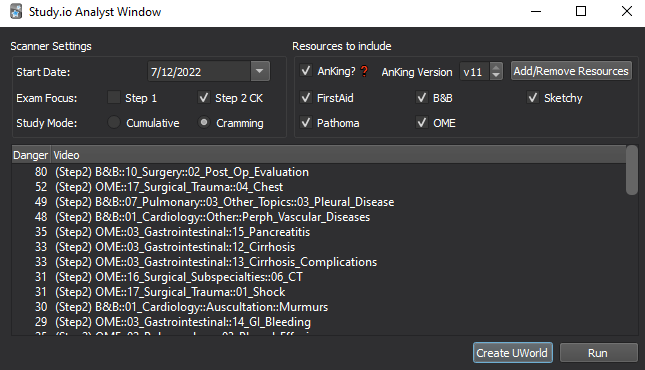
- New GUI (preview below) with ability to view results in real-time and modify settings without editing a text file
- Create UWorld practice blocks based on questions you’ve missed recently (AnKing only)
- Change results based on whether you are reviewing long-term or reviewing recently learned material
- More thoughtful algorithm for rating cards (“danger” score)
You can download previous versions from the change-log, if the new release is not stable for you.
This addon defaults to tags used by the AnKing deck, available on r/medicalschoolanki and at ankipalace.com, though there is now full functionality for any deck, as long it is tagged!
Parses your recent reviews and shows you your most-missed tags from your Anki Decks.
You can use these recommendations to help guide content review as you move through your coursework / dedicated period.
Please feel free to email me with feedback / any errors - I’d appreciate if you reach out here before leaving a negative review if there’s ever an issue. Keep in mind this is very much a rudimentary, hacked-together, labor of love! Reach me at: ankihuskyhelper@gmail.com
April 16 2022- Download available here
- Disabled the deck browser shortcut, as it was causing an error for Mac users - PC users can re-enable this from the config pane (does require client restart).
- Added option to filter by more two ratings instead of just one (still defaults to one)
- Added option to customize number of tags that are returned by the search (still defaults to three) There are no toggles for these new features on the Analysis Wizard for this currently - saving that for when I eventually retool the GUI completely.
- Did also clean up the code a bit, so if this broke anything that was previously working, shoot me an email!
- TODO - Retool GUI as above, and give more info on specific tags in the analysis report
March 6 2022 - Download available here
- Added a GUI element that makes it a bit easier to setup for AnKing users.
- Added functionality so folks using other decks like Lightyear can also make use of this via editing the config settings from the Addon browser. — Briefly, you can either run the wizard from “All Tags” or you can edit the list of resources in the config to include the tags you want to sort by, while making sure “All Tags” is set to 0.
- Default AnKing version is v11 - you can still change this from the config.
- Fixed some of the formatting on the recommend study subjects.
- TODO - would love to add a more interactive GUI element to display the “analysis” results. If you have feedback on how you’d like that information presented, please let me know!
Screenshots
Reviews (7)
👍 2024-08-26
Love this add-on. However, I recently had to update Anki to Qt6 because my old anki crashed. Do you know when the update will be out for that?
👍 2024-01-08
Anki 23.12.1 (1a1d4d54) (ao) Python 3.9.15 Qt 6.6.1 PyQt 6.6.1 Platform: Windows-10-10.0.22621
When loading Studyio - See your most-missed tags works great with AnKing for medical school: Traceback (most recent call last): File “aqt.addons”, line 245, in loadAddons File “C:\Users\lacey\AppData\Roaming\Anki2\addons21\720874373_init_.py”, line 7, in <module> from .analysisPrompt import * File “C:\Users\lacey\AppData\Roaming\Anki2\addons21\720874373\analysisPrompt.py”, line 11, in <m
👍 2023-05-13
excellent idea
glad that you made it work for non-anking tags as well
👍 2022-04-24
Updated review:
Works well on MacOS Monterey 12.4! Using Anki 2.1.50 q5, Macbook Pro M1 Pro.
Black screen issue appears to be resolved!
TIP: make sure to checkout the add-on config if you want to see more than the 3 baseline tags, or if you want to include other AnKing tags in its analysis!!
Original review:
Partially functional on 2.1.50 q5 - Mac. Goes to black screen after analysis. Analysis menu also only shows up halfway.
Cool concept! Seems useful. Comment from author Edit: Pu
👍 2022-04-15
Wonderful addon, this is exactly what I needed.
I was wondering if it could be updated with a few small changes to make it better. 1) config option to allow for multiple ratings to be analyzed together. I want it to look at cards rated either again or hard. 2) config option to show more than just the top 3 tags after running analysis. 3) ability to run this addon on cards selected in the browser or all cards that match a specific search instead of only those rated in the past x days.
Also
👍 2022-04-15
It works BUT it also gives me an error every time I open Anki and randomly while I’m using Anki. I think it messes with filtered decks somehow. While the addon is enabled, I keep having issues rebuilding and studying filtered decks. The problems go away when I disable this addon.
Here is the error I get when trying to open a filtered deck:
Debug info:
Anki 2.1.49 (dc80804a) Python 3.8.6 Qt 5.14.2 PyQt 5.14.2
Platform: Mac 10.16
Flags: frz=True ao=True sv=3
Add-ons, last update check: 2
👍 2022-03-10
anyway u can make this work for lightyear?
Update: works great! especially useful with lightyear as the cards are tagged by video, so it tells me exactly what videos to re-watch! Comment from author before post was edited Patched some support in for lightyear / other decks 👍
