An Anki addon designed to show deck statistics broken down at the deck and tag level.
Usage
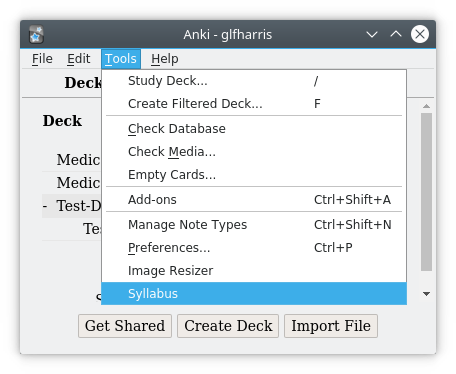
Open Syllabus through Tools > Syllabus
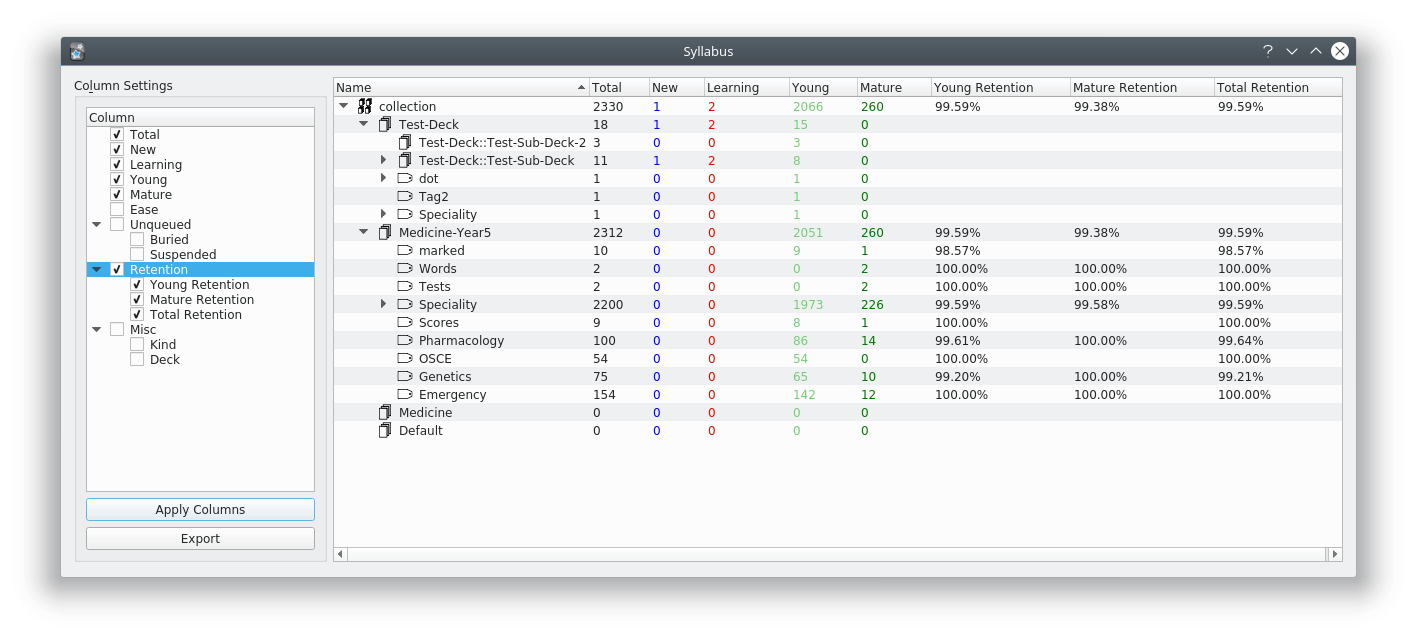
This then runs syllabus with the default column selection (Total, New, Learning, Young, and Mature). If you have a very large collection this may take some time, however it’s normally just a couple of seconds.
If you wish to change the column selection, simply check or uncheck in the column settings list, then click Apply Columns. This then regenerates the tree with the new selection. Note that because Syllabus doesn’t calculate the stats on unselected columns to save time, adding more columns may take Syllabus longer to generate.
Clicking the Export button opens a file dialog allowing you to export the tree to a csv file. Exporting the tree will export the data currently viewable in the tree, any unchecked columns will not be exported.
Feel free to look at the source on Github - https://github.com/glfharris/syllabus and I’d be very grateful for any feedback or suggestions!
To people getting the Error 404: This is likely due to you using Anki 2.0. Currently this addon only supports Anki 2.1, which probably isn’t going to change as the update contained significant changes. Please stop leaving negative feedback without even trying the addon.
Change Log
2020-01-12 - Bug Fixes 2018-09-28 - v0.1.4 - Added Retention Metrics, Altered Column Settings UI, and Ruggardised Column Handling. 2018-09-26 - v0.1.3 - Added Ease and Optimized Querying 2018-09-26 - v0.1.2 - Fixed Learning Column 2018-09-20 - v0.1.1 - Fixed Subdeck Handling 2018-09-20 - v0.1.0 - Initial Release
Screenshots
Liên kết hỗ trợ
Reviews (26)
👍 2024-05-26
I simply fixed this add-on for Anki24+ and uploaded it to AnkiWeb. After the original add-on has been updated to Anki24+, this fork is not needed. 📊Syllabus - Anki Statistics and Export by Tag and Deck (Fixed by Shige) https://ankiweb.net/shared/info/1403834620
👍 2024-03-10
It does not work with the current Anki version (Mac, 23.12.1 Qt6)
👍 2024-01-29
Excellent. The only thing missing is support for pyqt6.
👍 2023-11-05
Please, add support for Anki 23.10
👍 2023-02-17
Great!
👍 2022-04-23
Unusable with large decks, even on a powerful machine (Macbook M1 Pro). Add-on needs to be re-written or taken down altogether.
👍 2021-06-02
I’m going to give this a thumbs up, although I have a couple of issues.
First, some of my tags are multi-level, and it doesn’t deal well with those. For example, I’ve got items tagged as Level1::LevelA, Level1::LevelB, etc. While the LevelA, LevelB, etc., tags appear to give good statistics, the Level1 tag statistics include far more cards. It appears to combine my Level1 statistics with a different tag, Level1_sync.
Second, I’m using night mode, and the dark blue in the New column is a
👍 2021-02-07
Thats Great
👍 2020-08-31
This add on should be removed from the AnkiWeb page. I accidentally clicked on it from the tools bar and now my screen is stuck with no way to get out. If I hit force quit then I’ll lose hours of study progress. DONT INSTALL
👍 2020-07-15
Like another user said, this doesn’t work well with large decks, rendering it useless for me (I use anki for medical school)
Bummer :(
👍 2020-05-29
Awesome concept, but is almost unusable with large decks. If all columns are checked, this add-on can take > 1 hour to generate a report.
👍 2020-02-18
Just what I needed, thank you! Would be great if there was an option to view by tag across all decks.
👍 2019-12-09
Great for exporting data and doing better statistics in Excel
👍 2019-12-05
thanks
👍 2019-12-02
Takes time to load (get spinning beach ball on mac). Every time I press “X” to close syllabus, it closes my entire Anki; but in such a way that if it hadn’t synced or backed up any of my progress I have to re-do some reviews and news. Awesome concept, frustrating error.
👍 2019-11-06
Super clean. Exactly what I wanted and then some
👍 2019-09-30
This add on created a loading error in my program.
👍 2019-08-07
exactly what I’ve been missing
👍 2019-08-01
Such a useful tool, thank you!
Edit: is there a way to donate?
👍 2019-07-29
Funciona
👍 2019-04-29
Great Add-on.
I have this problem: On my computer (Linux, Fedora 29) this add-on crashes Anki if I close the syllabus window by clicking the “x” button in the upper right corner of the window. If I press “esc” to close the window this does not happen. Syllabus is the only add-on I have installed.
I use the Anki binary that’s published on the Anki website. This crash occurs with Anki versions 2.1.5 and newer. I also tried 2.1.4 and 2.1.0 and these didn’t crash when I closed the window wit
👍 2019-03-15
Awesome way to individually see which tags have been seen and matured!
👍 2019-03-09
Very cool but experiencing crashing issue. Everytime I open and close Syllabus Anki crashes.
👍 2019-03-07
what is the usage of the ‘export’? ,I had thought it can include the cards. Comment from author Export in the addon only outputs the data from the syllabus window. This is so that people can use their data/use for visualizations etc. I believe there is a way to export card content baked into vanilla anki if you go to Main Window > File > Export, then choose the format you want.
👍 2019-02-19
Works for me. Comment from author before post was edited This addon isn’t compatible with Anki 2.0, which you are likely using.
It is listed on the Ankiweb page for Anki 2.1 addons, here https://ankiweb.net/shared/addons/2.1
👍 2019-02-11
Cool !
![[Zzz] Templatesus](/default-thumbnail.webp)