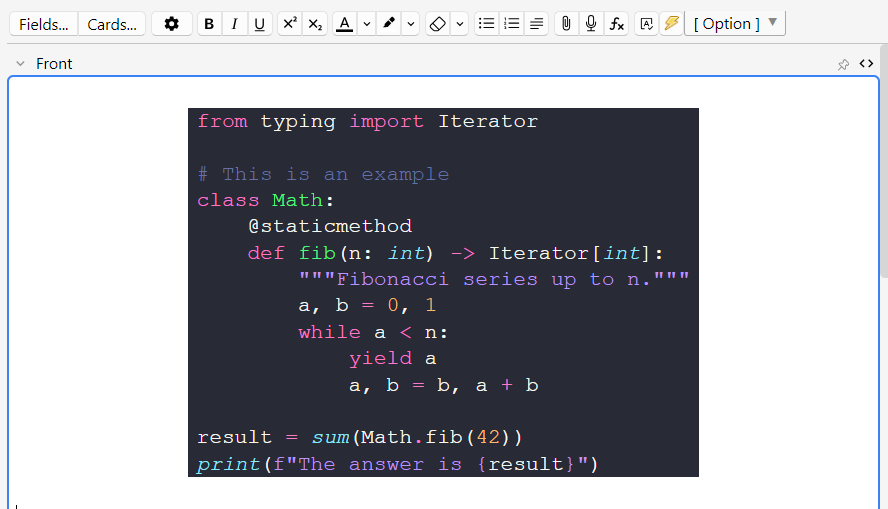
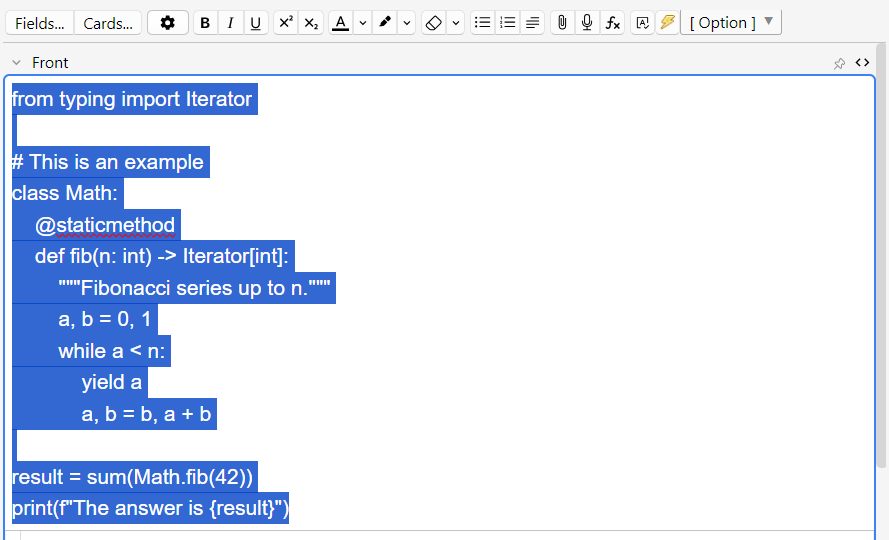
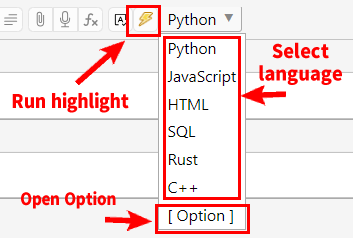
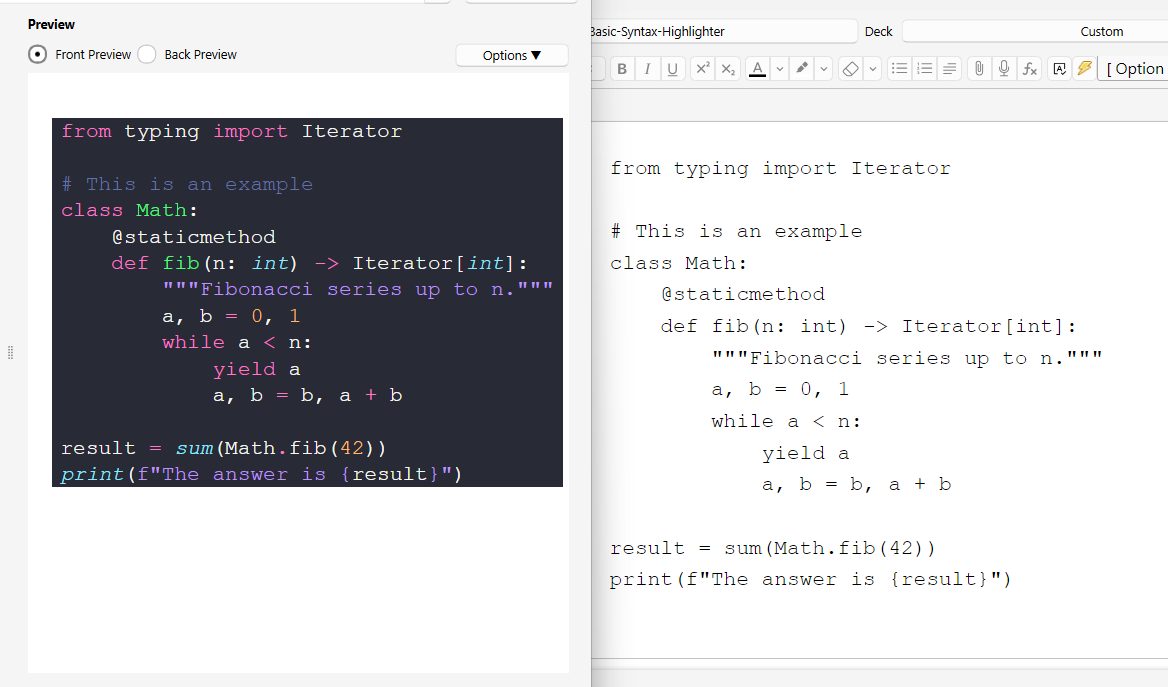
For quick syntax highlighting of code in Anki’s Editor. Select the code and press the ⚡️electric button to auto add highlighting. (or paste from the clipboard)
Credit
This add-on is a fixed and Custmized version for Anki25+ of the addon “Syntax Highlighting (NG)” and “Syntax Highlighting for Code”, originally created by Tiago Barroso, Tim Rae, Aristotelis P. Glutanimate, C A. Cavallo, and credit goes to them (AGPL). Syntax highlighting is executed by bundling pygments (BSD).
How to use
This customized version includes support for the latest Anki 25.04+, user interface enhancements, code updates and optimizations. Added functions to auto add CSS, select line numbers, etc.
Select the code or paste from the clipboard.
Option
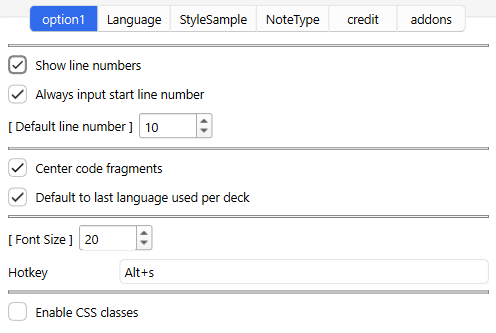
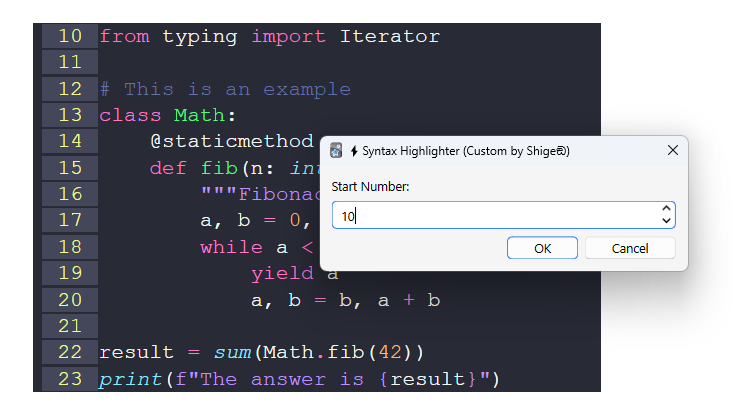
Line number Show line numbers Show numbers at the beginning of each line of code. Always input start line number If this option is enabled, you can input the start line number in the dialog that pops up when you run the syntax. Default line number Sets the default line start number.
Center code fragments Change whether code is left-aligned or centered. default to last language used per deck Auto save and use the last used programming language for each deck. Font Size Change the font size of the code. You can also change it by editing the HTML directly. Hotkey Sets a shortcut key to run a highlight. Enable CSS classes
Enable this option to highlight using CSS instead of inline highlighting.
CSS mode can be easily changed with the theme option, and can be auto change in night mode and light mode. Inline mode is not possible. CSS is auto added to the notetype style when syntax is added. CSS mode does not show highlight colors in the editor, but in the reviewer or previewer. Default inline highlighting can show color in the editor. Default inline highlighting has colors embedded in HTML, so you cannot change the theme like in CSS mode. The auto-generated CSS files are auto saved in the media folder. Language
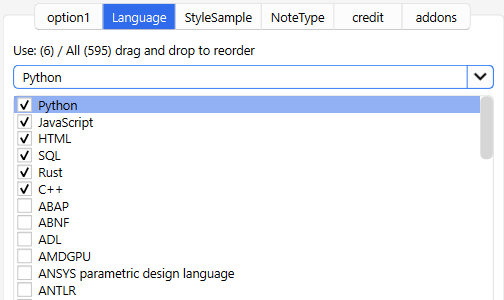
You can select which languages to display in the drop box in the editor, and rearrange them by dragging and dropping. StyleSample
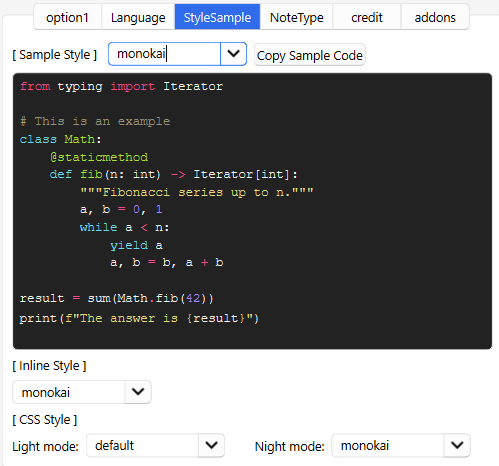
You can view a sample of syntax highlighting and change the default theme. Inline mode is the default highlighting. The highlight is embedded and cannot be changed later. If CSS mode is enabled, you can set light mode and night mode themes respectively. All highlighting will be changed when the theme is changed. Enable CSS Note Type
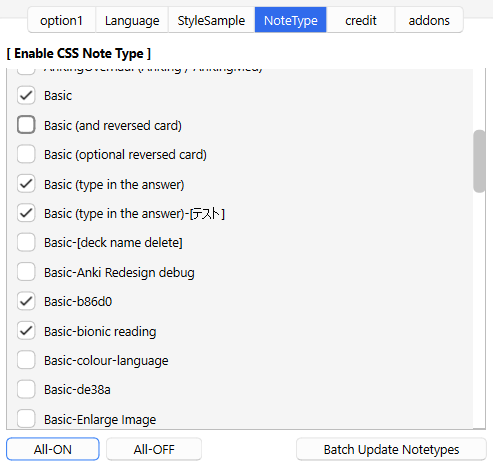
CSS mode automatically adds CSS to the card. This option allows you to batch remove or add CSS added to the note type style. If you are not using the CSS mode option this option does nothing.
All-ON, All OFF button Batch select or deselect note types. Batch Update Notetypes button Press this button to batch add or remove CSS. Note that the optional Save button does not save NoteType changes. Note type changes cannot be canceled with the optional Cancel button, but can be undone in a batch with Anki’s Undo. This option edits all note types at once, so if you are concerned I recommend making backups of your decks before running this option. CSS can be added or removed manually, only this one line is needed. -> @import url(“_shigeSyntax.css”);
🚨Report
If you have any problems or requests feel free to send them to me.
👍️Rate Comment : You can contact me anonymously, and AnkiWeb will send you an email when I reply, a high rating increases priority of development. 👩🚀Reddit : You can request me to repair broken Add-ons. 🌟AnkiForums : You can request me to repair broken Add-ons, and it is ideal for open discussions. 🐙Github : Makes it easier to track problems. 💖Patreon DM : Response will be prioritized.
💖Please Support Shige’s Anki add-ons development!
Hi thank you for using this add-on I’m Shigeඞ!
[ 🛠️Fix add-ons ] So far I fixed and customized 80+ broken add-ons for free and developed over 30 add-ons as a hobby (all add-ons). If you have requests to fix broken add-ons feel free to contact me. Fix broken addons (Free) [ 💖Donation ] I’m looking for supporters for my add-ons development because I like Anki!👍️ If you support my volunteer development you will get 14 add-ons for patrons only and 15 game themes included in AnkiArcade ($5/month).
Get Patrons only addons | Patrons Q and A | Contact
[ Special Thanks ] So far I received donations from 570 patrons and without their support I never could develop this, thank you very much!🙏
Patrons: Arthur Bookstein Haruka Luis Alberto, Letona Quispe 07951350313540 Lily Tim Daniel Kohl-Fink NamelessGO Kyle Mondlak ElAnki Matthew Hartford Abhi S findus161 Jonathan Contreras Peasant of Anki K Juan Salgado Jesse Asiedu David C Ernest Chan Yaeerrrrrr Christopher Lam Elisabeth Barber Steven Banner GP O’Byrne Xiuxuan Wang KM Kolorophyll Jake Stucki Kaitlyn Bowler Isabel Guan Heidi Leonora Lomoki Akporyoe ellie Tobias Klös Aydin Herik Ujwal Chadha Iggi Austin Regal gus forester Mia Hoang Hung iuventius Patrick ellis Orlando Frey Take Root tarek qiting zeng Carly Burdorf Muneeb Khan Sameer Al Matheus Chagas Bryn Price pie_is_good Svel1989 Vivian Cao Keeler Kime Kurt Grabow Zarina Balde Pansanity Gabriel Farrugia Terence Bartenbach R Rebecca Lis Y. Fahim Shaik Augusto Stein Ashok Rajpurohit mootcourt NoirHassassin alpha male, shredded af Morgan Torres Dennis Obis Will S. Anh-Tai Nguyen Tae Lee Devon Williams Joseph Howell Simeon Gabriel Vinicio Guedes sab hoque only Ythalo Vlogs Ketan Pal Aurora Dzurko Kevin Galvez Tyler Schulte Kmyungc Mac Meeyah Davis Eric Allen alex han Douglas Beeman Andrew Yick Robert Remedios Marley Easterbrook Temi Jide Ansel Ng Azfar Hussain Haley Schwarz Woody kenken …full list
📥 How do I install this add-on? This add-on works with Anki for desktop (it does not work on mobile). Download Anki from the official website if you haven’t already. Copy and paste the add-on code ( 272582198 ) into Anki and you can install it. ( Menu -> Tools -> Add-ons -> Get Add-ons -> Code [ add-on code ] ) When I develop bug fixes, create new features, or compatibility for New Anki, I will notify you and you can install it. Add-ons will be broken when the official Anki gets a major update, so if you like this add-on please support my volunteer development by rating, sharing, and donating. Thank you!
Click here and please Rate this add-on, Thank you! :-)
Screenshots

Liên kết hỗ trợ
Reviews (23)
👍 2026-02-20
I just went and left ratings on the older/defunct/abandoned syntax highlighters made by other devs, solely so I could link them here. Hopefully it’ll not only help people from the annoyance and sadness of finding what they’ve wanted, just to learn they cannot use it… but also generate more reviews for you! :D
I left long comments and my fingers are tired, so I’ll prob come back to edit/add… but you did great work. Absolutely fantastic add-on; thank you! I was devastated however long ago (I
👍 2026-02-07
Best Syntax Highlighter Comment from author glad it helped! this add-on is a custom version so most of the code is credited to the original author.
👍 2026-01-23
Thanks for continuing the work on this add-on, buddy. Comment from author glad it helped!👍️ :D
👍 2026-01-05
Does what it says Comment from author thanks! :D
👍 2026-01-05
Easy to Use Comment from author thank you! :D
👍 2026-01-01
Thank you for fixing this! Confirming it works. As a programmer, I use a lot of syntax highlighting in my Anki cards.
+1 to the idea of adding in-line syntax highlighting. And I think it would also be nice to be able to adjust the alignment of the code block. Right now it’s only middle-aligned, but I would like to move it to be left-aligned. Comment from author hi thanks for the feedback! that’s a good idea, I’ll look into it.
👍 2025-12-08
actually works conveniently Comment from author before post was edited Thank you!👍️
👍 2025-12-04
Great tool for creating Anki cards for code Comment from author thank you!👍️
👍 2025-11-23
Amazing add-on Comment from author thank you! :D
👍 2025-11-21
Thank you so much! Comment from author Thank you! :D
👍 2025-11-21
I really wish it had the option for inline <code> tags so you could use a code tag as a part of a sentence instead of needing it to be a separate code block. However this does work very well. Comment from author Hi thanks for the feedback! Auto detection of <code> tags is still under development, please wait👍️
👍 2025-10-17
Super fast and easy to use, produces nice output, great spread of languages Comment from author glad it helped! 👍️
👍 2025-10-02
Is it possible to have the syntax highlighting auto applied on a field when importing from a csv or tsv file? Is it through enabling CSS class option, if so how do i do Comment from author before post was edited Hi, that feature is not available for now, but I think such a new feature would be useful, I’ll look into it.
👍 2025-09-27
Is it possible to add notes with this feature through ankiconnect? R: I would like to make an external app that adds notes to anki through ankiconnect, and I would like to know if it would be possible to add notes with code snippets like these that way Comment from author --- Edit: 2025-09-29 --- This add-on retrieves the selected text from the UI so AnkiConnect cannot do this. If you are a developer I think it would be easier to add the highlighting directly to the code, this add-on uses pygmen
👍 2025-09-16
Amazing add-on, I was trying to find a fixed one and this one worked very well. Great work ! Comment from author thank you! :D
👍 2025-09-15
Great job so far! Can you also make the code handle cases where the content is too wide, by wrapping it instead of overflowing? Comment from author thanks for the feedback! it might be possible with an additional option, I’ll look into it.
👍 2025-08-21
Works great and even has the Nord theme Comment from author glad it helped!👍️
👍 2025-08-06
Someone already mentioned this but could you possibly add Dark Modern as a theme in the Style Sample tab? Its the default color theme in Visual Studio Code, a text editor a lot of people use. It is recognizable by a lot of people its also the default (and I think only theme) in Leetcode. Comment from author --- Edit 2025-11-30 --- Hi I added the Vscode dark modern theme so please try updating the add-on. (Tools -> Addons -> Check for update) --- 2025-8-06 --- Thanks for the request. These themes
👍 2025-08-06
Really good, but is there a way I could add my own color themes (StyleSample tab)? If thats to difficult or time consuming to add could you just add the Dark Modern theme from vs code? Its the default vs code dark theme, alot of people use it since its the default theme Comment from author --- Edit 2025-11-30 --- Hi I added the Vscode dark modern theme so please try updating the add-on. (Tools -> Addons -> Check for update) --- 2025-8-06 --- hi thanks for the request! that function is not devel
👍 2025-07-30
Very cool, I’m just started using anki today, but was able to follow your instructions and write code how I wanted. I was a little confused on how to exit the coding mode, but I realized you have to move your cursor to the right, as I’m typing this I realize that this sounds very dumb.
One thing I couldn’t figure out though is how to indent my code, is there a way to do that? Comment from author Thanks! Indent features maybe not, I may need to develop additional features.
👍 2025-07-25
works well! Comment from author thanks for the feedback! :D
👍 2025-07-23
i love you Comment from author Thanks!👍️
👍 2025-07-14
Very nice! Comment from author Thanks! :D
