This add-on is not maintained In 2022 there’s another syntax highlight add-on named “Highlight Code” that got many upvotes in a short time. Have a look at it. Also check out this approach by a top anki, ankidroid, add-on contributor which should make it easier to later change the code. Also see here.
This add-on is a fork (modified version). For the original add-on Syntax Highlighting for Code (maintained/extened by glutanimate) click here. There are many differences between the add-ons: My version only uses css for styling, has a different gui, has an updated pygments version, etc.
The downside of relying on CSS is that this add-on must be adjusted to future changes in Anki and who knows how I long will adjust the add-on. And very few people use this add-on …
SETUP NEEDED
The styling section of the card template (for each note type) must start with the line @import url(“_styles_for_syntax_highlighting.css”);. In my add-on config you can batch update all your note types with a few clicks.
If you use Anki 2.1.50-2.1.54 you must also install the add-on CSS Injector. Then you must modify it by adding one line into one file of this add-on. If css injector gets updates you’d have to repeat this. But “CSS Injector” shouldn’t get too many updates since Anki 2.1.55 now makes it easy to load css into the editor. Open the file “181103283/web/injector.js” in an editor. Then below the line 105 which is
injectStylesheet(root, editable, /_addons/${addonPackage}/user_files/field.css);
insert the new line
injectStylesheet(root, editable, /_addons/${addonPackage}/user_files/field_syntax_highlighting.css);
Then restart Anki.
bugs etc.
Make sure to check if the styling section of your card template starts with the line ‘@import url(“_styles_for_syntax_highlighting.css”);’. Then check if you have the file “_styles_for_syntax_highlighting.css” in your media folder and if it contains the css styles you want.
If you find a bug let me know on github or in the anki forum (click the “contact author” button in the upper right).
Versions
- 2023-03-19 user info about editor css workaround for 2.1.55+
- 2022-10-17 fix theme change sync, add warning about conflicts of day and night theme, change default themes.
- 2022-10-01 re-upload, fix for 2.1.50-2.1.54 and 2.1.55 Beta1, different styles for day and night mode, simplify settings, misc
- 2022-01-24 fix for pyqt6 font selection, modified pygments import
- 2022-01-20 support for anki 2.1.50, after the commits from 2022-01-08 (and before those from 2022-01-24). the beta1 and beta2 from 2021-12 are not supported. Thanks @kleinerpirat: I reused code from his CSS Injector add-on, https://ankiweb.net/shared/info/181103283.
- 2021-12-11 updated bundled pygments to 2.10 one version for all anki versions, misc
- 2021-03-15 fix for 2.1.41+, bundle pygments 2.8.1, removed all code related to inline styling and separate classes for each theme.
- 2020-11-03 “pre” has inline style “text-align: left;” and custom class, individual class for each theme, use less bs4,
- 2020-09-13 pygments 2.7.0, add button in settings to view/edit css file (location), add dialog to update all templates (instead of having to select each one).
- 2020-05-13 try to fix #2 (display chosen font when using classes)
- 2020-05-05 fix #1 (some code isn’t inserted)
- 2020-04-27 small improvements for the filter dialog: remember size, etc.
- 2020-03-24 pygments 2.6.1, night-mode fix in settings, reset font option in settings, remove leading spaces if possible (code by hakakou),
- 2020-01-03 handle non-existent lang names
- 2019-12-28 Pygments 2.5.2, fix for “sometimes no text was pasted”
- 2019-11-19 multiple fixes, improve inline code function, postprocess with bs4
- 2019-10-18 initial release
Credits and License
see the file init.py of this add-on.
the code to insert/wrap in “pre” or “code” tags is reused from the add-on Mini Format Pack Supplementary.
Screenshots
Liên kết hỗ trợ
Reviews (7)
👍 2025-01-03
Worked with no issue so far
👍 2023-11-07
thank u
👍 2023-06-02
I appreciate the effort. But it displays all the code in a single line. Version 2.1.63 Comment from author I can’t reproduce this problem. But you should probably try another add-on for syntax highlighting as mentioned on top of the description of this addon.
👍 2023-03-06
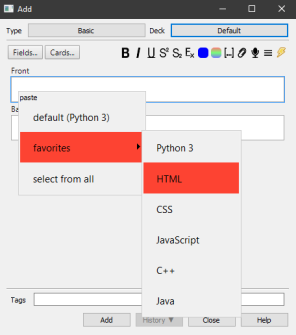
This includes high-utility improvements over the add-on from which this was forked—dear author, you are selling yourself short here! I prefer this one over the more “popular” Highlight Code add-on because it includes advanced customizability (deck-specific default language, favorite languages for quick selection, and more), full support for Pygments (necessary for cloze deletion support), and a simpler highlighting UI.
👍 2023-02-21
It’s not working, it’s influencing the choice of card type. What gets in the way of editing or paneling
👍 2022-10-16
So far this addon has brought me the least amount of hassle when styling code on cards in both light/night mode.
👍 2022-10-01
It’s me from reddit, thank you again! I just love this addon so much. It’s just amazing. Thank you.
