This is my first ever add-on! Huge thank you to u/ijgnord for helping me learn bits of python and making this possible.
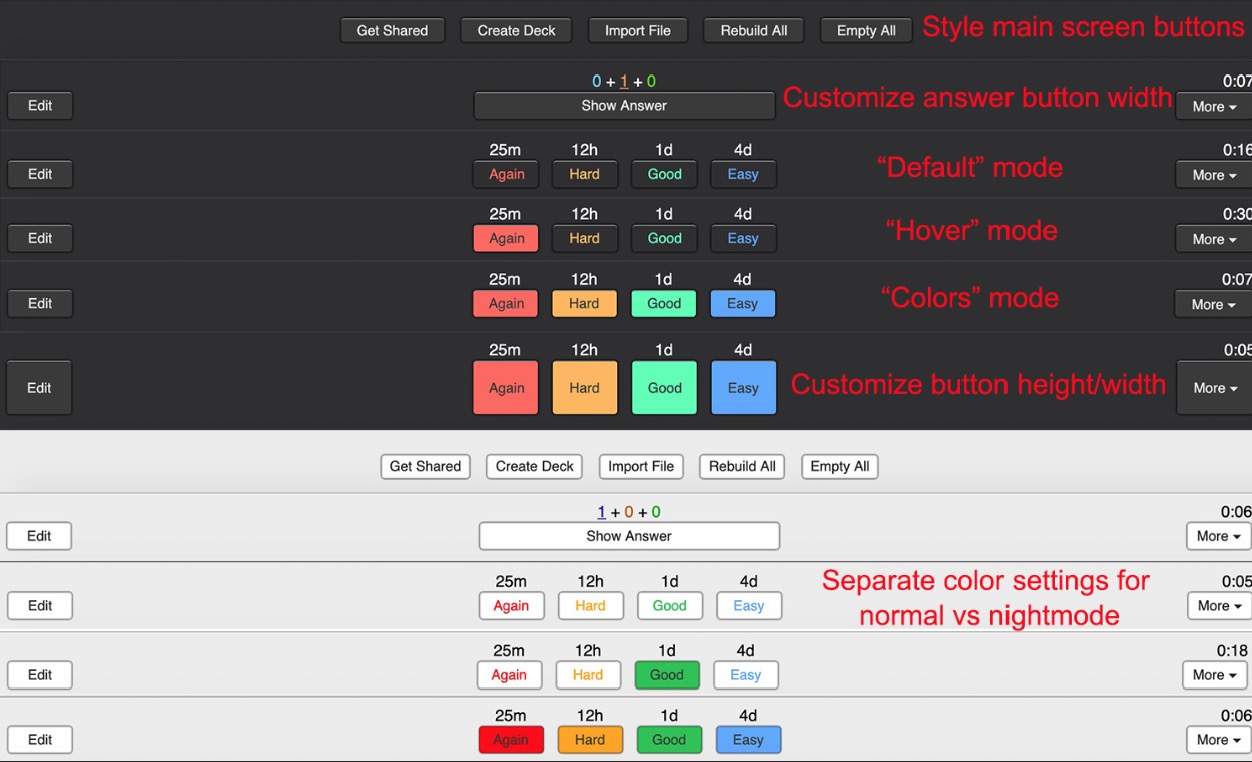
This button add-on that lets you customize multiple parts of the main screen and answer buttons including colors, font size and a confirmation tooltip. The confirmation tooltip is currently set over the buttons, but you can move it to wherever you’d like on the screen (if you’re using the Progress Bar add-on at the bottom of the screen, you’ll need to set the y-offset to 20)
The confirmation tooltips were designed to use with the V2 scheduler because there are always 4 buttons- see this video on how to update
If you like this add-on, please give it a like :)
The following changes can be made in the Config of the add-on
As this is a combination of many add-ons, it doesn’t play well with Button Colours (Good, Again), Advanced Review Bottom Bar, Large and Colorful Buttons, Large Fancy Buttons, Review Button Colors, or Color Confirmation.
Problems, Bugs, Errors, Improvements
If you find a serious bug, please submit it on Github or email us ankingmed@gmail.com. Please remember that we are not coders and thus may not be able to provide support.
Changelog
2020-3-10: Initial Release
2020-3-10: Improved compatiblity with other addons (e.g. Fill the blanks - Multiple Typeclose) thanks to Quip13. Easier to read code and windows/linux nightmode fixes thanks to ijgnord.
2020-3-12: Fixed an issue causing colors to not change when not using nightmode. Added an option to turn off the outline around the buttons in reviewer
2020-04-17: Updated to make it look better on 2.1.24
2022-12-19: Added support for 2.1.55
2023-02-17: Added changes for 2.1.57+
2024-01-04: Styles are now updated on theme change.
2024-01-27: Fixed small button sizes not properly working - Changed default border radius to match default set by Anki - Fixed confirmation never appearing when using a controller - Fixed error on Anki versions before 2.1.50
2024-09-23: Fixed compatibility issue with Anki versions before 2.1.50
2025-01-28: Updated icons
2025-07-28: Fix error if the confirmation x-offset/confirmation y-offset config options have decimals.
Please consider checking out our:
YouTube Channel- How to use Anki for beginners and advanced users.
Instagram/Facebook: @Ankingmed
www.TheAnKing.com- Recommended add-ons, tutorials and more including how to download 40+ add-ons in < 5min
Patreon/VIP- Support our work and get individualized Anki help!
Screenshots






Liên kết hỗ trợ
Reviews (22)
👍 2025-10-06
Simply the KING! Thank you ever so much!
👍 2025-09-10
veri gut
👍 2025-08-02
Great addon and truly lives up to its name! No other button add-on necessary with this one.
👍 2025-05-30
En si ayuda mucho en pc por que al veces el tiempo no te deja apretar el botón adecuado con este cambio será mas satisfactorio mi aprendizaje gracias y Buen día
👍 2025-05-21
If you want smaller buttons go to view files > answer_buttons.py. Open it with notepad or any text editor and look for “HEIGHT = 25” and change it to “HEIGHT = 15” or any number you like.
👍 2025-04-30
love this but also when I redownloaded everything after not having Anki for a while I cannot for the life of me figure out how to change from default mode to colors mode someone please help me
👍 2025-02-07
BUENISIMO
👍 2025-02-06
I’ve been using various add-ons to customize the appearance of Anki so that it looks more like Balatro’s UI. This add-on is almost perfect for getting the buttons around the right size and exact colors! The only config option missing is the button text color so I can make the text white.
👍 2025-01-12
thanks
👍 2024-12-15
The best of add-on
👍 2024-11-05
makes the buttons look very satisfying, which motivates me to answer more ankis :D
👍 2024-09-11
i havent tried but i have full expectation of using colourful anki
👍 2024-09-04
Excelente
👍 2024-09-02
on 2024-08-04 Ótimo :) al´m de dar o tempo para a prox avaliação da questão .
👍 2024-07-18
I have tried to install the add-on on Anki 2.1.49, but it unfortunately doesn’t work even though the page says it does. 😅 I have made a bug report on Github with more information. I hope the add-on will be fixed in the future because it seems to add a very nice touch to Anki.
👍 2024-07-15
very cool
👍 2024-05-03
very helpful
👍 2024-04-23
Great add-on. Easy to configure.
👍 2024-03-09
2040501954
👍 2024-03-09
So good. Very useful as I’m dependent on this similar feature on AnkiMobile and AnkiDroid. Thank you so much
👍 2024-03-09
I have been having a similar error as another review for months now (AttributeError: module ‘aqt.gui_hooks’ has no attribute ‘theme_did_change’) so I’m sad this hasn’t been figured out yet Comment from author Can you please report this along with other details (i.e. what version and OS you’re on) on Github? I’ll have one of our software team members look into it asap. We don’t get notifications from the reviews here and we can’t troubleshoot back and forth with you, but we’d love to turn this 👎
👍 2024-03-06
Works properly and provides useful features
