Transfer scheduling data and properties from one card to another.
2024-08-09 : Addon is working again ! Please note that it is for now impossible to undo the operation so please backup your collection before using it.
I use it to merge old flawed notes which should be single notes with several cards. To do so, I transform one of the note in a two-card note (Ctrl+Shift+M). This generates a new card. I then use the add-on to transfer the historical data from the second note to the newly created card. By default, the useless note is kept, but it is possible to auto-delete it as the data are transfered.
Shortcuts are customizable in config.json. Auto-deletion after the transfer and automatic transfer in the same deck can also be set in config.json
Usage :
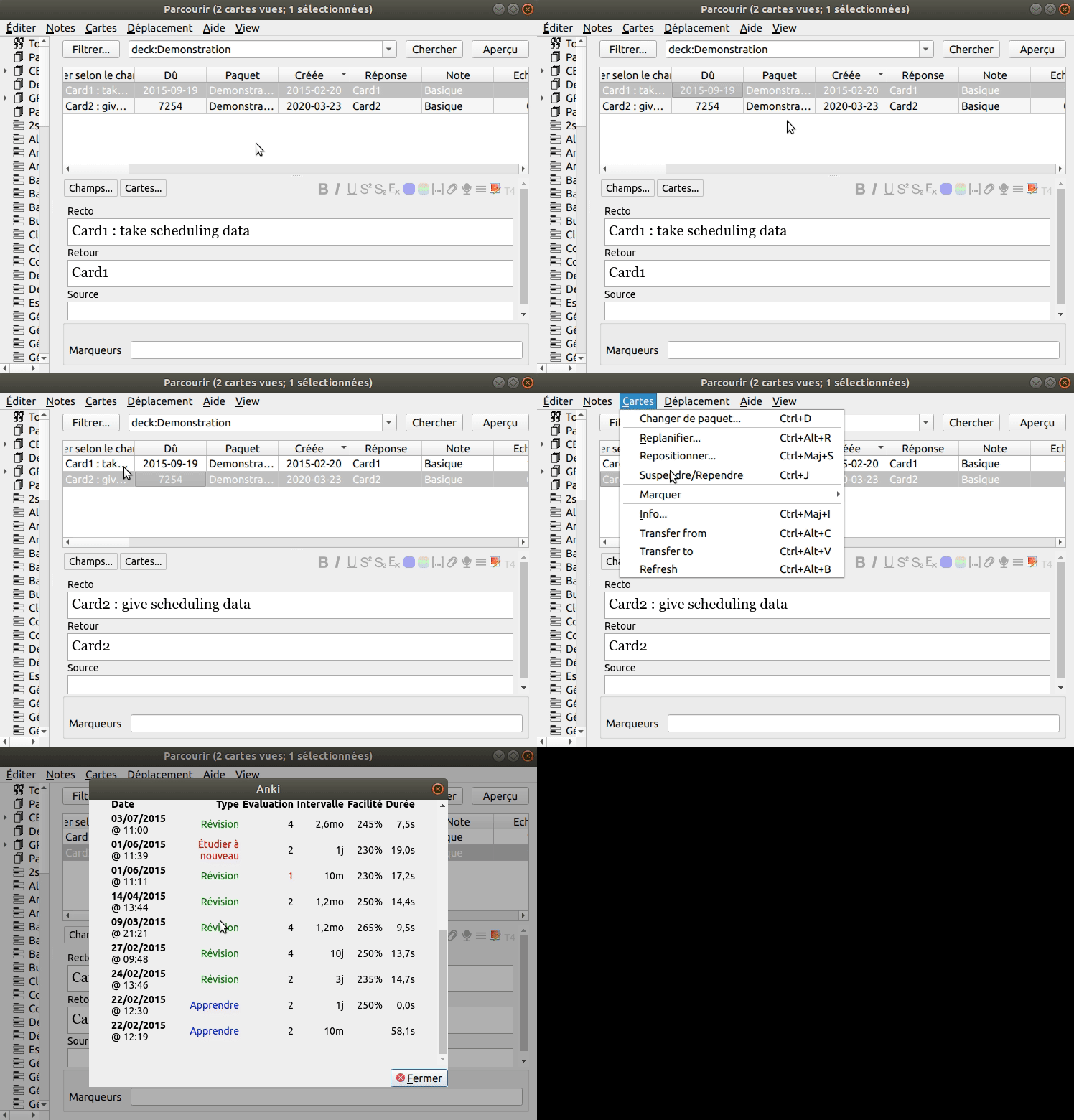
In the browser,
select the first card (from which data have to be taken), then go in “Cards” > “Scheduling data : Transfer from” (or Ctrl+Alt+C) select the second card (to which data have to be transfered), then go in “Cards” > “Scheduling data : Transfer from” (or Ctrl+Alt+V)
Bug report :
Please post an issue on the gitlab repository if you find a bug or want to propose an improvement.
Changelog :
Version 0.5 - 2024-08-09
Fixed Partially fixed the addon which was broken for a few months since Anki 23.10. It works but without “undo” (and with a reset of the focus in the browser after the data is transferred. Work in progress, help welcomed. Thanks to Shigeyuki for providing a working option while the addon was broken !
Version 0.4 - 2020-09-18
Fixed With Anki 2.1.29 and above (at least), the previous versions of the addon broke the sync function. Sorry ! See this post for details and instructions. In a nutshell, use this code to fix the sync function (in the debug console) : mw.col.db.execute(“update col set usn=3000”) mw.col.setMod() After that force the upload (Tools > Preferences > Network > Force sync). It should be ok. If it doesn’t work, put a higher number than 3000.
Version 0.3 - 2020-04-15
Fixed Bug fix of the automatic delete, which did not delete the cards associated with the note. This was achieved by anki’s “integrity check” function and is now achieved by the addon.
Version 0.2 - 2020-04-14
New Possibility to transfer the “deck” at the same time
Version 0.1 - 2020-04-14
Fixed The card 1 (from which scheduling data is taken) now takes a cid which was not used by a deleted card.
Version 0.0 - 2020-03-24
Screenshots
Liên kết hỗ trợ
Reviews (30)
👍 2025-11-09
It worked alright but didn’t copy FSRS information. I created an updated version here: https://ankiweb.net/shared/info/21426450.
This is a fork of this addon but which also copies FSRS data.
👍 2025-10-25
This doesnt work if you are turning a card into two separate ones but want to keep the old scheduling
👍 2025-05-20
w addon works super well and highly useful
👍 2025-05-19
is there any version for Anki 2.1.49?
👍 2025-04-27
Working great for situations where “Change note type…” can’t be used
👍 2025-03-22
Excellent!
👍 2024-12-20
Thanks for the fix. I’ve been using this add-on every and then.
👍 2024-09-27
Working well now. Thanks for the update! Comment from author before post was edited Thanks and sorry for the delay, it’s working again ! Please backup your collection because the “Undo” button is not available yet
👍 2024-09-01
Works the magic it promises. Only downside for me is; you can only work on one card at a time. Hopefully, in future updates, it should be possible to select more than one card and transfer data to corresponding selections.
👍 2024-03-31
It was a good add-on while it worked. Comment from author Thanks and sorry for the delay, it’s working again ! Please backup your collection because the “Undo” button is not available yet
👍 2024-03-03
I simply fixed this add-on for Anki23 + and uploaded it to AnkiWeb. After the original add-on has been updated to Anki 23.10+, this fork is not needed.
🚚Transfer scheduling data from one card to another(Fixed for Anki 23 by Shige) https://ankiweb.net/shared/info/274502770 Comment from author Thanks Shigeyuki for providing a working option while the addon was broken ! I have partially fixed the addon. Like your fork, it still misses the possibility to “Undo” which is critical. I put your name on
👍 2023-12-24
Please fix for the new update!! Comment from author Thanks and sorry for the delay, it’s working again ! Please backup your collection because the “Undo” button is not available yet
👍 2023-09-22
does exactly what it is supposed to do. thanks!
👍 2023-08-09
Indispensable.
I’m using it a lot to migrate from my old “one note-> multiple cards” to “one note -> two cards” approach because I found my previous approach worse.
This plugin works a a charm. The only thing I don’t like is that it also copies the flag status of a card, which I don’t need, but it’s not a big deal. Comment from author Thanks ! I will soon add an option not to copy the flag then :)
👍 2023-04-18
Works great. Should be a feature. Heart attack moment when undoing a data transfer and the card showed up as (deleted) but this is just a quirk of how the add-on works, rest assured that the card is still there. Or at least, it should be.
👍 2023-02-08
It is a nice add-on. But, it has one downside. It doesn’t copy the review history. So, the review history is blank even though the due date, the ease value, length of interval are copied. Comment from author True ! duplicating the reviews would be a bigger change to the database. And it would bias the statistics (total time, number of reviews…). That’s why I just change the card id referred to into the reviews (revlog table in the database). Thanks for the comment !
👍 2023-01-08
Excellent! Straightforward and did exactly what I needed it to.
👍 2022-12-22
Works great for Ubuntu! :)
👍 2022-10-31
works well
user friendly
👍 2022-08-08
Extremely useful for transferring scheduling data after changing note type.
👍 2022-06-22
Works well.
👍 2022-06-02
2021-02-28
Great function, great documentation!
I had been using only https://ankiweb.net/shared/info/1566928056 before. It is supposed to copy the review log, too, but this feature never worked for me. So, the add-ons are great complements.
It would be even faster, albeit more complicated, if one could transfer in batch.
2021-09-16: Fix for the “Copy notes” add-on: https://github.com/Arthur-Milchior/anki-copy-note/issues/21
2022-06-02: Error in Anki 2.1.53, although it still see
👍 2022-03-27
This perfectly solves the problem when creating new notes for the same content.
👍 2020-11-10
Good on an individual card level for transferring the scheduling data from one card to the next.
What I’d love to see:
The ability to transfer that data en-masse to cards with the same sort field so that it can help adjust whole decks as well as individual cards. Comment from author Thanks ! For the feature request, see https://gitlab.com/S.Allain/anki-add-on-transfer-scheduling-data/-/issues/3
👍 2020-11-02
This type of functionality is NECESSARY to tinker with some older bulky cards (you know, THIS cards) which need to be split up. Thank you for making this addon, because it helped me greatly in doing so Comment from author Thanks ! :)
👍 2020-09-19
Thanks for fixing the issue.
👍 2020-07-20
Excellent add-on!
I am wondering what ‘possibility to transfer the “deck” at the same time’ means? It is possible to transfer scheduling data for multiple cards simultaneously? The idea that I need to transfer data from every card to another one separately makes me nuts. Comment from author Thanks !
It may be a bad wording because it’s based on the software perspective : the deck is an attribute of the card so transferring the deck meant changing the deck of the card. For the feature request
👍 2020-06-16
Very useful!
👍 2020-06-01
Very good
👍 2020-05-06
exactly what I was looking for
