The Purpose
This plugin was made for students, language learners, and anyone dealing with a large number of Anki reviews. Sometimes, opening Anki and seeing hundreds (or thousands) of due cards can feel overwhelming and exhausting.
The purpose of the Ultimate Session Pacer is to break down your massive daily workload into smaller, manageable chunks (blocks). By forcing you to take healthy, timed breaks between these blocks, it prevents mental fatigue and keeps you focused for longer periods of time.
How It Works
- Smart FSRS Advisor
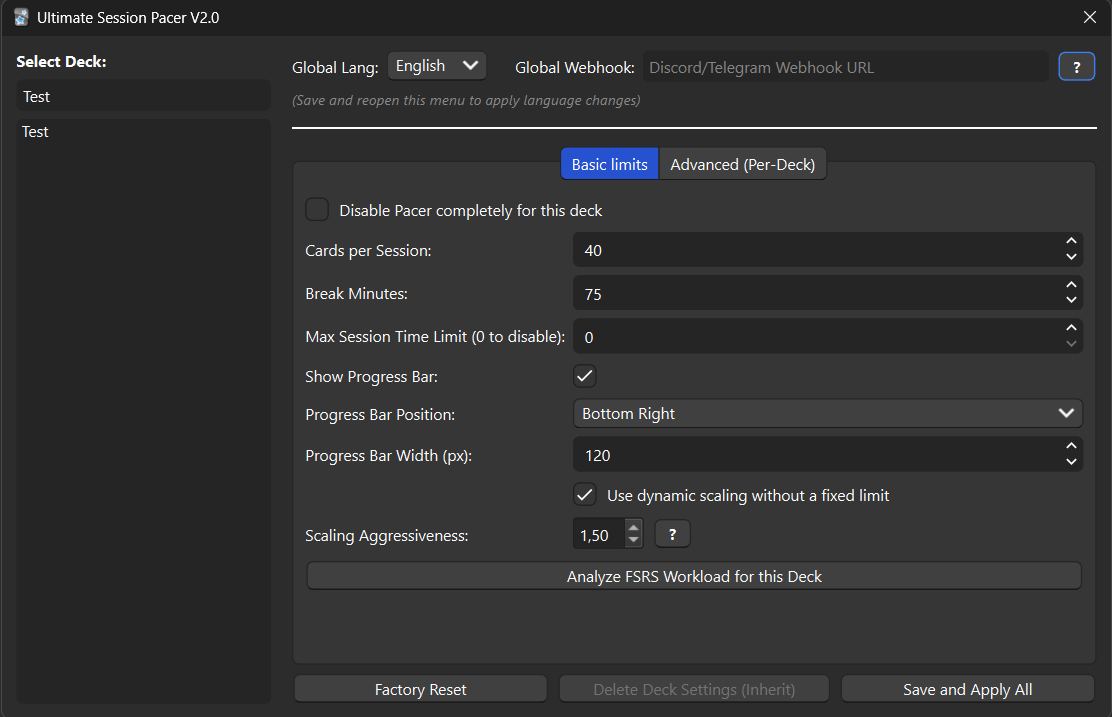
You don’t need to guess how many cards to study per session. The plugin features a built-in advisor that reads your pending card queue. Depending on your backlog, it uses a dynamic math formula (Square Root scaling) to suggest the perfect number of cards per block and the ideal break duration.
- Live Progress Bar (Qt6)
As you study, a clean, non-intrusive progress bar appears directly on your screen. It shows exactly how many cards are left in your current block. When the bar fills up, your session is complete, and it’s time for a break! You can move this bar to any corner of the screen.
- Auto-Hide & Auto-Sync
If you activate these options, the plugin will automatically minimize Anki to your taskbar the moment your break starts—forcing you to step away and rest your eyes. Note: Please leave Anki running in the background during breaks so the timer can run. It can also automatically sync your progress with AnkiWeb to keep your profile safe.
- Notifications & Webhooks
When your break time is over, the plugin will send a native Windows notification to your desktop. If you are away from your PC, you can link a Discord or Telegram webhook, and the plugin will send a message directly to your phone to remind you to get back to studying.
- Highly Customizable Decide exactly how many cards or how many minutes each session should last. Disable the pacer for specific “easy” decks while keeping it strict for hard ones. Change the popup texts, enable sound chimes, and fully switch the language (Built-in English and Italian). Important Compatibility Notes Works perfectly with the latest Anki updates (Versions 24.xx and 25.xx) and the modern Qt6 framework. Completely safe to use alongside the V3 Scheduler and the modern FSRS algorithm. Changelog 2026-02-24 - New Update (New Content + Bug Fixes) Interactive FSRS scaling graph embedded in settings (zoom, pan, hover) Smart low-cards warning with toggle in Advanced settings Fixed sub-deck settings inheritance (parent deck now applies correctly to child cards) Fixed infinite cooldown loop bug Fixed Auto-Sync not working during breaks Fixed timer flashing on multi-deck cooldowns Fixed missing default config keys on upgrade Cross-platform notification safety Improved translation coverage General stability and performance improvements 2026-02-22 - First Upload Release
Screenshots
Reviews (1)
👍 2026-03-01
Love this a lot, the fsrs workload calculation is pretty great too!
