The add-on can be used to convert videos (or audios) with subtitles to Anki. The video will be split into separate scenes/phrases. It was inspired by subs2srs.
SUBS2SRS & RELATED TOOLS
http://subs2srs.sourceforge.net/ — subs2srs allows you to create import files for Anki or other Spaced Repetition Systems (SRS) based on your favorite foreign language movies and TV shows to aid in the language learning process. http://www.randomhacks.net/substudy/ — substudy: A tool for learning languages using TV shows and subtitles.
https://github.com/killergerbah/asbplayer - Browser-based media player and Chrome extension for subtitle sentence mining https://ripose-jp.github.io/Memento - a mpv-based video player that makes studying Japanese easier with a built in popup dictionary https://yallmp.com - Y’ALL Media Player lets you master vocabulary, listening comprehension and pronunciation by turning any media into an interactive study session with integrated dictionary lookups, subtitles editing, Anki flashcard creation and more!
https://mortii.github.io/anki-morphs/ - AnkiMorphs (MorphMan) is an Anki add-on that can rearrange your cards based on how well you know the words on them and how important the words are to learn. https://ankiweb.net/shared/info/909420026 - FrequencyMan allows you to sort your new cards by word frequency, familiarity, and other useful factors.
HOW TO INSTALL (ANKI 25.02)
If you’re on Windows or Linux, installing the add-on with the code should be enough to make it work, but it’s recommended to additionally install ffmpeg.
If you’re on Mac, it’s better to additionally install mpv and ffmpeg via brew and restart Anki. Otherwise, Tools > Generate Mobile Cards might fail to encode mp3 and mp4 and will only work with opus and webm, because the mpv version that is packaged with Anki might not have libmp3lame and libx264 encoders built-in.
HOW TO INSTALL (ANKI 2.1.49)
Install the add-on. Install FFmpeg from http://ffmpeg.org. On Windows it can be downloaded from https://www.gyan.dev/ffmpeg/builds/ On macOS it can be installed using brew - https://trac.ffmpeg.org/wiki/CompilationGuide/macOS#ffmpegthroughHomebrew, i.e. install “brew” and then run “brew install ffmpeg”. Download mpv videoplayer from https://mpv.io For Windows, use https://sourceforge.net/projects/mpv-player-windows/files then click on “stable” or “64bit/32bit” subfolder and download mpv from there. For Linux, mpv might be already installed alongside with Anki sometime ago. For macOS, mpv can be installed via brew either by using “brew cask install mpv” to quickly install the latest binary version or “brew install mpv” to compile and install mpv from source. For Windows, update the PATH environment variable in the User or System variables by adding folders that contain mpv.exe and ffmpeg.exe. Here’s a short guide how to update the PATH environment variable on Windows 10 - https://www.architectryan.com/2018/03/17/add-to-the-path-on-windows-10/ - or a quick screencast - https://streamable.com/2b1l6 Restart Anki.
Another possible method to install mpv and FFmpeg on Windows without manually updating the PATH environment variable is to use scoop or https://chocolatey.org.
HOW TO USE
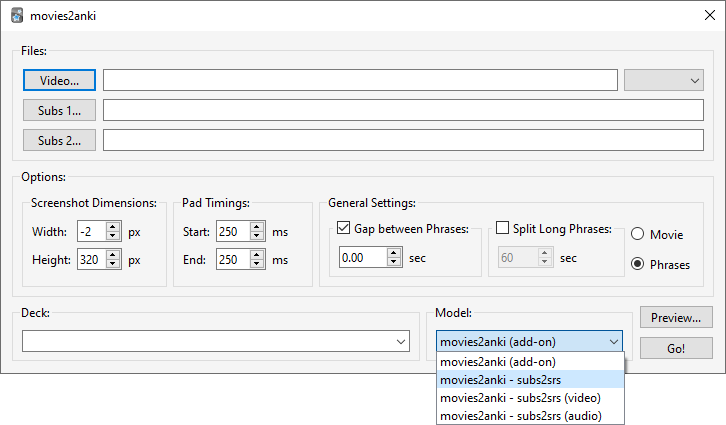
Tools - Generate Video Cards… (Ctrl+M). Select Video and Audio. Select Subs 1. Maybe change some other options. Select Deck and Model. Maybe click on Preview to see how many cards will be created. Click Go!
In the Phrases mode, the add-on will only use the subtitles’ timings to generate cards, i.e. everything that doesn’t have subtitles will be ignored like the start of the video or scene changes where usually no one speaks and there are no subtitles.
In the Movie mode, the add-on will change the subtitles’ timings to make them continuous to be able to watch the video from start to finish without missing anything, i.e. the end time of each line in the subtitles will be changed to match the start time of the next line.
HOW TO REVIEW ON MOBILE
Tools - Generate Mobile Cards… from the main window or Edit > Generate Mobile Cards … from the card browser window Export an apkg file or sync with AnkiWeb.
For AnkiDroid 2.17, if you want video on cards, the “subs2srs (video)” note type is recommended as the “movies2anki” note type may not look good.
A slightly updated version of the card template is available at https://ankiweb.net/shared/info/2061725225 (“Learn German A1: Nicos Weg”).
YOUTUBE VIDEOS (OUTDATED)
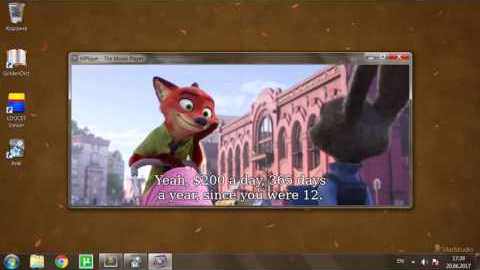
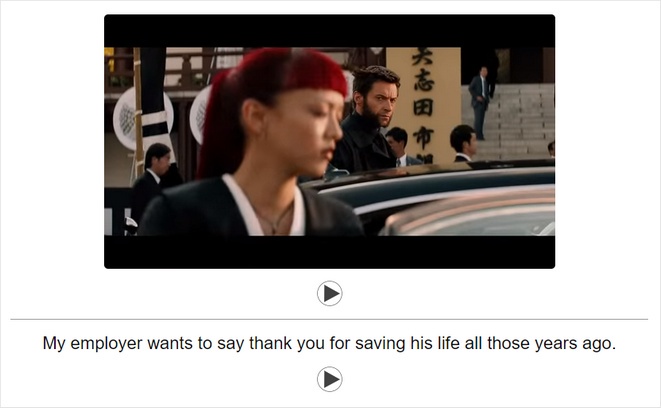
This is how it may look in action using movies2anki card template.
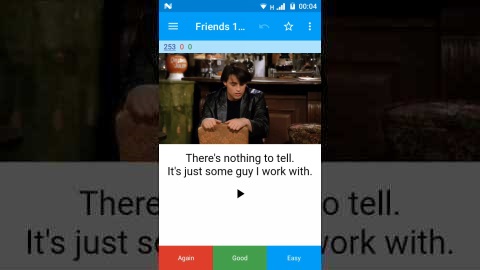
This is how it may look in action using movies2anki (subs2srs - video) card template.
ADD-ON CONFIGURATION
It can be edited via Tools > Add-ons > … > Config.
The “preferred languages” can be set similarly to the mpv.conf file below. If it’s not empty, it’ll be used to select automatically audio and external subtitles if there’s more than one (while making a new deck of cards).
{ “audio fade in/out”: 0.1, “join lines with”: “<br>”, “join sentences with”: “<br>”, “preferred languages”: "", “video encoding settings (webm)”: “-c:v libvpx-vp9 -crf 30 -b:v 0 -c:a libopus -b:a 64k”, “video extension”: “mp4”, “video height”: 320, “video width”: -2 }
MPV CONFIGURATION
The add-on now remembers the selected audio stream (that was used to make a new deck of cards) and adding ‘alang=eng’ or ‘aid=1’ to mpv.conf is no longer needed.
If the video file contains multiple audio streams, it might be useful to create mpv.conf with alang=eng to select the English audio track by default. For example, mpv.conf can look like this:
sub-visibility=no sub-auto=fuzzy slang=eng alang=eng audio-file-auto=fuzzy save-position-on-quit=yes autofit-larger=100%x100% geometry=50%:50%
It can be downloaded from this link - https://gist.github.com/kelciour/dbb573812e9a45eaa7d5b123f1ccf822
For Windows, mpv.conf can be added to the same folder as mpv.exe or %APPDATA%/mpv/mpv.conf, i.e. C:\Users\USERNAME\AppData\Roaming\mpv\mpv.conf For macOS & Linux, it’d be ~/.config/mpv/mpv.conf
All the options can be found in the mpv manual - https://mpv.io/manual/master/#configuration-files | https://mpv.io/manual/master/#options
ADDITIONAL INFORMATION
The add-on doesn’t generate any audio/video files by default. Instead it can play a part of the original video/audio file with mpv video player using —start and —end options.
If the original video/audio file has been deleted or moved to a different folder, the add-on will try to find and play video/audio from the collection.media folder that were generated using Tools - Generate Mobile Cards option.
By default, new cards will be added to the deck with the name of the video file. It can be changed by selecting a deck from the list of existing decks or by typing a different name for the deck.
Set “Gap between Phrases” option to 0.0 to split subtitles by sentences or disable it to prevent joining subtitles into sentences.
The add-on contains 4 default note types:
• movies2anki (add-on) – Video + Audio • movies2anki (subs2srs) – Picture + Audio • movies2anki (subs2srs - video) – Video + Audio (desktop) / HTML5 Video + Audio (mobile) • movies2anki (subs2srs - audio) – Audio
DEFAULT HOTKEYS
R – replay Ctrl+R – replay video
[ - replay the previous card and the current card. ] - replay the current card and the next card. Shift+[ - join the current card with the previous card (and remove the previous card). Shift+] - join the current card with the next card (and remove the next card).
, – subtract 0.25 ms. from the start time . – add 0.25 ms. to the start time < (Shift+,) – subtract 0.25 ms. from the end time > (Shift+.) – add 0.25 ms. to the end time
EXPORT CONDENSED AUDIO
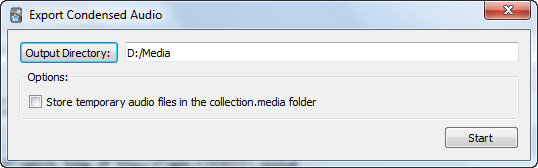
Open the card browser, select a few cards that were generated by the add-on and click Edit - Export Condensed Audio. The cards with the same Path field will be joined into a single audio file.
The “Store temporary audio files in the collection.media folder” option makes sense to check if you intend to later use, or maybe already used, Tools - Generate Mobile Cards to review cards on mobile.
With the full movies or series, maybe try it in a new Anki profile (File - Switch Profile) by generating a new deck of cards with “Gap between Phrases” set to 1.25 or 1.75 and “Pad Timings” set to 750ms or something similar.
For more information, see “Optimizing Passive Immersion: Condensed Audio” by Matt vs. Japan - https://youtu.be/QOLTeO-uCYU - and also “Online Directory Of Condensed Shows for Passive Listening” by No_Swing_6301 - https://www.reddit.com/r/MassImmersionApproach/comments/k2yflx/online_directory_of_condensed_shows_for_passive/
Known Alternatives: https://github.com/dxing97/subs2cia — subs2cia: extract subtitled dialogue from audiovisual media for use in language acquisition
OLD SUBS2SRS ENGLISH ANKI FLASHCARDS COLLECTION
The deck includes 10,000+ cards from the first 5–10 minutes of various movies and TV shows.
The subtitles were manually resynced to better match the audio or converted as-is with a bit of padding added.
It’s currently available at https://s3.tebi.io/396f1022
CHANGELOG
… 2025-06-20 Fix ModuleNotFoundError: No module named ‘distutils’ in the latest Anki version 2025-08-03 Add —ontop to video player that might help if Anki is in full screen 2025-08-03 Set default video extension to .webm 2025-08-03 Add “sentence duration limit” equal to 0 to config. If it’s not 0, it’ll take precedence over Split Long Phrases in GUI 2025-08-03 Play videos using a separate mpv video player instance running in the background. To restore the old behaviour, set Tools > Add-ons > … > Config > “new video player (experimental)” to false 2025-08-03 Keep a new video player window open by default. To restore the old behaviour, set Tools > Add-ons > … > Config > “keep video open (experimental)” to false 2025-08-03 Don’t show video title and border by default. To restore the old behaviour, set Tools > Add-on > … > Config > “don’t show video border and tit
Screenshots
Liên kết hỗ trợ
- https://github.com/killergerbah/asbplayer
- https://ripose-jp.github.io/Memento
- https://mortii.github.io/anki-morphs/
- https://gist.github.com/kelciour/dbb573812e9a45eaa
- https://github.com/dxing97/subs2cia
Reviews (30)
👍 2026-02-25
extremely unstable. wasted 4 hours of my life remaking the same deck over and over trying to get it work but it never did. video started frozen. then fully disappeared (didn’t even leave empty space behind), then went fully black. has support for multiple subtitle files but of course it won’t show any of them before you flip the card (what are you trying to do? associate sounds with written language? what’s this, some sorta learning app???). doesn’t remember your settings for when you inevitably
👍 2026-02-15
2026.02.15 В конфигурации дополнения появились новые настройки. Но нет описания того что они делают.
Подскажите чем можно пакетно извлекать субтитры из видеофайлов? Comment from author Большая часть настроек касается нового режима воспроизведения видео, когда окно видеоплеера отображается без рамок, сохраняет размер и позицию и остается видимым на экране.
👍 2026-01-22
on 2025-12-01 Everytime I discover a 🔥 anki add-on I always leave a review. Thank you so much for this!!! I’m so glad I invested so much time in setting this up.
👍 2025-11-16
The best thing for Anki! as a language learning tool
👍 2025-09-04
Работает шикарно, но с новым обновлением почему то не получается пользоваться
Anki 25.07.5 (7172b2d2) (ao) Python 3.13.5 Qt 6.9.1 PyQt 6.9.1 Platform: Windows-10-10.0.19045-SP0
When loading Watch Foreign Language Movies with Anki: Traceback (most recent call last): File “C:\Users\tommy\AppData\Local\AnkiProgramFiles.venv\Lib\site-packages\aqt\addons.py”, line 250, in loadAddons import(addon.dir_name)
File "C:\Users\tommy\AppData\Roaming\Anki2\addons2
### 👍 2025-09-01
This add-on is essential for language learning! - I recommend upgrading to the latest version of Anki for this! If you are a Japanese learner, then It is best to generate your decks in "exact" mode, ie, without any "General Settings" selected. "Exact" mode means that if you have 115 subs for example, then the add-on will create 115 cards (or Phrases). The problem with using any of the General Settings for Japanese subs, I think, is that the add-on can't determine where each sentence begins and e
### 👍 2025-08-26
Bug Report: Multiple Issues - Hotkey, Subtitles, Mobile Playback
Hello,
I'm a user of the "Watch Foreign Language Movies with Anki" add-on and I'm reporting several issues that persist despite troubleshooting.
1. **Issue: Shift+R Hotkey Not Working (Desktop)**
The Shift+R hotkey for continuous video playback does not function on my Windows machine.
- I confirmed the hotkey is listed as a default control.
- I tried changing the "new video player (experimental)" config setting to '
### 👍 2025-08-24
have some error!!!!plz take a look-----date:25.08.24(the new version is the fault!!!)
######
=====1======
My video cards just turned to blank (I can't even found the Play button), I tried to downgrade to 25.7.3 and toggled off all addons. The bug is still there.(plus reinstall the addon and then lost my previous videos "directory". Even after i refilled it and added "recent_deck_names", it still CAN'T FOUND VIDEO). But the "sound:{{Audio}}" in the backfield can work successfully.
this is my emai
### 👍 2025-08-24
at 14:12:39
From: https://github.com/Homebrew/homebrew-core/blob/HEAD/Formula/f/ffmpeg.rb
License: GPL-2.0-or-later
;
### 👍 2025-07-16
Great add-on, thank you! Is there an easy way to just keep the mpv player open on one side of the screen? Or can it even open inside the anki window somehow? It's a little clunky how with each new card the mpv player has to reload. It's not bad just a little quirk that slows things down a bit. Thank you.
### 👍 2025-07-01
Thanks for creating this excellent tool! For those on Windows, be sure to download the Full Build of FFMPEG (not the Essential Build) or else you will encounter issues generating mobile cards. The Essential Build does not include the libx264 encoder.
### 👍 2025-04-09
Anki 25.02 (038d85b1) (ao)
Python 3.9.18 Qt 6.6.2 PyQt 6.6.1
Platform: Windows-10-10.0.22621
Traceback (most recent call last):
File "C:\Users\PC\AppData\Roaming\Anki2\addons21\939347702\player.py", line 647, in run
time_start, time_end = re.match(r"^.*?_(\d+\.\d\d\.\d\d\.\d+)-(\d+\.\d\d\.\d\d\.\d+).*$", fld).groups()
AttributeError: 'NoneType' object has no attribute 'groups'
===Add-ons (active)===
(add-on provided name [Add-on folder, installed at, version, is config changed])
Watch F
### 👍 2025-03-31
Je voudrais savoir comment faire en sorte que la vidéo rejouer aussi quand j'affiche la réponse et pas seulement l'audio.
C'est un peu un caprice car le addon est vraiment bien
Merci
### 👍 2025-03-27
Don't work
### 👍 2025-02-20
Fantastic job!
### 👍 2025-02-15
Anki 24.06.3 (d678e393) (ao)
Python 3.9.18 Qt 6.6.2 PyQt 6.6.1
Platform: Windows-10-10.0.22000
Traceback (most recent call last):
File "C:\Users\yuta0\AppData\Roaming\Anki2\addons21\939347702\player.py", line 647, in run
time_start, time_end = re.match(r"^.*?_(\d+\.\d\d\.\d\d\.\d+)-(\d+\.\d\d\.\d\d\.\d+).*$", fld).groups()
AttributeError: 'NoneType' object has no attribute 'groups'
===Add-ons (active)===
(add-on provided name [Add-on folder, installed at, version, is config changed])
Wa
### 👍 2025-02-03
It's a really nice and powerful tool! Thank you for your efforts!
But I'm wondering if you could add a feature where we could have the control of the video, say, chaging play speed and stop or turn on videos. That would be really helpful cuz I find myself couldn't do anything but watch the whole clips on my mobile. Thanks.
### 👍 2025-02-03
can't generate mobile cards and this popup coming up
Anki で問題が発生しました。次のトラブルシューティングの手順に従ってください。
次のアドオンが関係している可能性があります:Watch Foreign Language Movies with Anki
Anki 24.06.3 (d678e393) (ao)
Python 3.9.18 Qt 6.6.2 PyQt 6.6.1
Platform: Windows-10-10.0.22000
Traceback (most recent call last):
File "C:\Users\yuta0\AppData\Roaming\Anki2\addons21\939347702\player.py", line 841, in run
raise CalledProcessError(retcode, cmd_debug)
subprocess.CalledProcessError: Command '['"C:\\Users\\yuta0\\Downl
### 👍 2025-01-20
Best add-on ever ♡♡♡
Thank you for this smart application. But I have this question: How to change the default bitrate of the generated audio files that are generated right after clicking 'Generate mobile cards'... I would like to lower the output of my audio files in my collection.media folder to just 64k or 48k instead of the default one 124k.
Another small issue, sometimes the lines can't be jointed even after adding: "join lines with": "<br>" AND "join sentences with": "<br>"
Ultimately, I
### 👍 2025-01-20
perfact!
### 👍 2025-01-14
Thank you for this excellent plugin. Regarding a case that the video/audio was playing on the computer, but not the mobile, this happened to me also. After investigation, I noticed that the produced mp3,mp4 in the "collection.media" folder had a filename with a double dot, for example XXX..mp3 XXX..mp4 because of some strange unicode chars in the original file. This seems to break the android player when playing from AnkiDroid, while the desktop version is OK.
### 👍 2024-12-20
great!
### 👍 2024-11-04
very useful!!!!!!!!!!
This feature is very useful, but I have a question: why are the aduio(MP3) cards set up successfully on the computer not displaying on the phone?
I've tried several methods, but I still can't solve this issue, so I'd like to ask the author for advice.
### 👍 2024-10-16
(The issue has been resolved on GitHub)
Hello, thank you very much for your anki add-on, it helps me a lot when learning languages.
I use your add-on on windows.
I encountered a small problem when using a screenshot (subs2srs - video) of a smaller height than 320 (I tried to make the height 240). The problem is that the size of the mpv video window opens by default with a height of 320. Thus, part of the map is covered by this window and this is a little inconvenient.
If I generate cards without
### 👍 2024-10-10
When I EXPORT CONDENSED AUDIO, got the problem:
Debug info:
Anki 2.1.65 (aa9a734f) Python 3.9.15 Qt 6.4.3 PyQt 6.4.0
Platform: Windows-10-10.0.19041
Flags: frz=True ao=True sv=3
Add-ons, last update check: 2024-10-10 14:28:28
Caught exception:
Traceback (most recent call last):
File "C:\Users\scott\AppData\Roaming\Anki2\addons21\939347702\condensed_audio.py", line 327, in <lambda>
a.triggered.connect(lambda _, b=browser: onCondensedAudio(b))
File "C:\Users\scott\AppData\Roaming\Anki2\ad
### 👍 2024-09-18
great, more convenient than subs2srs. yet got problem:
Anki 23.12.1 (1a1d4d54) (ao)
Python 3.9.15 Qt 6.6.1 PyQt 6.6.1
Platform: Windows-10-10.0.22621
Traceback (most recent call last):
File "C:\Users\coco\AppData\Roaming\Anki2\addons21\939347702\player.py", line 642, in run
time_start, time_end = re.match(r"^.*?_(\d+\.\d\d\.\d\d\.\d+)-(\d+\.\d\d\.\d\d\.\d+).*$", fld).groups()
AttributeError: 'NoneType' object has no attribute 'groups'
### 👍 2024-09-02
I love hotkeys that allow for tweaking the start/end times and merging with adjacent clips. This makes it quick and easy to tweak less-than-perfect sources without having to spend time upfront.
### 👍 2024-08-09
great job
### 👍 2024-08-03
on 2024-06-18
Thank you so much, I've been using it for years
But recently, Im not sure if it because of the latest update of the Ankidroid. Some card with high bitrate video can't play on Android, sometimes I have to refresh or re start the app, but it happen usually with the video with high bitrate.
Is there anyway to fix it?
Im trying to change the config from the Add on menu (for lower quality) but nothing work at all, the output always returns the same. I even tried to change the config.js
### 👍 2024-05-20
No update, yes.
Anki 24.04.1 (ccd9ca1a) (ao)
Python 3.9.18 Qt 6.6.2 PyQt 6.6.1
Platform: Windows-10-10.0.19045
When loading Watch Foreign Language Movies with Anki movies2anki subs2srs:
Traceback (most recent call last):
File "aqt.addons", line 247, in loadAddons
File "C:\Users\Ammy\AppData\Roaming\Anki2\addons21\939347702\__init__.py", line 3, in <module>
from . import condensed_audio
File "C:\Users\Ammy\AppData\Roaming\Anki2\addons21\939347702\condensed_audio.py", line 23, in <mo
