YOMICHAN FORVO SERVER FOR ANKI
Simple server to take advantage of Yomichan’s custom audio sources feature. Requires Anki Connect. It web scrapes Forvo’s search and word page to get a list of words.
NOTICE Forvo sometimes enables Cloudflare verification, meaning it tries to verify that a human is browsing their site instead of a program like this one. The add-on can’t function when this happens, but please check https://github.com/jamesnicolas/yomichan-forvo-server/issues/13 if you want to track this issue.
Prerequisites:
Anki Yomichan Anki Connect
Install:
Copy the code and install like you would for any other Anki addon Restart Anki Allow network connections (required since this is a local server) In yomichan settings, go to Audio > Configure Audio Playback Sources > Custom Audio Source Select Type as JSON and set URL to http://localhost:8770/?term={term}&reading={reading} In your Audio Sources list below, make sure one of them is set to Custom
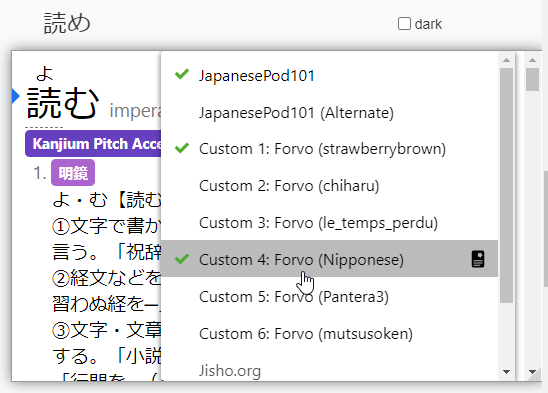
Now when you scan a word in Yomichan, you should be able to right click the audio icon and the Forvo custom audio sources should appear.
Configuration
Yomichan Forvo Server supports a few configuration options, which you can edit by going to Tools > Add-Ons > Yomichan Forvo Server > Config. Note configuration changes requires you to restart Anki to see effects.
port Port that YomiChan will call. Default is 8770 language Language code to use in Forvo. Some examples are ja for Japanese or zh for Mandarin Chinese. Default ja. On the Forvo website, you can see what language code is in square brackets beside the language name on a pronunciation. If you want to have a separate source for another language, you can add another parameter to the URL to override this config: eg http://localhost:8770/?term={term}&reading={reading}&language=zh preferred_usernames A list of Forvo usernames. This will order the results on top based on this priority. If empty, results will show based on the Forvo website order or according to preferred_countries. Default empty. preferred_countriesA list of countries, usually title case. (Eg. “United States”). This will order the results on top based on this priority. preferred_usernames takes priority over preferred_countries. If empty, results will show based on the Forvo website order or according to preferred_usernames. Default empty. show_gender Show the gender symbols (♂, ♀,) beside the username based on their gender. Default true. show_countryShow the country of the user beside their name. Default false
Links
GitHub: https://github.com/jamesnicolas/yomichan-forvo-server Anki Add-on page: https://ankiweb.net/shared/info/580654285
Changelog
2024-07-15
add support for preferred countries
2024-06-10
handle anonymous users support showing country
2023-08-30
support overriding the language in the URL
2023-07-28
fixed deprecated method_whitelist in urllib3 Retry and use allowed_methods
2022-10-26
handle case when gender isn’t available
2022-09-05
add support for preferred usernames fixed bug where it was using the raw audio from forvo, now uses the normalized audio from forvo added gender symbols to results support configuration where port, username order, language, and showing gender symbols are configurable
2022-07-25
update selectors for new forvo layout
2022-01-30
add Content-length header
2021-11-14
change timeout to 10 seconds
2021-03-22
fixed bug with empty reading/expression inputs returning unrelated words added basic retries/timeouts to deal with connection issues
Screenshots
Liên kết hỗ trợ
- Contact Author
- https://github.com/jamesnicolas/yomichan-forvo-ser
- https://github.com/jamesnicolas/yomichan-forvo-ser
- Contact Author
Reviews (29)
👍 2025-09-08
9/8/25: currently broken
👍 2025-07-17
Great add-on!
👍 2025-02-19
Doesn’t work anymore.
👍 2025-01-01
Thank you for addon. However it is not working now for some reason. Up until December it was working perfectly fine but then it suddenly stopped working. I hope you can solve that.
👍 2024-12-13
not working
👍 2024-11-20
I have the same problem as the user below. Here are some steps I’ve taken for debugging:
- checked that AnkiConnect is running properly on port 8765
- replaced the extension code with the newest version on github
- with the original extension code, I’ve verified that Forvo Server is running on port 8770
- sent several requests for simple words such as 食べる and こんにちは E.g.: http://127.0.0.1:8770/search?term=食べる&reading=たべる In all cases, the response was: { “type”: “audioSourceList”,
👍 2024-11-16
I have the same problem, it doesn’t work on my setup. The add-on is instaled on anki, I copied the link to the Custom (JSON) on Yomitan and nothing happens. It just show me a tab with “Custom (JSON)” and when i click on it a small red X appear in the up right.
👍 2024-09-16
I would love to give it a positive review but it doesn’t work on my setup. The add-on is instaled on anki, i copied the link you mentioned to the Custom (JSON) on Yomitan and nothing happens. It just show me a tab with “Custom (JSON)” and when i click on it a small red X appear in the up right.
👍 2024-02-17
good stuff!
👍 2023-10-25
I don’t know if it’s just me or the add-on stopped working? Anybody else? I’m using Yomitan instead of Yomichan.
👍 2023-08-27
Works so well that I forgot I set it up ! Beautiful work that removes the need for manually logging into the browser, downloading the audio, and adding it into Anki. I can’t remember when I set this up so leaving a review now so I remember that I did. Can’t recommend this add-on enough
👍 2023-07-03
Works perfectly, great way to add some more audio sources!
👍 2023-01-08
Edit: updated to 2.1.35 and got it to work.
👍 2022-11-06
Edited: It suddenly started working again. I hope it was just a temporary problem with Forvo. Comment from author before post was edited It looks like the addon is getting blocked by a CloudFlare verification. Working on a fix but this might be difficult
👍 2022-10-11
Great add-on for improving availability of human voice clips (used with Yomichan).
👍 2022-09-09
Everything works except for the audio being blank when I go into anki. What I mean is when I click “use audio for anki card” the audio in anki doesn’t show up
👍 2022-07-28
Very useful, gives word audio for a lot of words that Japanesepod101 doesn’t have. Thanks for the quick fix
👍 2022-07-25
Rally useful for adding audio to cards.
👍 2022-07-19
ばせd
UPDATE:
init.py fix from 20220716 worked
👍 2022-07-16
EDIT: replaced the contents of the py file with the text in the link provided by 07/16 and it works for now, thank you 07/16
👍 2022-07-16
Hi, for those of you who have a problem with the plugin as of now (16.07.2022), here’s a quick fix until the maintainer steps in to solve the problem. First, you have to find the location of the plugin directory. Inside the directory there is a init.py file. Replace it’s content with the text from https://raw.githubusercontent.com/kuator/yomichan-forvo-server/main/__init__.py
Now it should work again
👍 2022-07-15
Has been a great addon, but today it suddenly stopped working for some reason. Everything is updated to the latest version, except for Anki which is currently at 2.1.49
Edit: It suddenly works now, for some reason.
👍 2022-05-12
☆彡 Comment from author before post was edited Sorry the addon isn’t working for you. Can you give some examples of words that don’t work? Also if you can give some more info such as operating system, Anki version, browser, it might make it easier to debug.
👍 2022-05-02
I adjusted my local file to use play_args[5] and /audios/mp3/ because the /mp3/ version was a longer audio with dead noise at the end, making it a waste of time when I wanted more than one audio file to be played consecutively. However for some reason it errors for 不自由 even though the fifth arg should be fine
👍 2022-04-08
Great plugin
👍 2022-04-04
Very awesome, thanks for sharing :)
👍 2022-01-31
When I try to use this, I cannot select any servers in yomichan.
page looks like this
{“type”: “audioSourceList”, “audioSources”: []}
Update:
Yeah, I should haven given more context, sorry.
Set it up like described in Yomichan -> pasted the URL into Custom URL (JSON), but can’t select any Server in Yomichan. It just shows Custom URL (JSON) in the dropdown menu where you select the sound.
Anki is open and runs with Anki Connect Version 6. Comment from author before post was edited Are
👍 2021-11-17
How do i solve this
When loading ‘Yomichan Forvo Server’:
Traceback (most recent call last):
File “aqt\addons.py”, line 211, in loadAddons
File “C:\Users\user\AppData\Roaming\Anki2\addons21\580654285_init_.py”, line 209, in <module>
httpd = http.server.ThreadingHTTPServer((‘localhost’, 8770), ForvoHandler)
File “socketserver.py”, line 452, in init
File “http\server.py”, line 139, in server_bind
File “socket.py”, line 756, in getfqdn
UnicodeDecodeError: ‘utf-8’ co
👍 2021-06-16
very ばせd
