This add-on is a fixed and customize version of Zoom 2.1 for Anki24+. (Fork)
💡Inspired add-ons :
add-on : Zoom 2.1 / Author : Krassowski
add-on : Anki Zoom / Author : ccz-2
📖How to use :
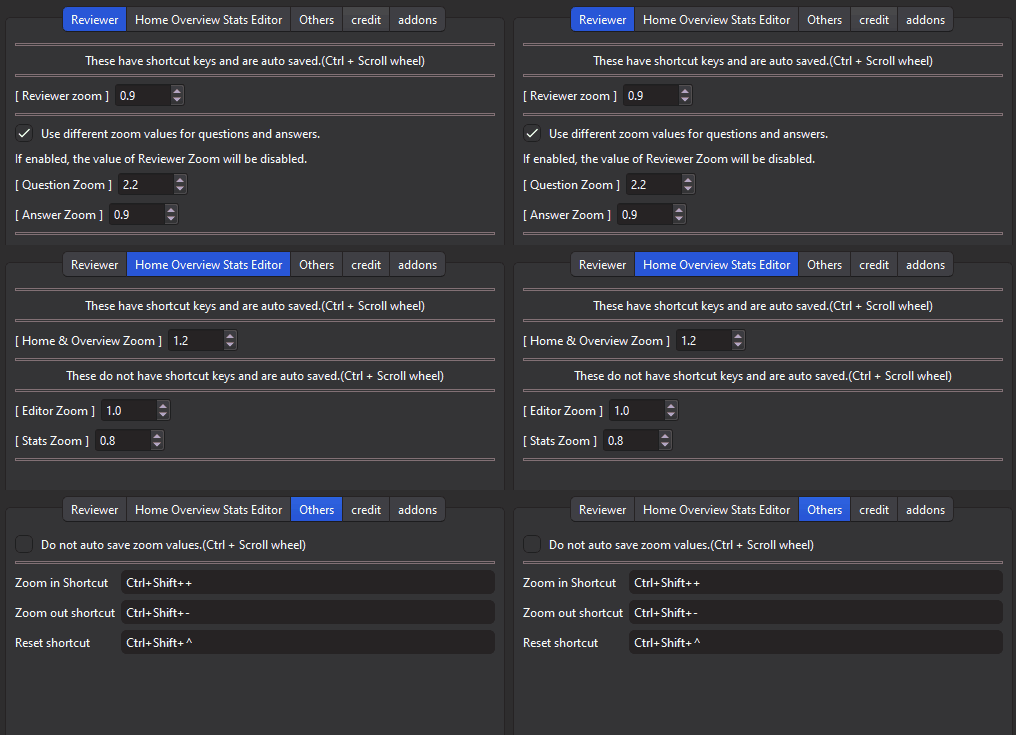
Zoom values for Reviewer, Home, Overview, Editor, Stats can be memorized. This effect is valid after restarting Anki.
Auto saving of zoom levels with Ctrl + Scroll Wheel. (Reviewer, Home, Overview, Editor, Stats.) Separate zoom levels for Question and Answer, it can be disabled in options. Use shortcut keys to zoom in, zoom out, Reset.(Reviewer, Home, Overview.)
Added option to manually set zoom.(Disable auto save.)
⚙Options :
- Option window (Tools -> Zoom for Anki 24)
- custom options for shortcut keys
Default Shortcut Keys (Home and Reviewer)
Zoom_in : Ctrl+Shift++ Zoom_out : Ctrl+Shift+- Reset : Ctrl+Shift+^
🚨Known issue:
Incremental reading add-on is incompatible. (Incremental read add-on has its own zoom). “Ctrl++” or “Ctrl+-” will not work, please set another Shortcut Keys.
Others
I added simple support for old Anki (Anki2.1.35-Anki2.1.44), but some new features are not available. I added a workaround for a crash problem that was occurring with another zoom addons, so it is relatively safe. If the flicker problem occurs the Fade In add-on might help alleviate it a bit. addon: 👻Anki Fade In (by Shigeඞ) Related Add-ons (for GUI) 🖥️No Distractions Full Screen (Fixed by Shigeඞ) 🎨Anki Redesign - Make Anki Cool Design (Fixed by Shigeඞ) 📌Rearrange home addons(Created by Shigeඞ) 🐻TidyAnkiBear - Select and hide Anki menu bar items 📊Enhance main window (Fork by Shigeඞ) 👻Remove tooltip for Answer buttons (Fork by Shigeඞ) 🩸Hide Leech Notification (Created by Shigeඞ) 👻Anki Fade In - add fade in effect to Reviewer Home etc (Custom by Shigeඞ)
💖Please Support Shige’s Anki add-ons development!
Hi thank you for using this add-on I’m Shigeඞ!
[ 🛠️Fix add-ons ] So far I fixed and customized 80+ broken add-ons for free and developed over 30 add-ons as a hobby (all add-ons). If you have requests to fix broken add-ons feel free to contact me. Fix broken addons (Free) [ 💖Donation ] I’m looking for supporters for my add-ons development because I like Anki!👍️ If you support my volunteer development you will get 14 add-ons for patrons only and 15 game themes included in AnkiArcade ($5/month).
Get Patrons only addons | Patrons Q and A | Contact
[ Special Thanks ] So far I received donations from 561 patrons and without their support I never could develop this, thank you very much!🙏
Patrons: Arthur Bookstein Haruka Luis Alberto, Letona Quispe 07951350313540 Lily Daniel Kohl-Fink Tim NamelessGO Kyle Mondlak ElAnki Abhi S Matthew Hartford Jonathan Contreras findus161 K Peasant of Anki Juan Salgado Ernest Chan Yaeerrrrrr Elisabeth Barber Jesse Asiedu GP O’Byrne David C KM Christopher Lam Kolorophyll Jake Stucki Kaitlyn Bowler Isabel Guan Steven Banner Heidi Leonora Lomoki Akporyoe ellie Tobias Klös Xiuxuan Wang Ujwal Chadha gus forester iuventius Patrick ellis tarek Iggi qiting zeng Carly Burdorf Austin Regal Muneeb Khan Aydin Herik Mia Hoang Hung Sameer Al Matheus Chagas Bryn Price Orlando Frey pie_is_good Svel1989 Take Root Vivian Cao Keeler Kime Kurt Grabow Zarina Balde Pansanity Gabriel Farrugia Lis Y. Fahim Shaik Augusto Stein Ashok Rajpurohit mootcourt NoirHassassin alpha male, shredded af Morgan Torres Dennis Obis Anh-Tai Nguyen Tae Lee Joseph Howell Gabriel Vinicio Guedes sab hoque Terence Bartenbach R Rebecca only Ythalo Vlogs Ketan Pal Aurora Dzurko Tyler Schulte Kmyungc Mac Will S. Meeyah Davis Eric Allen Devon Williams alex han Douglas Beeman Andrew Yick Robert Remedios Marley Easterbrook Temi Jide Ansel Ng Simeon Azfar Hussain Haley Schwarz Woody kenken Jeanna …full list
[ 📥 How do I install this add-on? ] Copy and paste the add-on code ( 1923741581 ) into Anki and you can install it. ( Menu -> Tools -> Add-ons -> Get Add-ons -> Code [ add-on code ] ) When I develop bug fixes, create new features, or compatibility for New Anki, I will notify you and you can install it. Add-ons will be broken when the official Anki gets a major update, so if you like this add-on please support my volunteer development by rating, sharing, and donating. Thank you!
Click here and please Rate this add-on, Thank you! :-)
Screenshots





Liên kết hỗ trợ
- Krassowski
- ccz-2
- 📊Enhance main window (Fork by Shigeඞ)
- 🩸Hide Leech Notification (Created by Shigeඞ)
- Patrons Q and A
Reviews (30)
👍 2025-12-16
Worked great for a while, just recently started to have the issue where the zoom for the Home and Overview zoom randomly changes its value to the Reviewer zoom. Comment from author hi thanks for the report, I think it’s probably a bug, I’ll look into it.
👍 2025-12-05
Works as intended! Comment from author glat it helped! :D
👍 2025-11-26
Cuando hago los flashcards al aumentar el zoom y pasar de anverso a reverso, el aumento vuelve al predeterminado, y esto no se resuelve incluso si hago zoom en ambos (anverso/reverso), y esto sucede con CADA TARJETA. Comment from author Hola, gracias por informar del problema. Por favor, prueba las siguientes opciones:
- Zoom option -> Others tab -> Do not auto save zoom values[ON]
- Zoom option -> Reviewer tab -> Use different zoom values for questions and answers[OFF]
👍 2025-11-14
It works as intended. Comment from author thanks for the feedback! :D
👍 2025-10-22
Works well!
One minor UI issue on MacOS that confused me, specifying Ctrl+Shift++ for the shortcut is actually Cmd+Shift++.
Comment from author
Thanks for the feedback! :D I’ll add an explanation of that shortcut key later.
👍 2025-09-19
Thanks <3 Comment from author thank you! :D
👍 2025-09-18
its a good plugin but its kinda annoying that it causes my Home Screen to glitch for a millisecond every time I press + or - on a deck Comment from author before post was edited Thanks! :D
👍 2025-08-17
Work Comment from author thanks for the feedback! :-D
👍 2025-07-30
love this addon, does what it should. i think it would be even greater if the zoom for the edit field and for the browse field could also be saved! Comment from author Thanks! :D I haven’t developed that feature yet, I’ll look into it again later.
👍 2025-07-19
Perfect Comment from author Thanks!👍️
👍 2025-07-07
thanks Comment from author Thanks! 👍️
👍 2025-06-28
Works! Comment from author Thanks! :)
👍 2025-06-14
Just works Comment from author Thanks! :)
👍 2025-06-06
Thanks! Working on Anki 25.02 (linux-flatpak) Comment from author Thanks for the feedback! :)
👍 2025-05-27
Works perfectly! Comment from author Thanks! :D
👍 2025-05-26
Just what I was looking for! works perfectly. Comment from author Glad it helped! :D
👍 2025-05-24
Perfect! Comment from author Thanks!👍️
👍 2025-04-25
a very good extension indeed. Comment from author thank you! :-)
👍 2025-04-10
Works nicely, no problems Comment from author Thanks for the feedback! :)
👍 2025-03-26
Your add-on is very useful, but I would like to give feedback on a question. When I increase the resolution of the ANKI main interface and click to fold or unfold sub decks, there will be an animation of the page suddenly shrinking and then zooming in, as if Anki first returned to the default resolution and then returned to the set resolution. When I disable your add-on , no matter what resolution I set, this animation will not appear. Can you solve this problem, as watching too much of this ani
👍 2025-03-26
Thank you very much for developing and making this extension available to us! The zoom extension I was using previously stopped working after I updated Anki. I missed it a lot, but now I can enjoy this extension again! Thanks again. Comment from author Thank you very much! :D
👍 2025-03-09
Thanks man! Comment from author Thank you! :D
👍 2025-03-06
Very useful, thank you for your efforts. I have an Apple mouse, the scroll wheel can’t be used, a bit regretful. ❤️❤️ Comment from author Thank you for the feedback! :-) It would be useful to have an option to adjust the zoom easily besides the shortcut keys.
👍 2025-02-17
not working Comment from author Edit 2025-03-04: Hi is this problem still occurring? If you want to debug it, please send me more info. If the problem has already been resolved please give me feedback because I’ll remove it from my task list, thanks.
Hi thanks for reporting the problem. When you download the add-on you need to restart Anki for it to take effect, have you restarted it already? (If it works, or if not, please send me a feedback.)
👍 2025-02-17
I just wanna say thank you for whoever coded this addon
Comment from author Thanks! :D If you have any requests for add-ons feel free to send them to me👍️
👍 2025-02-11
im not a impostor
Comment from author me too!ඞඞඞ
👍 2025-01-08
I had a problem and the author was quicky to solve the problem. The app works very well. Comment from author thank you! :-)
👍 2025-01-07
Thanks. It worked Comment from author thank you! :-)
👍 2024-12-20
Addon works Comment from author Thanks! :-)
👍 2024-11-09
Very good! Comment from author Thank you! :-)
