The add-on’s no longer working with the latest Anki’s version and it’s no longer maintained.
The alternative add-on might be released in the future.
A half-working prototype to batch download audio and pronunciation from Merriam-Webster.
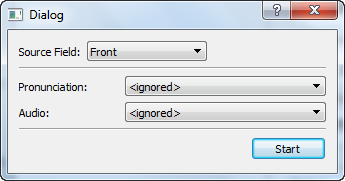
- Open the card browser - select a few cards - menu Edit - Add Merriam-Webster.
- Select “Source Field”.
- Select “Destination Field” instead of “<ignored>”.
- Click on “Start”.
If the destination field isn’t empty, it’ll be skipped.
The API Key is limited to 1,000 queries per day (https://www.dictionaryapi.com/info/frequently-asked-questions).
Nickolay <kelciour@gmail.com>
Screenshots
Reviews (17)
👍 2024-07-14
This one is still working with Version 2.1.38 ,and because of this add-on, I don’t want to upgrade.
👍 2022-01-18
I would like to say thank you to the developer.
This add-on is working with Anki mac version 2.1.30. I am still not planning to update to a newer version because I am satisfied with the current version and there are many useful add-ons that are not compatible with newer versions like this.
👍 2021-02-02
Error
An error occurred. Please start Anki while holding down the shift key, which will temporarily disable the add-ons you have installed.
If the issue only occurs when add-ons are enabled, please use the Tools > Add-ons menu item to disable some add-ons and restart Anki, repeating until you discover the add-on that is causing the problem.
When you’ve discovered the add-on that is causing the problem, please report the issue on the add-on support site.
Debug info:
Anki 2.1.39 (576f0043) Py
👍 2021-01-07
Work, very useful. Thank you
👍 2021-01-03
Nice! Works seamlessly. What feature I wanted to have exactly.
👍 2020-12-20
Thank you! Everything works fine, it’s just that you have to write the word clearly as it’s represented in the dictionary. So if you choose to write “a door” it’ll won’t work, but just “door” works perfectly. My solution for this is to add one more invisible field where I put “key word” and use this field as a sourse. It’s invisible when you revise your cards because you don’t add code for it to make it visible.
👍 2020-12-01
good job
👍 2020-11-04
nothing changes
👍 2020-10-28
It doesn’t seem to work. It says “1 field updated” but nothing has changed.
👍 2020-10-12
I added this and it shows me “updated 1 note” but I still can’t hear any pronunciation
👍 2020-07-30
Is there any way that this works with multiple words in source field?
👍 2020-07-27
Wow, very useful.
👍 2020-04-25
It’s working, thanks! But except those with multiple words in source field.
👍 2020-01-14
it does work
👍 2019-12-09
nice one
👍 2019-09-10
Could I apply this to other dictionaries and languages somehow? Comment from author Maybe, if the API hasn’t changed and the data stored the same way, the add-on will still work with the API key from different Merriam-Webster dictionary, but I haven’t tried it and not sure.
👍 2019-09-02
Nicely done thx.
